
Wkhtmltopdf is an open source simple and much effective command-line shell utility that enables user to convert any given HTML (Web Page) to PDF document or an image (jpg, png, etc).
Wkhtmltopdf is written in C++ programming language and distributed under GNU/GPL (General Public License). It uses WebKit rendering layout engine to convert HTML pages to PDF document without loosing the quality of the pages. Its is really very useful and trustworthy solution for creating and storing snapshots of web pages in real-time.
Wkhtmltopdf Features
- Open source and cross platform.
- Convert any HTML web pages to PDF files using WebKit engine.
- Options to add headers and footers
- Table of Content (TOC) generation option.
- Provides batch mode conversions.
- Support for PHP or Python via bindings to libwkhtmltox.
In this article we will show you how to install Wkhtmltopdf program under Linux systems using source tarball files.
Install Evince (PDF Viewer)
Let’s install evince (a PDF reader) program for viewing PDF files in Linux systems.
$ sudo yum install evince             [RHEL/CentOS and Fedora]
$ sudo dnf install evince             [On Fedora 22+ versions]
$ sudo apt-get install evince         [On Debian/Ubuntu systems]
Download Wkhtmltopdf Source File
Download wkhtmltopdf source files for your Linux architecture using Wget command, or you can also download latest versions (current stable series is 0.12.4) at wkhtmltopdf download page.
On 64-bit Linux OS
$ wget https://github.com/wkhtmltopdf/wkhtmltopdf/releases/download/0.12.4/wkhtmltox-0.12.4_linux-generic-amd64.tar.xz
On 32-bit Linux OS
$ wget https://github.com/wkhtmltopdf/wkhtmltopdf/releases/download/0.12.4/wkhtmltox-0.12.4_linux-generic-i386.tar.xz
Install Wkhtmltopdf in Linux
Extract the files to a current working directory using following tar command.
------ On 64-bit Linux OS ------
$ sudo tar -xvf wkhtmltox-0.12.4_linux-generic-amd64.tar.xz

------ On 32-bit Linux OS ------
$ sudo tar -xvzf wkhtmltox-0.12.4_linux-generic-i386.tar.xz
Install the wkhtmltopdf under /usr/bin directory for easy execution of program from any path.
$ sudo cp wkhtmltox/bin/wkhtmltopdf /usr/bin/
How to Use Wkhtmltopdf?
Here we will see how to covert remote HTML pages to PDF files, verify information, view created files using evince program from the GNOME Desktop.
Convert Website HTML Page to PDF File
To convert any website HTML web page to PDF, run the following example command. It will convert the given webpage to 10-Sudo-Configurations.pdf in current working directory.
# wkhtmltopdf https://www.tecmint.com/sudoers-configurations-for-setting-sudo-in-linux/ 10-Sudo-Configurations.pdf
Sample Output :
Loading pages (1/6)
Counting pages (2/6)
Resolving links (4/6)
Loading headers and footers (5/6)
Printing pages (6/6)
Done
View Generated PDF File
To verify that the file is created, use the following command.
$ file 10-Sudo-Configurations.pdf
Sample Output :
10-Sudo-Configurations.pdf: PDF document, version 1.4
View Information of Generated PDF File
To view the information of generated file, issue the following command.
$ pdfinfo 10-Sudo-Configurations.pdf
Sample Output :
Title:          10 Useful Sudoers Configurations for Setting 'sudo' in Linux
Creator:        wkhtmltopdf 0.12.4
Producer:       Qt 4.8.7
CreationDate:   Sat Jan 28 13:02:58 2017
Tagged:         no
UserProperties: no
Suspects:       no
Form:           none
JavaScript:     no
Pages:          13
Encrypted:      no
Page size:      595 x 842 pts (A4)
Page rot:       0
File size:      697827 bytes
Optimized:      no
PDF version:    1.4
View Created PDF File
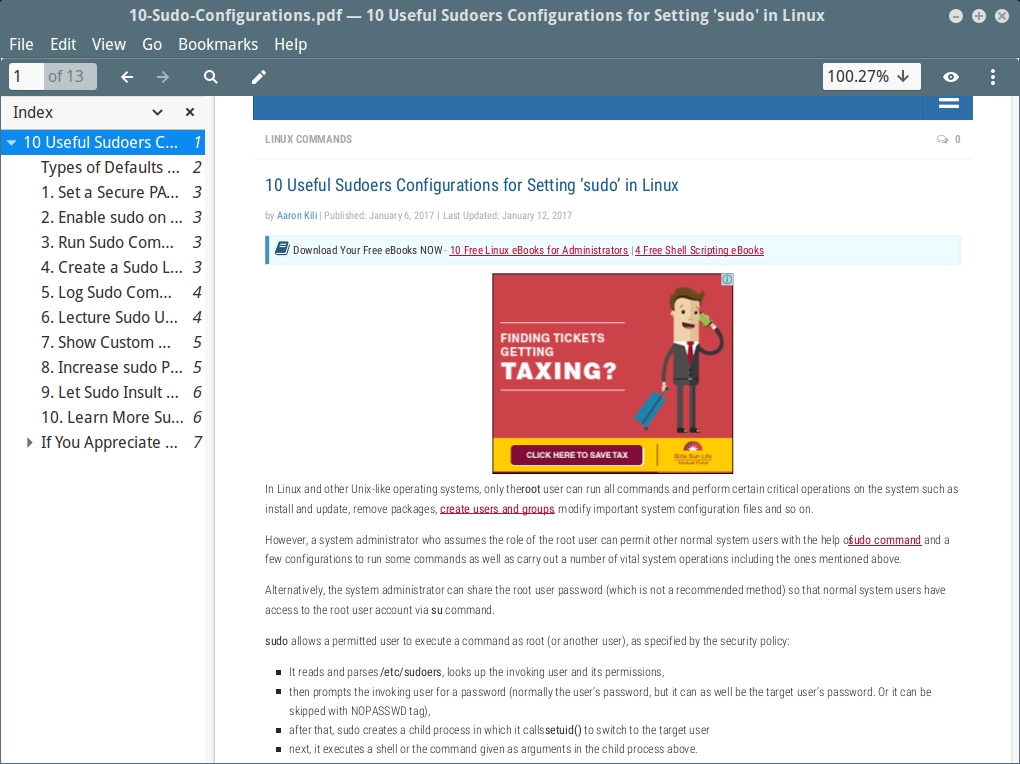
Take a look at the newly created PDF file using evince program from the desktop.
$ evince 10-Sudo-Configurations.pdf
Sample Screenshot :
Looks pretty nice under my Linux Mint 17 box.
Create TOC (Table Of Content) of a Page to PDF
To create a table of content for a PDF file, use the option as toc.
$ wkhtmltopdf toc https://www.tecmint.com/sudoers-configurations-for-setting-sudo-in-linux/ 10-Sudo-Configurations.pdf
Sample Output :
Loading pages (1/6)
Counting pages (2/6)
Loading TOC (3/6)
Resolving links (4/6)
Loading headers and footers (5/6)
Printing pages (6/6)
Done
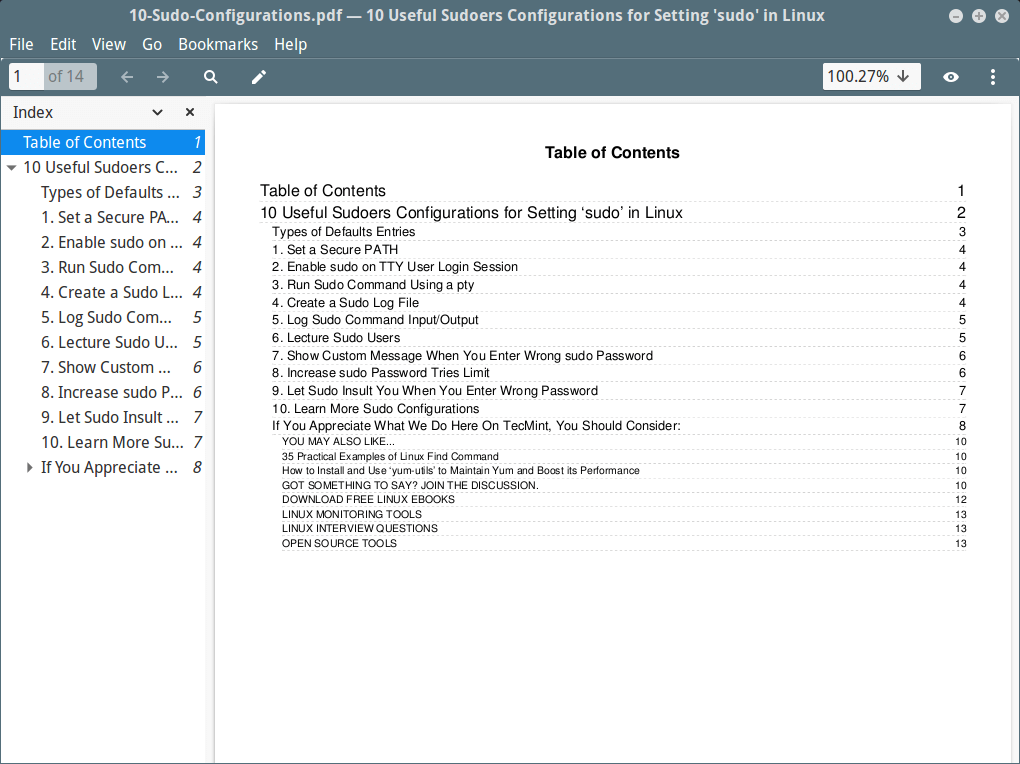
To check the TOC for the created file, again use evince program.
$ evince 10-Sudo-Configurations.pdf
Sample Screenshot :
Take a look at the picture below. it looks even more better than the above.
Wkhtmltopdf Options and Usage
For Wkhtmltopdf more usage and options, use the following help command. It will display list of all available options that you can use with it.
$ wkhtmltopdf --help





Hello! So I am using wkhtmltopdf to convert generated pages into PDF’s and can’t find a solution for the issue I have found. The html pages have CSS that allows me to write text over an image that is set to an opacity of .2. The html displays great but when I convert to PDF the image which was in the background and opaque are now in the foreground and not opaque therefore the text is now behind the image.
Is there a way to get wkhtmltopdf to keep the formatting of the page as defined by CSS? I have been reading the man page but can’t find anything that seems to address my question. Other than this issue I like the tool, works quite well and fast!
I want to use a PHP script to produce/save an html page to pdf. I have not found any working models/examples.
Do you have one?
-Kit
@Kit,
Check this article that explains how to convert web pages and HTML documents to PDF in PHP using the Pdfcrowd API v2.
https://pdfcrowd.com/doc/api/html-to-pdf/php/
Thanks, Ravi, I have Wkhtmltopdf installed on my Linux server and want to be able to convert without having to go to an outside source. Wkhtmltopdf works when I use it from the command line, just need to understand what I need to do to be able to have it work from a PHP script.
Thanks
-Kit
How to use in windows 10 with a PHP script?
I agree with John. I would say the best option ( or my advise should I say ) is to use PDFmyURL.com Two reasons: API’s are well documented and easy to use, and the Pricing will not burn a hole in your wallet. Check their website at PDFmyURL.com and check it yourselves. Awesome stuff.
Nice on the paper but very bad in practice, unable to print more than 10 urls …
Hello Folks,
I was quite happily using wkhtmltopdf until this awesome library failed to convert anything from website. I don’t know how and why. Please do check and update whats wrong here.
Hello,
Please somebody help, i have error on the negatif sign
(-)on negatif number rendered into small square instead of"-", when i try to remove the msstcore fonts package, both the “square” and the “-” did not show up, when reinstall the msttcore fonts, persist not back to show up.I try to use wkhtmltopdf version 0.12.1, 0.12.2, 0.12.2.1, 0.12.4.
All required dependency was installed and up-to-date, Centos 7.3, and upgraded to CentOs 7.4 have same problem.
I have problem on odoo 10 report.
Please help.
Hi Ravi,
I am getting the following error […network error: TimeoutError] because I has a proxy in my LAN. I found another solution, it’s to save as “local” the “web page, complete” & give it to input’s argument of command wkhtmltopdf.
Finally very good post
The instructions are lacking the steps of installing the includes, libraries, and man pages. Once the archive is extracted (as noted in the article), all of the files need to be copied to their respective locations as they are in the archive folder (i.e. stuff in the ‘include’ folder needs to go in the system’s /usr/include folder).
Does anybody know from their testing, whether the outputted PDF’s are images of text or text on a page?
If it is images of text, the text will not be selectable or copyable into another application.
I prefer the PDF format, for all of my E-books and many of my comics; but I use Firefox with the mhtml add-on to get copies of articles that allow me to copy-paste into other applications if needed.
text on a page, not an image
No GUI interface. Typing extensive command lines in XXI century? No thanks.
Hi Ravi.
I’m a fairly new user. I used the root terminal in MX-16 to run the commands.
Evince installed no problem.
The tar downloaded to my user directory no problem
The unpack exited with the following error:
Any suggestions?
Hi Ravi,
I dropped the z from the unpack line and everything worked normally.
Thanks for the entertainment! I enjoy learning more. Keep up the good work.
Ted
@Ted,
Thanks for notifying us about that
zoption tar command, could you tell us on which Linux distro you have omitted the option? it will help us to add correct instructions in the article.I’m using a 32 bit non-pae debian 8 base on an eeePC laptop.
It is the base for MX-16 linux.
Thanks again
wkhtmltopdf http://www.google.com.ph google.pdf
bash: wkhtmltopdf: command not found
BUT
/usr/local/bin/wkhtmltopdf http://www.google.com google.pdf
Loading pages (1/6)
Counting pages (2/6)
Resolving links (4/6)
Loading headers and footers (5/6)
Printing pages (6/6)
Done
Please suggest me what to do now ?
@Ananda,
Could you please tell me the output of the following command.
Better create a symbolic link to the /usr/local/bin/wkhtmltopdf file and try..
/usr/bin/which: no wkhtmltopdf in (/sbin:/bin:/usr/sbin:/usr/bin:/usr/lib/jvm/java-1.7.0-openjdk/bin:/usr/lib/ant/apache-ant-1.9.6/bin)
@Summet,
May I know on which Linux OS distributions you getting such error?
Hi Ravi,
I am getting below error while trying this command. please check and advice me.
[root@localhost tmp]$ wkhtmltopdf “https://www.google.co.in/?gfe_rd=cr\&ei=7n1LVeKNOMPCuAGDjoGACw\&gws_rd=ssl” /tmp/test/web/
Loading pages (1/6)
QPainter::begin(): Returned false============================] 100%
Error: Unable to write to destination
[root@localhost tmp]$
Thanks.
@Ravi,
Do we need to add crontab by using root username or nagios username?
@Eddy,
Better add as root user…
Hi..
Good article.
I use this command to create
wkhtmltopdf –username nagiosadmin –password XXXX “http://10.20.20.159/nagios/cgi-bin/status.cgi?servicegroup=HC&style=detail” /usr/local/nagios/report_daily/nagios_daily.pdf
1. I want run this automatically by using crontab. How do i do it?
2. I want to add this file at my nagios side.php. How?
Thank you
@Eddy,
Just add the same command in the crontab file..
@Ravi,
Thanks for the reply. Here what ii create at crontab. Please correct me if im wrong.
56 9 * * * wkhtmltopdf -username nagiosadmin -password XXXX “http://10.20.20.159/nagios/cgi-bin/status.cgi?servicegroup=HC&style=detail” /usr/local/nagios/report_daily/nagios_daily.pdf
From the crontab, i wish to get report at 9.56am everyday. i’m i correct?
@Eddy,
The cron entry is correct, but just you need to add correct path like ‘/usr/bin/wkhtmltopdf’ in the cron entry..
@Ravi and all,
I got error (from /var/mail/root)
From [email protected] Wed Mar 11 16:49:02 2015
Return-Path:
X-Original-To: root
Delivered-To: [email protected]
Received: by ubuntu-ea (Postfix, from userid 0)
id 18E07396D; Wed, 11 Mar 2015 16:49:01 +0800 (MYT)
From: [email protected] (Cron Daemon)
To: [email protected]
Subject: Cron wkhtmltopdf -username nagiosadmin -password XXX “http://X.X.X.X/nagios/cgi-bin/status.cgi?servicegroup=HC&style=detail” /usr/local/nagios/report_daily/nagios_daily.pdf
Content-Type: text/plain; charset=ANSI_X3.4-1968
X-Cron-Env:
X-Cron-Env:
X-Cron-Env:
X-Cron-Env:
Message-Id:
Date: Wed, 11 Mar 2015 16:49:01 +0800 (MYT)
Unknown switch -u
Please help
@Eddy,
Please use the following command in cron file.
hi,
how can I install this tool in my Solaris-x86 environment ??
hi,
how can I install this tool in my Solaris-x86 environment ??
I really want to know how to download and install in solaris OS.
thanks.
The steps described in the article will also work on Solaris, did you tried them?
Hi Ravi,
Is it possible to have our TOC in second page of our PDF during PDF generation using Wkhtmltopdf?? Please do reply asap..
Thanks in advance :)
tar needs -j argument for bz2 files, not -z which is for gzip
Good article, but it should be symlinked to /usr/bin to run from anywhere, also no one has yet thought to rename it to something shorter ?
Check the article again, we already moved the program under /usr/bin folder for easy execution.
Hi,
I am PHP developer. I have installed wkhtmltopdf in my application. I have one chart which is working fine in browser as html. But when I converts this to pdf via wkhtmltopdf it does not display. I searched on google but I didn’t find any solution.
Thanks,
Ganesh
Is there any you getting? Please post here to figure out.
Hi
I’ve used wkhtmltopdf on linux, mac and windows. Works great.
Has anyone tried to install it on z/OS (zLinux probably) to be used from a batch environment called from JCL ?
Great work… Thanks for the detailed info.
Can you tell me , how I can add Tahoma font to generated pdf? or another font with utf-8 support (for characters üöğıəçşÜÖĞİƏÇŞ)
Hi, I installed. No errors but when I run wkhtmltopdf http://google.com /opt/test.pdf
I get error “-bash: wkhtmltopdf: command not found”
If wkhtmltopdf is in your present working directory, you should run like.
I solved it, I run like this /usr/local/bin/wkhtmltopdf/wkhtmltopdf-amd64 http://google.com /opt/test.pdf
Ok, but now another problem, I cant run it from php. Please help me