How to Disable root Login Access to PhpMyAdmin

Take Your Linux Skills to the Next Level All courses, certifications, ad-free articles & community — from $8/mo
Join Root →
Ad-free access to all premium articles
Access to all courses: Learn Linux, AI for Linux, Bash Scripting, Ubuntu Handbook, Golang and more.
Access to Linux certifications (RHCSA, RHCE, LFCS and LFCA)
Access new courses on release
Get access to weekly newsletter
Priority help in comments
Private Telegram community
Connect with the Linux community
From $8/mo · or $59/yr billed annually · Cancel anytime

If you are planning on using phpmyadmin on a regular basis to manage your databases over the network (or worse, over the Internet!), you don’t want to use the root account. This is valid not only for phpmyadmin but also for any other web-based interface.

In /etc/phpmyadmin/config.inc.php, look for the following line and make sure the AllowRoot directive is set to FALSE:

$cfg['Servers'][$i]['AllowRoot'] = FALSE;
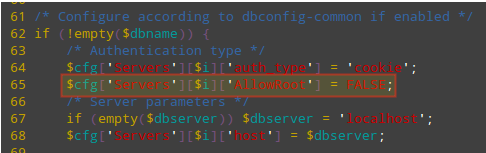
Disable Root Login in PhpMyAdmin

In Ubuntu/Debian, you need to add these two lines as shown:

/* Authentication type */
$cfg['Servers'][$i]['auth_type'] = 'cookie';
$cfg['Servers'][$i]['AllowRoot'] = false;

Save changes and restart Apache.

------------- On CentOS/RHEL Systems -------------
# systemctl restart httpd.service

------------- On Debian/Ubuntu Systems -------------
# systemctl restart apache2.service

Then follow the steps outlined in the above tips to get to the phpmyadmin login page (https://<ip address>/phpmyadmin) and Try to login as root:

Root Access Disabled in Phpmyadmin

Then connect to your MySQL / MariaDB database via the command prompt and, using root credentials, create as many accounts as needed to access one database each. In this case we will create an account named jdoe with password jdoespassword:

# mysql -u root -p
Enter password: 
Welcome to the MariaDB monitor.  Commands end with ; or \g.
Your MariaDB connection id is 24
Server version: 10.1.14-MariaDB MariaDB Server

Copyright (c) 2000, 2016, Oracle, MariaDB Corporation Ab and others.

Type 'help;' or '\h' for help. Type '\c' to clear the current input statement.

MariaDB [(none)]> CREATE USER 'jdoe'@'localhost' IDENTIFIED BY 'jdoespassword';
Query OK, 0 rows affected (0.04 sec)

MariaDB [(none)]> GRANT ALL PRIVILEGES ON gestion.* to 'jdoe'@'localhost';
Query OK, 0 rows affected (0.00 sec)

Then let’s login using the above credentials. As you can see, this account only has access to only one database:
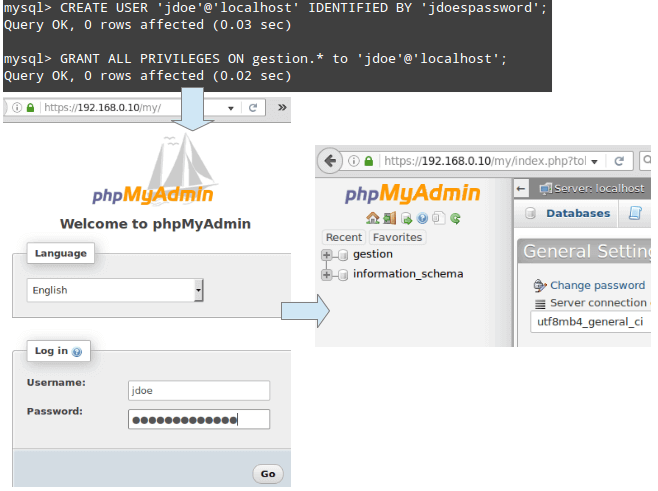
Enable PhpMyAdmin Access to User

Congratulations! You have disabled root access to your phpmyadmin installation and can now use it to manage your databases.

I strongly recommend you to add an extra layer of security to your phpmyadmin installation with .htaccess password protection and setup HTTPS (SSL certificate) to avoid sending username and password in plain text format over network.

Root Plan
Premium Linux Education for Serious Learners

Take Your Linux Skills to the Next Level

Root members get full access to every course, certification prep track, and a growing library of hands-on Linux content — with new courses added every month.

What You Get
Ad-free access to all premium articles
Access to all courses: Learn Linux, AI for Linux, Bash Scripting, Ubuntu Handbook, Golang and more.
Access to Linux certifications (RHCSA, RHCE, LFCS and LFCA)
Access new courses on release
Get access to weekly newsletter
Priority help in comments
Private Telegram community
Connect with the Linux community
Gabriel Cánepa
Gabriel Cánepa is a GNU/Linux sysadmin and web developer from Villa Mercedes, San Luis, Argentina. He works for a worldwide leading consumer product company and takes great pleasure in using FOSS tools to increase productivity in all areas of his daily work.

Each tutorial at TecMint is created by a team of experienced Linux system administrators so that it meets our high-quality standards.

Join the TecMint Weekly Newsletter (More Than 156,129 Linux Enthusiasts Have Subscribed)
Was this article helpful? Please add a comment or buy me a coffee to show your appreciation.

4 Comments

Leave a Reply
  1. What if MySQL administrator account is not called root? I mean, it’s not like `root` if of any special meaning to mySQL.

    Reply
  2. This whole series is awesome, and a big help. I had inherited a set up with phpMyAdmin with every virtual host using root access to the databases, including my live site. What I did and would recommend is that if your site is being used while you’re taking these steps, create the users and their passwords first, test them, then update your php code to use the new usernames. Then when you put the bash on root access you don’t have to scramble to get the new connection code in place.

    Reply

Got Something to Say? Join the Discussion...

Thank you for taking the time to share your thoughts with us. We appreciate your decision to leave a comment and value your contribution to the discussion. It's important to note that we moderate all comments in accordance with our comment policy to ensure a respectful and constructive conversation.

Rest assured that your email address will remain private and will not be published or shared with anyone. We prioritize the privacy and security of our users.

Root Plan Premium Linux Education for Serious Learners

Before You Go - Upgrade Your Linux Skills

Root members get everything in one place, with new courses added every month.

What You Get
Ad-free access to all premium articles
Access to all courses: Learn Linux, AI for Linux, Bash Scripting, Ubuntu Handbook, Golang and more.
Linux certifications: RHCSA, RHCE, LFCS and LFCA
Access new courses on release
Weekly newsletter, priority support & Telegram community
Join Root Today and Start Learning Linux the Right Way
Structured courses, certification prep, and a community of Linux professionals - all in one membership.
Join Root Plan →
$8/mo · or $59/yr billed annually