

If you are planning on using phpmyadmin on a regular basis to manage your databases over the network (or worse, over the Internet!), you don’t want to use the root account. This is valid not only for phpmyadmin but also for any other web-based interface.
In /etc/phpmyadmin/config.inc.php, look for the following line and make sure the AllowRoot directive is set to FALSE:
$cfg['Servers'][$i]['AllowRoot'] = FALSE;
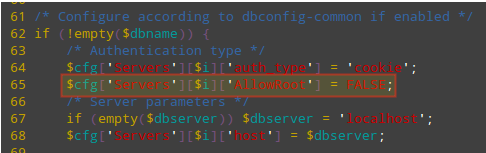
In Ubuntu/Debian, you need to add these two lines as shown:
/* Authentication type */
$cfg['Servers'][$i]['auth_type'] = 'cookie';
$cfg['Servers'][$i]['AllowRoot'] = false;
Save changes and restart Apache.
------------- On CentOS/RHEL Systems -------------
# systemctl restart httpd.service

------------- On Debian/Ubuntu Systems -------------
# systemctl restart apache2.service
Then follow the steps outlined in the above tips to get to the phpmyadmin login page (https://<ip address>/phpmyadmin) and Try to login as root:

Then connect to your MySQL / MariaDB database via the command prompt and, using root credentials, create as many accounts as needed to access one database each. In this case we will create an account named jdoe with password jdoespassword:
# mysql -u root -p
Enter password:
Welcome to the MariaDB monitor.  Commands end with ; or \g.
Your MariaDB connection id is 24
Server version: 10.1.14-MariaDB MariaDB Server

Copyright (c) 2000, 2016, Oracle, MariaDB Corporation Ab and others.

Type 'help;' or '\h' for help. Type '\c' to clear the current input statement.

MariaDB [(none)]> CREATE USER 'jdoe'@'localhost' IDENTIFIED BY 'jdoespassword';
Query OK, 0 rows affected (0.04 sec)

MariaDB [(none)]> GRANT ALL PRIVILEGES ON gestion.* to 'jdoe'@'localhost';
Query OK, 0 rows affected (0.00 sec)
Then let’s login using the above credentials. As you can see, this account only has access to only one database:
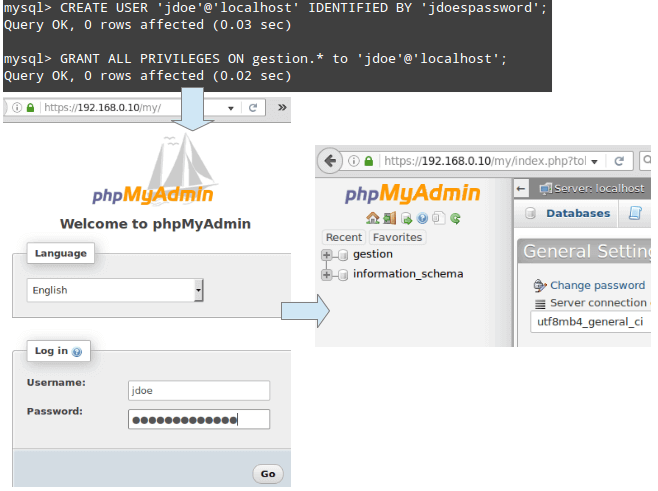
Congratulations! You have disabled root access to your phpmyadmin installation and can now use it to manage your databases.
I strongly recommend you to add an extra layer of security to your phpmyadmin installation with .htaccess password protection and setup HTTPS (SSL certificate) to avoid sending username and password in plain text format over network.

This didn’t work in ubuntu 22.04.
@Scott,
It should work; I have followed the same steps to disable MySQL root access in PhpMyAdmin on my Ubuntu 22.04.
What if MySQL administrator account is not called root? I mean, it’s not like `root` if of any special meaning to mySQL.
This whole series is awesome, and a big help. I had inherited a set up with phpMyAdmin with every virtual host using root access to the databases, including my live site. What I did and would recommend is that if your site is being used while you’re taking these steps, create the users and their passwords first, test them, then update your php code to use the new usernames. Then when you put the bash on root access you don’t have to scramble to get the new connection code in place.