

rdesktop is an open source software that enables you to connect and manage your remote Windows desktop from your Linux computer using RDP – Remote Desktop Protocol. In other words, while you are sitting in front of your Linux system at home or office, and access your Windows desktop as if you’re sitting in front of the Windows machine.
Read Also: 11 Best Tools to Access Remote Linux Desktop
In this article, we will explain how to install rdesktop in Linux system to access the remote desktop of Windows computer using the Hostname and IP Address.
Windows Settings
To enable rdesktop to connect to any given Windows machine, you need to make few following changes on the Windows box itself.
- Enable RDP port no. 3389 in Firewall.
- Enable remote desktop under Windows Operating System.
- Require at least one user with a password.
Once you make all of the above Windows configuration settings, you can now move further to install rdesktop on your Linux system to access your Windows desktop.

Install rdesktop (Remote Desktop) in Linux
It is always preferable to use a default package manager such as yum, dnf or apt to install software to handle dependencies automatically during installation.
# yum install rdesktop   [On CentOS/RHEL 7]
# dnf install rdesktop   [On CentOS/RHEL 8 and Fedora]
# apt install rdesktop   [On Debian/Ubuntu]
If rdesktop is not available to install from the default repositories, you can download the tarball from Github here or use the following wget command to download and install it as shown.
# wget https://github.com/rdesktop/rdesktop/releases/download/v1.8.6/rdesktop-1.8.6.tar.gz
# tar xvzf rdesktop-1.8.6.tar.gz
# cd rdesktop-1.8.6/
# ./configure --disable-credssp --disable-smartcard
# make
# make install
Connecting to Windows Desktop Using Hostname
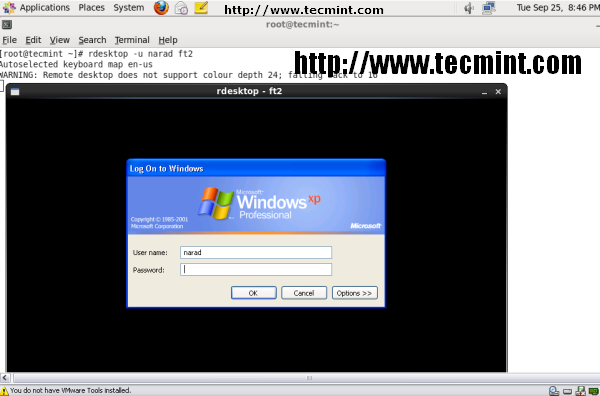
To connect Windows host from Linux desktop type following command using -u parameter as username (narad) and (ft2) as the hostname of my Windows host. To resolve hostname make an entry at /etc/hosts file if you don’t have DNS Server in your environment.
# rdesktop -u narad ft2
Connecting to Windows Desktop Using IP Address
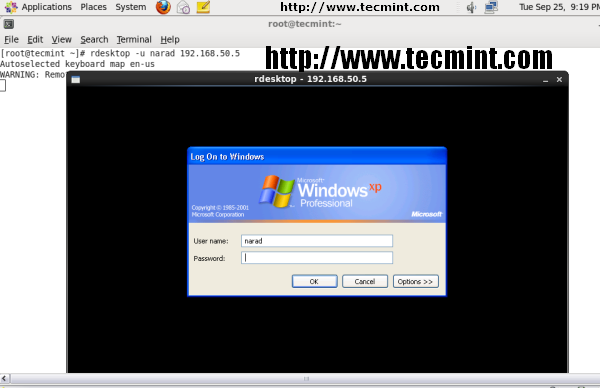
To connect Windows host from Linux machine, use username as (narad) and IP Address as (192.168.50.5) of my windows host, the command would be as.
# rdesktop -u narad 192.168.50.5
Please execute man rdesktop in command prompt If you would like to know more about it or visit rdesktop project website. Kindly share it and let us know your comments through our comment box below.





On my Red Hat 8.2, I had first to run:
And then it worked with:
We have Debian only with the SSH package installed and RDESKTOP in the call center with 16 machines logging into the Windows Server 2016 TS. However, if an employee goes out to have a coffee and the computer is without activity, he drops the rdesktop and returns to the home screen. Debian is ready with login and password. How do I never go into standby?
How I redirect printer from Windows to Ubuntu with the help of rdesktop?
I have installed the rdesktop successfully, but the Rdesktop application not working…
@Harish,
Any error you getting while starting rdesktop? could you share?
How to install rdesktop offline (without internet) mode or downloaded package.
@Thiruvengadam,
Run the following commands to install rdesktop offline on any Linux distribution.
I installed rdesktop, but I noticed that day by day he keeps flashing the screen, has updated video drive and nothing …. anyone have any tips?
In a GUI environment.
yum -y install rdesktop
yum -y install tsclient
The tsclient is a frontend that makes it easy to use rdesktop (and vncviewer). You should now see “Teminal Server Client” in the Internet tab in GUI.
Its very useful
Thanks
can we use it for linux-linux sharing………????????
@Kiran,
Yes, you can use this tool to share your Linux desktop too..
let help me I am not configure mail server in Linux5.1
Hi, am unable to install rdesktop package in rhel 6 terminal.it says
Unable to read consumer identity
No package rdesktop available. what to do ?
great tutorial man… but i’d most like to use free nx in installing RDP on my centos server. it more fast and great work..
thanks for tutorial…
Thank you!!
I was able to connect to a windows machine. If I go to full screen then I was unable to get back. Screen remain full in the windows machine. I tried restarting the remote windows machine, then the current(linux) machine screen frozen at the shutdown screen of the remote windows machine.
Question is,
how do I get back to the physical Linux machine from the remote full screen windows machine?
Thank you.
Use key combination ctrl+enter key to come back from fullscreen.
-When I type rdesktop -u hourhour hour; it appears ” Error: getaddrinfo: Name or Sevice not Know.
-When I type rdesktop -u hourhour 192.168.0.10; it appears ” Error: Unable to connect.” .
Thank you for your reply.
I’m amazed, I have to admit. Seldom do I come across a blog that’s both equally
educative and amusing, and let me tell you, you have hit the nail on
the head. The issue is something that not enough people are
speaking intelligently about. Now i’m very happy I found this in my search for something relating to this.
Hy,
I have installed rdesktop+grdesktop,
congratulations for your work. Can you help me?
How i can delete ip adress in General/Logon Settings/Computer: ………….
Thanks you very much