2 Ways to Re-run Last Executed Commands in Linux

Take Your Linux Skills to the Next Level All courses, certifications, ad-free articles & community — from $8/mo
Join Root →
Ad-free access to all premium articles
Access to all courses: Learn Linux, AI for Linux, Bash Scripting, Ubuntu Handbook, Golang and more.
Access to Linux certifications (RHCSA, RHCE, LFCS and LFCA)
Access new courses on release
Get access to weekly newsletter
Priority help in comments
Private Telegram community
Connect with the Linux community
From $8/mo · or $59/yr billed annually · Cancel anytime

One of the greatest features of Bash is the command history, which stores all commands a user runs, in a history file within his/her home directory (typically /home/$USER/.bash_history). This allows the user to easily recall, edit and rerun previous commands.

In this article, we will demonstrate how to re-execute a specific command from the history of commands entered to a shell. This is useful to avoid typing the same commands over and over again.

Normally, to get a command you recently run, you can use the Up arrow keys to retrieve a previous command. Pressing it constantly takes you through multiple commands in history, so you can find the one you want. Use the Down arrow to move in the reverse direction.

However, the history file may contain a lot of entries, to re-execute a specific command from the history of commands, you can run the history command.

$ history 
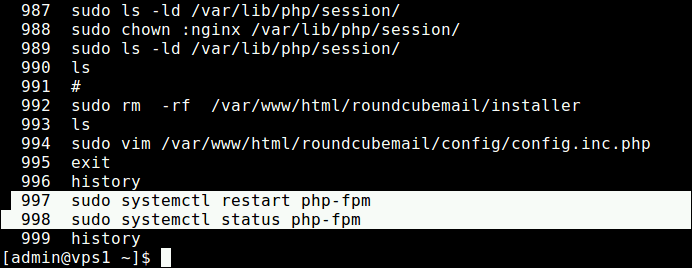
List Last Executed Linux Commands

Then get the number(s) of the command(s) you want to re-execute (if, for example you want to restart PHP-FPM and view its status, you need to re-execute the commands 997 and 998) as shown.

$ !997
$ !998
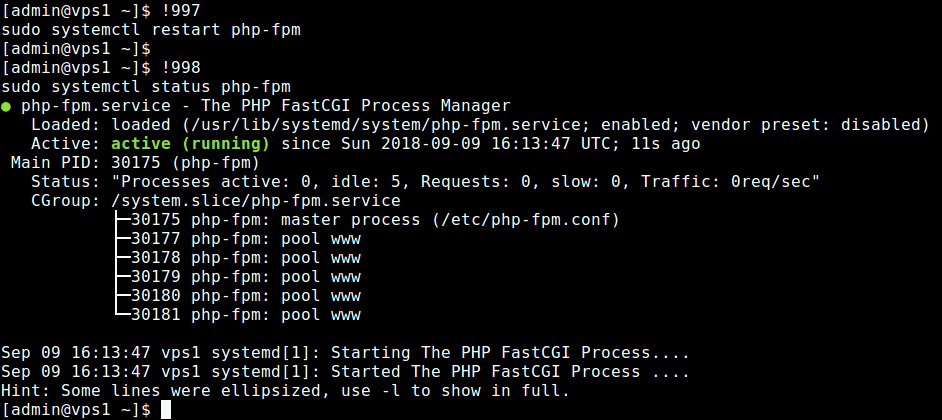
Re-excute Previous Commands in Linux

You can also re-execute previously used command (sudo yum update) with '!' character followed by a few of the first characters (for instance sud or sudo) of that particular command as shown.

$ !sud
OR
$ !sudo
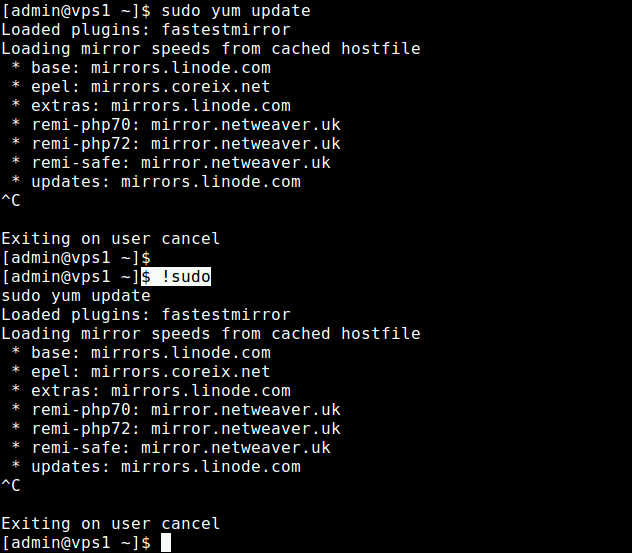
Re-excute Previous Command Using Exclamation Mark

For more information about Bash history, see these following guides:

  1. The Power of Linux “History Command” in Bash Shell
  2. How to Clear BASH Command Line History in Linux
  3. Set Date and Time for Each Command You Execute in Bash History
  4. Useful Linux Command Line Bash Shortcuts You Should Know

That’s all! Bash history is a cool feature that allows you to easily recall, edit and rerun previous commands. If you know other ways to re-excute the last exucuted command do share with us in the comment section.

Root Plan
Premium Linux Education for Serious Learners

Take Your Linux Skills to the Next Level

Root members get full access to every course, certification prep track, and a growing library of hands-on Linux content — with new courses added every month.

What You Get
Ad-free access to all premium articles
Access to all courses: Learn Linux, AI for Linux, Bash Scripting, Ubuntu Handbook, Golang and more.
Access to Linux certifications (RHCSA, RHCE, LFCS and LFCA)
Access new courses on release
Get access to weekly newsletter
Priority help in comments
Private Telegram community
Connect with the Linux community
Aaron Kili
Aaron Kili is a Linux and F.O.S.S enthusiast, an upcoming Linux SysAdmin, web developer, and currently a content creator for TecMint who loves working with computers and strongly believes in sharing knowledge.

Each tutorial at TecMint is created by a team of experienced Linux system administrators so that it meets our high-quality standards.

Join the TecMint Weekly Newsletter (More Than 156,129 Linux Enthusiasts Have Subscribed)
Was this article helpful? Please add a comment or buy me a coffee to show your appreciation.

6 Comments

Leave a Reply

Got Something to Say? Join the Discussion...

Thank you for taking the time to share your thoughts with us. We appreciate your decision to leave a comment and value your contribution to the discussion. It's important to note that we moderate all comments in accordance with our comment policy to ensure a respectful and constructive conversation.

Rest assured that your email address will remain private and will not be published or shared with anyone. We prioritize the privacy and security of our users.

Root Plan Premium Linux Education for Serious Learners

Before You Go - Upgrade Your Linux Skills

Root members get everything in one place, with new courses added every month.

What You Get
Ad-free access to all premium articles
Access to all courses: Learn Linux, AI for Linux, Bash Scripting, Ubuntu Handbook, Golang and more.
Linux certifications: RHCSA, RHCE, LFCS and LFCA
Access new courses on release
Weekly newsletter, priority support & Telegram community
Join Root Today and Start Learning Linux the Right Way
Structured courses, certification prep, and a community of Linux professionals - all in one membership.
Join Root Plan →
$8/mo · or $59/yr billed annually