Skip to content
⏳ Offer Ends Soon: Get 17 Linux courses, 4 certification courses, 7 eBooks and all future releases for life, just $99 → [Join Now]
Tecmint: Linux Howtos, Tutorials & Guides
  • Latest Tutorials
  • Commands
    • A – Z Linux Commands
    • 100+ Linux Commands
  • Tools
  • Distros
    • Linux Distros for Beginners
    • Linux Distros for Experts
    • New Linux Distros
    • Linux Server Distros
    • Secure Linux Distros
    • CentOS Alternatives
    • RedHat Distributions
    • Debian Distributions
    • Ubuntu Distributions
    • Arch Linux Distros
    • Rolling Linux Distros
    • KDE Linux Distros
    • Linux Distros for Old PC
    • Linux Distros for Kids
    • Linux Distributions for Students
    • Linux Distros for Windows
  • Courses
    • Bash Scripting
    • Learn Linux
    • AI for Linux
    • RHCSA Certification
    • RHCE Certification
    • LFCS Certification
  • eBooks
    • RHCSA Exam
    • RHCE Exam
    • LFCS Exam
    • LFCE Exam
    • LFCA Exam
    • Ansible Exam
  • About
  • Advertise
Tecmint: Linux Howtos, Tutorials & Guides
  • Latest Tutorials
  • Commands
    • A – Z Linux Commands
    • 100+ Linux Commands
  • Tools
  • Distros
    • Linux Distros for Beginners
    • Linux Distros for Experts
    • New Linux Distros
    • Linux Server Distros
    • Secure Linux Distros
    • CentOS Alternatives
    • RedHat Distributions
    • Debian Distributions
    • Ubuntu Distributions
    • Arch Linux Distros
    • Rolling Linux Distros
    • KDE Linux Distros
    • Linux Distros for Old PC
    • Linux Distros for Kids
    • Linux Distributions for Students
    • Linux Distros for Windows
  • Courses
    • Bash Scripting
    • Learn Linux
    • AI for Linux
    • RHCSA Certification
    • RHCE Certification
    • LFCS Certification
  • eBooks
    • RHCSA Exam
    • RHCE Exam
    • LFCS Exam
    • LFCE Exam
    • LFCA Exam
    • Ansible Exam
  • About
  • Advertise

dmesg

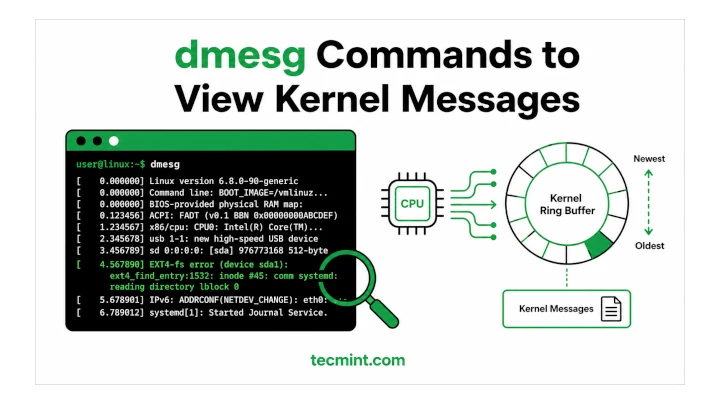
dmesg Commands to View Kernel Messages

12 Ways to Use the dmesg Command in Linux to View and Troubleshoot Kernel Messages

Most people run dmesg once, see thousands of lines, and close the terminal. But that’s not really how you should

TecMint Weekly
Get the Learn Linux 7 Days Crash Course free when you join 34,000+ Linux professionals reading every Thursday.
Check your email for a magic link to get started.
Something went wrong. Please try again.
Free forever. Unsubscribe anytime.
Learn Linux Right Way
17 structured courses, ad-free articles, and the weekly newsletter in one place.
  • ✓SSH, Bash, Ubuntu, Golang, n8n, AI for Linux, Claude for Linux, RHCSA, RHCE, LFCS, LFCA and more
  • ✓Ad-free access to all premium articles
  • ✓Priority help and Telegram community
  • ✓Weekly newsletter every Thursday
Join Root for $59/yr →

Linux Server Monitoring Tools

linux-dash: Monitors “Linux Server Performance” Remotely Using Web Browser

How to Install dbWatch to Monitor MySQL Performance in Linux

Sysmon – A Graphical System Activity Monitor for Linux

Petiti – An Open Source Log Analysis Tool for Linux SysAdmins

Netdata – A Real-Time Performance Monitoring Tool for Linux Systems

5 Tools to Scan a Linux Server for Malware and Rootkits

Learn Linux Tricks & Tips

16 Useful apt Command Examples for Ubuntu/Debian Linux

How to Add a New Disk to an Existing Linux Server

10 Must-Know Linux Commands You Probably Missed – Part 4

How to Create Aliases (Shortcuts) for Common Commands in Linux

How to Change Linux Partition Label Names on EXT4 / EXT3 / EXT2 and Swap

4 Ways to Find Server Public IP Address in Linux Terminal

Best Linux Tools

12 Best Command-Line FTP Clients for Linux Users

13 Most Used Microsoft Office Alternatives for Linux

8 Best MySQL/MariaDB GUI Tools for Linux in 2024

5 Best Microsoft Word Alternatives for Linux in 2024

Top 3 Open Source Virtual Data Room (VDR) for Linux

Top 5 Diagram Tools for Linux Users in 2025 (Free & Open-Source)

Tecmint: Linux Howtos, Tutorials & Guides © 2026. All Rights Reserved.

The material in this site cannot be republished either online or offline, without our permission.

Hosting Sponsored by : Linode Cloud Hosting