

Apache OpenOffice is a widely used open-source application suite compatible with Linux, Windows, and Mac operating systems. It encompasses various essential functions such as word processing, spreadsheets, presentations, drawings, databases, formula creation, and more.
Utilized by over 360 million users globally, it finds applications in companies, homes, and research centers, supporting nearly 121 languages. Available for free download, Apache OpenOffice is compatible with common systems, making it a versatile and accessible tool for a wide range of users.
OpenOffice System Requirements
- Linux kernel version 2.6 or higher, glibc2 version 2.5 or higher.
- Free memory of 256 MB RAM (512 MB recommended).
- 400 MB available disk space.
- JRE (Java Runtime Environment) 1.5 or higher.
Install Apache OpenOffice on Linux
The following installation instructions guide you through the process of installing Apache OpenOffice with US English language settings on both 32-bit and 64-bit Linux distributions.
While there may be slight variations in directory names for 64-bit platforms, the installation instructions remain the same for both architectures.
Step 1: Install Java JRE in Linux
As I said above, you must have a JRE version installed on your systems, if not install the latest Java JRE version using the following articles.
- How To Install Java with Apt on Ubuntu 20.04
- How to Install JAVA with APT on Debian 10
- How to Install Java in Fedora
- How to Install Java 14 on CentOS/RHEL 7/8 & Fedora
Else, you can follow the below instructions to install the most recent version of Java JRE on Linux distributions such as Debian and RedHat based.
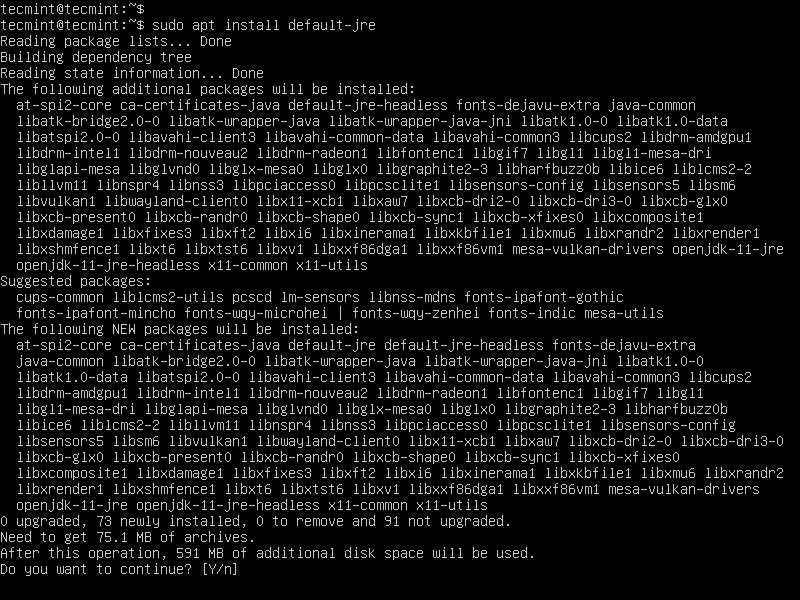
Install Java On Debian and Ubuntu
sudo apt install default-jre
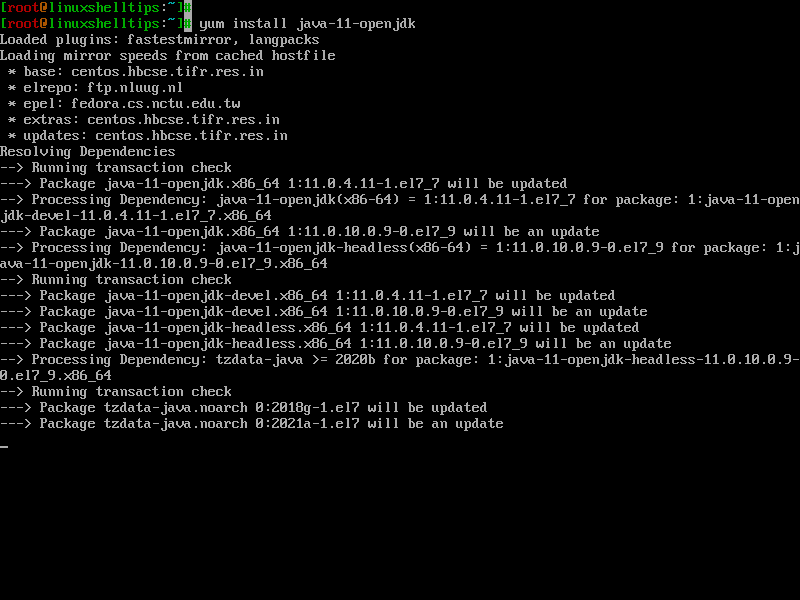
Install Java On RedHat, Fedora, and CentOS
# yum install java-11-openjdk
Once Java is installed, you can verify the version using the following command.
$ java -version

openjdk version "11.0.11" 2021-04-20
OpenJDK Runtime Environment (build 11.0.11+9-Ubuntu-0ubuntu2.20.04)
OpenJDK 64-Bit Server VM (build 11.0.11+9-Ubuntu-0ubuntu2.20.04, mixed mode, sharing)
Step 2: Download Apache OpenOffice
Next, go to the official OpenOffice download page and grab the latest version, or use the following wget command to download directly in the terminal.
On RHEL-based distributions such as Fedora, CentOS Stream, Rocky, and Alma Linux.
cd /tmp

---------------------------- On 32-bit Systems ----------------------------
wget http://sourceforge.net/projects/openofficeorg.mirror/files/4.1.15/binaries/en-US/Apache_OpenOffice_4.1.15_Linux_x86_install-rpm_en-US.tar.gz


---------------------------- On 64-bit Systems ----------------------------
wget http://sourceforge.net/projects/openofficeorg.mirror/files/4.1.15/binaries/en-US/Apache_OpenOffice_4.1.15_Linux_x86-64_install-rpm_en-US.tar.gz
On Debian-based distributions such as Ubuntu and Linux Mint.
cd /tmp

---------------------------- On 32-bit Systems ----------------------------
wget http://sourceforge.net/projects/openofficeorg.mirror/files/4.1.15/binaries/en-US/Apache_OpenOffice_4.1.15_Linux_x86_install-deb_en-US.tar.gz


---------------------------- On 64-bit Systems ----------------------------
wget http://sourceforge.net/projects/openofficeorg.mirror/files/4.1.15/binaries/en-US/Apache_OpenOffice_4.1.15_Linux_x86-64_install-deb_en-US.tar.gz
Step 3: Remove Old OpenOffice
If any previously installed OpenOffice versions you have, remove them using the dnf or apt command as shown.
sudo dnf remove openoffice*  [On RHEL/CentOS/Fedora and Rocky/AlmaLinux]
sudo apt remove openoffice*  [On Debian, Ubuntu and Mint]
The above command will remove the old OpenOffice installation and associated configuration files from your system.
Make sure to install the new version afterward, following the installation instructions for your specific Linux distribution.
Step 4: Install OpenOffice Packages
After downloading the OpenOffice package, use the tar command to extract it under the /tmp directory or in a directory of your choice.
tar -xvf Apache_OpenOffice*
After extracting the package, you will find a directory, and within this directory, there will be a sub-directory named RPMS or DEBS. Now, execute the following command to install it.
On RHEL-based distributions:
cd /tmp/
rpm -Uvh en-US/RPMS/*.rpm en-US/RPMS/desktop-integration/openoffice*.rpm
On Debian-based distributions:
cd /tmp/
sudo dpkg -i en-US/DEBS/*.deb en-US/DEBS/desktop-integration/openoffic*.deb
Step 5: Starting Apache OpenOffice
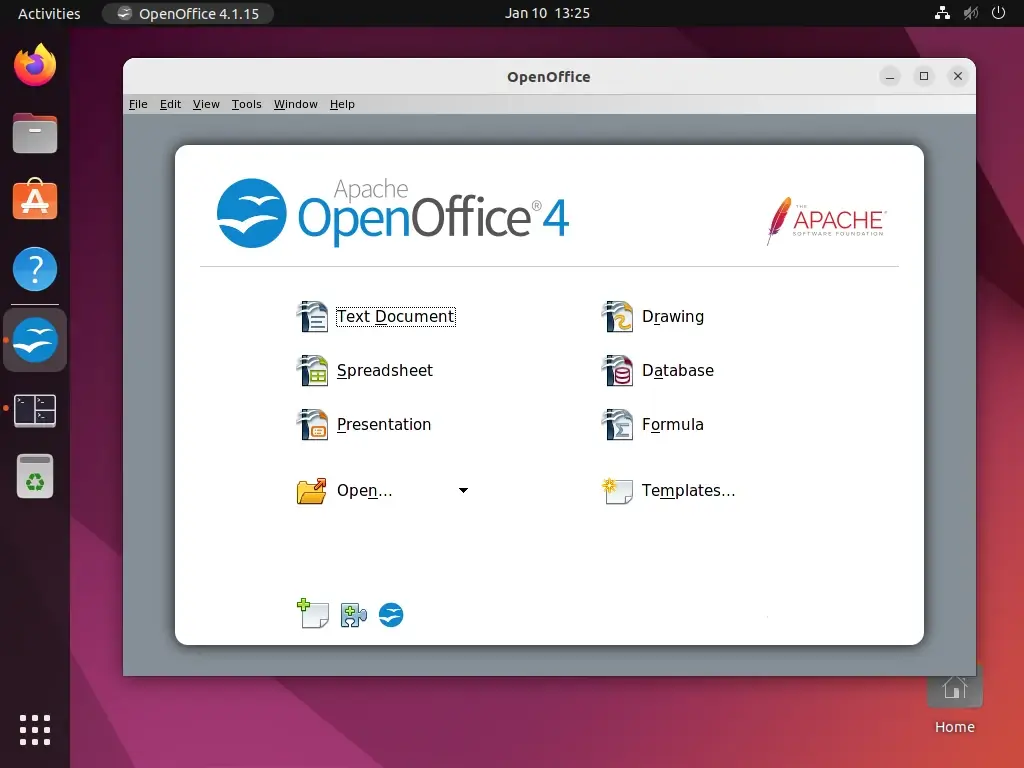
On the terminal execute the following command to start the OpenOffice application.
openoffice4

Hello,
OpenOffice should be offered as Appimage. That would be easier and would allow to have it next to LibreOffice. I don’t understand why OpenOffice is not present in repositories any longer and why the OO developers don’t offer Appimage. Personally, I prefer OpenOffice. In my Mint the default Y-theme doesn’t like OO though…
“I don’t understand why OpenOffice is not present in repositories any longer and why the OO developers don’t offer Appimage.” Basically, because Apache does not have sufficient development staff.
“I prefer OpenOffice”
Why do you prefer OpenOffice to LibreOffice? They’re pretty much the same product, except LO is being actively developed and gets regular updates and OO has been pretty much stagnant since 2014.
“Apache OpenOffice is a most popular and open-source application suite for Linux, Windows & Mac”.
That MAY have been true when you first wrote this article. However, for the past 6-7 years LibreOffice has been the office suite that is installed by default in the majority of Linux distros. The last significant release of OpenOffice (4.1) was in 2014.
Since then, there were only point releases introducing mostly cosmetic changes. The reason for that is that the OpenOffice team has been steadily losing developers to the point that there are not enough of them left for Apache to maintain a vigorous development pace. OpenOffice is falling further and further behind other office suites.
OpenOffice has support for 41 languages while LibreOffice supports 119 at the latest count – three times as many.
The above instructions call for installing Java first, then OpenOffice – two separate operations. If the first one does not complete successfully, as has happened to several posters, the installation of the office suite cannot proceed. Since at least LibreOffice 3.x, Java and Java Runtime Environment have been part of the default install of the LO suite.
Let’s admit it, Apache Open Office is a niche product.
Operating system: Centos Linux, I have installed libre office few days back. Now I installed Apache Open office rpms successfully but when i try to install desktop integration I’m getting an error.
file /usr/bin/soffice from install of openoffice4.1.3-redhat-menus-4.1.3-9783.noarch conflicts with file from package libreoffice-core-1:5.0.6.2-5.el7_3.1.x86_64
@Naveed,
First remove the LibfreOffice first from the system, because you can’t install both LibreOffice and ApacheOffice on same Linux box.
all commands worked and then i open office
then occur this type of mesg
openoffice4
javaldx: Could not find a Java Runtime Environment!
/opt/openoffice4/program/soffice.bin: error while loading shared libraries: libfreetype.so.6: cannot open shared object file: No such file or directory
@Prakash,
Please install Java as show in the article, and also install freetype-devel libraries with yum command.
Hi ,
I am getting following error while installing in rhel 6 update 5
rpm -ivh en-US/RPMS/*.rpm en-US/RPMS/desktop-integration/openoffice4.1.2-redhat-*.rpm
error: Failed dependencies:
perl(common.pl) is needed by openoffice-core06-4.1.2-9782.x86_64
Any hints ?
Thanks
Anjan
@Anjan,
It’s because you’re installing most latest version of Apache Office in older version of CentOS 6, that means either you need to install supported version of Apache Open Office or upgrade your OS.
I am new on linux . Your steps worked great until the 4th step . After the 4 th step ..when i gave the command u said to install the rpm packages ….it came as follows : error: File not found by glob: RPMS/*.rpm
error: File not found by glob: RPMS/desktop-integration/openoffice4.1.2-redhat-*.rpm
Please help me with it as soon as possible !
@Naren,
Please check location of rpm files and make sure you are in the current path to install them..
Why not just use LibreOffice? it is already in most most linux distribution, can do everything OpenOffice can do (its a fork), has more features and better performance.
@Sam,
Yes, we can install LibreOffice from default repositories and I do admit that LibreOffice is much better than OpenOffice, but both does same job and have almost same features and this article is specially created for Openoffice lovers…
i have installed apacheopenoffice 4.0.1 along with libreoffice, but the problem is that apacheopenoffice is not showing in applications. what shuld i do to run openoffice?
You have to remove Libre office first by below command.
# yum erase libreoffice\*
Then install Open Office
Sorry, messed up the format of that first command here it is:
# yum install glibc-2.7* –skip-broken
@Vikram
Hi, you could always try to install the version that is required bypassing whatever issues you encounter…like this
#yum install glibc-2,7* –skip-broken than after it installs you can run
#yum update
which should try to rectify the problems with versioning…..just as a suggestion.
Thanks for this webpage. I already have Package glibc-2.5-81.el5_8.7.x86_64 already installed but it requires version `GLIBC_2.7′
/opt/openoffice.org3/program/../basis-link/ure-link/bin/javaldx: /lib64/libc.so.6: version `GLIBC_2.7′ not found (required by /opt/openoffice.org/ure/bin/../lib/libuno_sal.so.3)
/opt/openoffice.org3/program/../basis-link/ure-link/bin/javaldx: /lib64/libc.so.6: version `GLIBC_2.7′ not found (required by /opt/openoffice.org/ure/bin/../lib/libxml2.so.2)
/opt/openoffice.org3/program/soffice.bin: /lib64/libc.so.6: version `GLIBC_2.7′ not found (required by /opt/openoffice.org3/program/../basis-link/ure-link/lib/libuno_sal.so.3)
/opt/openoffice.org3/program/soffice.bin: /lib64/libc.so.6: version `GLIBC_2.11′ not found (required by /opt/openoffice.org3/program/../basis-link/program/libsvt.so)
/opt/openoffice.org3/program/soffice.bin: /lib64/libc.so.6: version `GLIBC_2.7′ not found (required by /opt/openoffice.org3/program/../basis-link/program/libsvt.so)
/opt/openoffice.org3/program/soffice.bin: /lib64/libc.so.6: version `GLIBC_2.11′ not found (required by /opt/openoffice.org3/program/../basis-link/program/libvcl.so)
/opt/openoffice.org3/program/soffice.bin: /lib64/libc.so.6: version `GLIBC_2.7′ not found (required by /opt/openoffice.org3/program/../basis-link/program/../ure-link/lib/libxml2.so.2)
I have been trying to install this for weeks for my Linux class, prior to this class I have only heard of Linux and have never tried it. I have followed your instructions with no issue until step 5. After entering the command I get “tar: Apache_OpenOffice_incubating_3.4.1_Linux_x86-64_install-rpm_en-US.tar.gz: Cannot open: No such file or directory
tar: Error is not recoverable: exiting now” but when looking into the tmp file i is sitting there. What is wrong?
@Wb,
Sorry, we have mentioned wrong order for tar command option. the correct way to install it using tar command is as follows.
# tar -xzvf Apache_OpenOffice_incubating_3.4.1_Linux_x86-64_install-rpm_en-US.tar.gz
I think it should work.
Dear,
I tried to install open office 3.4 at my Fedora 8 PC, but it did’nt work. I am getting the following message:
User must select a JRE from options dialog!/opt/openoffice.org3/program/soffice.bin: /lib/libc.so.6: version `GLIBC_2.11′ not found (required by /opt/openoffice.org3/program/../basis-link/program/libsvt.so)
/opt/openoffice.org3/program/soffice.bin: /lib/libc.so.6: version `GLIBC_2.11′ not found (required by /opt/openoffice.org3/program/../basis-link/program/libvcl.so)
And I don’t know what can I do?
Please if you help me I will appreciate that.
See ya!
Reinhardt
Dear Reinhardt,
I think you don’t have glibc package installed on your system, install it using following command.
If you still get’s same error then this guide is not compatible with Fedora 8.
Kernel 2.6 or higher and glibc2 2.11 or higher : any idea about installing glibc2 2.11 in centos 5.8
@Diju,
Just try the following command to install it.
I followed your instructions step by step and since I am new to Linux but I love working on it, I had to install this app. 3 times and finally I understood the commands and it worked out great for me. Thank you very much.