

Skype is a most popular software application developed by Microsoft that is largely used for Instant Messaging and for Audio and Video calls and Video conferencing call. Among these features, Skype can also be used for screen sharing, file sharing and text and voice messaging.
In this article we will cover the process of installing the most recent version of Skype (8.13) in Debian, Ubuntu and Linux Mint distributions.
Read Also: How to Install Skype 8.13 on CentOS, RHEL and Fedora
Update: The official Skype is now available to install from snap store on Ubuntu and other Linux distributions, including Linux Mint, which is maintained and updated by Skype themselves.
$ sudo apt install snapd
$ sudo snap install skype --classic
You can also install Skype using .deb package in your Linux distribution, first visit Skype official download page and download the most recent (latest) available version of the Skype for Linux in your system by following the download link from browser or use open a Terminal window and download the package using following wget command line utility.
# wget https://go.skype.com/skypeforlinux-64.deb
After the download finishes, proceed with Skype installation process, by opening a terminal and run the following command with root privileges in your machine.
$ sudo dpkg -i skypeforlinux-64.deb
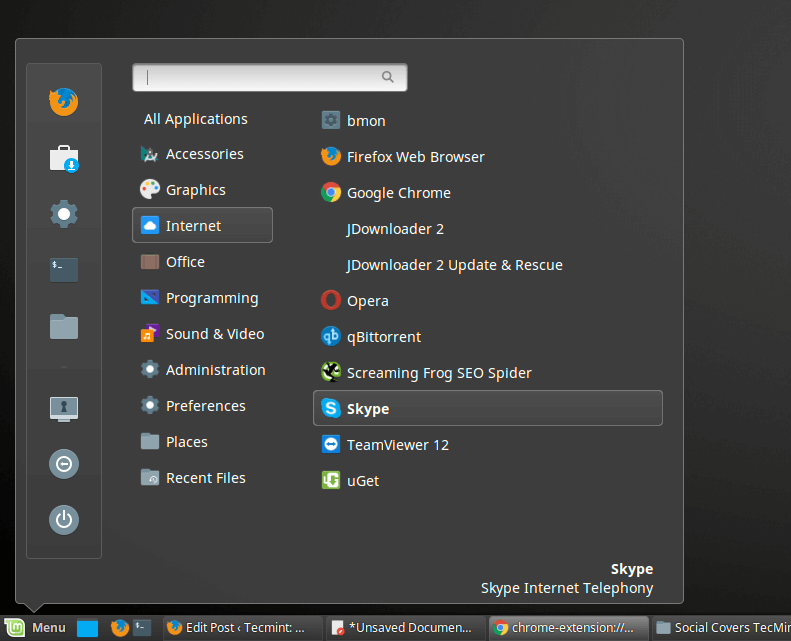
After the installation process finishes, start Skype application by navigating to Application Menu -> Internet -> Skype in Linux Mint distribution.
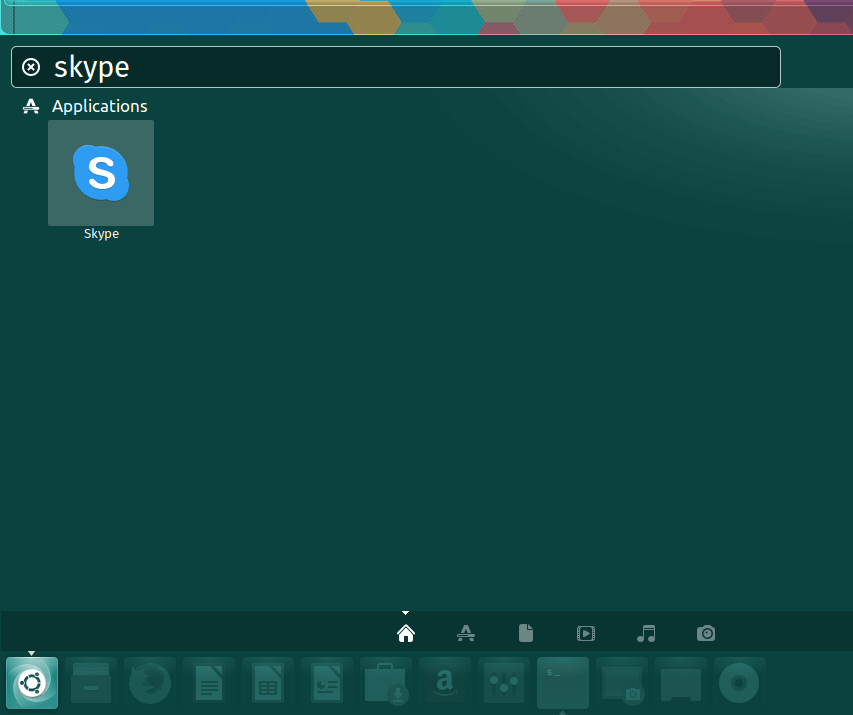
On Ubuntu distribution, launch Dash and search for Skype.
To start Skype from the Linux command line, open a terminal and type skypeforlinux in console.
$ skypeforlinux

Sign In to Skype with the Microsoft account or press on Create Account button and follow the instructions in order to create a new Skype account and freely communicate with your friends, family or co-workers.


I’m sorry, but when a site that purports to be “the fastest growing and most trusted community site for any kind of Linux Articles, Guides and Books on the web”, and then starts an article on Skype off with “Skype is a most popular software application developed by Microsoft”, I just have to laugh. Thank you for the giggle.
Trying to install on an old IBM ThinkPad T60 and get this error message:
error: snap “skype” is not available on stable for this architecture (i386) but exists on other architectures (amd64).
Cinnamon Mint 18.1 – Have followed your instructions – downloaded the skypeforlinux-64.deb, it showed up in Internet directory, but clicking on it produced nothing.
Tried to start it from the command – skypeforlinux – again nothing.
@Alfie,
As I said, the official way to install Skype on Linux is using snap, please remove the
.debpackage and install from snap using following commands.I cannot find the skype installation package, so the command goes wrong.
@Mikael,
You can find Skype installation
.debpackage here: https://www.skype.com/en/get-skype/Else you can also install Skype directly using the Snap package as shown.
Did this exactly but no joy skype doesn’t show under the Internet.
I have Linux Mint 17.1 – 32 bit. My computer is also ok for 64 bit. Can I download and work with Skype 8 – 64 bit
@Daisy,
Not sure, but you should give a try and see that Skype 64-bit works on 32-bit systems..
No, a 32bit OSes cannot run 64 bit binaries, while a 64bit OS can support 32bit executables.
A very big thanks buddy…
Errors were encountered while processing:
skype:i386
rigel@rigel-Inspiron-3542:/tmp$
i am soo tired on instaling this i have the 12.10 ubuntu version
Hello i followed de exact commands but I’ve got no sound in skype. What could I do?
Thank you so much!
hi, i install skype 4.1 version using the installer(offline). my problem is the camera is not working, even the person i have conversation with i cannot see. the voice is very good. please help. thanks
dpkg: error processing package skype (–install):
dependency problems – leaving unconfigured
Processing triggers for gnome-menus (3.10.1-0ubuntu2) …
Processing triggers for desktop-file-utils (0.22-1ubuntu1) …
Processing triggers for mime-support (3.54ubuntu1) …
Processing triggers for hicolor-icon-theme (0.13-1) …
Errors were encountered while processing:
skype
Thank you very much Ravi! It was easy to install the Skype with your help. :)
Thanks for the post. It really helped to install Skype with OS related architecture.
thaaaaaaaaaaaaanks!!! skype finally worked…just remove the package downloaded from the official site, and added yours and voila !! thank you very much
This is all nice and dandy, but “If you receive any dependency error or issues while installing Skype 4.1, first remove the older version of Skype, if you may have installed.” – means that we’re doing the same thing again and it won’t be auto-updated with this method. Not much point installing it in this way, imo.. Skype needs to have a stable repo (ppa) for *all* current versions of Ubuntu, Mint and Debian. After all, it’s the 21th century today and not the 1990s (ffs. :))
Is it possible to put my video chat and my chat box together when having a video chat? When I start having a video chat, I have a 2 windows. 1 video window and 1 for chat box. Now is it possible to make into all in one?
If this works.. You are cool guy! : D
Thank you men . I installed . Everything is okey
Thank you for everything :)
Skype needs i386 libs. I had use sudo apt-get install -f and the installation works now. For x64 don’t exist a amd64 version, only for i386.
Here’s a list from a fresh installed Ubuntu 12.04 LTS with KDE (skype:i386):
libasound2 (>= 1.0.23).
libc6 (>= 2.3.6-6~).
libc6 (>= 2.7).
libgcc1 (>= 1:4.1.1).
libqt4-dbus (>= 4:4.5.3).
libqt4-network (>= 4:4.8.0).
libqt4-xml (>= 4:4.5.3).
libqtcore4 (>= 4:4.7.0~beta1).
libqtgui4 (>= 4:4.8.0).
libqtwebkit4 (>= 2.2~2011week36).
libstdc++6 (>= 4.6).
libx11-6.
libxext6.
libxss1.
libxv1.
libssl1.0.0.
hello
there is no skype 64 for linux
so you have to do multi arch
read my replay that i did in January 18, 2013 at 11:38 pm
follow those steps, and hopfully that wil do it
it work for me and my friends
I have the exact same problem as Tom – very annoying! Is this just because Skype haven’t released an official version yet?
Thanks for your help so far, everyone! :)
dpkg: error processing skype (–install):
dependency problems – leaving unconfigured
Processing triggers for bamfdaemon …
Rebuilding /usr/share/applications/bamf.index…
Processing triggers for desktop-file-utils …
Errors were encountered while processing:
skype
Okay, so I do all that but I get the error “dependency problems” – “leaving unconfigured”
What Do I do?!
Can you post the whole output of the error. So, it help us in finding the actual problem.
if you want skype on 64-bit system follow this steps
# dpkg –add-architecture i386
# apt-get update
# wget -O skype-install.deb http://www.skype.com/go/getskype-linux-deb
# dpkg -i skype-install.deb
apt-get -f install
thank you for this site i have followed many of your tips.
@David,
Thanks for the tips, hope this will help us in installing skype on 64-bit.
it’s work ;)
Thanks :)
tried installing skype-debian…deb but synaptic says its not a valid deb file.
trying skype-ubunutu-lucid. deb now
how would you install via Synaptic? dont like command line
I have the same problem as the others. Maybe adjust your tutorial or warn that it likely doesn’t work for the majority of users.
Son, i am disappoint.
I installed Skype with no errors. Now how do i ACCESS IT?
@John,
On the terminal type ‘skype’ to launch.
Does anyone actually test the supposed amd64 version before posting this? None of the steps above install the 64-bit version of Skype for Ubuntu 12.10 64-bit.
I’m getting the same error. skype-ubuntu-precise_4.1.0.20-1_amd64.deb is named amd64 but is probably NOT a 64bit package !
I’ll give that a go and report back. Thanks!
I have a proplem instaling packge 64bits in the ubuntu 12.10 64bits,
anderson@ubuntu:/tmp$ sudo dpkg -i skype-ubuntu*.deb
dpkg: erro ao processar skype-ubuntu-precise_4.1.0.20-1_amd64.deb (–install):
arquitetura do pacote (i386) não combina com a do sistema (amd64)
Erros foram encontrados durante o processamento de:
skype-ubuntu-precise_4.1.0.20-1_amd64.deb
Skype is not a Open source software..
Exactly! If it was open source, it would not be broken 90% of the time…..
I’ve followed your tutorial and get the following error:
dpkg: error processing skype-ubuntu-precise_4.1.0.20-1_amd64.deb (–install):
package architecture (i386) does not match system (amd64)
Errors were encountered while processing:
skype-ubuntu-precise_4.1.0.20-1_amd64.deb
Any ideas?
You have chosen wrong package architecture. Your system is 32-bit so select .i386.deb file.
If I’m my system(amd64) is 64-bit…would I not want the 64 bit package, like I tried to download?
Just a note…I tried to install the i386 version into 12.10 and still got the same error…so maybe the amd64 package is actually a renamed i386 package on skype’s end?
I agree on you on this. Skype may have the same i386 version on the amd64 file.
I tried installing both i386 and amd64 and they keep telling me that I am using the i386 for an amd64 system.
try this:
# sudo apt-get -f install
then run installation again.
# sudo dpkg -i skype-ubuntu*.deb
Done.
Yep, that’s it! ;-)
My friend how did you fix this. I am tying very hard to make it work , I know nothing about ubuntu but I am sick and tired of windows …. still no matter what I do I cannot make it work. Please help
Thanks it works
There’s an error in the command for wget the amd64 package. Where is i386 there could be amd64.
wrong filename for am64 version, should be
wget http://www.skype.com/go/getskype-linux-ubuntu-64/skype-ubuntu-precise_4.1.0.20-1_amd64.deb
@ Arsen and Vanderlei,
Thanks for pointing out.. link is corrected now.
it is telling me : bash: wget http://www.skype.com/go/getskype-linux-ubuntu-64/skype-ubuntu-precise_4.1.0.20-1_amd64.deb: No such file or directory
I checked the link is working fine. do you have wget installed? please check and let me know
Hi Ravi,
I have re installed Ubuntu and it worked but when I entered the last line sudo dpkg -i skype-ubuntu*.deb
it gave me this:
dpkg: error processing skype (–install):
dependency problems – leaving unconfigured
Processing triggers for bamfdaemon …
Rebuilding /usr/share/applications/bamf.index…
Processing triggers for desktop-file-utils …
Processing triggers for gnome-menus …
Errors were encountered while processing:
skype
Please help I want to get out of Windows
Thanks a lot in advance
Anastasios
Try to install the package libcurl3 to overcome this issue.
apt-get install libcurl3
I have the same problem and I tried the command you said below, but it still doesn’t work. Any ideas?
Dear Ravi,
Finally I installed the 32-bit version of skype (I do not know how!!!). I installed chrome also and it gave me the message that it is a bad quality softwate, I think this latest version of ubuntu has problems. Thanks a lot for listening
AP
Silly me. I copied the link without thinking and it read “.det” not “.deb” because of the window edge. A simple fix and then I followed your other advice on libcurl3. Then as the system suggested apt-get update with massive changes and no apparent errors. What a robust system. Thanks for your help.