
If you’ve ever managed a hosting server, you know that cPanel & WHM is one of the most popular control panels in the web hosting industry, which makes server management much easier, especially for beginners who don’t want to spend hours tweaking config files manually.
In this post, I’ll walk you through installing cPanel & WHM on AlmaLinux 9.
What are cPanel & WHM?
- cPanel → This is the control panel for end-users (website owners), which lets you manage websites, domains, databases, and email accounts.
- WHM (WebHost Manager) → This is the administrator side, where you manage the server, create hosting accounts, and handle security.
Together, they make running a hosting server much more user-friendly than doing everything by hand.
Why AlmaLinux 9?
Since the end of CentOS 8, AlmaLinux has become a popular replacement for web servers because it is free, community-driven, and fully compatible with RHEL (Red Hat Enterprise Linux).
cPanel now officially supports AlmaLinux 9 (starting with cPanel v114), which means you get a secure, stable, and modern OS for your hosting environment.
System Requirements
Before installing, make sure your server meets these requirements:
- CPU: 1.1 GHz single-core (Recommended: Multi-core for better performance)
- RAM: 2 GB (Recommended: 4 GB+)
- Disk Space: 20 GB (Recommended: 40 GB+)
- Architecture: 64-bit (Recommended: 64-bit)
Other important notes:
- Use a fresh AlmaLinux 9 install without any pre-install web servers (Apache, Nginx, MySQL, etc.), as cPanel manages its own stack.
- Set up a static IP address (DHCP causes problems).
- Configure a fully qualified domain name (FQDN) for the hostname, like host.example.com.
- Disable SELinux (cPanel does not support it).
- You must have root access to the server.
Pro Tip: Always install cPanel on a clean server to avoid conflicts and make the installation smoother.
1. Update Your Server
Before installing cPanel, let’s make sure your system is fully up to date, which prevents conflicts and ensures you have the latest security patches:
dnf update -y
dnf upgrade -y
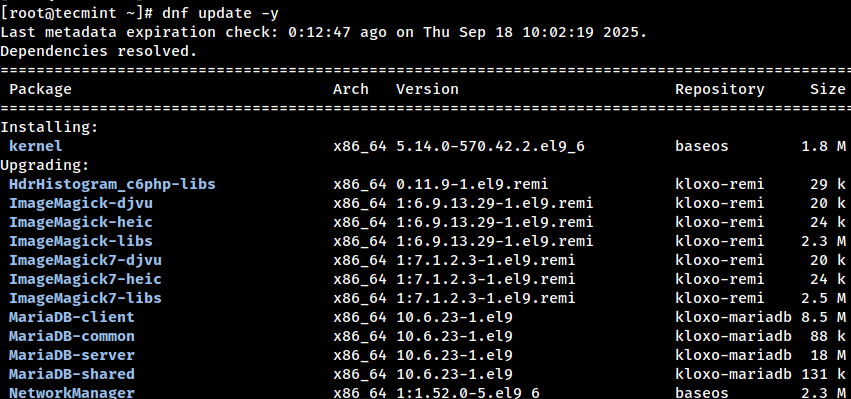
After the update, you must reboot the server so the newly installed kernel can take effect.
reboot
2. Set a Proper Hostname
cPanel requires the server hostname to be a Fully Qualified Domain Name (FQDN), which means it must include both a host label and a domain name (e.g., host.example.com).
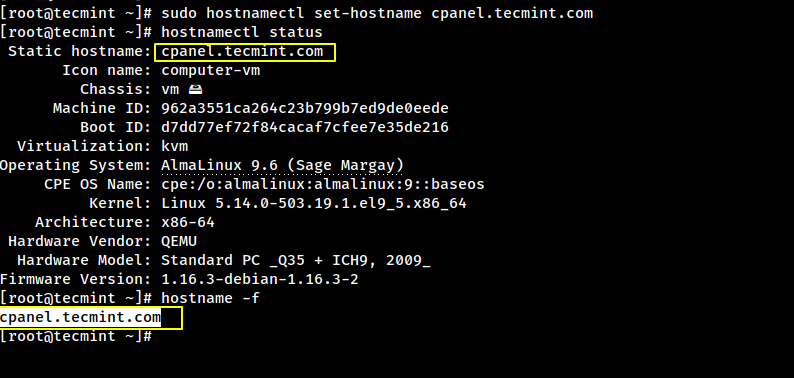
To set a hostname, you can use the hostnamectl command as shown.
sudo hostnamectl set-hostname host.example.com
Make sure your chosen hostname (e.g., host.example.com) is mapped to your server’s public IP address in DNS, with both forward and reverse DNS resolving correctly.
Avoid using the root domain (example.com) as the hostname; instead, assign a subdomain such as server.example.com, host.example.com, or cpanel.example.com for proper configuration.
You can verify the change with:
hostnamectl status
hostname -f
3. Disable SELinux (Required for cPanel)
cPanel does not support SELinux, so you must disable it both temporarily (for the current session) and permanently (so it stays disabled after reboot):
# Temporarily set SELinux to permissive mode
setenforce 0

# Permanently disable SELinux by editing the config file
sed -i 's/^SELINUX=enforcing/SELINUX=disabled/' /etc/selinux/config
Reboot the server to apply the changes:
reboot
After reboot, verify SELinux is disabled:
getenforce
4. Install Required Packages
Before you can run the cPanel installer, your server needs a few basic tools to be installed.
dnf install -y perl wget curl screen
Here’s what each one does:
- perl → The cPanel installer depends on it.
- wget / curl → Used to download the installation script.
- screen → Lets the installation keep running even if your SSH session disconnects.
Tip: Using screen is especially handy if your internet connection is unstable. Just type screen before running the installer, and you can safely disconnect and reconnect later.
5. Disable Firewall (Temporarily)
cPanel manages its own firewall rules during installation, so it’s best to temporarily disable any existing firewall to prevent conflicts:
systemctl stop firewalld
systemctl disable firewalld
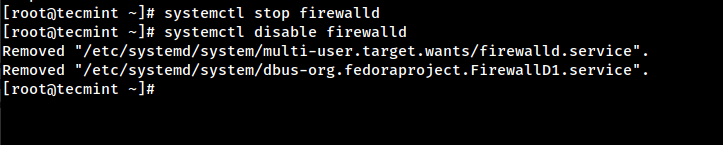
Don’t worry! After installation, you should re-enable a firewall for security, such as CSF (ConfigServer Security & Firewall), which is highly recommended.
6. Run the cPanel Installer
Now comes the exciting part! cPanel installation is straightforward but can take 30-60 minutes, depending on your server specification.
Navigate to the /home directory:
cd /home
Download the latest cPanel installer script:
curl -o latest -L https://securedownloads.cpanel.net/latest
Run the installer:
sh latest
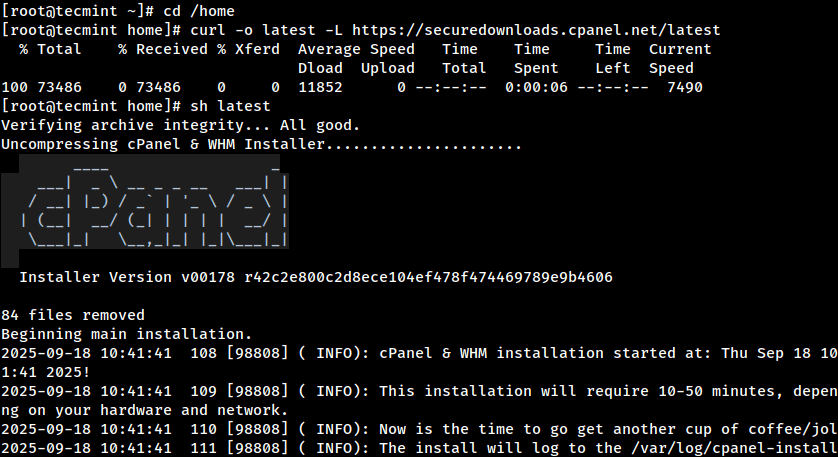
The installer will automatically set up everything cPanel needs, such as Apache (web server), PHP, MySQL/MariaDB, Exim (mail server), DNS services, and more.
7. Access WHM Panel
Once the installation completes, you can log into WHM to finalize your setup:
https://your-server-ip:2087
You can log into WHM using your server’s root credentials.
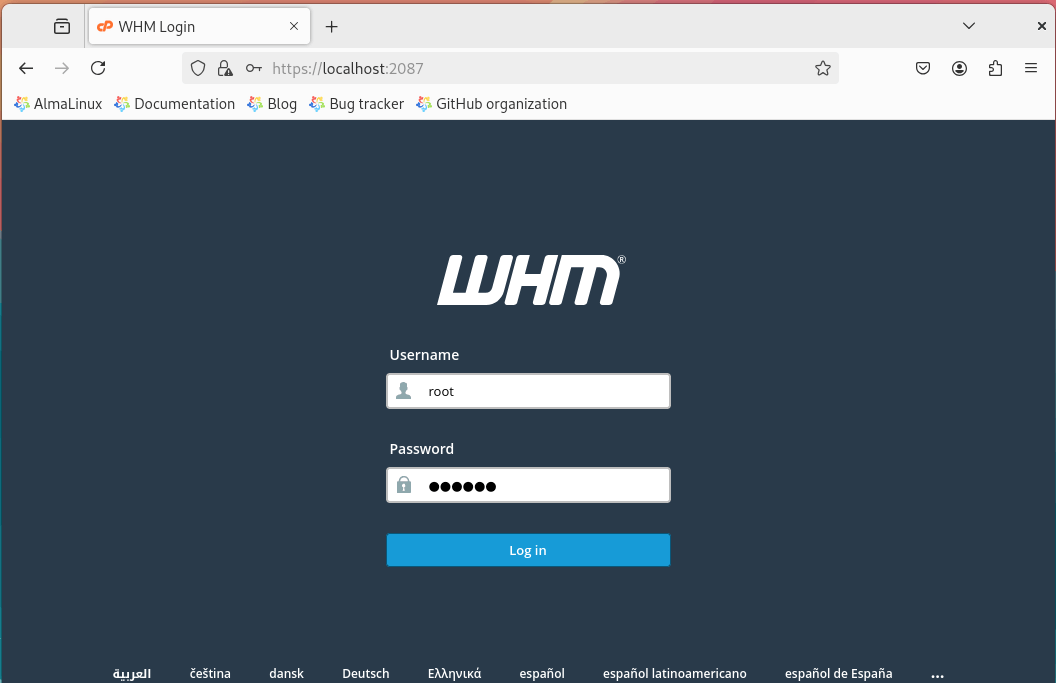
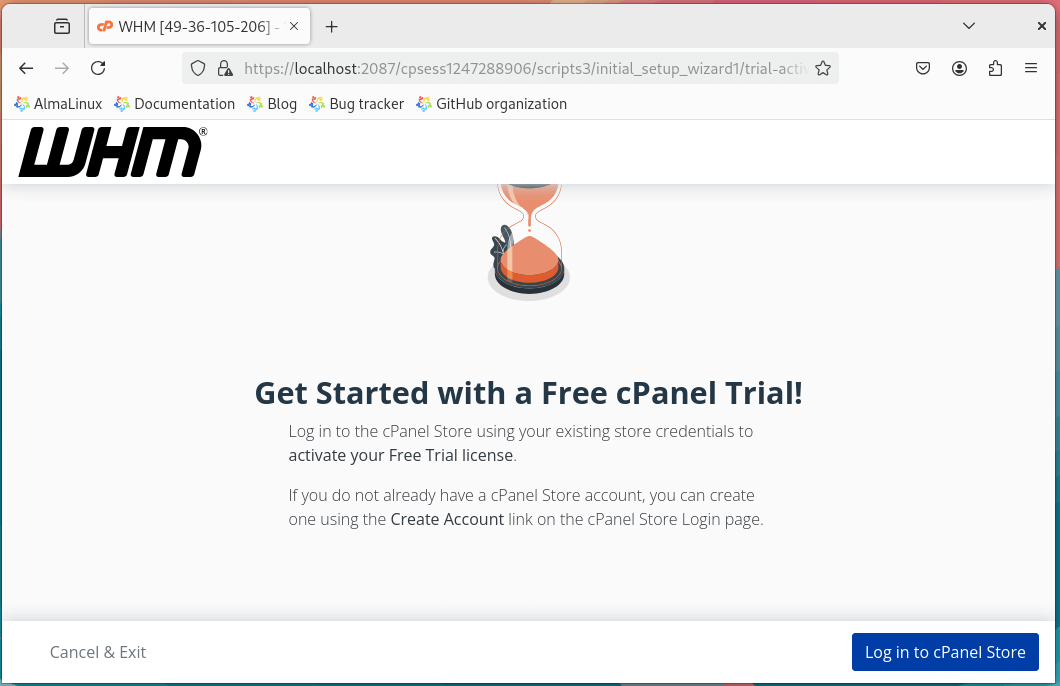
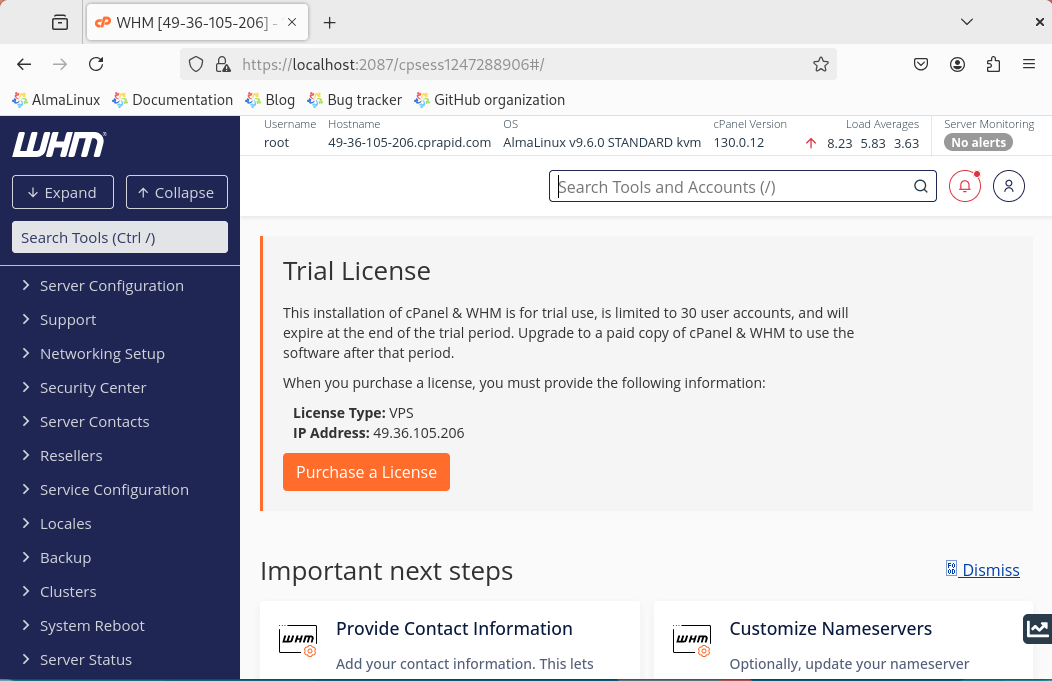
Once logged in, the WHM setup wizard will guide you through the initial configuration, including entering your contact information, setting up nameservers, configuring networking settings, and choosing your preferred service options.
Tip: A trial license is fully functional, so you can explore all features without limitations before deciding whether to buy.
Conclusion
Installing cPanel & WHM on AlmaLinux 9 is actually pretty simple if you follow the steps carefully. With cPanel, managing websites, emails, and databases becomes a lot easier, even for beginners.
This setup is perfect for hosting providers, freelancers, or anyone running multiple websites. Once it’s up and running, your server will be ready to host sites safely, smoothly, and efficiently.



this tutorial is really very well explained I have a problem with you this video tutorial always explain well as its images thank you to you for the work you do
Thank you so much.
Best explain article.
any other software as like as cpanel with the almost same feature.
@Jigar,
Go for open source control panels like Webmin or Cockpit..
Hi,
I read your full article carefully for additional net information. Really you explain so good i understand all steps for installing cpanel on CentOS.
I cannot close this tab without mentioning how helpful this tutorial was after i have spent the past 48 hours trying to configure my new VPS as a newbie. Very detailed with the screen shots, keep up the good work. my WHM is good to go
Make sure you set fqdn as your hostname before you start the installation. If you do not set fqdn installer would halt the installation. It can be verified using
Took me 15 minutes to figure it out.
Hi,
For security you should consider installing cPMalScan plugin. It has the highest malware detection compared to maldet and clamav
http://tijeers.com/cpanel-whm-plugins/cpmalscan/
HI Ravi,
Thanks for this post. Can you please tell me, if i can install cPanel VPS license in my Dedicated server. Or i need to buy cPanel Dedicated one for my Dedicated server ?
@Sunil,
You need to buy the Cpanel license to use it for commercial purpose only..
Hi
I actually got cpanel installed and working by following your tutorial. But I’m kinda scared to continue using it because cpanel is not free. Is this a free version of cpanel?
@Mike,
Yes, you right CPanel is not free for commercial use only, if you are using for home level for practice, you can use it without any fear..
Hi Ravi,
The WHM panel is License only. Is it possible can i use the WHM panel internal network for internal sites hosting. Please advice. Moreover i want to host 5 sites internal network only. Let me know any other option pls.
Let me know how much time to install the WHM panel.
@Muthu,
Yes, I think you can use WHM panel for non-commercial use for free..
sh latest
Verifying archive integrity… All good.
Uncompressing Cpanel & WHM Installer…..
____ _
___| _ \ __ _ _ __ ___| |
/ __| |_) / _` | ‘_ \ / _ \ |
| (__| __/ (_| | | | | __/ |
\___|_| \__,_|_| |_|\___|_|
Installer Version v00053 re6361667eb509a53fa18abae65182fa60dae4822
Beginning main installation.
The system detected an installer lock file: (/root/installer.lock)
Make certain that an installer is not already running.
You can remove this file and re-run the cPanel installation process after you are certain that another installation is not already in progress.
root 3531 0.0 0.1 106032 1224 pts/0 S+ 19:15 0:00 sh -c ps auxwww |grep 3890038900
root 3533 0.0 0.0 103276 776 pts/0 S+ 19:15 0:00 grep 389003890
but http://your-server-ip:2087
can’t be reached please reply
also telnet 192.168.212.132 2087
Trying 192.168.212.132…
Connected to 192.168.212.132.
Escape character is ‘^]’.
@Ravi sir please help
futhermore on digging my tail -f /usr/local/cpanel/logs/error_log
==> cpsrvd: Setting up native SSL support … Done
==> cpsrvd: transferred port bindings
==> cpsrvd: bound to ports
[2016-05-23 19:43:10 -0700] info [cpsrvd] Internal Server Error: “-” 500 The cPanel Server operation timed out at cpsrvd.pl line 533.
==> cpsrvd 11.56.0.18 started
==> cpsrvd: loading security policy….Done
==> cpsrvd: Setting up native SSL support … Done
==> cpsrvd: transferred port bindings
==> cpsrvd: bound to ports
Please help
@Raaz,
Will it possible for you to grant access to server? if yes, just send me credentials to [email protected], I will check and install CPanel for you..
Fantastic tutorial… As a novice, i was fearing to install cPanel. But thanks to your tutorial, all went successful.
i need to install whm cpanel on a domain via shell script
system could not fetch tiers file when i switch to runlevel 3
http://server1p:2087 it show could not connect to host
reply me sir
@ravi sir when i switch to runlevel 3 and run sh latest then it show system could not fetch tiers file
@Manpreet,
Try downloading TIERS using wget command and place in the same place where sh latest scripts exists and also make sure you’ve correct DNS resolvers in /etc/resolve.conf file.
for it show message of runelevel cpanel script should be running in runlevel 3 show message that the system could not fetch the tier file if i am running script of cpanel in runlevel 3 i.e sh latest
Verifying archive integrity… All good.
Uncompressing Cpanel & WHM Installer…..
____ _
___| _ \ __ _ _ __ ___| |
/ __| |_) / _` | ‘_ \ / _ \ |
| (__| __/ (_| | | | | __/ |
\___|_| \__,_|_| |_|\___|_|
Installer Version v00052 r675dcdd3813bad0a549b02665738ff72a765dcf5
Beginning main installation.
2016-03-22 15:17:15 601 ( INFO): cPanel & WHM installation started at: Tue Mar 22 15:17:15 2016!
2016-03-22 15:17:15 602 ( INFO): This installation will require 20-50 minutes, depending on your hardware.
2016-03-22 15:17:15 603 ( INFO): Now is the time to go get another cup of coffee/jolt.
2016-03-22 15:17:15 604 ( INFO): The install will log to the /var/log/cpanel-install.log file.
2016-03-22 15:17:15 605 ( INFO):
2016-03-22 15:17:15 606 ( INFO): Beginning Installation v3…
2016-03-22 15:17:15 392 ( INFO): CentOS 6 (Linux) detected!
2016-03-22 15:17:15 408 ( INFO): Checking RAM now…
2016-03-22 15:17:15 467 ( INFO): Validating that the system hostname (‘node1.techmint.com’) is a FQDN…
2016-03-22 15:17:16 1284 (DEBUG): – ssystem [BEGIN]: /usr/bin/rdate -s rdate.cpanel.net
2016-03-22 15:17:17 1284 (DEBUG): – ssystem [END]
2016-03-22 15:17:17 1286 ( INFO): The system set the clock to: Tue Mar 22 15:17:17 2016
2016-03-22 15:17:17 1296 ( INFO): The system changed the clock by 1 seconds.
2016-03-22 15:17:17 1002 ( INFO): The installation process will now set up the necessary empty cpanel directories.
2016-03-22 15:17:17 1022 ( INFO): The installation process will now ensure that GPG is set up properly before it imports keys.
2016-03-22 15:17:17 1025 ( INFO): The installation process will now import GPG keys for yum.
2016-03-22 15:17:17 923 (DEBUG): Retrieving http://httpupdate.cpanel.net/cpanelsync/TIERS to the TIERS file…
2016-03-22 15:17:17 923 (DEBUG): Retrieving http://httpupdate.cpanel.net/cpanelsync/TIERS.asc to the TIERS.asc file…
2016-03-22 15:17:18 1477 ( INFO): Downloading GPG public key, cPanelPublicKey.asc
2016-03-22 15:17:21 1446 ( INFO): Valid signature for TIERS
2016-03-22 15:17:21 119 (DEBUG): Parsing command line arguments.
2016-03-22 15:17:21 326 ( INFO): Install type: standard
2016-03-22 15:17:21 124 ( INFO): Running health checks prior to start.
2016-03-22 15:17:21 823 ( INFO): Validating whether the system can look up domains…
2016-03-22 15:17:21 835 (DEBUG): Testing cpanel.net…
2016-03-22 15:17:21 835 (DEBUG): Testing http://www.cpanel.net...
2016-03-22 15:17:21 835 (DEBUG): Testing updates.cpanel.net…
2016-03-22 15:17:21 835 (DEBUG): Testing httpupdate.cpanel.net…
2016-03-22 15:17:21 835 (DEBUG): Testing layer2.cpanel.net…
2016-03-22 15:17:21 835 (DEBUG): Testing layer1.cpanel.net…
2016-03-22 15:17:21 835 (DEBUG): Testing http://www.google.com...
2016-03-22 15:17:23 869 ( INFO): The system successfully connected to the httpupdate.cpanel.net server.
2016-03-22 15:17:23 580 (ERROR): The installation process detected that the server was in runlevel 5.
2016-03-22 15:17:23 581 (FATAL): The server must be in runlevel 3 before the installation can continue.
Removing /root/installer.lock.
can anyone help me for this problem
@manpreet,
To get rid of this problem, switch to run level 3 mode using init 3 command and then try the installation again, it will for 100%. As you see the last 2 lines states that you’re running the installation in run level 5 and asking you to switch to run level 3.
I am using CentOS 7 and when i install cpanel it shows some error…
[root@cpanel home]# sh latest
Verifying archive integrity… All good.
Uncompressing Cpanel & WHM Installer…..
____ _
___| _ \ __ _ _ __ ___| |
/ __| |_) / _` | ‘_ \ / _ \ |
| (__| __/ (_| | | | | __/ |
\___|_| \__,_|_| |_|\___|_|
Installer Version v00049 r4acea837e68e6bac6c7d8d61a9d5d6cb8a0640c6
Beginning main installation.
2015-12-11 19:45:48 581 ( INFO): cPanel & WHM installation started at: Fri Dec 11 19:45:48 2015!
2015-12-11 19:45:48 582 ( INFO): This installation will require 20-50 minutes, depending on your hardware.
2015-12-11 19:45:48 583 ( INFO): Now is the time to go get another cup of coffee/jolt.
2015-12-11 19:45:48 584 ( INFO): The install will log to the /var/log/cpanel-install.log file.
2015-12-11 19:45:48 585 ( INFO):
2015-12-11 19:45:48 586 ( INFO): Beginning Installation v3…
2015-12-11 19:45:48 391 ( INFO): CentOS 7 (Linux) detected!
2015-12-11 19:45:48 407 ( INFO): Checking RAM now…
2015-12-11 19:45:48 466 ( INFO): Validating that the system hostname (‘cpanel.networkworldit.com’) is a FQDN…
2015-12-11 19:45:48 1259 (DEBUG): – ssystem [BEGIN]: /scripts/rdate
open3: exec of /scripts/rdate failed at /home/cPanelInstall/selfgz7843/install line 238.
Removing /root/installer.lock.
@Mickey,
Are you installing cPanel on a newly installed CentOS 7 system? Can you post the output of “/scripts/rdate”?
Hi
I get trouble while installing WHM Cpanel on my Centos 6 please help me to solve this issue
Verifying archive integrity… All good.
Uncompressing Cpanel & WHM Installer…..
____ _
___| _ \ __ _ _ __ ___| |
/ __| |_) / _` | ‘_ \ / _ \ |
| (__| __/ (_| | | | | __/ |
\___|_| \__,_|_| |_|\___|_|
Installer Version v00049 r4acea837e68e6bac6c7d8d61a9d5d6cb8a0640c6
Beginning main installation.
2015-11-21 16:52:42 581 ( INFO): cPanel & WHM installation started at: Sat Nov 21 16:52:42 2015!
2015-11-21 16:52:42 582 ( INFO): This installation will require 20-50 minutes, depending on your hardware.
2015-11-21 16:52:42 583 ( INFO): Now is the time to go get another cup of coffee/jolt.
2015-11-21 16:52:42 584 ( INFO): The install will log to the /var/log/cpanel-install.log file.
2015-11-21 16:52:42 585 ( INFO):
2015-11-21 16:52:42 586 ( INFO): Beginning Installation v3…
2015-11-21 16:52:42 391 ( INFO): redhat-server 6 (Linux) detected!
2015-11-21 16:52:42 407 ( INFO): Checking RAM now…
2015-11-21 16:52:42 466 ( INFO): Validating that the system hostname (‘foremost.missingserver.com’) is a FQDN…
2015-11-21 16:52:42 1015 ( INFO): Checking the Red Hat registration for updates…
2015-11-21 16:53:02 1027 (ERROR): When you use Red Hat Enterprise Linux®, you must register
2015-11-21 16:53:02 1028 (ERROR): with the Red Hat Network before you install cPanel & WHM.
2015-11-21 16:53:02 1029 (ERROR): Run the following command to register your server: /usr/sbin/rhn_register
2015-11-21 16:53:02 1030 (FATAL): The installation process will now terminate…
Removing /root/installer.lock.
@Abhay,
The error is clear that your system must registered to Red Hat network before installing updates from Red Hat repository. I think the following article will help you out in registering your Server.
please advice what to do:
Installer Version v00049 r4acea837e68e6bac6c7d8d61a9d5d6cb8a0640c6
Beginning main installation.
2015-11-18 02:10:51 581 ( INFO): cPanel & WHM installation started at: Wed Nov 18 02:10:51 2015!
2015-11-18 02:10:51 582 ( INFO): This installation will require 20-50 minutes, depending on your hardware.
2015-11-18 02:10:51 583 ( INFO): Now is the time to go get another cup of coffee/jolt.
2015-11-18 02:10:51 584 ( INFO): The install will log to the /var/log/cpanel-install.log file.
2015-11-18 02:10:51 585 ( INFO):
2015-11-18 02:10:51 586 ( INFO): Beginning Installation v3…
2015-11-18 02:10:51 391 ( INFO): CentOS 6 (Linux) detected!
2015-11-18 02:10:51 407 ( INFO): Checking RAM now…
2015-11-18 02:10:51 418 (ERROR): cPanel, Inc. requires a minimum of 768 MB of RAM for your operating system.
2015-11-18 02:10:51 419 (FATAL): Increase the server’s total amount of RAM, and then reinstall cPanel & WHM.
Removing /root/installer.lock.
@Keemoads,
It seems your server has less RAM to process cPanel installation, try to add more RAM at least 1GB and try the installation again..
Thanks for the tutorial, i’ve installed whm on my debian 7.
So why you moved from whm/cpanel ?
Hi
I installed cpanel on centos 7.1 after restart server i don’t access to my server even after install and active csf, after restart server i don’t access to my server.i search test any solution but i cant solved this issue.
Please help me for this issue
Tanks
Hello Everyone,
Recently I have ordered a vps from Phi9 web host. After the successful installation of cPanel, everything works fine.
Thank you for your nice article.
Hi,
While I’m installing the WHM Cpanel in my RedHat 6 server. the below error was shown and stopped suddenly. Could you please help me on this..!!?
2015-08-09 14:28:17 692 ( INFO): Closing the installation log and passing output control to the updatenow.static file…
Can’t exec “./updatenow.static”: No such file or directory at /home/cPanelInstall/selfgz1527/install line 697.
2015-08-09 14:28:17 708 (DEBUG): The installation process detected a failed synchronization. The system will reattempt the synchronization with the updatenow.static file…
2015-08-09 14:28:17 714 (FATAL): The installation process was unable to synchronize cPanel & WHM. Verify that your network can connect to httpupdate.cpanel.net and rerun the installer.
Removing /root/installer.lock.
Awaiting for your reply..
Thanks,
Mubarak
How to remove or solved Trial License
Buy license and execution : /usr/local/cpanel/cpkeyclt
hello , after cpanel installation then i login to cpanel for configure but after this tutorial’s step 6 , cpanel asking me for password , then i entered my root pass but i can’t access to it :(
Hi, thanks for the topic, before I buy a VPS I want to try everything on my pc window so I install Vmware and centos6.4 to train myself, then I followed your steps, but I don’t know how to get access to my Cpanel. so If you could plz help me out, I’ll very greatfull.
@Karim,
After Cpanel installation, just point your browser to your system ip and port 2087
[root@www ~]# sh latest
Verifying archive integrity… All good.
Uncompressing Cpanel & WHM Installer…..
____ _
___| _ \ __ _ _ __ ___| |
/ __| |_) / _` | ‘_ \ / _ \ |
| (__| __/ (_| | | | | __/ |
\___|_| \__,_|_| |_|\___|_|
Installer Version v00041 r3beb783c03f4e885821ebfb2d7fab04dc476197a
Beginning main installation.
2015-05-09 22:16:13 460 ( INFO): cPanel & WHM installation started at: Sat May 9 22:16:13 2015!
2015-05-09 22:16:13 461 ( INFO): This installation will require 20-50 minutes, depending on your hardware.
2015-05-09 22:16:13 462 ( INFO): Now is the time to go get another cup of coffe e/jolt.
2015-05-09 22:16:13 463 ( INFO): The install will log to the /var/log/cpanel-in stall.log file.
2015-05-09 22:16:13 464 ( INFO):
2015-05-09 22:16:13 465 ( INFO): Beginning Installation v3…
2015-05-09 22:16:14 341 ( INFO): CentOS 6 (Linux) detected!
2015-05-09 22:16:14 365 ( INFO): Validating that the system hostname (‘www.deviangroupbd.com’) is a FQDN…
2015-05-09 22:16:14 366 (FATAL): The installation process detected the following hostname: http://www.deviangroupbd.com
Hostnames cannot start with www! Use a valid hostname.
Removing /root/installer.lock.
just add hostname without www, for example deviangroupbd.com
Plz Help Me
[root@www ~]# sh latest
Verifying archive integrity… All good.
Uncompressing Cpanel & WHM Installer…..
____ _
___| _ \ __ _ _ __ ___| |
/ __| |_) / _` | ‘_ \ / _ \ |
| (__| __/ (_| | | | | __/ |
\___|_| \__,_|_| |_|\___|_|
Installer Version v00041 r3beb783c03f4e885821ebfb2d7fab04dc476197a
Beginning main installation.
2015-05-09 22:16:13 460 ( INFO): cPanel & WHM installation started at: Sat May 9 22:16:13 2015!
2015-05-09 22:16:13 461 ( INFO): This installation will require 20-50 minutes, depending on your hardware.
2015-05-09 22:16:13 462 ( INFO): Now is the time to go get another cup of coffe e/jolt.
2015-05-09 22:16:13 463 ( INFO): The install will log to the /var/log/cpanel-in stall.log file.
2015-05-09 22:16:13 464 ( INFO):
2015-05-09 22:16:13 465 ( INFO): Beginning Installation v3…
2015-05-09 22:16:14 341 ( INFO): CentOS 6 (Linux) detected!
2015-05-09 22:16:14 365 ( INFO): Validating that the system hostname (‘www.deviangroupbd.com’) is a FQDN…
2015-05-09 22:16:14 366 (FATAL): The installation process detected the following hostname: http://www.deviangroupbd.com
Hostnames cannot start with www! Use a valid hostname.
Removing /root/installer.lock.
I am reading your blog, it is very nice. I want to setup an environment using this Ec2-instance, ELB, RDS, WHM in AWS. can you please suggest me how to configure mysql RDS in WHM ?
I had the same issue like Rahul; changing the memory size in the php.ini file fixed the problem for me. Thanks for the great tutorial!
I have VPS with Daily Razor. This tutorial has resolved one problem. I had deleted one folder by mistake. Now I have reinstalled the C-Panel. Thanks.
Hello Tarunika
I tried to install the cPanel into a Red Hat Enterprise Linux Server release 6.5 (Santiago) but:
# sh latest
Verifying archive integrity… All good.
Uncompressing Cpanel & WHM Installer…..
____ _
___| _ \ __ _ _ __ ___| |
/ __| |_) / _` | ‘_ \ / _ \ |
| (__| __/ (_| | | | | __/ |
\___|_| \__,_|_| |_|\___|_|
Installer Version v00035 rba1f2162e9d3a2ba38cc6aa7722aec0d3a7ad371
Beginning main installation.
2014-09-25 06:11:59 433 ( INFO): cPanel install started at: Thu Sep 25 06:11:59 2014!
2014-09-25 06:11:59 434 ( INFO): This install will take 20-50 minutes depending on your hardware.
2014-09-25 06:11:59 435 ( INFO): Now is the time to go get another cup of coffee/jolt.
2014-09-25 06:11:59 436 ( INFO): The install will log to /var/log/cpanel-install.log.
2014-09-25 06:11:59 437 ( INFO):
2014-09-25 06:11:59 438 ( INFO): Beginning Installation v3
2014-09-25 06:11:59 338 ( INFO): redhat-server 6 (Linux) detected!
2014-09-25 06:11:59 366 ( INFO): Validating that ‘ip-10-123-168-170.ec2.internal’ is a FQDN
2014-09-25 06:11:59 836 ( INFO): Checking Red Hat registration for updates
Unable to locate SystemId file. Is this system registered?
2014-09-25 06:12:05 900 ( INFO): Validating you are subscribed to the optional RHN channel
2014-09-25 06:12:05 921 (ERROR): You do not appear to be registered with a known base channel for redhat
2014-09-25 06:12:05 922 (ERROR): $> /usr/sbin/spacewalk-channel –list
Unable to locate SystemId file. Is this system registered?
2014-09-25 06:12:05 923 (ERROR):
2014-09-25 06:12:05 925 (ERROR): $> /usr/sbin/subscription-manager repos
2014-09-25 06:12:06 926 (ERROR): This system has no repositories available through subscriptions.
Removing /root/installer.lock
The error indicating that you’ve not registered your system in Red Hat network to get updates, that’s the reason your installation is unsuccessful. I suggest you to first active your system in RedHat network and then follow CPanel instructions. To know how to register your system in RHN, follow the below link.
https://www.tecmint.com/enable-redhat-subscription-reposiories-and-updates-for-rhel-7/
Thanks for this guide! I recently started learning all about unmanaged VPS and this was very helpful.
Hi sir..
I try to install the cpanel WHM in my server and its working well. The only problem is the trial License.
Even though i try to update the lincense using the syntax you give, the trial license is displaying all the way. .
Can you help me to fixed my problem in the trial lincense?
Hi Tarunika,
I tried but my limitation is that my root parition is just about 90-10 GBs. and my installtion is failing coz of it.
[20140813.024102] see http://go.cpanel.net/rpmcheckfailed for more information
[20140813.024102] The Administrator will be notified to review this output when this script completes
[20140813.024102] E Detected events which require user notification during updatenow. Will send iContact the log
info [updatenow] upcp Notification => root@infppcad0022 via EMAIL [level => 1]
Cpanel::iContact: icontact /usr/sbin/sendmail is not executable by 0
[20140813.024103] Removing staged files and directories for x3mail
[20140813.024103] Removing staged files and directories for x3
[20140813.024103] Removing staged files and directories for binaries/linux-x86_64, cpanel
Can’t exec “/usr/local/cpanel/scripts/cpanel_initial_install”: No such file or directory at /home/cPanelInstall/selfgz19245/install line 146.
2014-08-13 02:41:05 148 (FATAL): Failure to exec /usr/local/cpanel/scripts/cpanel_initial_install
Removing /root/installer.lock
[root@INFPPCAD0022 shiv_RnD]#
[root@INFPPCAD0022 shiv_RnD]#
[root@INFPPCAD0022 shiv_RnD]#
Can we install it in my storage directory using some –prefix like we do in rpms…
I am getting a Fatal error : allowed memory executed.
What should i do ?
Should i edit the ” php.ini ” file ?
How will I restart the server after that ?
I need complete procedure to restart server through cpanel.
Thanks
Yes, increase memory size and execution time in php.ini file and restart the Apache service.
Hello, thanks for the tutorial.
I got some problem here. I have done installed CPanel according to your tutorial. However, when i want to access using URL, it shows “the webpage is not available”. Am i doing wrongly?
Hello, thanks it works fine!
I don’t understand the part with the license, you are saying (Sometimes, cPanel installer script is not able to update the license because of firewall)
I assume that if you buy a license then you are running the command and the registration is downloaded from the cpanels company server, right?
error removed the file with rm-rf / root / command installer.lock but still the error continues, anyone have any tips on how to solve?
Uncompressing Cpanel & WHM Installer…..
____ _
___| _ \ __ _ _ __ ___| |
/ __| |_) / _` | ‘_ \ / _ \ |
| (__| __/ (_| | | | | __/ |
\___|_| \__,_|_| |_|\___|_|
Installer Version v00032 rd0a77335c9257e711a05151f8371e04f218507ca
Beginning main installation.
2014-06-27 11:13:30 433 ( INFO): cPanel install started at: Fri Jun 27 11:13:30 2014!
2014-06-27 11:13:30 434 ( INFO): This install will take 20-50 minutes depending on your hardware.
2014-06-27 11:13:30 435 ( INFO): Now is the time to go get another cup of coffee/jolt.
2014-06-27 11:13:30 436 ( INFO): The install will log to /var/log/cpanel-install.log.
2014-06-27 11:13:30 437 ( INFO):
2014-06-27 11:13:30 438 ( INFO): Beginning Installation v3
2014-06-27 11:13:30 338 ( INFO): CentOS 6 (Linux) detected!
hostname: Unknown host
2014-06-27 11:13:30 366 ( INFO): Validating that ” is a FQDN
2014-06-27 11:13:30 372 (ERROR):
2014-06-27 11:13:30 373 (ERROR): ********************* ERROR *********************
2014-06-27 11:13:30 374 (ERROR):
2014-06-27 11:13:30 375 (ERROR): Your hostname () is not set properly. Please
2014-06-27 11:13:30 376 (ERROR): change your hostname to a fully qualified domain name,
2014-06-27 11:13:30 377 (ERROR): and re-run this installer.
2014-06-27 11:13:30 378 (ERROR):
2014-06-27 11:13:30 379 (ERROR): ********************* ERROR *********************
2014-06-27 11:13:30 380 (FATAL): exiting…
Removing /root/installer.lock
This error comes when you installing cPanel on already running Cpanel or installer.lock file is already exists. Removing installer.lock file from the path will solve the problem.
Hello
Congratulations on the tutorial, but when I try to do the following error appears:
[root @ home allan] #-bash: wget: command not found
-bash:-bash :: command not found
[root @ home allan] # [root @ allan home] #
-bash: [root @ allan: command not found
[root @ home allan] #
know what can that be? I have done on other machines and it worked good
Dear, Thank you for great and amazing article. I love it.
Thanks.
Hi,
I have installed the Cpanel as per your documentation,I got it work,
Thanks a lot for sharing the docs.
Set hostname before installing cPanel.
By typing this commend line:
hostname server.domain.com
You should replace “domain.com” with your domain.
Best Regards.
Mohamed Salah
Hello Tarunika
I tried to install the cPanel into a CentOS6.5 VM. I don’t use a FQDN for my hostserver. The cPanel installation procedure throws up this error:
“[root@centostest ~]# sh latest
Verifying archive integrity… All good.
Uncompressing Cpanel & WHM Installer…………..
____ _
___| _ \ __ _ _ __ ___| |
/ __| |_) / _` | ‘_ \ / _ \ |
| (__| __/ (_| | | | | __/ |
\___|_| \__,_|_| |_|\___|_|
Installer Version v00029 r6849459174e3809f72de2bef81427a8a45399d66
Beginning main installation.
2014-01-29 11:32:42 557 ( INFO): cPanel install started at: Wed Jan 29 11:32:42 2014!
2014-01-29 11:32:42 558 ( INFO): This install will take 20-50 minutes depending on your hardware.
2014-01-29 11:32:42 559 ( INFO): Now is the time to go get another cup of coffee/jolt.
2014-01-29 11:32:42 560 ( INFO): The install will log to /var/log/cpanel-install.log.
2014-01-29 11:32:42 561 ( INFO):
2014-01-29 11:32:42 562 ( INFO): Beginning Installation v3
2014-01-29 11:32:42 462 ( INFO): centos 6 (Linux) detected!
hostname: Unknown host
2014-01-29 11:32:42 490 ( INFO): Validating that ” is a FQDN
2014-01-29 11:32:42 496 (ERROR):
2014-01-29 11:32:42 497 (ERROR): ********************* ERROR *********************
2014-01-29 11:32:42 498 (ERROR):
2014-01-29 11:32:42 499 (ERROR): Your hostname () is not set properly. Please
2014-01-29 11:32:42 500 (ERROR): change your hostname to a fully qualified domain name,
2014-01-29 11:32:42 501 (ERROR): and re-run this installer.
2014-01-29 11:32:42 502 (ERROR):
2014-01-29 11:32:42 503 (ERROR): ********************* ERROR *********************
2014-01-29 11:32:42 504 (FATAL): exiting…
Removing /root/installer.lock”
Is there any work around to proceed with this cPanel installation?
Regards
Jo
rm -rf /root/installer.lock
Please let trained security settings
The cpanel is free software or what ? Please reply as i am planning to deploy this
Hi Sarfaraz,
cPanel & WHM is a commercial paid control panel, you can buy it directly from Cpanel Inc or some other vendors. Also if you own a Linux server, please ask your hosting provider too , they must be having some plans with affordable costs.