How to Add, Delete and Update Files in Tar Archive in Linux

Take Your Linux Skills to the Next Level All courses, certifications, ad-free articles & community — from $8/mo
Join Root →
Ad-free access to all premium articles
Access to all courses: Learn Linux, AI for Linux, Bash Scripting, Ubuntu Handbook, Golang and more.
Access to Linux certifications (RHCSA, RHCE, LFCS and LFCA)
Access new courses on release
Get access to weekly newsletter
Priority help in comments
Private Telegram community
Connect with the Linux community
From $8/mo · or $59/yr billed annually · Cancel anytime

In the realm of file archiving and compression, the tar command stands as a versatile tool for creating, managing, and manipulating archives in Linux systems.

In this article, we will delve into the process of adding, deleting, and updating files within a tar archive, exploring the steps and commands needed to perform these tasks.

Adding Files to a Tar Archive

Adding files to an existing tar archive can be extremely useful when you want to update or expand the contents of an archive without creating a new one from scratch.

To achieve this, you can use the -r or --append option followed by the name of the tar archive and the list of files you want to add.

$ tar -rvf tecmint.tar ravi1.txt ravi2.txt ravi3.txt

In the above command, -r specifies that you want to append files to the archive, -v enables verbose output for tracking progress, and -f specifies the name of the tar archive.

To view the contents of a tar file called tecmint.tar, you would use the following command:

$ tar -tvf tecmint.tar 
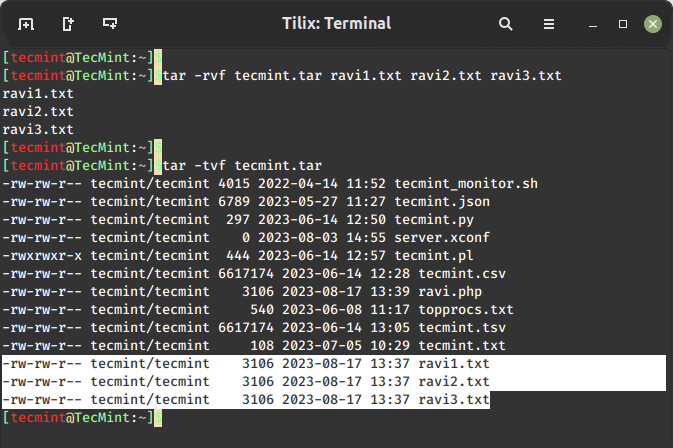
Add Files to Tar Archive

Deleting Files from a Tar Archive

Sometimes, you might want to remove specific files from an existing archive to keep it up to date or reduce its size. This is where the --delete option is used to delete a file from an archive as shown.

$ tar --delete -f tecmint.tar ravi1.txt ravi3.txt
$ tar -tvf tecmint.tar 

In this example, the tar command will extract the archive, remove the specified file, and then re-create the archive without the deleted file.
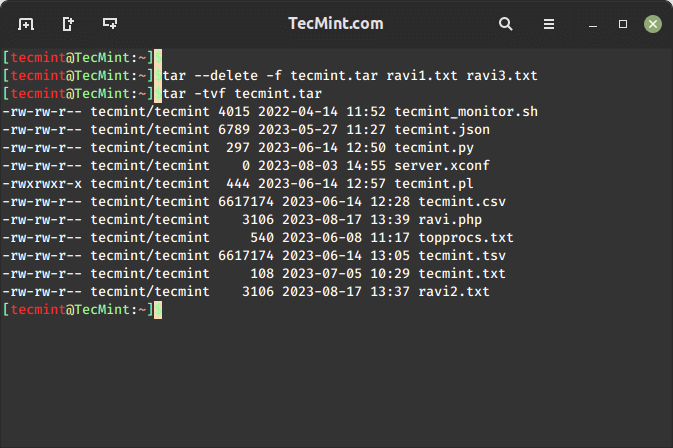
Delete Files From Tar Archive

Updating Files in a Tar Archive

Updating files within a tar archive involves a two-step procedure: extracting the archive, modifying the desired files, and then re-creating the archive. This method empowers you to fine-tune the contents without altering the entire archive.

$ tar -xf tecmint.tar ravi2.txt  [extracting archive]
$ tar -uvf tecmint.tar ravi2.txt [updating archive]
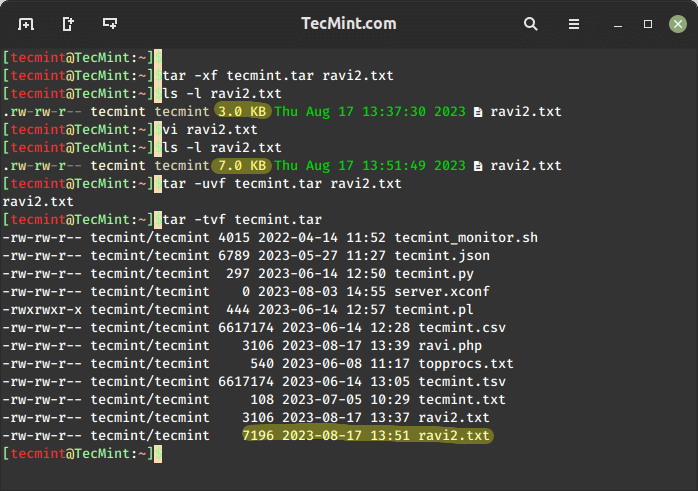
Update File in Tar Archive
Conclusion

The tar command’s ability to add, delete and update files within tar archives offers a dynamic way to keep your archives current and relevant.

Whether you’re updating files, removing obsolete data, or optimizing archive sizes, understanding how to utilize the tar command’s features can significantly enhance your data management skills.

By following the steps outlined in this article, you can confidently add, delete and update files within tar archives, thereby enhancing the efficiency and effectiveness of your digital storage endeavors.

Root Plan
Premium Linux Education for Serious Learners

Take Your Linux Skills to the Next Level

Root members get full access to every course, certification prep track, and a growing library of hands-on Linux content — with new courses added every month.

What You Get
Ad-free access to all premium articles
Access to all courses: Learn Linux, AI for Linux, Bash Scripting, Ubuntu Handbook, Golang and more.
Access to Linux certifications (RHCSA, RHCE, LFCS and LFCA)
Access new courses on release
Get access to weekly newsletter
Priority help in comments
Private Telegram community
Connect with the Linux community
Ravi Saive
I'm Ravi Saive, an award-winning entrepreneur and founder of several successful 5-figure online businesses, including TecMint.com, GeeksMint.com, UbuntuMint.com, and the premium learning hub Pro.Tecmint.com.

Each tutorial at TecMint is created by a team of experienced Linux system administrators so that it meets our high-quality standards.

Join the TecMint Weekly Newsletter (More Than 156,129 Linux Enthusiasts Have Subscribed)
Was this article helpful? Please add a comment or buy me a coffee to show your appreciation.

Got Something to Say? Join the Discussion...

Thank you for taking the time to share your thoughts with us. We appreciate your decision to leave a comment and value your contribution to the discussion. It's important to note that we moderate all comments in accordance with our comment policy to ensure a respectful and constructive conversation.

Rest assured that your email address will remain private and will not be published or shared with anyone. We prioritize the privacy and security of our users.

Root Plan Premium Linux Education for Serious Learners

Before You Go - Upgrade Your Linux Skills

Root members get everything in one place, with new courses added every month.

What You Get
Ad-free access to all premium articles
Access to all courses: Learn Linux, AI for Linux, Bash Scripting, Ubuntu Handbook, Golang and more.
Linux certifications: RHCSA, RHCE, LFCS and LFCA
Access new courses on release
Weekly newsletter, priority support & Telegram community
Join Root Today and Start Learning Linux the Right Way
Structured courses, certification prep, and a community of Linux professionals - all in one membership.
Join Root Plan →
$8/mo · or $59/yr billed annually