
Some system administrators often block ICMP messages to their servers in order to hide the Linux boxes to outside world on rough networks or to prevent some kind of IP flooding and denial of service attacks.
The most simple method to block ping command on Linux systems is by adding an iptables rule, as shown in the below example. Iptables is a part of Linux kernel netfilter and, usually, is installed by default in most Linux environments.
# iptables -A INPUT --proto icmp -j DROP
# iptables -L -n -v  [List Iptables Rules]
Another general method of blocking ICMP messages in your Linux system is to add the below kernel variable that will drop all ping packets.
# echo “1” > /proc/sys/net/ipv4/icmp_echo_ignore_all
In order to make the above rule permanent, append following line to /etc/sysctl.conf file and, subsequently, apply the rule with sysctl command.
# echo “net.ipv4.icmp_echo_ignore_all = 1” >> /etc/sysctl.conf
# sysctl -p
In Debian-based Linux distributions that ship with UFW application firewall, you can block ICMP messages by adding the following rule to /etc/ufw/before.rules file, as illustrated in the below excerpt.
-A ufw-before-input -p icmp --icmp-type echo-request -j DROP
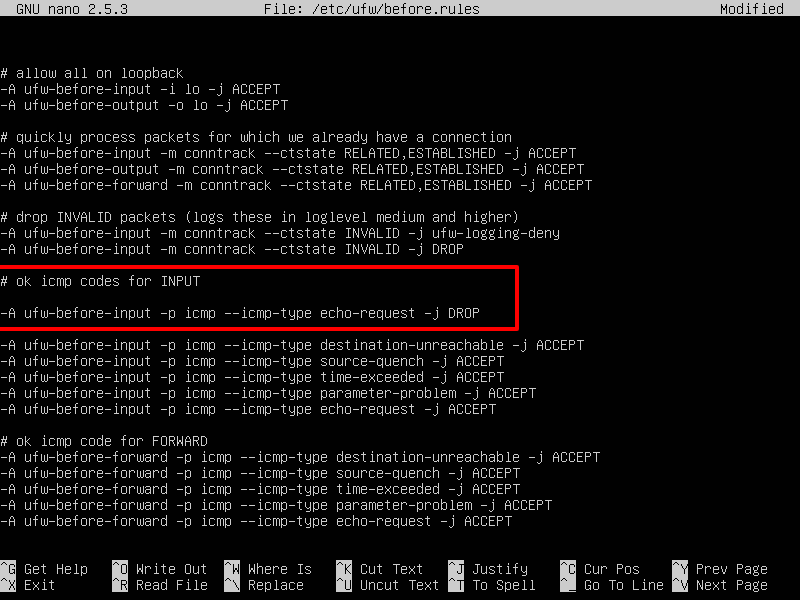
Restart UFW firewall to apply the rule, by issuing the below commands.
# ufw disable && ufw enable
In CentOS or Red Hat Enterprise Linux distribution that use Firewalld interface to manage iptables rules, add the below rule to drop ping messages.
# firewall-cmd --zone=public --remove-icmp-block={echo-request,echo-reply,timestamp-reply,timestamp-request} --permanent
# firewall-cmd --reload
In order to test if the firewall rules had been successfully applied in all the cases discussed above, try to ping your Linux machine IP address from a remote system. In case ICMP messages are blocked to your Linux box, you should get a “Request timed out” or “Destination Host unreachable” messages on the remote machine.




In the latest set of command it should be “
--add-icmp-block“, NOT “--remove-icmp-block“. See for details: https://access.redhat.com/documentation/en-us/red_hat_enterprise_linux/7/html/security_guide/sec-managing_icmp_requestsThe guide just shows how you can disable ICMP for certain cases, but not implies that you must disable it.
This is just a BAD recommendation. You should not block ICMP, it disables Path MTU discovery which gives poor performance for people on links with less than 1500 bytes MTU. PPPoE is one such link.
If you want to filter, rate limit ICMP to 10 packets/sek or similar.
What the stupid thing to remove icmp protocol. This move not security improve, but networking maybe slow down (to this host).
Also, before adding the solution in /etc/sysctl.conf, check that file for eventual other places the definitions are/is set (on my system it was in /usr/lib/sysctl.d/50-default.conf )
If you just want to block ICMP-“scans” (ICMP redirect, ping the whole network), the file solution could be good to do with the file /proc/sys/net/ipv4/icmp_echo_ignore_broadcasts.