

If you record, compose, mix, or produce music on Linux, choosing the right software matters. An outdated application can lead to installation problems, compatibility issues, or crashes, particularly when working with newer audio systems and plugin formats.
Fortunately, Linux music production has improved significantly in recent years. Most modern Linux distributions support PipeWire, a sound server that handles everyday desktop audio alongside professional, low-latency audio workflows. This makes it easier to run digital audio workstations (DAWs) without sacrificing normal desktop sound.
There are also several actively maintained music applications with native Linux support, including commercial DAWs such as Bitwig Studio, REAPER, and Renoise, alongside free and open-source alternatives for recording, audio editing, synthesizers, music notation, and DJ mixing.
In this guide, we cover 14 actively maintained music production tools for Linux, explain what each application offers, and provide installation instructions for Ubuntu, Fedora, Rocky Linux, and other Linux distributions.
How We Picked These Music Production Tools
Before exploring the list, it is worth explaining how we selected these applications and why some familiar names from older Linux music software guides are not included.
Each tool featured in this guide has received an update or release within approximately the past year, offers native Linux support without relying on Wine, and supports PipeWire either directly or through its JACK compatibility layer.
JACK (JACK Audio Connection Kit) is a low-latency audio server widely used by professional Linux audio applications. PipeWire provides JACK compatibility, allowing many existing JACK-based applications to work without requiring changes to their code.
We also focused on covering different music production workflows rather than listing multiple applications that serve the same purpose. The selection includes audio editors, full-featured DAWs, pattern-based beat makers, MIDI sequencers with notation support, score editors, drum machines, guitar amp simulators, synthesizers, and DJ applications.
The list also includes three commercial applications with native Linux builds. These are clearly identified so you can distinguish free and open-source software from paid products before choosing what to install.
Set Up Flatpak to Install Music Software on Any Distribution
Many Linux distributions ship older versions of desktop applications in their default repositories, while some music production tools are not packaged for distributions such as Rocky Linux, AlmaLinux, or RHEL.
To avoid dealing with different package names and installation methods, most of the applications in this guide use Flatpak through Flathub. Flatpak provides a consistent way to install and run applications across different Linux distributions, making it easier to get the same application version regardless of which distribution you use.
Before installing the music software, set up Flatpak and add the Flathub repository.
On Ubuntu and Debian, install Flatpak from the default repositories:
sudo apt update
sudo apt install -y flatpak
On Fedora, Rocky Linux, AlmaLinux, and RHEL, use DNF:
sudo dnf install -y flatpak
Flatpak is often already installed on desktop editions of Fedora, but running this command ensures that it is available.
Next, add the Flathub repository, which hosts the Flatpak applications featured in this guide:
flatpak remote-add --if-not-exists flathub https://dl.flathub.org/repo/flathub.flatpakrepo
Once the repository is added, log out and log back in to allow your desktop environment to detect newly installed Flatpak applications and display them in the application menu.
You can now install the music production tools covered in the following sections using their respective Flatpak commands.
1. Audacity 4
With Flatpak ready, let’s start with the tool most people already know. Audacity is a free, open-source audio editor and recorder, and it’s usually the first tool you reach for when you need to trim a recording, remove background noise, or convert between formats.
Audacity 4.0, released in September 2026, is the biggest change to the app in many years. It has been rebuilt on the Qt 6 toolkit with a redesigned interface, while keeping the features people rely on, such as multitrack editing, noise reduction, spectrogram views, and plugin support. If you depend on a workflow from the 3.x series, the 3.7 releases are still available from the project’s older versions page.
You can install the latest Audacity on any distribution with Flatpak:
flatpak install -y flathub org.audacityteam.Audacity
The Audacity team also publishes an AppImage on its download page, and Ubuntu users can install the archive version with sudo apt install audacity, although that version may be one or two releases behind.
2. Ardour 9
Audacity is great for editing a single recording, but once you’re recording a band, mixing many tracks, or mastering an album, you need a full DAW. Ardour is the most complete open-source DAW on Linux, and it’s used for recording, editing, mixing, and mastering both audio and MIDI.
Ardour 9.0 was released in February 2026 and added a dedicated pianoroll window for MIDI editing along with many workflow improvements, and the 9.x series has continued with regular bug-fix releases. It supports LV2, VST2, VST3, and LADSPA plugins, unlimited tracks, automation, and clip launching for live performance.
The Ardour developers recommend their own official binaries from ardour.org, which are paid (pay what you want) but fully supported. The free Flathub build is community-maintained, and the developers have said it can’t see plugins installed system-wide, so use it if you mainly rely on plugins that are also on Flathub:
flatpak install -y flathub org.ardour.Ardour
On Ubuntu, Ardour is also in the universe repository:
sudo apt install -y ardour
3. LMMS
Where Ardour is built around recording real instruments, LMMS (formerly Linux MultiMedia Studio) is built around making music entirely inside the computer. It uses patterns, a beat and bassline editor, a piano roll, and built-in synthesizers, which makes it a popular free alternative to FL Studio for electronic music and hip-hop.
The last stable release is still 1.2.2 from 2020, but development is very active. LMMS 1.3.0-alpha.2 was released in September 2026 with over five years of work in it, including new native plugins, ARM64 builds, and hundreds of bug fixes, and the project recommends this alpha over nightly builds for most users. Keep in mind that projects saved in 1.3 can’t be opened in 1.2.2 again.
Install the stable LMMS with Flatpak:
flatpak install -y flathub io.lmms.LMMS
If you want to try LMMS 1.3.0-alpha.2 instead, download the Linux AppImage from the official LMMS download page or the GitHub releases page.
4. Zrythm
LMMS is easy to start with, but some producers outgrow its pattern-based layout and want a DAW with a more modern linear workflow without moving to Ardour. Zrythm fills that gap, since it’s a free and open-source DAW focused on being easy to use, with chord assistance, flexible automation, and support for LV2, VST2, VST3, and CLAP plugins.
Zrythm 1.0 is the stable, production-ready release on Linux. The developers have also released Zrythm 2.0 in alpha, which is a full rewrite in C++ and Qt 6, so treat 2.0 as something to try rather than something to rely on for real projects yet.
Zrythm is available on Flathub under its official ID:
flatpak install -y flathub org.zrythm.Zrythm
The project also sells installers with bundled plugins on its website, which is how the developers fund their work.
5. Qtractor
Zrythm and Ardour are large applications, and on an older laptop or a small home studio you may want something lighter. Qtractor is an audio and MIDI multitrack sequencer written specifically for Linux home studios, using JACK (or PipeWire) for audio and ALSA (Advanced Linux Sound Architecture) for MIDI.
Qtractor has a steady release schedule, with new 1.5.x versions every couple of months. Recent releases added an aux-send bus matrix, better recording latency compensation, and updated CLAP and VST3 support, so it keeps up with modern plugin formats while staying light on resources.
[Screenshot: Qtractor main window with audio and MIDI tracks]
On Ubuntu, install Qtractor from the universe repository:
bash
sudo apt install -y qtractor
On other distributions, install it with Flatpak:
bash
flatpak install -y flathub org.rncbc.qtractor
[VERIFY: confirm the Qtractor Flathub app ID]
6. Compose with MIDI and Sheet Music Using Rosegarden
Qtractor shows MIDI as a piano roll, but composers who think in standard notation often want to see their music as a score while they sequence it. Rosegarden is a MIDI and audio sequencer with a strong understanding of music notation, which makes it a good fit for composers, music students, and small studios.
Rosegarden is one of the most consistently maintained projects on this list, with two releases every year. The current version is 26.06 from June 2026, and the recent series moved the app to Qt 6 and added LV2 plugin support.
[Screenshot: Rosegarden notation editor]
On Ubuntu, install Rosegarden from the universe repository:
bash
sudo apt install -y rosegarden
On other distributions, use the Flatpak:
bash
flatpak install -y flathub com.rosegardenmusic.rosegarden
[VERIFY: confirm Rosegarden is published on Flathub under this ID]
7. Write and Print Sheet Music with MuseScore Studio
Rosegarden is a sequencer that understands notation, but if your main goal is producing clean, printable sheet music, a dedicated score editor does the job better. MuseScore Studio (renamed from MuseScore in 2024) is the most popular free notation editor, and it can play your score back through its built-in sounds while you write it.
The current release line is MuseScore Studio 4.7, with 4.7.x bug-fix updates through mid-2026. It imports and exports MusicXML, MIDI, PDF, and audio formats, which makes it easy to move scores between MuseScore and a DAW.
[Screenshot: MuseScore Studio 4.7 score view]
The MuseScore team recommends its official AppImage if you want the newest version, but Flatpak is just as easy on every distribution:
bash
flatpak install -y flathub org.musescore.MuseScore
Are you a music producer and use Linux as your primary operating system, then music production is going to become easy for you after reading this article.
There is good music production software in Linux just as it is in Windows and Mac OS, though a few features may vary, but the underlying functionalities mostly are the same.
Here, I will look at some free and open-source software that you can use for music production purposes or music creation in Linux.
1. Audacity
Audacity is a free, open-source, cross-platform audio recording and editing application that runs on Linux, Mac OS X, Windows, and other operating systems, offering features such as:
- Records live audio through a microphone, a mixer, or from other media.
- Import and export files from and to different sound formats.
- Copy, cut, paste, and delete options for easy editing.
- Large range of keyboard shortcuts.
- Add sound effects.
- Extensible with various plug-ins and many more.
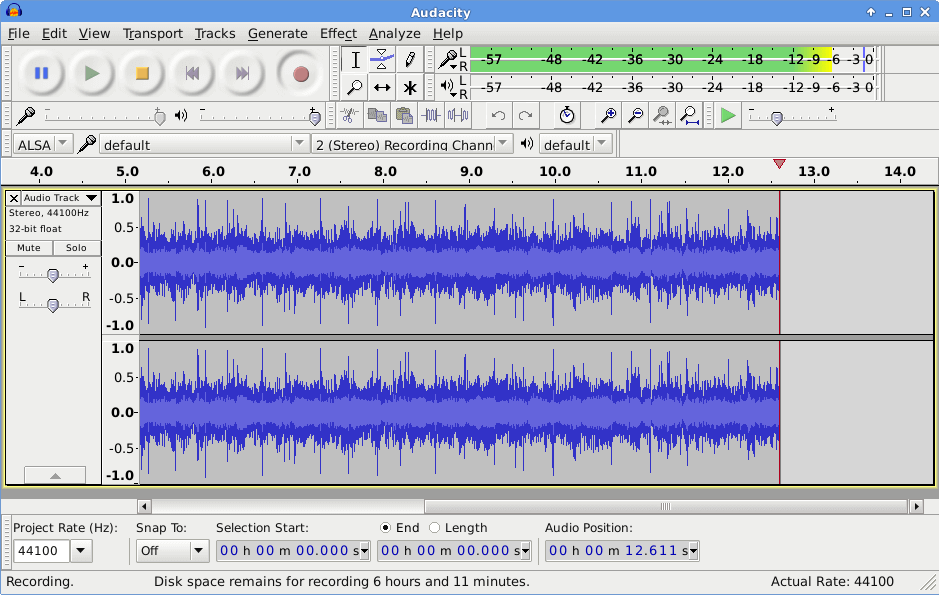
To install Audacity in Linux, run:
$ sudo apt install audacity         [On Debian, Ubuntu and Mint]
$ sudo yum install audacity         [On RHEL/CentOS/Fedora and Rocky/AlmaLinux]
$ sudo emerge -a sys-apps/audacity  [On Gentoo Linux]
$ sudo apk add audacity             [On Alpine Linux]
$ sudo pacman -S audacity           [On Arch Linux]
$ sudo zypper install audacity      [On OpenSUSE]
2. Cecilia
Cecilia is an audio signal processing software that allows users to do sound exploration and music composition, and it is intended for use by sound designers. It can run on Linux, Windows, and Mac OS X.
It allows you to create a customized GUI (grapher, sliders, toggles, popup menus) by following a simple syntax. Cecilia has built-in modules that allow users to add sound effects and also for synthesis.
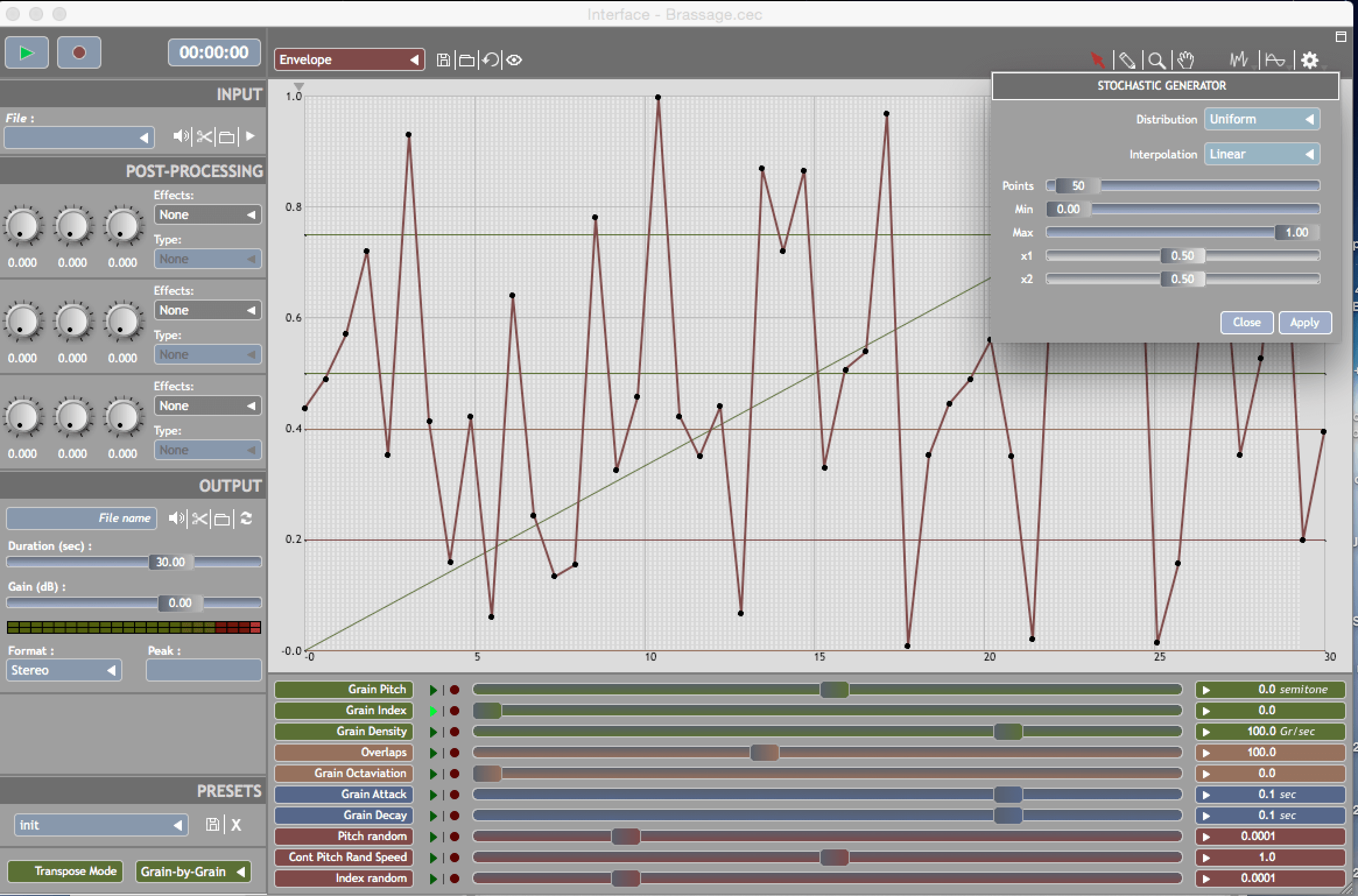
To install Cecilia in Linux, run:
$ sudo apt install cecilia         [On Debian, Ubuntu and Mint]
$ sudo yum install cecilia         [On RHEL/CentOS/Fedora and Rocky/AlmaLinux]
$ sudo emerge -a sys-apps/cecilia  [On Gentoo Linux]
$ sudo apk add cecilia             [On Alpine Linux]
$ sudo pacman -S cecilia           [On Arch Linux]
$ sudo zypper install cecilia      [On OpenSUSE]
3. Mixxx
Mixxx is a music mixing software that can help you become a professional DJ. It is available on Linux, Mac OS X, and Windows. It can help you test your audio after completing production by mixing it with other audio files while listening to it.
Therefore having it in a studio can be so helpful just in case the user is also a sound producer.
It has some of the following features:
- Four decks with advanced controls.
- In-built sound effects.
- Quad sampler decks.
- Designer skins.
- Record and broadcast functionality.
- DJ hardware support and many more.
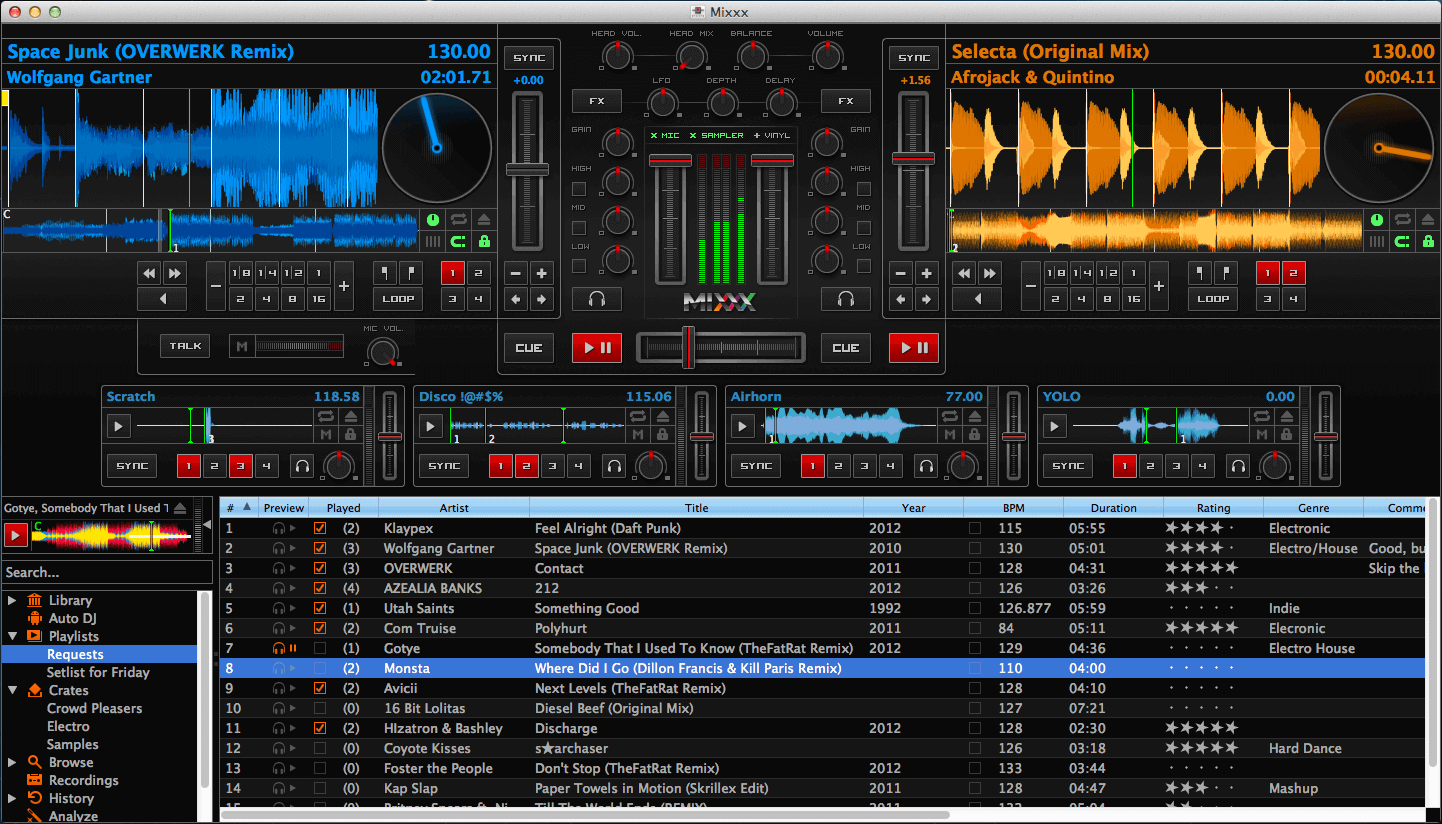
To install Mixxx in Linux, run:
$ sudo apt install mixxx         [On Debian, Ubuntu and Mint]
$ sudo yum install mixxx         [On RHEL/CentOS/Fedora and Rocky/AlmaLinux]
$ sudo emerge -a sys-apps/mixxx  [On Gentoo Linux]
$ sudo apk add mixxx             [On Alpine Linux]
$ sudo pacman -S mixxx           [On Arch Linux]
$ sudo zypper install mixxx      [On OpenSUSE]
4. Ardour
Ardour is an open-source, digital audio workstation software that offers recording, editing, and mixing capabilities, catering to musicians, audio engineers, and producers. Compatible with Linux, macOS, and Windows, Ardour is a versatile tool for professional audio production.
Ardour has some of the following features:
- Flexible recording.
- Unlimited multichannel tracks.
- Importing and exporting audio files of different formats.
- Extensible through plug-ins and In-line plug-in control.
- Automation and many more.
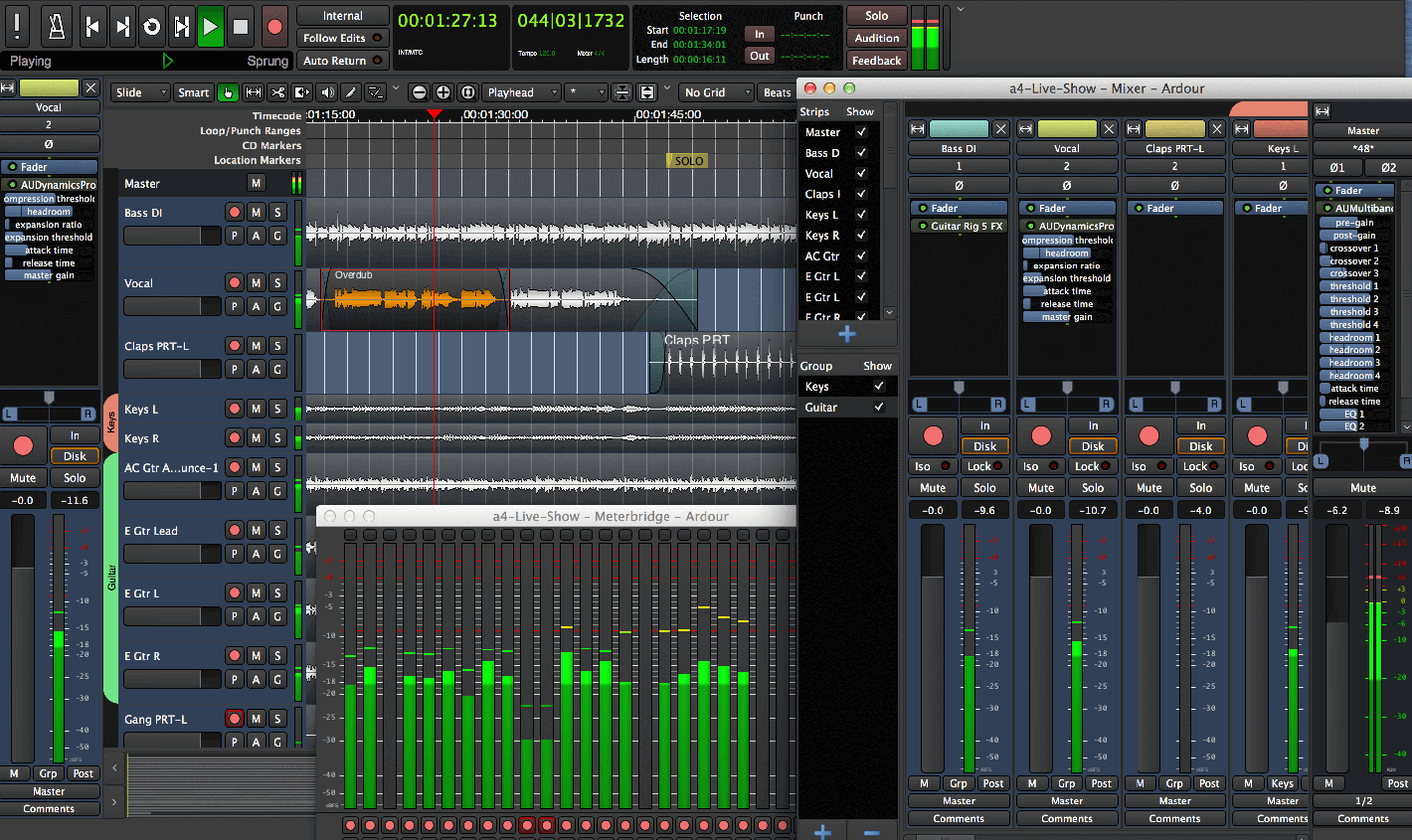
To install Ardour in Linux, run:
$ sudo apt install ardour         [On Debian, Ubuntu and Mint]
$ sudo yum install ardour         [On RHEL/CentOS/Fedora and Rocky/AlmaLinux]
$ sudo emerge -a sys-apps/ardour  [On Gentoo Linux]
$ sudo apk add ardour             [On Alpine Linux]
$ sudo pacman -S ardour           [On Arch Linux]
$ sudo zypper install ardour      [On OpenSUSE]
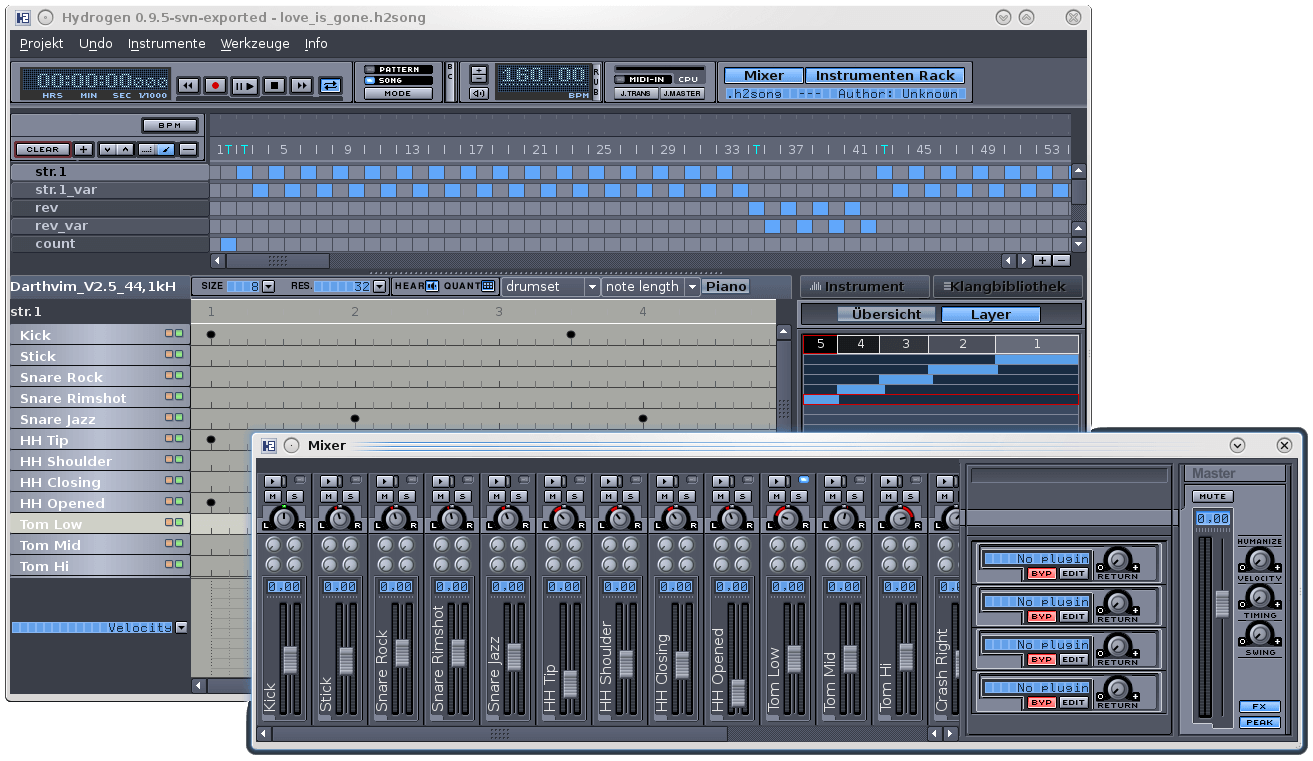
5. Hydrogen Drum Machine
Hydrogen drum machine is an open-source, digital audio software tailored for creating beats. It offers intuitive pattern-based sequencing, high-quality samples, and a user-friendly interface, making it a favorite among both novices and professional music producers.
Hydrogen machine has some of the following features:
- User-friendly and modular
- Fast and intuitive GUI
- Pattern-based sequencer
- Multilayer instrument support
- Jack audio connection kit
- Import and export drum kits and also export audio files to different formats plus many more
To install Hydrogen in Linux, run:
$ sudo apt install hydrogen         [On Debian, Ubuntu and Mint]
$ sudo yum install hydrogen         [On RHEL/CentOS/Fedora and Rocky/AlmaLinux]
$ sudo emerge -a sys-apps/hydrogen  [On Gentoo Linux]
$ sudo apk add hydrogen             [On Alpine Linux]
$ sudo pacman -S hydrogen           [On Arch Linux]
$ sudo zypper install hydrogen      [On OpenSUSE]
6. Guitarix
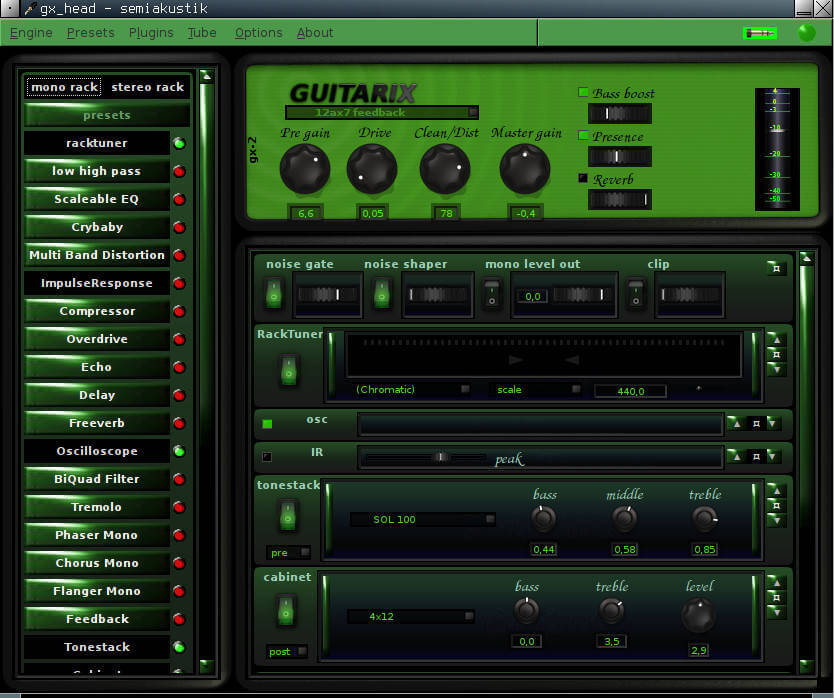
Guitarix is a virtual guitar amplifier available on Linux (but buildable for BSD and Mac OS X), operates on the Jack audio connection kit, processing guitar signals through a mono amp and rack section, with integrated modules for adding effects.
To install Guitarix in Linux, run:
$ sudo apt install guitarix         [On Debian, Ubuntu and Mint]
$ sudo yum install guitarix         [On RHEL/CentOS/Fedora and Rocky/AlmaLinux]
$ sudo emerge -a sys-apps/guitarix  [On Gentoo Linux]
$ sudo apk add guitarix             [On Alpine Linux]
$ sudo pacman -S guitarix           [On Arch Linux]
$ sudo zypper install guitarix      [On OpenSUSE]
7. Rosegarden
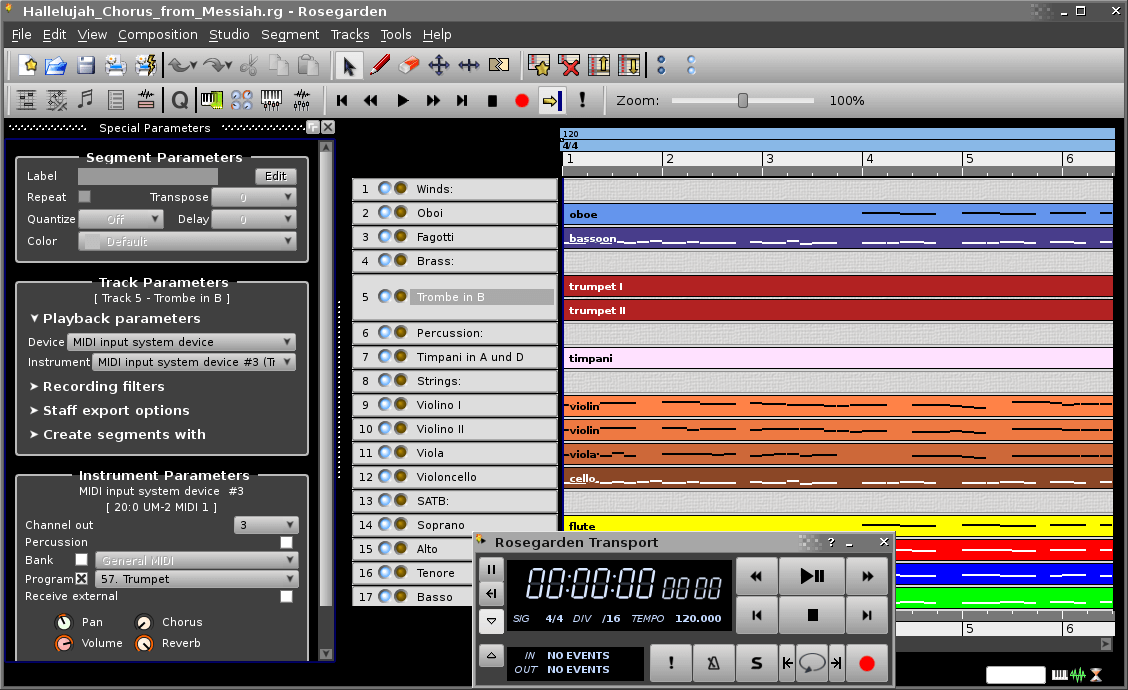
Rosegarden is a music composing and editing application available on Linux and it is intended for use by music composers, musicians can be used in a home or small-scale recording environment.
A great understanding of music notations makes it interesting for users who know and understand music notations. Furthermore, it also has some basic support for digital audio.
To install Rosegarden in Linux, run:
$ sudo apt install rosegarden         [On Debian, Ubuntu and Mint]
$ sudo yum install rosegarden         [On RHEL/CentOS/Fedora and Rocky/AlmaLinux]
$ sudo emerge -a sys-apps/rosegarden  [On Gentoo Linux]
$ sudo apk add rosegarden             [On Alpine Linux]
$ sudo pacman -S rosegarden           [On Arch Linux]
$ sudo zypper install rosegarden      [On OpenSUSE]
8. Qtractor
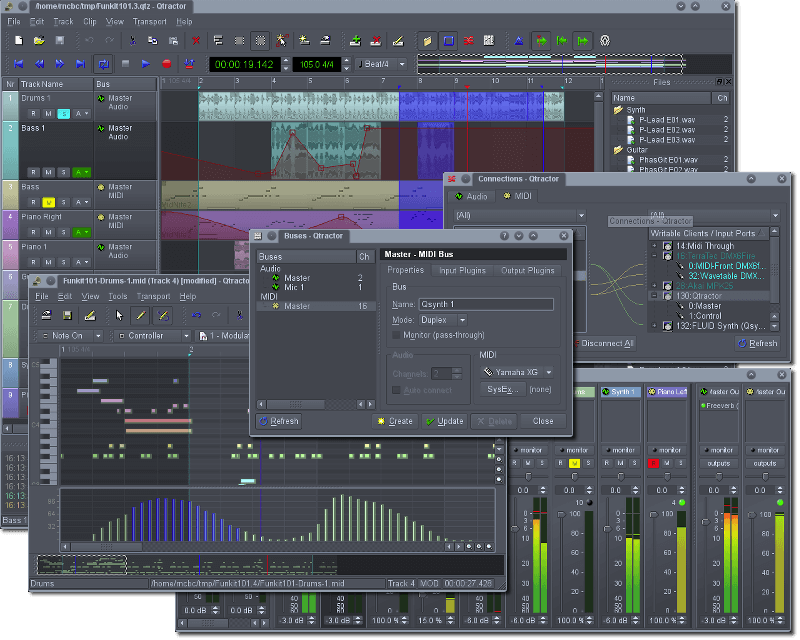
Qtractor is an audio Audio/MIDI multi-track sequencer designed specifically for personal home studios. It runs on Linux as the target operating system.
It has some of the following features:
- Use of Jack Audio Connection Kit for audio and Advanced Linux Sound Architecture sequencer for MIDI as multimedia infrastructures.
- Support for different audio formats such as WAV, MP3, AIFF, OGG, and many more.
- In-built mixer and monitor controls.
- Loop recording.
- MIDI clip editor.
- Non-destructive and non-linear editing.
- Extensible through an unlimited number of plug-ins plus many more.
To install Qtractor in Linux, run:
$ sudo apt install qtractor         [On Debian, Ubuntu and Mint]
$ sudo yum install qtractor         [On RHEL/CentOS/Fedora and Rocky/AlmaLinux]
$ sudo emerge -a sys-apps/qtractor  [On Gentoo Linux]
$ sudo apk add qtractor             [On Alpine Linux]
$ sudo pacman -S qtractor           [On Arch Linux]
$ sudo zypper install qtractor      [On OpenSUSE]
9. LMMS
LMMS (Let’s Make Music) is a free, open-source, and cross-platform software for making music on your computer, made by musicians, for musicians. It comes with a user-friendly and modern interface.
LMMS also comes with playback instruments, samples, and plugins. It is bundled with ready-to-use content such as a collection of instrument and effect plugins, presets, and samples to VST and SoundFont support.
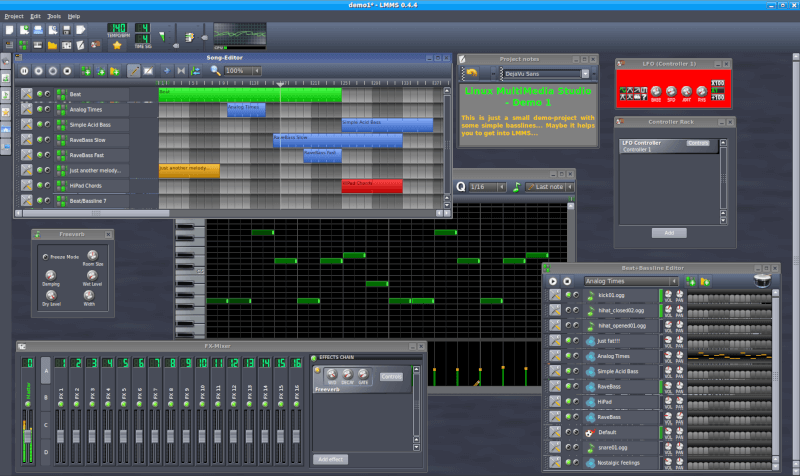
To install LMMS in Linux, run:
$ sudo apt install lmms         [On Debian, Ubuntu and Mint]
$ sudo yum install lmms         [On RHEL/CentOS/Fedora and Rocky/AlmaLinux]
$ sudo emerge -a sys-apps/lmms  [On Gentoo Linux]
$ sudo apk add lmms             [On Alpine Linux]
$ sudo pacman -S lmms           [On Arch Linux]
$ sudo zypper install lmms      [On OpenSUSE]
10. MuseScore
MuseScore is also a free, open-source, and easy-to-use, yet powerful tool for creating, playing, and printing beautiful sheet music.
It supports input via the MIDI keyboard and also supports exporting to and from other programs via MusicXML, MIDI, and more.
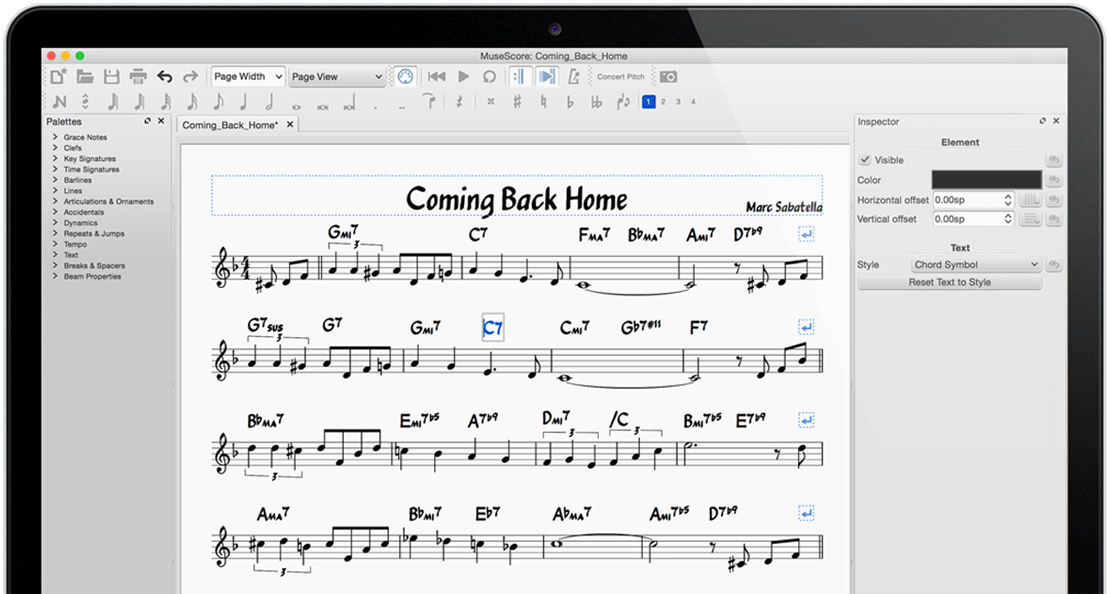
To install MuseScore in Linux, run:
$ sudo apt install musescore         [On Debian, Ubuntu and Mint]
$ sudo yum install musescore         [On RHEL/CentOS/Fedora and Rocky/AlmaLinux]
$ sudo emerge -a sys-apps/musescore  [On Gentoo Linux]
$ sudo apk add musescore             [On Alpine Linux]
$ sudo pacman -S musescore           [On Arch Linux]
$ sudo zypper install musescore      [On OpenSUSE]
11. Renoise [Not Open Source]
Renoise is a premium, powerful, cross-platform, and fully-featured Digital Audio Workstation (DAW) with a unique top-down approach.
Renoise features a wide range of modern features that allow you to record, compose, edit, process, and render production-quality audio using a tracker-based approach. Importantly, it comes with Redux, a powerful yet affordable sampler, and sequencer in the VST/AU format.
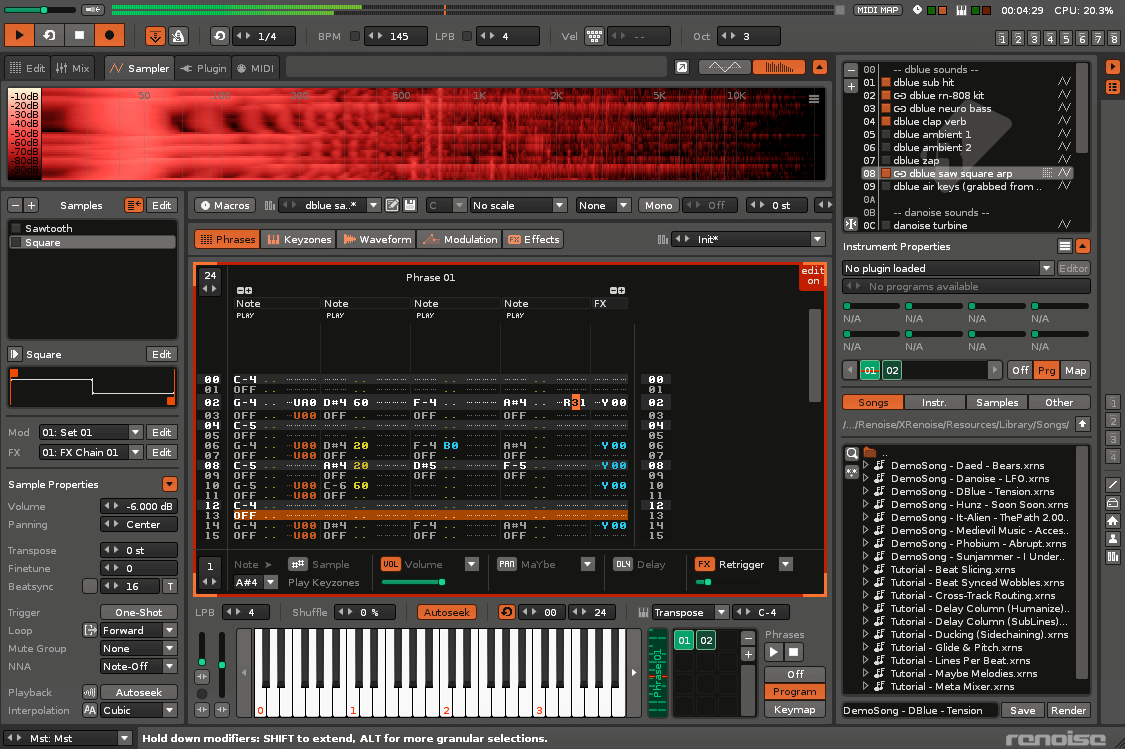
12. Virtual DJ [Not Open Source]
Virtual DJ is a premium, powerful, widely used, feature-rich, and highly-configurable music-mixing software. Many DJ hardware devices such as those from ‘Pioneer’ include built-in support for ‘Virtual DJ’. Unfortunately, the Virtual DJ is designed to run on Windows and Mac OS X only.
To run a Virtual DJ on GNU/Linux, you can use Wine, a tool that lets you run some of MS Windows software on GNU/Linux.
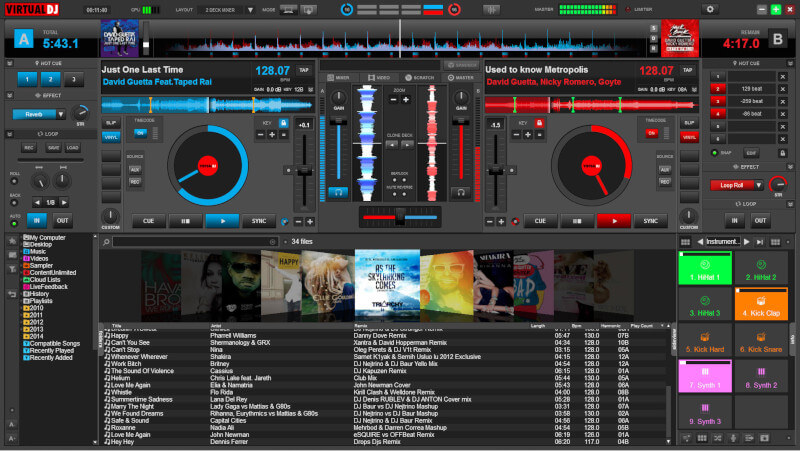
13. Aria Maestosa
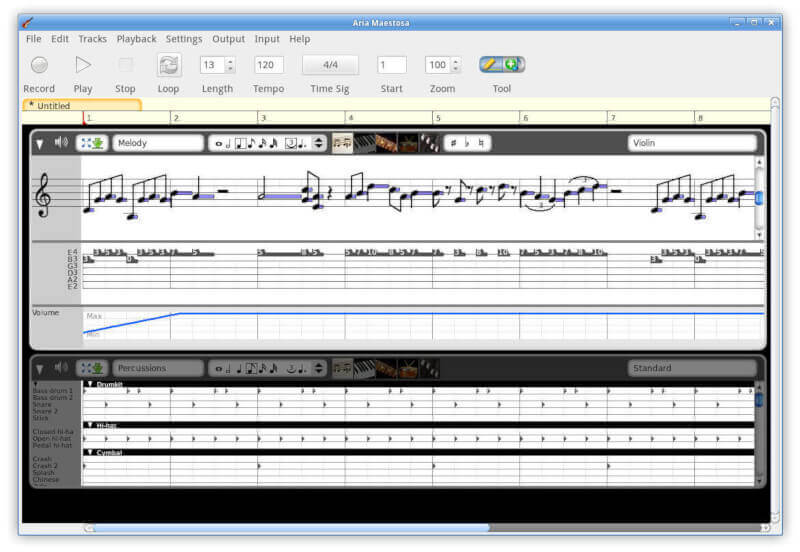
Aria Maestosa is a free and open-source midi sequencer and editor for Linux, that enables you to compose, edit and play midi files with a few easy clicks in a user-friendly interface providing a score, keyboard, guitar, drum, and controller views.
14. MusE
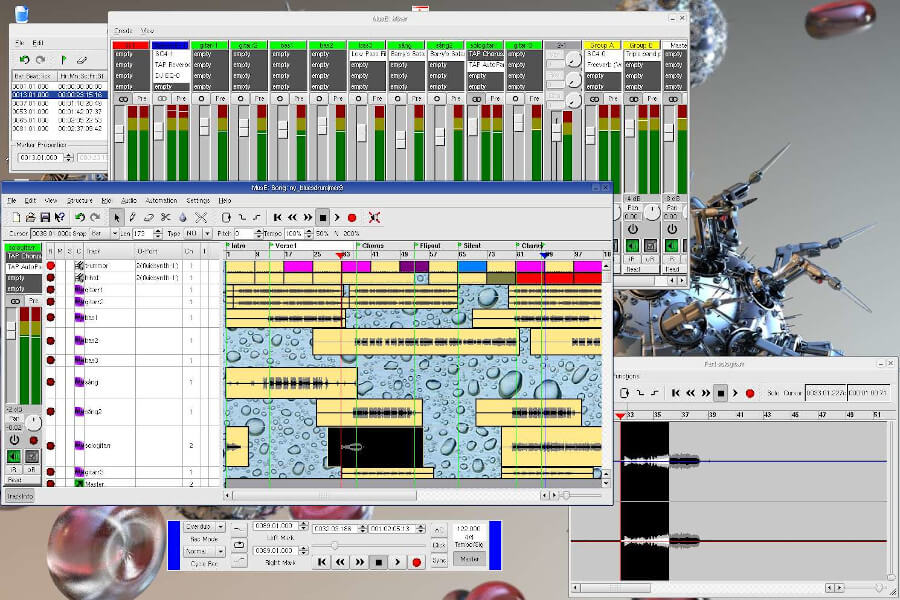
MusE is a Musical Instrument Digital Interface (MIDI) and Audio sequencer with support for recording and editing capabilities created by Werner Schweer now developed and maintained by the MusE development team.
It aims to be a comprehensive multitrack virtual studio for the Linux operating system and it is released under the GNU General Public License.
15. Reaper
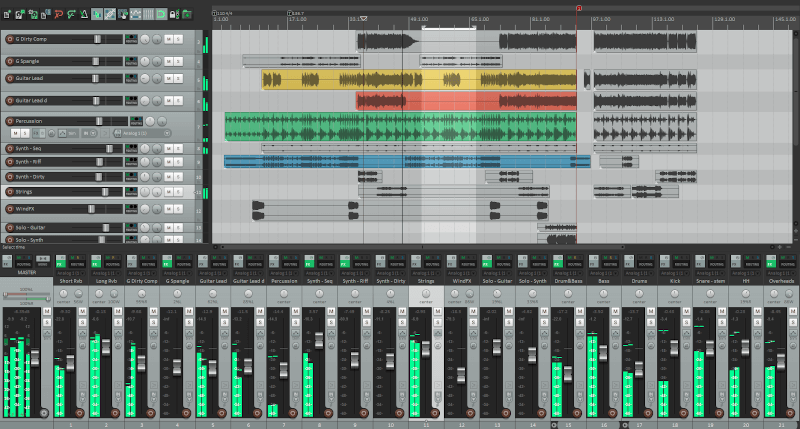
Reaper is a powerful and popular digital audio production tool for editing music, recording, processing, mixing, and other audio projects.
The application is also cross-platform and is created by Cockos. It plays a vital role in most of the industry-standard plugin formats such as VST and AU.
The following are some key features:
- Productive and loads fast.
- Install and run the application easily from a portable or network drive.
- Simply drag and drop to import, arrange, and render.
- It is fully customizable.
- Easily switch between the layouts as needed for different tasks.
- A simple nested folder system allows group editing, routing, and bussing, all in one step.
Summary
There are a lot of music-making and mixing software out there for the Linux operating system, we have just looked at a few. You can let us know what you are using by leaving a comment or giving some additional information on the ones we have looked at.

Thank you for the article. It helped me find new and useful programs. I really like Mixx!
Have you tried running VirtualDJ under Wine?! No way this should be listed as being software you can run on Linux.
@Cnayl,
Actually, many users have successfully run VirtualDJ under Wine on Linux. While it’s not natively supported, but it can bridge the gap for many Windows applications.
It’s always worth checking the Wine App Database or forums for specific configuration tips and user experiences.
I know that Reaper can be used as a complex score writer. What about the others? Can any of the other software use external orchestral libraries? How many MIDI and Audio tracks can they handle (combined) and whether they have good plug-ins, such as EQ and Compression, so vital for orchestral composition.
Any multitrack output (5.1 or 7.1 Dolby, DTS )? I could mention many other features, but don’t want to lengthen this message.
Thanks for reading, John.
I’m not clear on the advantages of this over a traditional digital mixer, or any other music player, which would not be possible with some standard audio library. Is this the future of music playing? And why?
REAPER is nice but *not* Open Source, unfortunately.
What do you mean? Do they /collect/ stuff? How do I worry about security when there are rushing hacking the software of the Society of Acoustic Engineers.
The audacity for windows looks good, but in the video, you don’t get the benefit of using the full screen of the camera, so they are not very informative. This leads me to believe they are trying to force everyone to open the source of all the music players on a proprietary platform.
I wonder if there are other reasons. Anyway, I think the video player needs a good UI and the video player needs some work. It really needs some work on mobile though.
Don’t get it. Audacity doesn’t handle video files.
You can rip audio from video .mp4 video files and save them as .mp3 or .ogg files. I have done it. You are right though it will not play the video portion.
No one is forcing you to open source. You can pay for software anytime you want.
Many of those are not MIDI sequencers.
I miss Reaper. It works great with Linux.
@Aledosim,
Thanks for notifying about Reaper, added to the list as suggested.
Missing the MusE – http://muse-sequencer.org/
@Jose,
Thanks for informing us about the MusE, included in the article as suggested..
MuseScore allows one to add lyrics to the score
Isn’t there any system to add text lines to the score/music?
It wouldn’t only be a benefit to be able to write lyrics for a song, but also for voice-overs for presentations, movies…
@Dirk
‘
There should be an application used for doing this, we’ll let you know once we discover one. Thanks for the feedback.
I found it out myself – five minutes after my comment – Audacity does it quite good.
When zooming the audio the text display could shown better, but for me and my ad hoc purpose it is sufficient.
@Dirk
That’s great, thanks for the feedback.
You forgot one of the very best ones: Aria Maestosa!
@Nitrofurano,
Thanks a ton for informing us about Aria Maestosa tool, we’ve included in the list.
Try Smart Mix Player and create your own mix tapes or broadcast an endless mix to your radio station. GUI is not so beautiful (yet) as applications mentioned in this article, but it does a great job.
@Martin,
It’s not open source and free trial avaiable to test it, not worth for FOSS community.
Ubuntu Studio is a great place to start. Many of the listed programs are preinstalled. :)
https://ubuntustudio.org/
@Zach
Thanks for sharing this, we will check it out.
One of the Best DJ Softwares and Mixers which I know are:
1. Virtual DJ
2. Mixxx
3. Cross DJ
4. ZULU DJ
5. PartyCloud Online
@Windows User
Thanks for sharing this list. We will check out the versions for Linux operating systems, if they exist.
Hey I’m using Audacity, Mixxx, Ardour, Hydrogen and Guitarix (from the list) on Linux to create Metal music and Goa Trance as a composer and music producer and play Goa Trance mixes on parties as a DJ!
It’s suffering, but I’m getting the programs working better and better. Using only Linux is like starting from Nothing, using only the pure power of the mind to create Something out of the void. You don’t get much support from anyone in exchange for your money, (for there is no money involved) so it’s a rough start, but the best learning process! and if you “break through” … well you’ll get far.
@ZenG
Absolutely true, this is what using Linux has also taught me, no much help especially when cash is not involved, so you have to learn on your own but it is the best learning process. As you have clearly stated, “if you “break through” … well you’ll get far”.
Thanks for sharing your thoughts.
LMMS!
@Garret
Thanks for mentioning this, we will check it out and include it in the list.
What if you don’t want FANCY? I only want to edit my sound files. Nothing super fancy like the above. Audacity doesn’t work. I can’ t clip my sound files with it for some reason. I only want to trim off the beginning and the end. I think audacity is corrupt so I can’t even clip my files. I am looking for a very very simple alternative, nothing super fancy like these. These are way, way too much. Thanks.
@Julie
Many thanks for sharing your thoughts, we will perhaps try to find out something that works for you; simple and easy-to-use. And give you feedback soon.
Audacity does work and you can cut bits off a track and join them with others and do lots more. It can be a pain to get off the ground first time but once you get through that, its a great tool.
I’ve used it to make ringtones for my phone off of bits of songs i like. If you need more info, just hola
Renoise should be in there too
@denniz
Thanks for sharing, we’ll check it out.
sweep is brilliant for most small jobs :)
@womble
Thanks for the feedback.
I was browsing for audio editors and came across ocenaudio. Just downloaded it a minute ago but haven’t installed it yet as I like to see alternatives and reviews. Just looking to amplify an ogg recording and a voice-mail from my smart phone.
Used Audacity in the past and may do two applications for testing purposes. OcenAudio is just about a year old and my thought is that some older programs aren’t really intuitive on GUI. Not that they are bad but some are better, easier to use. Simple and quick for this project, not looking for midi studio and complexity at this time. Let ya know how it goes.
Muse is another great open source audio tool – http://www.muse-sequencer.org
@MartyS,
Thanks for updating about Muse tool, we will include in the list as per your suggestion..
You forgot about LMMS (https://lmms.io). An FLstudio clone. Really great software…
Thanks for the info, will add it straight away.