

rtop is a straightforward and interactive, remote system monitoring tool based on SSH that collects and shows important system performance values such as CPU, disk, memory, network metrics.
It is written in Go Language and does not require any extra programs to be installed on the server that you want to monitor except SSH server and working credentials.
rtop basically functions by launching an SSH session, and executing certain commands on the remote server to gather various system performance information.
Once an SSH session is been established, it keeps refreshing the information collected from the remote server every few seconds (5 seconds by default), similar to all other top-like utilities (like htop) in Linux.
Prerequisites:
Make sure you have installed Go (GoLang) 1.2 or higher on your Linux system in order to install rtop, otherwise click on the link below to follow the GoLang installation steps:
How to Install rtop in Linux Systems
If you have Go installed, run the command below to build rtop:
$ go get github.com/rapidloop/rtop
The rtop executable binary will be saved in $GOPATH/bin or $GOBIN once the command completes executing.

Note: You do not need any runtime dependencies or configurations to start using rtop.
How to Use rtop in Linux Systems
Try to run rtop without any flags and arguments as below, it will display a usage message:
$ $GOBIN/rtop
Sample Output
rtop 1.0 - (c) 2015 RapidLoop - MIT Licensed - http://rtop-monitor.org
rtop monitors server statistics over an ssh connection

Usage: rtop [-i private-key-file] [user@]host[:port] [interval]

	-i private-key-file
		PEM-encoded private key file to use (default: ~/.ssh/id_rsa if present)
	[user@]host[:port]
		the SSH server to connect to, with optional username and port
	interval
		refresh interval in seconds (default: 5)
Now let’s monitor the remote Linux server using rtop as follows, while refreshing the information gathered after an interval of 5 seconds by default:
$ $GOBIN/rtop [email protected]
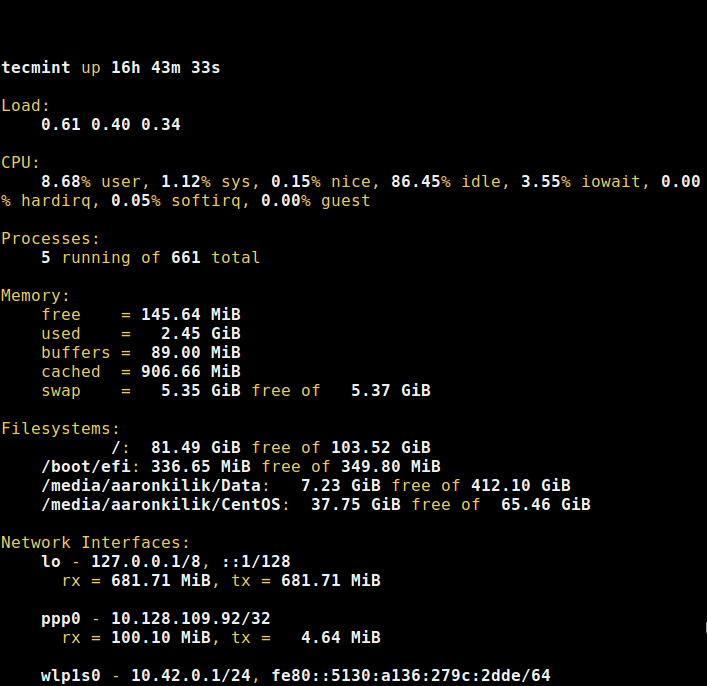
The command below will refresh the system performance metrics collected after every 10 seconds:
$ $GOBIN/rtop [email protected] 10
rtop can also connect using ssh-agent, private keys or password authentication.
Visit rtop Github repository: https://github.com/rapidloop/rtop
As a concluding remark, rtop is a simple and easy-to-use remote server monitoring tool, it uses very few and direct options. You can as well read about several other command line tools to monitor your system so as to improve your Linux performance monitoring skills.
Lastly, get in touch with us via the comment section below for any questions or remarks.
