
When you run a command, it produces some kind of output: either the result of a program is suppose to produce or status/error messages of the program execution details. Sometimes, you may want to store the output of a command in a variable to be used in a later operation.
In this post, we will review the different ways of assigning the output of a shell command to a variable, specifically useful for shell scripting purpose.
To store the output of a command in a variable, you can use the shell command substitution feature in the forms below:
variable_name=$(command)
variable_name=$(command [option ...] arg1 arg2 ...)
OR
variable_name='command'
variable_name='command [option ...] arg1 arg2 ...'
Below are a few examples of using command substitution.
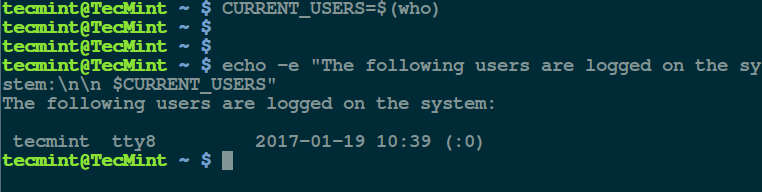
In this first example, we will store the value of who (which shows who is logged on the system) command in the variable CURRENT_USERS user:
$ CURRENT_USERS=$(who)
Then we can use the variable in a sentence displayed using the echo command like so:
$ echo -e "The following users are logged on the system:\n\n $CURRENT_USERS"
In the command above: the flag -e means interpret any escape sequences ( such as \n for newline) used. To avoid wasting time as well as memory, simply perform the command substitution within the echo command as follows:
$ echo -e "The following users are logged on the system:\n\n $(who)"
Next, to demonstrate the concept using the second form; we can store the total number of files in the current working directory in a variable called FILES and echo it later as follows:
$ FILES=`sudo find . -type f -print | wc -l`
$ echo "There are $FILES in the current working directory."

That’s it for now, in this article, we explained the methods of assigning the output of a shell command to a variable. You can add your thoughts to this post via the feedback section below.


In my case it does not work for:
The command module list python writes to the command line:
Currently Loaded Modules Matching: python/3.7.4
You missed process substitution. For example: read uid gid < <(grep ^root /etc/passwd | awk -F: '{print $3 " " $4}') This allows you to set 2 or more variables if you mant.
@Micheal
Yap, how did i forget to mention this, it’s so helpful while writing scripts. Thanks for the reminder.
Why is $(…) preferred over `…` (backticks):
http://mywiki.wooledge.org/BashFAQ/082
@Anonymous
Many thanks for providing this useful link.
From the link Above “The backtick is also easily confused with a single quote.”
This happened in this article for the first figure.
@Depressing
True, it was a typo during publishing. We will modify the article as soon as possible. Thanks for the feedback.
Is there a way to store the result of the command ONLY if there is no error during the command ?
@Hedy
That is exactly what we explained in the article. To separate the result of a command from error messages, you can perform output/error redirection to files other than the screen. Then read the result from the file.
Read more about output redirection from here: https://www.tecmint.com/linux-io-input-output-redirection-operators/