How to View Configuration Files Without Comments in Linux

Take Your Linux Skills to the Next Level All courses, certifications, ad-free articles & community — from $8/mo
Join Root →
Ad-free access to all premium articles
Access to all courses: Learn Linux, AI for Linux, Bash Scripting, Ubuntu Handbook, Golang and more.
Access to Linux certifications (RHCSA, RHCE, LFCS and LFCA)
Access new courses on release
Get access to weekly newsletter
Priority help in comments
Private Telegram community
Connect with the Linux community
From $8/mo · or $59/yr billed annually · Cancel anytime

Are you looking through an extremely lengthy configuration file, one with hundreds of lines of comments, but only want to filter the important settings from it. In this article, we will show you different ways to view a configuration file without comments in Linux.

Read Also: ccat – Show ‘cat Command’ Output with Syntax Highlighting or Colorizing

You can use the grep command to for this purpose. The following command will enable you view the current configurations for PHP 7.1 without any comments, it will remove lines starting with the ; character which is used for commenting.

Note that since ; is a special shell character, you need to use the \ escape character to change its meaning in the command.

$ grep ^[^\;] /etc/php/7.1/cli/php.ini
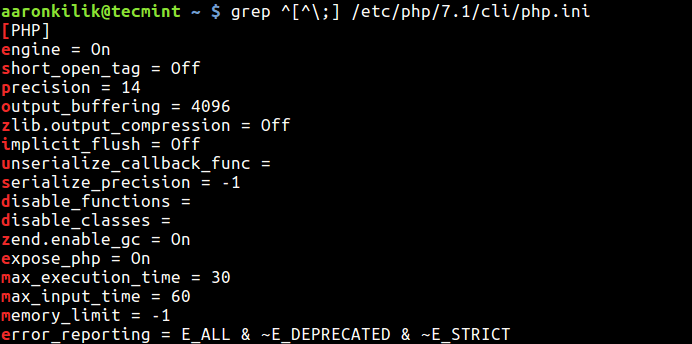
View Files Without Comments

In most configuration files, the # character is used for commenting out a line, so you can use the following command.

$ grep ^[^#] /etc/postfix/main.cf

What if you have lines starting with some spaces or tabs other then # or ; character?. You can use the following command which should also remove empty spaces or lines in the output.

$ egrep -v "^$|^[[:space:]]*;" /etc/php/7.1/cli/php.ini 
OR
$ egrep -v "^$|^[[:space:]]*#" /etc/postfix/main.cf
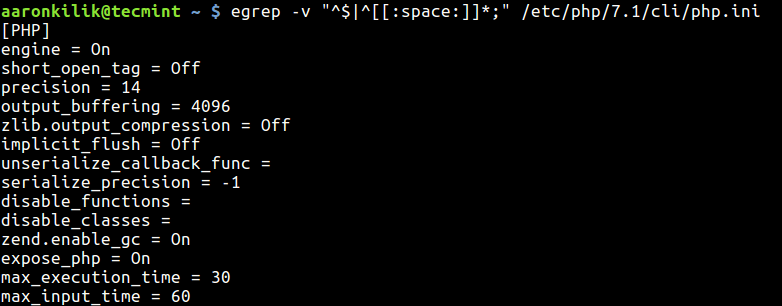
View Files Without Spaces

From the above example, the -v switch means show non-matching lines; instead of showing matched lines (it actually inverts the meaning of matching) and in the pattern “^$|^[[:space:]]*#”:

  • ^$ – enables for deleting empty spaces.
  • ^[[:space:]]*# or ^[[:space:]]*; – enables matching of lines that starting with # or ; or “some spaces/tabs.
  • | – the infix operator joins the two regular expressions.

Also learn more about grep command and its variations in these articles:

  1. What’s Difference Between Grep, Egrep and Fgrep in Linux?
  2. 11 Advanced Linux ‘Grep’ Commands on Character Classes and Bracket Expressions

That’s all for now! We would love to hear from you, share with us any alternative methods for viewing configuration files without comments, via the feedback form below.

Root Plan
Premium Linux Education for Serious Learners

Take Your Linux Skills to the Next Level

Root members get full access to every course, certification prep track, and a growing library of hands-on Linux content — with new courses added every month.

What You Get
Ad-free access to all premium articles
Access to all courses: Learn Linux, AI for Linux, Bash Scripting, Ubuntu Handbook, Golang and more.
Access to Linux certifications (RHCSA, RHCE, LFCS and LFCA)
Access new courses on release
Get access to weekly newsletter
Priority help in comments
Private Telegram community
Connect with the Linux community
Ravi Saive
I'm Ravi Saive, an award-winning entrepreneur and founder of several successful 5-figure online businesses, including TecMint.com, GeeksMint.com, UbuntuMint.com, and the premium learning hub Pro.Tecmint.com.

Each tutorial at TecMint is created by a team of experienced Linux system administrators so that it meets our high-quality standards.

Join the TecMint Weekly Newsletter (More Than 156,129 Linux Enthusiasts Have Subscribed)
Was this article helpful? Please add a comment or buy me a coffee to show your appreciation.

8 Comments

Leave a Reply

Got Something to Say? Join the Discussion...

Thank you for taking the time to share your thoughts with us. We appreciate your decision to leave a comment and value your contribution to the discussion. It's important to note that we moderate all comments in accordance with our comment policy to ensure a respectful and constructive conversation.

Rest assured that your email address will remain private and will not be published or shared with anyone. We prioritize the privacy and security of our users.

Root Plan Premium Linux Education for Serious Learners

Before You Go - Upgrade Your Linux Skills

Root members get everything in one place, with new courses added every month.

What You Get
Ad-free access to all premium articles
Access to all courses: Learn Linux, AI for Linux, Bash Scripting, Ubuntu Handbook, Golang and more.
Linux certifications: RHCSA, RHCE, LFCS and LFCA
Access new courses on release
Weekly newsletter, priority support & Telegram community
Join Root Today and Start Learning Linux the Right Way
Structured courses, certification prep, and a community of Linux professionals - all in one membership.
Join Root Plan →
$8/mo · or $59/yr billed annually