
fwbackups is a free and open-source feature-rich user backup application that allows you to backup your important documents anytime, anywhere using a simple powerful interface with the support for scheduled backups and backing up to remote systems.
Read Also: 24 Outstanding Backup Utilities for Linux Systems in 2018
fwbackups – Features
fwbackups offers a rich interface that is both powerful and easy to use with the following features:
- Simple interface: Creating new backups or restoring from a previous backup is an easy task.
- Flexible backup configuration: Select between a number of backup formats and modes, which includes the archive format and clone copy mode for recovering data from corrupted or damaged disks.
- Backup your files to any computer: It can backup files to a remote backup server or a connected media like USB device, making it perfect for all users.
- Backup the entire computer: Create archives images of your entire system so that your files are safe.
- Scheduled and one-time backups: Select to run a backup once (on demand) or periodically so that you never have to panic about losing your data again.
- Faster backups: Create your backup quicker by taking only the changes from the last backup with the incremental backup modes.
- Exclude files or folders: Don’t waste disk space on your system by backing up files you don’t require.
- Organized and clean: It takes care of the organization of backups, including the deletion of expired ones so you don’t have to bother about organizing the backups. It also allows you to choose a backup to restore from with a list of dates.
Install fwbackups on Linux Systems
fwbackups is not included in most Linux distribution’s repositories, so the only way to install fwbackups using the source tarball as explained below.
Install fwbackups on Debian and Ubuntu/Mint Linux
First, install these following dependencies on your system.
$ sudo apt-get install gettext autotools-dev intltool python-crypto python-paramiko python-gtk2 python-glade2 python-notify cron
Then download fwbackups to your home directory using wget command and install it from source using the following commands.
$ wget http://downloads.diffingo.com/fwbackups/fwbackups-1.43.7.tar.bz2
$ tar xfj fwbackups-1.43.7.tar.bz2
$ cd fwbackups-1.43.7/
$ ./configure --prefix=/usr
$ make && sudo make install
Install fwbackups on CentOS and RHEL
Similarly, you need to install these following dependencies on CentOS and RHEL system as well.
$ sudo yum install gettext autotools-dev intltool python-crypto python-paramiko python-gtk2 python-glade2 python-notify cron
Next, download fwbackups and install it from source using the following commands.
$ wget http://downloads.diffingo.com/fwbackups/fwbackups-1.43.7.tar.bz2
$ tar xfj fwbackups-1.43.7.tar.bz2
$ cd fwbackups-1.43.7/
$ ./configure --prefix=/usr
$ make && sudo make install
Install fwbackups on Fedora Linux
fwbackups is included in the Fedora Linux repositories and can be installed using the following dnf command.
$ sudo dnf install fwbackups
Once installed, you can start the fwbackups using a Graphical and Command-line way.
Select Applications → System Tools → fwbackups from the menu or simply type fwbackups on the terminal to start it.
$ fwbackups
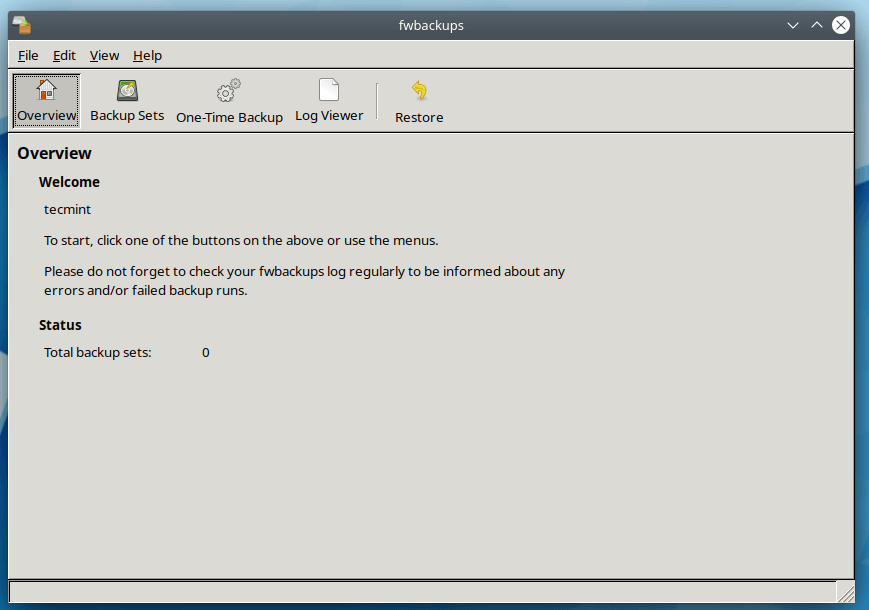
From the fwbackups Overview page, you can simply click on any one of the toolbar buttons to begin.
- Backup Sets – To create, edit or delete backup sets as well as manually create a backup set.
- One-Time Backup – Create “one-time” backups.
- Log Viewer – Shows the information about fwbackups’s activities.
- Restore – Allows you to restore any backup from previously made backup.
To know more about creating backup sets, I request you to read the user guide that will help you on how to use and configure fwbackups. As it provides instructions for creating and configuring backups with various configuration options.







fwbackups is not in the Fedora 31 repositories
@David,
Yes, you are right, fwbackups isn’t available in Fedora 31 repositories, my official site claims that it is included in the Fedora Linux repositories.
It seems fwbackups has not been updated in close to two years. Is the project even alive or is it dormant or discontinued?
@Dragonmouth,
After a bit of research, this is what mentioned in the Github page of fwbackups.