Pydf – An Alternative “df” Command to Check Disk Usage in Different Colours

Take Your Linux Skills to the Next Level All courses, certifications, ad-free articles & community — from $8/mo
Join Root →
Ad-free access to all premium articles
Access to all courses: Learn Linux, AI for Linux, Bash Scripting, Ubuntu Handbook, Golang and more.
Access to Linux certifications (RHCSA, RHCE, LFCS and LFCA)
Access new courses on release
Get access to weekly newsletter
Priority help in comments
Private Telegram community
Connect with the Linux community
From $8/mo · or $59/yr billed annually · Cancel anytime

The “pydf” (Python Disk File System) is an advanced command line tool and a good alternative to the “df command”, which is used to display the amount of used and available disk space on a mounted filesystem, the same as df command, but in different colors. The output of the pydf command can be customizable according to your needs.

This “pydf” command is written in python language that displays the amount of disk usage and available space on Linux mounted file system, using custom colors for different file system types.

Installing pydf in Linux Systems

By default, the pydf tool is not installed on RHEL-based distributions such as CentOS, Fedora Rocky, and Alma Linux, you need to install it using the following commands.

# python3 -m venv pydf
# source pydf/bin/activate
# python3 -m pip install pydf
Install Pydf in RHEL Systems

On older versions of RHEL-based distributions, you need to enable the EPEL repository and install it using the yum command as shown.

# yum install pydf

On Debian/Ubuntu/Linux Mint

On Debian-based distributions, the pydf tool is availabe from the package manager, you can install it using apt-get or apt commands as shown.

$ sudo apt-get install pydf
OR
$ sudo apt install pydf
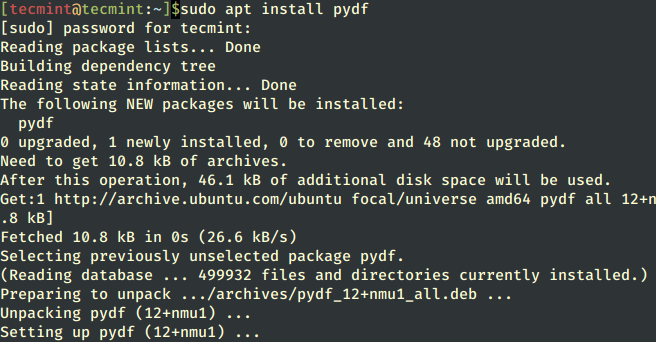
Install Pydf in Debian Systems

On other Linux distributions, you can install pydf using the default package manager as shown.

$ sudo emerge -a app-admin/pydf  [On Gentoo Linux]
$ sudo apk add pydf              [On Alpine Linux]
$ sudo pacman -S pydf            [On Arch Linux]
$ sudo zypper install pydf       [On OpenSUSE]    

How to Use pydf Command in Linux

If you run only the “pydf” command without specifying an argument, it will display just information on disk space usage along with all mounted file systems.

# pydf
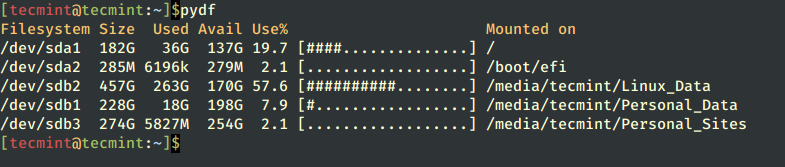
pydf - Show File System Disk Usage
pydf – Show File System Disk Usage

To check which file system has 0 blocks, simply run the following command along with the “-a” or “--all” argument.

# pydf -a
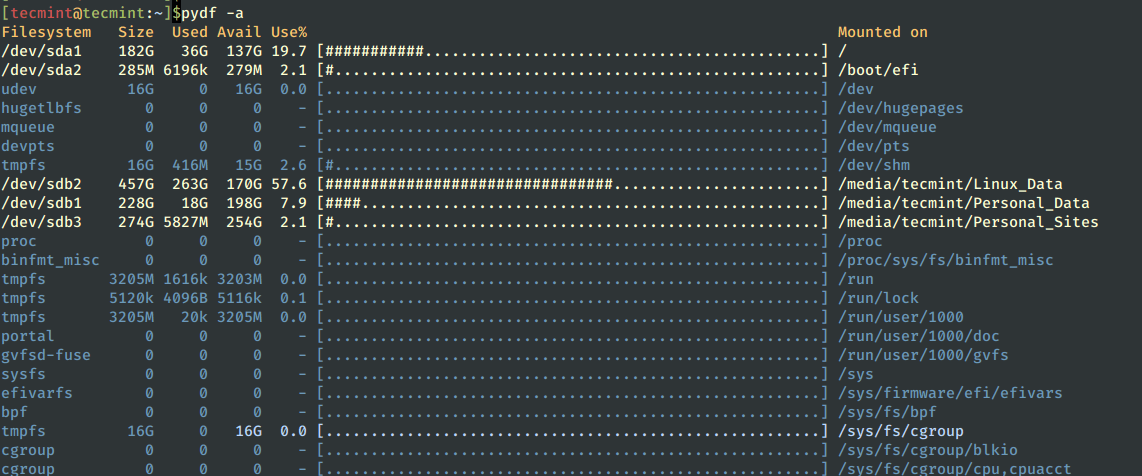
pydf - Show File System With 0 Blocks
pydf – Show File System With 0 Blocks

To see the output in human-readable format, use the option “-h", which will print sizes (e.g., 10K, 10M, 10G).

# pydf -h
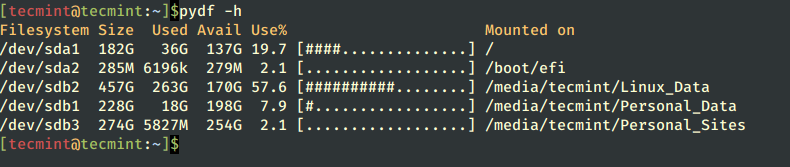
pydf - Show Disk Usage in Human-Readable Format
pydf – Show Disk Usage in Human-Readable Format

To print sizes in kilobytes (e.g., 1024 block size) use the option “-k” as shown below.

# pydf -k

pydf - Show Disk Usage in Kilobytes
pydf – Show Disk Usage in Kilobytes

To print summary output in megabytes (e.g., 1048576 block size) use option “-m” as shown below.

# pydf -m

pydf - Show Disk Usage in Megabytes
pydf – Show Disk Usage in Megabytes

To print sizes in gigabytes (e.g., 1073741824), specify the option “-g” as shown below.

# pydf -g
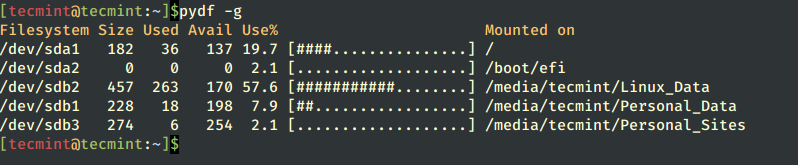
pydf - Show Disk Usage in Gigabytes
pydf – Show Disk Usage in Gigabytes

To see the information about inodes instead of blocks, use the argument “-i” as given below.

# pydf -i

If you want to disable the colorized output, simply use the option “--bw“.

# pydf --bw

How to Customize pydf Colours

The pydf has its own configuration file, where you can define your own custom colors to give some extra feel and look to your output.

# vi /etc/pydfrc

For more information and usage, read the help page of the pydf by running “pydf –help” in a terminal.

# pydf --help
Root Plan
Premium Linux Education for Serious Learners

Take Your Linux Skills to the Next Level

Root members get full access to every course, certification prep track, and a growing library of hands-on Linux content — with new courses added every month.

What You Get
Ad-free access to all premium articles
Access to all courses: Learn Linux, AI for Linux, Bash Scripting, Ubuntu Handbook, Golang and more.
Access to Linux certifications (RHCSA, RHCE, LFCS and LFCA)
Access new courses on release
Get access to weekly newsletter
Priority help in comments
Private Telegram community
Connect with the Linux community
Ravi Saive
I'm Ravi Saive, an award-winning entrepreneur and founder of several successful 5-figure online businesses, including TecMint.com, GeeksMint.com, UbuntuMint.com, and the premium learning hub Pro.Tecmint.com.

Each tutorial at TecMint is created by a team of experienced Linux system administrators so that it meets our high-quality standards.

Join the TecMint Weekly Newsletter (More Than 156,129 Linux Enthusiasts Have Subscribed)
Was this article helpful? Please add a comment or buy me a coffee to show your appreciation.

4 Comments

Leave a Reply
  1. Nice idea but you seem to have forgotten two specifics. Linux is NOT one or two particular distros and not all distros have the same things in their repositories. It would therefore be nice if you included the location of the sources or some way of manually installing it onto something other than a Red Hat or Ubuntu templated system.

    Reply

Got Something to Say? Join the Discussion...

Thank you for taking the time to share your thoughts with us. We appreciate your decision to leave a comment and value your contribution to the discussion. It's important to note that we moderate all comments in accordance with our comment policy to ensure a respectful and constructive conversation.

Rest assured that your email address will remain private and will not be published or shared with anyone. We prioritize the privacy and security of our users.

Root Plan Premium Linux Education for Serious Learners

Before You Go - Upgrade Your Linux Skills

Root members get everything in one place, with new courses added every month.

What You Get
Ad-free access to all premium articles
Access to all courses: Learn Linux, AI for Linux, Bash Scripting, Ubuntu Handbook, Golang and more.
Linux certifications: RHCSA, RHCE, LFCS and LFCA
Access new courses on release
Weekly newsletter, priority support & Telegram community
Join Root Today and Start Learning Linux the Right Way
Structured courses, certification prep, and a community of Linux professionals - all in one membership.
Join Root Plan →
$8/mo · or $59/yr billed annually