
qBittorrent is a popular open-source BitTorrent client that allows users to download and share files over the internet. The latest version, qBittorrent 5.0, was released recently and comes packed with new features and improvements.
This article will guide you on how to install qBittorrent 5.0 on Linux, highlight its key features, and explain how to use the AppImage format for installation.
What is qBittorrent?
qBittorrent is designed to be a free alternative to other BitTorrent clients like µTorrent, which offers a user-friendly interface, no ads, and many advanced features such as an integrated search engine, RSS feed support, and more.
The latest version of qBittorrent 5.0 includes several notable enhancements and performance improvements:
- Improved integration with systemd allows better power management on Linux systems.
- A polished interface that resembles µTorrent, making it easier for users transitioning from that platform.
- Users can now specify the Python executable path for search plugins, enhancing flexibility.
- A new dark theme option improves visibility and aesthetics in the web interface.
- The ability to create .torrent files with larger piece sizes has been added.
- Users can now remove trackers directly from the filter widget menu.
- New features allow users to keep unwanted files in a separate folder and move content files to the trash instead of deleting them outright.
These updates aim to enhance usability and provide more control over torrent management.
How to Install qBittorrent on Linux
One of the easiest ways to install qBittorrent on Linux is through the AppImage format, which are portable application that can run on most Linux distributions without needing installation.
First, visit the official qBittorrent website and download the latest version of qBittorrent AppImage.
Once downloaded, navigate to the directory where you downloaded the AppImage file, set the permissions to make it executable, and run it.
chmod +x qbittorrent-5.0.AppImage
./qbittorrent-5.0.AppImage
This will launch qBittorrent, and you can start using it right away.
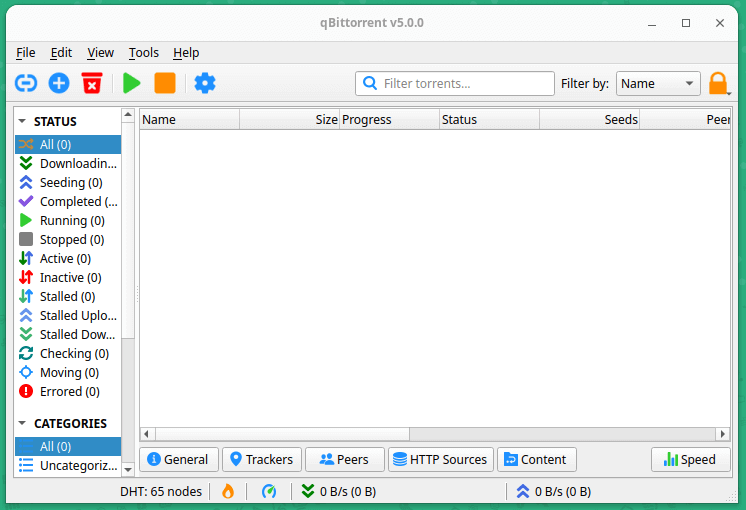
If you prefer using your system’s package manager, you can also install qBittorrent directly from repositories (if available).
sudo apt install qbittorrent         [On Debian, Ubuntu and Mint]
sudo yum install qbittorrent         [On RHEL/CentOS/Fedora and Rocky/AlmaLinux]
sudo emerge -a sys-apps/qbittorrent  [On Gentoo Linux]
sudo apk add qbittorrent             [On Alpine Linux]
sudo pacman -S qbittorrent           [On Arch Linux]
sudo zypper install qbittorrent      [On OpenSUSE]
sudo pkg install qbittorrent         [On FreeBSD]
Once you have installed qBittorrent, you can start using it to download torrents. If you have the built-in search engine enabled, you can search for torrents directly within the app. Alternatively, you can download .torrent files from websites and open them in qBittorrent.
Conclusion
qBittorrent stands out as a robust BitTorrent client due to its combination of user-friendly design, powerful features, and commitment to being ad-free.
Its support for advanced functionalities like integrated search engines, RSS feeds, sequential downloading, and remote management makes it a top choice for both novice and experienced torrent users.




If you’re using the Web UI, I can highly recommend getting the VueTorrent alternate UI.
Works great.
Interesting post ! Just to add my thoughts , others are wanting a USPS PS 3615 , my business edited a fillable document here
http://goo.gl/w6W0bxnot working on kali
root@ADMIN-PC:~# apt-get install qbittorrent
Reading package lists… Done
Building dependency tree
Reading state information… Done
E: Unable to locate package qbittorrent
Any solution for this problem :(
For Debian Jessie:
– sudo apt-get update
– sudo apt-get install qbittorrent
PPA in OP invalid. ppa:qbittorrent-team/qbittorrent-stable worked for me instead. Just installed 3.2.0 on 14.04. Please update your article.
Cannot add PPA: ‘ppa:hydr0g3n/qbittorrent-stable’.
Please check that the PPA name or format is correct.
@Ionut,
I’ve updated the PPA..they should work now..
PPA still not working — Cannot add PPA: ‘ppa:hydr0g3n/qbittorrent-stable’.
Please check that the PPA name or format is correct.
@Dave
It seems your machine is behind proxy, you need to import your proxy settings this way..
Make sure to replace username, password, host and port in the above settings and after that run the following command to add PPA.
Worked fine on Ubuntu 12.04.05 x64 desktop.
worked fine on my debian wheezy server :)
i tried but with no sucess to in stall qbittorrent on Kali
——————————————————————————————————————-
root@katana:~# apt-get update
Hit http://security.kali.org kali/updates Release.gpg
Hit http://security.kali.org kali/updates Release
Hit http://security.kali.org kali/updates/main i386 Packages
Hit http://security.kali.org kali/updates/contrib i386 Packages
Hit http://security.kali.org kali/updates/non-free i386 Packages
Ign http://security.kali.org kali/updates/contrib Translation-en_GB
Ign http://security.kali.org kali/updates/contrib Translation-en
Ign http://security.kali.org kali/updates/main Translation-en_GB
Ign http://security.kali.org kali/updates/main Translation-en
Ign http://security.kali.org kali/updates/non-free Translation-en_GB
Ign http://security.kali.org kali/updates/non-free Translation-en
Reading package lists… Done
root@katana:~# apt-get install qbittorrent
Reading package lists… Done
Building dependency tree
Reading state information… Done
E: Unable to locate package qbittorrent
root@katana:~#
Are you sure you’ve added PPA? It doesn’t seem to be updating with ‘apt-get update’.
Thanks DaveM. Was wondering what the heck was going on. Still 3.0.11 on Ubuntu 13.10
Worked for me on Mint Maya, no problems at all
This instructions currently are not valid… Hydr0g3n ppa repositories (stable or trunk) they not contain any valid deb file of qbittorrent for Ubuntu Saucy (13.10)… Just a remind to anyone out there wondering why they cant update their qbittorrent 3.0.11 version from the official ubuntu repositories…
Hydr0g3n ppa (qbittorrent) stable or trunk are broken for ubuntu 13.10…
Hi,
I am the current qBittorrent maintainer.
Are you sure that the .debs from the PPA don’t work for 13.10? The PPA shows that the debs have built ok for it.
I don’t actually have 13.10 to test. Could you come to our forums and detail what does not work?
Thank you.