Here document (Heredoc) is an input or file stream literal that is treated as a special block of code. This block of code will be passed to a command for processing. Heredoc originates in UNIX shells and can be found in popular Linux shells like sh, tcsh, ksh, bash, zsh, csh. Notably, other programming languages like Perl, Ruby, PHP also support heredoc.
Structure of Herdoc
Heredoc uses 2 angle brackets (<<) followed by a delimiter token. The same delimiter token will be used to terminate the block of code. Whatever comes within the delimiter is considered to be a block of code.
Look at the example below. I am redirecting the block of code to the cat command. Here the delimiter is set to “BLOCK” and terminated by the same “BLOCK“.
cat << BLOCK
	Hello world
	Today date is $(date +%F)
	My home directory = ${HOME}
BLOCK
NOTE: You should use the same delimiter token to start the block and terminate the block.
Create Multiline Comments
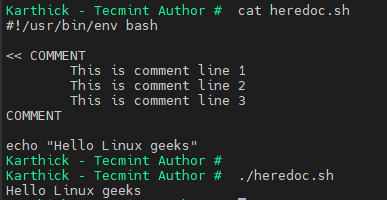
If you are coding sometime in bash now, you may know bash by default doesn’t support multiline comments like C or Java. You can use HereDoc to overcome this.
This is not a built-in feature of bash supporting multi-line comment, but just a hack. If you are not redirecting heredoc to any command, the interpreter will simply read the block of code and will not execute anything.
<< COMMENT
	This is comment line 1
	This is comment line 2
	This is comment line 3
COMMENT
Handling White Spaces
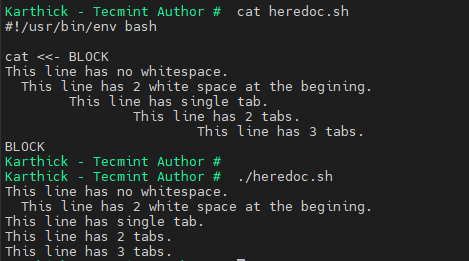
By default, heredoc will not suppress any white space characters (tabs, spaces). We can override this behavior by adding dash (-) after (<<) followed by a delimiter. This will suppress all tab spaces but white spaces will not be suppressed.
cat <<- BLOCK
This line has no whitespace.
  This line has 2 white spaces at the beginning.
    This line has a single tab.
        This line has 2 tabs.
            This line has 3 tabs.
BLOCK
Variable and Command Substiution
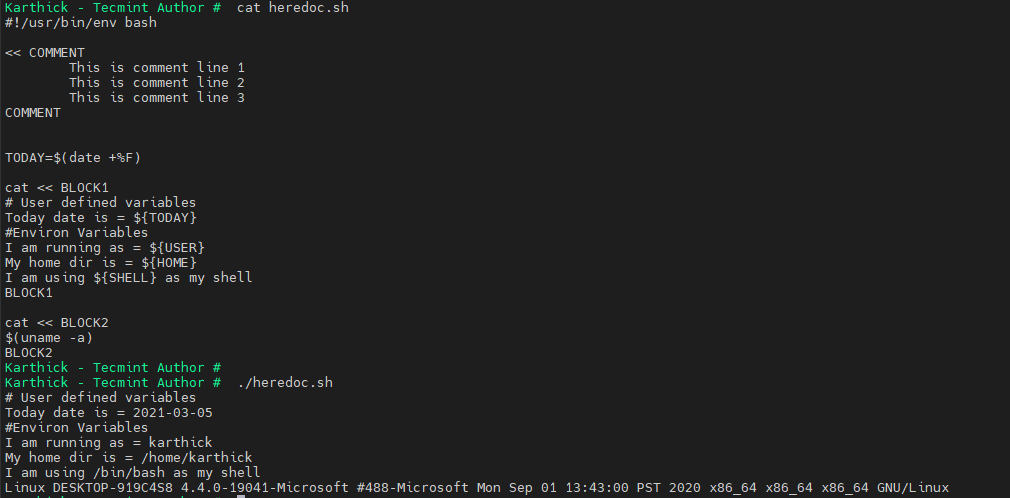
Heredoc accepts variable substitution. Variables can be user-defined variables or environmental variables.
TODAY=$(date +%F)

cat << BLOCK1
# User defined variables
Today date is = ${TODAY}
#Environ Variables
I am running as = ${USER}
My home dir is = ${HOME}
I am using ${SHELL} as my shell
BLOCK1
Similarly, you can run any commands inside the heredoc code block.
cat << BLOCK2
$(uname -a)
BLOCK2
Escaping Special Characters
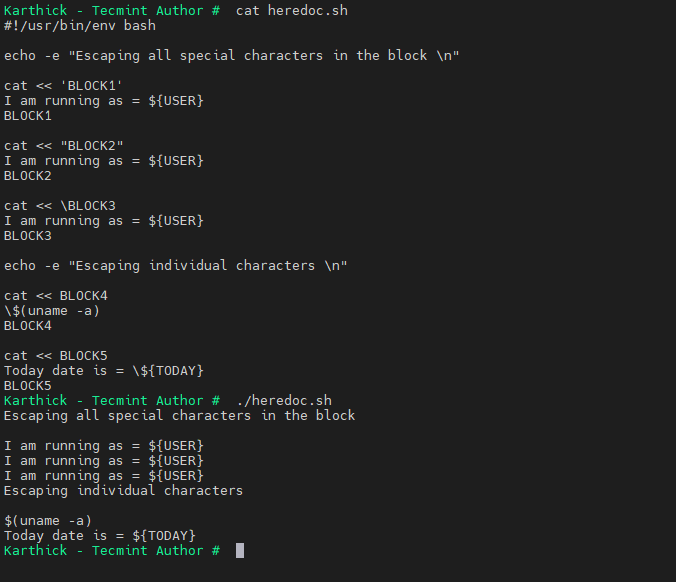
There are several ways we can escape special characters. Either you can do it at the character level or doc level.
To escape individual special characters use a backslash (\).
cat << BLOCK4
\$(uname -a)
BLOCK4

cat << BLOCK5
Today date is = \${TODAY}
BLOCK5
To escape all the special characters inside the block surround the delimiter with single quotes, double quotes, or prefix delimiter with a backslash.
cat << 'BLOCK1'
I am running as = ${USER}
BLOCK1

cat << "BLOCK2"
I am running as = ${USER}
BLOCK2

cat << \BLOCK3
I am running as = ${USER}
BLOCK3
Now that we know the structure of heredoc and how it works, let’s see a few examples. Two common areas where I use heredoc are running a block of commands over SSH and passing SQL queries through heredoc.
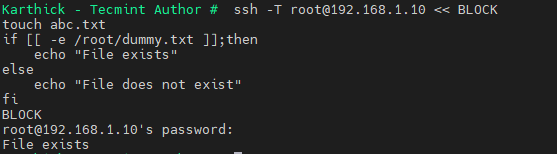
In the below example, we are trying to execute a block of code in a remote server through SSH.
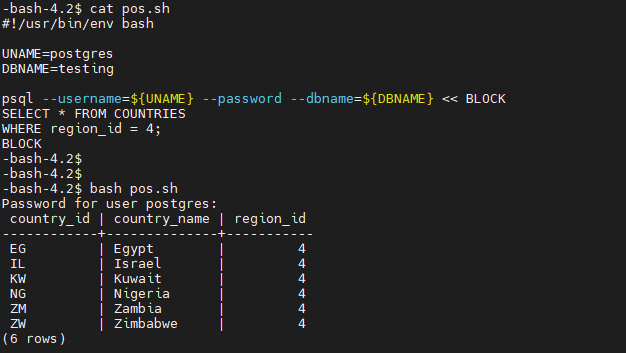
In the below example I am passing a select statement to psql to connect to a database and run the query. This is an alternative way to run a query in psql inside bash script instead of using the -f flag to run .sql file.
#!/usr/bin/env bash

UNAME=postgres
DBNAME=testing

psql --username=${UNAME} --password --dbname=${DBNAME} << BLOCK
SELECT * FROM COUNTRIES
WHERE region_id = 4;
BLOCK
That’s it for this article. There is a lot more you can do with heredoc compared to what we have shown in the examples. If you have any useful hack with heredoc please post it in the comment section so our readers could benefit from that.