

Chef is one of the popular configuration management tools, which is used to rapidly automate deployment, configurations, and management of the entire IT infrastructure environment.
In the first part of this Chef series, we’ve explained Chef concepts, which consists of three important components: Chef Workstation, Chef Server & Chef Client/Node.
In this article, you will learn how to install and test Chef Workstation in RHEL/CentOS 8/7 Linux distributions.
Installing Chef Workstation in CentOS/RHEL
Chef Workstation is the Machine where the admin will work to create recipes, cookbooks. With Chef Workstation, Developers/Admins can make Infrastructure as Code. All the development and testing processes can be done in the Chef Workstation. It can be installed in Windows, macOS, Redhat, Ubuntu & Debian. It consists of all the necessary packages, tools, and dependencies like Chef-CLI, Knife, Chef Infra Client, etc., to develop tests.
1. Go to the Chef Workstation downloads page and grab the appropriate package for your distribution release version or use the following wget command to download directly on the terminal.
------ On CentOS / RHEL 7 ------
# wget https://packages.chef.io/files/stable/chefdk/4.13.3/el/7/chefdk-4.13.3-1.el7.x86_64.rpm

------ On CentOS / RHEL 8 ------
# wget https://packages.chef.io/files/stable/chefdk/4.13.3/el/8/chefdk-4.13.3-1.el7.x86_64.rpm
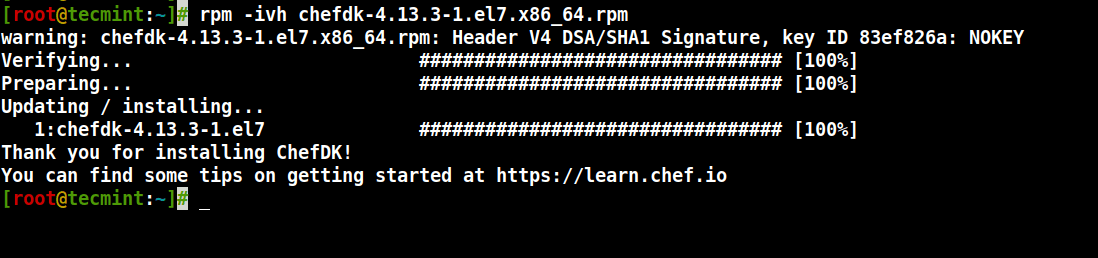
2. Next, use the following rpm command to install ChefDK as shown.
# rpm -ivh chefdk-4.13.3-1.el7.x86_64.rpm
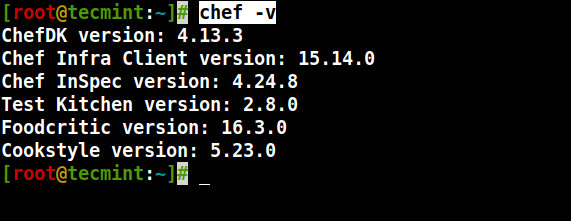
3. Verify the ChefDK installation using the following command.
# chef -v
4. Next, we will validate the workstation by simple recipe. Here, we are going to create a text file test.txt which should contain “Welcome to Tecmint” using Chef.
# vi tecmintchef.rb
Add the following code.
file 'text.txt' do
    content 'Welcome to Tecmint'
end
5. Run the recipe using the below command. While running the first time, it will ask you to accept the Licence.
# chef-apply tecmintchef.rb
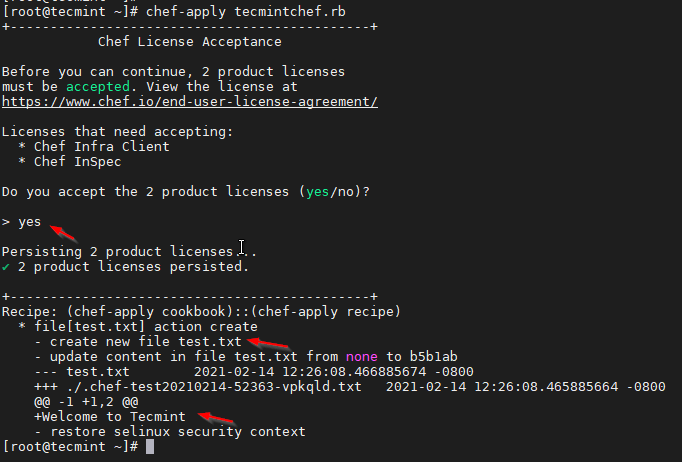
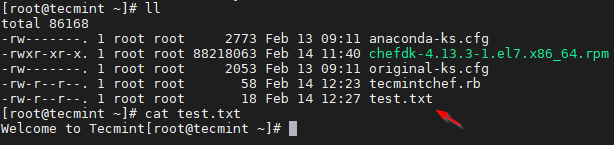
Your file test.txt is created and you can verify it by running the ls command as shown.
# ll
Uninstall Chef Workstation
6. Run the following command to uninstall Chef Workstation from the system.
# rpm -e chefdk
That’s It! In this article, we have gone through Chef Workstation installation and testing. We will see the Chef client-server model in the upcoming articles.
