

Wine is an open-source and free application for Linux that allows users to run Windows-based software and games on Unix/Linux-like operating systems.
Recently, the Wine team proudly announced the stable release of version 10.0, which is now available for download as the source and binary packages for various distributions including Linux, Windows, and Mac.
This release reflects a year of hard work and over 8,600 changes, introducing several exciting improvements. The main highlights include:
- Enhanced support for Bluetooth devices.
- Better support for HID input devices.
- Optimized for running 32-bit and 64-bit applications.
- Early support for Wayland display server protocol.
In this article, we will show how to install the Wine 10.0 version in RHEL-based distributions such as CentOS Stream, Rocky Linux, and AlmaLinux using source code (difficult and only suitable for experts) and on Fedora Linux using the official wine repository.
Step 1: Installing Dependency Packages
To begin the installation process, you need to install the necessary development tools and libraries, which include packages like GCC, libX11-devel, freetype-devel, zlib-devel, and libxcb-devel.

yum -y groupinstall 'Development Tools'
yum install gcc libX11-devel freetype-devel zlib-devel libxcb-devel libxslt-devel
For Fedora users, the commands are slightly different:
dnf -y groupinstall 'Development Tools'
dnf -y install gcc libX11-devel freetype-devel zlib-devel libxcb-devel libxslt-
Step 2: Downloading the Wine Source Code
Next, you need to download the Wine source code using the wget command under /tmp directory as a normal user.
cd /tmp
wget http://dl.winehq.org/wine/source/10.0/wine-10.0.tar.xz
After downloading the source code, use the following tar command to extract it under /tmp directory.
tar -xvf wine-10.0.tar.xz -C /tmp/
Step 4: Installing Wine from Sources
After extracting the source code, you need to compile Wine from the sources as a normal user.
---------- On 64-bit Systems ----------
cd wine-10.0/
./configure --enable-win64
make
sudo make install

---------- On 32-bit Systems ----------
cd wine-10.0/
./configure
make
sudo make install
Install Wine on Fedora Linux Using Wine Repository
For Fedora users, you can install Wine using the official Wine repository by using the following commands.
---------- On Fedora 41 ----------
dnf config-manager --add-repo https://dl.winehq.org/wine-builds/fedora/41/winehq.repo
dnf install winehq-stable

---------- On Fedora 40 ----------
dnf config-manager --add-repo https://dl.winehq.org/wine-builds/fedora/40/winehq.repo
dnf install winehq-stable
Configuring and Running Wine
Once the installation completes run the “winecfg” configuration tool from GNOME desktop to see the supported configuration. If you don’t have any of the desktops, you can install it by using the below command as the root user.
dnf groupinstall workstation
OR
yum groupinstall "GNOME Desktop"
Once the X Window System is installed, run the command as a normal user to see the wine configuration.
winecfg
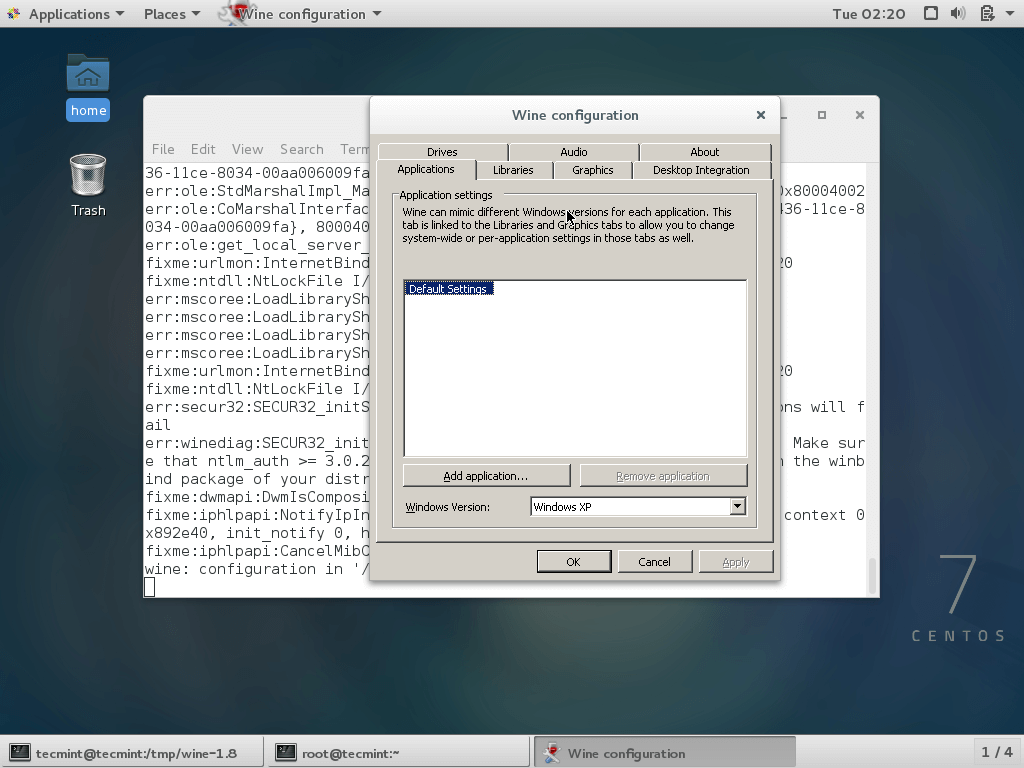
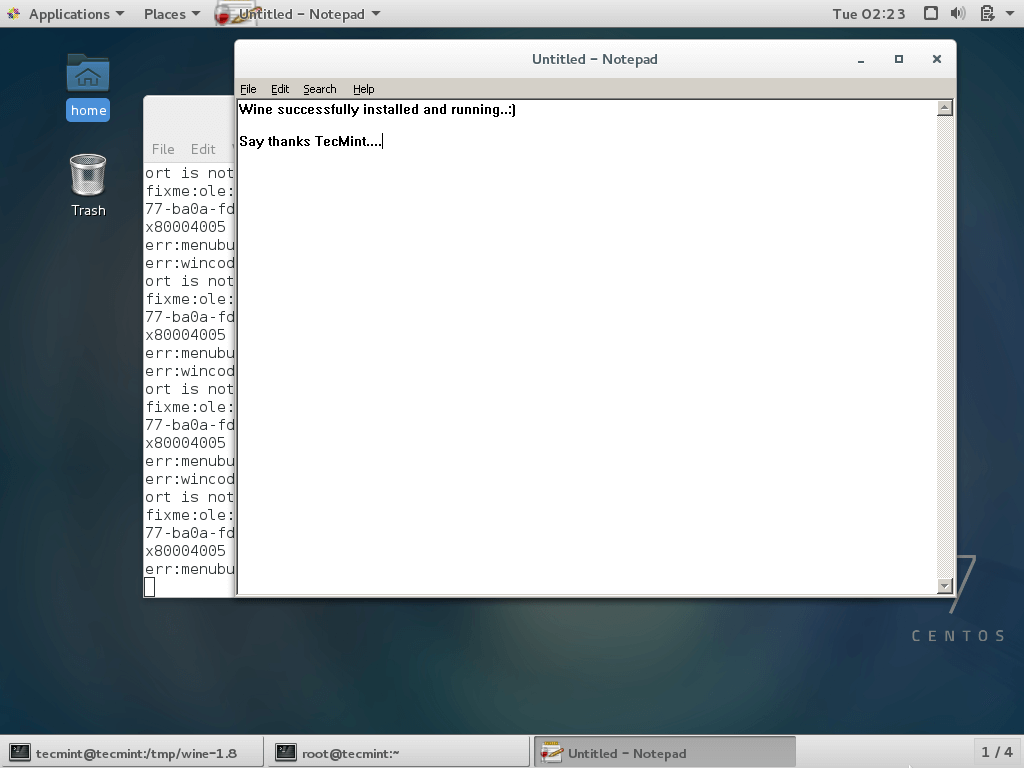
To run the Wine, you must specify the full path to the executable program or program name as shown in the example below.
--------- On 32-bit Systems ---------
wine notepad
wine c:\\windows\\notepad.exe
--------- On 64-bit Systems ---------
wine64 notepad
wine64 c:\\windows\\notepad.exe
Conclusion
Wine 10.0 is a significant milestone, bringing better support for modern hardware and software. While it’s not perfect and some applications may still crash, the Wine team continues to make great strides in improving compatibility.
If you’ve tried Wine 10.0, share your experiences in the comments below!







Instructions for installing (building, actually) Wine 10.0 for CentOS Stream worked like charm, even for myself who is not combortable with building software from sources.
However, the dependencies installed here are only sufficient for building a 64-bit Wine, which can only run 64-bit Windows binaries. Such a build is triggered by the –enable-win64 flag to the configuration script.
Most people are likely interested to build a Wine version hosted in a 64-bit OS (such as CentOS), but capable of running both 32-bit and 64-bit Windows binaries. Such a build is triggered by a different flag:
> ./configure –enable-archs=i386,x86_64
> make
See https://gitlab.winehq.org/wine/wine/-/wikis/Building-Wine
Such a build requires pre-installing one more dependency, namely a compiler capable of generating PE or Portable Executables. Me and Claude Sonnet figured out that there are no suitable compilers in the CentOS or EPEL repositories. The mstorsjo/llvm-mingw project in GitHub however provides a suitable compiler collection. The steps are:
– Download a recent version of the llvm-mingw–ucrt-ubuntu-22.04-x86_64.tar.xz
(Ignore the ‘ubuntu’: that is the system used to build the library, not the target system)
– Use tar to extract contents, eg. to an /opt subdirectory
– Add the /opt//bin to $PATH
(Now the Wine config script finds the compilers)
– Launch the Wine build configure script with the –enable-archs=i386,x86_64 flag
– Launch make
Could you please tell me how to install Bottles on RHEL 8?
@Aamir,
On RHEL 8, the recommended way to install Bottles is through Flatpak, which ensures you get the latest stable version with all dependencies managed automatically.
Pro tip: You don’t need either the Workstation meta-package or the GNOME desktop in order to run Wine on Fedora.
Hello Ravi,
Could you please me with wine 32 bit installation in Rhel 9.
I have installed wine but I need 32 bit.
I have tried to install using
./configure --enable-wingetting the below error.Could you please guide me to install 32 bit.
@Yogesh,
To install the 32-bit version of Wine on RHEL 9, you’ll need to install the necessary 32-bit development packages installed, particularly those related to Xlib.
After installing the required packages, you can attempt to configure Wine again with the:
This should successfully configure and install the 32-bit version of Wine on your RHEL 9 system.
Can’t we use wine in the KDE desktop environment? Does it require Gnome?
@Harshan,
You can install wine on the KDE desktop as well…
Hello I have this error.
Error:
Problem: package winehq-stable-1:5.0.2-1.1.x86_64 requires wine-stable64 = 1:5.0.2-1.1, but none of the providers can be installed
– cannot install the best candidate for the job
– nothing provides libm.so.6(GLIBC_2.29)(64bit) needed by wine-stable64-1:5.0.2-1.1.x86_64
– nothing provides libSDL2-2.0.so.0()(64bit) needed by wine-stable64-1:5.0.2-1.1.x86_64
– nothing provides libFAudio.so.0()(64bit) needed by wine-stable64-1:5.0.2-1.1.x86_64
– nothing provides libvkd3d.so.1(VKD3D_1_0)(64bit) needed by wine-stable64-1:5.0.2-1.1.x86_64
– nothing provides libvkd3d.so.1()(64bit) needed by wine-stable64-1:5.0.2-1.1.x86_64
I have installed Wine and everything was successful, I try to run it on server but i get this error.
000f:fixme:service:scmdatabase_autostart_services Auto-start service L”MountMgr” failed to start: 2
000f:fixme:service:scmdatabase_autostart_services Auto-start service L”WineBus” failed to start: 2
@Sara,
Please install Wine on 64-bit Linux OS, 32-bit won’t support and have different installation instructions..
When ever I try to do step 3, the following error shows up, “Tar: you may not specify more than one ‘-acdtrux’, ‘–delete’ or ‘–test-label’ option. and i followed the steps as it was shown and this pops up,
Please help me.
Thanks!
@Nate,
As the error says, you can’t combine
candroptions together; the former means “create an archive“, the latter “append to an archive“, so they can’t be used simultaneously.You can simply do
cp: cannot create regular file ‘/usr/local/lib64/wine/_inst.31846_’: Permission denied
make: *** [dlls/acledit/install-lib] Error 1
[indu@localhost wine-2.0.1]$ wine
bash: wine: command not found…
[indu@localhost wine-2.0.1]$ yum install epel-release
Loaded plugins: fastestmirror, langpacks
You need to be root to perform this command.
[indu@localhost wine-2.0.1]$ wine
Usage: wine PROGRAM [ARGUMENTS…] Run the specified program
wine –help Display this help and exit
wine –version Output version information and exit
[indu@localhost wine-2.0.1]$ wine /home/indu/Downloads/RadiAnt-4.0.3-Setup.exe
wine: created the configuration directory ‘/home/indu/.wine’
err:ole:marshal_object couldn’t get IPSFactory buffer for interface {00000131-0000-0000-c000-000000000046}
err:ole:marshal_object couldn’t get IPSFactory buffer for interface {6d5140c1-7436-11ce-8034-00aa006009fa}
err:ole:StdMarshalImpl_MarshalInterface Failed to create ifstub, hres=0x80004002
err:ole:CoMarshalInterface Failed to marshal the interface {6d5140c1-7436-11ce-8034-00aa006009fa}, 80004002
err:ole:get_local_server_stream Failed: 80004002
err:ole:marshal_object couldn’t get IPSFactory buffer for interface {00000131-0000-0000-c000-000000000046}
err:ole:marshal_object couldn’t get IPSFactory buffer for interface {6d5140c1-7436-11ce-8034-00aa006009fa}
err:ole:StdMarshalImpl_MarshalInterface Failed to create ifstub, hres=0x80004002
err:ole:CoMarshalInterface Failed to marshal the interface {6d5140c1-7436-11ce-8034-00aa006009fa}, 80004002
err:ole:get_local_server_stream Failed: 80004002
fixme:urlmon:InternetBindInfo_GetBindString not supported string type 20
err:process:__wine_kernel_init boot event wait timed out
I run this cmd showing an error.
You are running wineinstall as root, this is not advisable. Please rerun as a user.
Aborting.
when i execute the command
# ./tools/wineinstall
than occure this type of mesg…..plz solve my problem
Running configure…
checking build system type… x86_64-pc-linux-gnu
checking host system type… x86_64-pc-linux-gnu
checking whether make sets $(MAKE)… yes
checking for gcc… no
checking for cc… no
checking for cl.exe… no
configure: error: in `/tmp/wine-1.8.5′:
configure: error: no acceptable C compiler found in $PATH
See `config.log’ for more details
Configure failed, aborting install.
@Prakash,
Please install C compiler on the machine with the help of following command:
yum install gcc*
thats solve
Thanks for your wonderful work! I enjoy my wine 1.8 on centos7 64bit. I just carefully followed your instruction. Kodus!
i’ve followed your instruction to install wine in centos7 in order to install Dude one monitoring software for windows, but the wine64cfg did not run at all and said
“Bash: wine64cfg: command not found…
kindly help as this is very important to monitor our network
@Hatem,
It seems you’re compilation was unsuccessful, Please try again and see..
Hi, i have followed all your step, but i get some error message like this “wine: for some mysterious reason, the wine server failed to run.”
could you tell me how to fix it?
@Piseth,
Sorry to hear that, could you please show me the error while running wine, so that we can help you out..
I do all the steps, but after execute make and compile the wine, install, … , i can’t run wine64cfg. What have to do?
@Icaro,
Did you’ve seen any error during wine compilation? any error message throwing while running wine64cfg?
Why is all of this being done in the /tmp directory? The /tmp directory is pretty limited on many machines.
:When i configure wine its giving error:
configure: error: Cannot build a 32-bit program, you need to install 32-bit development libraries
i am on centos 7 64 bit OS
Please advise
@Prateek,
Then follow 64-bit instructions…..
configure: libGLU development files not found, GLU won’t be supported.
configure: libOSMesa development files not found (or too old), OpenGL rendering in bitmaps won’t be supported.
configure: OpenCL development files not found, OpenCL won’t be supported.
configure: libdbus development files not found, no dynamic device support.
configure: libgnutls development files not found, no schannel support.
configure: libsane development files not found, scanners won’t be supported.
configure: libv4l development files not found.
configure: libgphoto2 development files not found, digital cameras won’t be supported.
configure: libgphoto2_port development files not found, digital cameras won’t be auto-detected.
configure: liblcms2 development files not found, Color Management won’t be supported.
configure: gstreamer-0.10 base plugins development files not found, gstreamer support disabled
configure: OSS sound system found but too old (OSSv4 needed), OSS won’t be supported.
configure: libcapi20 development files not found, ISDN won’t be supported.
configure: libcups development files not found, CUPS won’t be supported.
configure: libtiff development files not found, TIFF won’t be supported.
configure: libmpg123 development files not found (or too old), mp3 codec won’t be supported.
configure: libopenal development files not found (or too old), OpenAL won’t be supported.
configure: libldap (OpenLDAP) development files not found, LDAP won’t be supported.
configure: WARNING: prelink not found, base address of core dlls won’t be set correctly.
configure: WARNING: libxml2 development files not found (or too old), XML won’t be supported.
configure: WARNING: libxslt development files not found, xslt won’t be supported.
configure: WARNING: libjpeg development files not found, JPEG won’t be supported.
@Khuram,
On which version of distro you’re trying to build wine?
boss
pls i need help
@Kayode,
Which OS and architecture you are trying to run wine?
line 52: exec: wine: not found
i have one .exe file and one .rar file both are interlinked .
I want extract them in RHL 6.5 system both files are on the file system same folder XYZ .
How do I check if I have ” wine application available and that will help me to extract these 2 files at same time.
my system is 64 bit VCloud /VMware i ran > command wine64cfg ” says command not found ”
pls help me to get Wine on my RHL 6.5 ent system. I have RHL subscription for support .
Sir,
I have installed Wine by following your instructions in one user and how can i share the installed Wine for all other users..?
Regards,
Ram,
[email protected]
I configured wine properly but i got following error
/usr/local/bin/winecfg: line 52: exec: wine: not found
@Vijay,
Try to link ‘/usr/local/bin/wine’ to ‘/usr/local/bin/wine64’ using following command.
# yum -y groupinstall ‘Development Tools’
Loaded plugins: refresh-packagekit, rhnplugin
This system is not registered with RHN.
RHN support will be disabled.
adobe-linux-i386 | 951 B 00:00
linuxtech-release | 2.6 kB 00:01
Error: Cannot retrieve repository metadata (repomd.xml) for repository: rpmfusion-free. Please verify its path and try again
Please register your system at RHN first.
sir can i register free with Redhat or necessary to purchase a subscription ?
You need to purchase a redhat subscription from the official redhat site.
sir please help me…
# yum -y groupinstall ‘Development Tools’
Loaded plugins: refresh-packagekit, rhnplugin
This system is not registered with RHN.
RHN support will be disabled.
adobe-linux-i386 | 951 B 00:00
linuxtech-release | 2.6 kB 00:01
Error: Cannot retrieve repository metadata (repomd.xml) for repository: rpmfusion-free. Please verify its path and try again
….
getting this error again and again.
“/usr/bin/install: cannot create regular file `/usr/local/share/man/man1/wine.1′: Permission denied”
I have tried sticky bit and sorts of permissions.Chmod 777 /usr/local/ ;chmod 2777 /usr/local. What do i do so that all the files and folders made inside gain a automatic executable permission for all users
Instread of giving 777 permission, add the users to sudoers group and grant permissions.
can i install D-link modem s/w through WINE in centOS
Hello, running my application i get this error: err:mscoree:load_mono Could not load Mono into this process ….. any idea?
Thank you!
Hi, can you please tell me which theme has been used in this picture ?
https://www.tecmint.com/wp-content/uploads/2012/07/winecfg-screen.jpg
Thanks.
Hi,
Im having this problem when I run make command
make[1]: Leaving directory `/tmp/wine-1.6.2/dlls/gphoto2.ds’
make[1]: Entering directory `/tmp/wine-1.6.2/dlls/gphoto2.ds’
gcc -c -I. -I. -I../../include -I../../include -I/usr/include/gphoto2 -I/usr/include/gphoto2 -D__WINESRC__ -D_REENTRANT -fPIC -Wall -pipe -fno-strict-aliasing -Wdeclaration-after-statement -Wempty-body -Wignored-qualifiers -Wstrict-prototypes -Wtype-limits -Wunused-but-set-parameter -Wwrite-strings -Wpointer-arith -Wlogical-op -gdwarf-2 -gstrict-dwarf -g -O2 -o capability.o capability.c
In file included from capability.c:27:0:
gphoto2_i.h:101:29: error: field ‘xjsm’ has incomplete type
struct jpeg_source_mgr xjsm;
^
gphoto2_i.h:102:35: error: field ‘jd’ has incomplete type
struct jpeg_decompress_struct jd;
^
gphoto2_i.h:103:28: error: field ‘jerr’ has incomplete type
struct jpeg_error_mgr jerr;
^
make[1]: *** [capability.o] Error 1
make[1]: Leaving directory `/tmp/wine-1.6.2/dlls/gphoto2.ds’
make: *** [dlls/gphoto2.ds] Error 2
works charm !
Hi
i am using centos 6.5 64 bit and having problem when i run following command
[root@ZyXEL0 wine-1.6.2]# yum groupinstall “X Window System” “GNOME Desktop Environment”
Loaded plugins: fastestmirror, refresh-packagekit, security
Loading mirror speeds from cached hostfile
* base: mirror.dhakacom.com
* extras: mirrors.digipower.vn
* updates: mirrors.digipower.vn
Setting up Group Process
Checking for new repos for mirrors
Package xorg-x11-server-Xorg-1.13.0-23.1.el6.centos.x86_64 already installed and latest version
Package xorg-x11-xinit-1.0.9-14.el6.x86_64 already installed and latest version
Package 1:xorg-x11-xauth-1.0.2-7.1.el6.x86_64 already installed and latest version
Package xorg-x11-drivers-7.3-13.4.el6.x86_64 already installed and latest version
Package wdaemon-0.17-5.el6.x86_64 already installed and latest version
Package xorg-x11-server-utils-7.5-13.el6.x86_64 already installed and latest version
Package hal-0.5.14-11.el6.x86_64 already installed and latest version
Package plymouth-system-theme-0.8.3-27.el6.centos.noarch already installed and latest version
Package xorg-x11-utils-7.5-6.el6.x86_64 already installed and latest version
Package wacomexpresskeys-0.4.2-3.el6.x86_64 already installed and latest version
Package spice-vdagent-0.14.0-3.el6_5.x86_64 already installed and latest version
Package firstboot-1.110.15-1.el6.x86_64 already installed and latest version
Package glx-utils-9.2-0.5.el6_5.2.x86_64 already installed and latest version
Package xvattr-1.3-18.el6.x86_64 already installed and latest version
Warning: Group x11 does not have any packages.
Warning: Group GNOME Desktop Environment does not exist.
No packages in any requested group available to install or update
[root@ZyXEL0 wine-1.6.2]# yum groupinstall “X Window System” “KDE (K Desktop Environment)”
Loaded plugins: fastestmirror, refresh-packagekit, security
Loading mirror speeds from cached hostfile
* base: mirrors.fibo.vn
* extras: mirrors.digipower.vn
* updates: mirrors.fibo.vn
Setting up Group Process
Checking for new repos for mirrors
Package xorg-x11-server-Xorg-1.13.0-23.1.el6.centos.x86_64 already installed and latest version
Package xorg-x11-xinit-1.0.9-14.el6.x86_64 already installed and latest version
Package 1:xorg-x11-xauth-1.0.2-7.1.el6.x86_64 already installed and latest version
Package xorg-x11-drivers-7.3-13.4.el6.x86_64 already installed and latest version
Package wdaemon-0.17-5.el6.x86_64 already installed and latest version
Package xorg-x11-server-utils-7.5-13.el6.x86_64 already installed and latest version
Package hal-0.5.14-11.el6.x86_64 already installed and latest version
Package plymouth-system-theme-0.8.3-27.el6.centos.noarch already installed and latest version
Package xorg-x11-utils-7.5-6.el6.x86_64 already installed and latest version
Package wacomexpresskeys-0.4.2-3.el6.x86_64 already installed and latest version
Package spice-vdagent-0.14.0-3.el6_5.x86_64 already installed and latest version
Package firstboot-1.110.15-1.el6.x86_64 already installed and latest version
Package glx-utils-9.2-0.5.el6_5.2.x86_64 already installed and latest version
Package xvattr-1.3-18.el6.x86_64 already installed and latest version
Warning: Group x11 does not have any packages.
Warning: Group KDE (K Desktop Environment) does not exist.
No packages in any requested group available to install or update.
please help….
Thanks
You can install Desktop on CentOS 6.5 using following command.
Hi, I found that we can use yum install wine to get wine installed, though the version is 1.6.1
CentOS 6.5 x64
when i run
$ winecfg
i got following error.
/usr/local/bin/winecfg: line 52: exec: wine: not found
The issue is that not exist the file
/usr/local/bin/wine
in 64 bits instalation exist
/usr/local/bin/wine64
but the scripts call wine and not wine64
I reslve this creating a link
# ln /usr/local/bin/wine /usr/local/bin/wine64
Dear Sir Ravi,
I was try to find everywhere especially google,i ask “How to Install wine 1.6.2 on centos 6.5 64bit” …
And i end up here …
i follow so many time your tutorial,i also try to use original wine from epel version 1.6.1 release 1.el6,but it suck,terminal on winbox is so blurred,it’s hard to read and could damage my eyes,i was do everything to fix the problem told by google,but i got nothing …
so i decide to try install another wine version ,, and no matter how many key words and i try to search , i always end up here,cz you has a nice rank in google …
but now i had a problem,as i sad,i was follow your tutorial on how to install n compiling wine 1.6.2 on centos 6.5 64bit,so many time …
but i failed,Dont ask me about i was wrong following a 32bit installation,cz i was read every single words you made with carefully.
so please help me or maybe us to get rid of this problem,cz i dont know where to go and find place to fix this problem.
Thanks before for your help sir …
With Best Regards
Syech
Can I have access to your server? I will do it for you.. mail me your details using our contact us page. Will surely help you out..
sir please help me this is my problem
onfigure: libxcursor development files not found, the Xcursor extension won’t be supported.
configure: libxi development files not found, the Xinput extension won’t be supported.
configure: XShm development files not found, X Shared Memory won’t be supported.
configure: XShape development files not found, XShape won’t be supported.
configure: libXxf86vm development files not found, XFree86 Vidmode won’t be supported.
configure: libxrandr development files not found, XRandr won’t be supported.
configure: libxinerama development files not found, multi-monitor setups won’t be supported.
configure: libxcomposite development files not found, Xcomposite won’t be supported.
configure: libGLU development files not found, GLU won’t be supported.
configure: libOSMesa development files not found (or too old), OpenGL rendering in bitmaps won’t be supported.
configure: OpenCL development files not found, OpenCL won’t be supported.
configure: libdbus development files not found, no dynamic device support.
configure: libgnutls development files not found, no schannel support.
configure: lib(n)curses development files not found, curses won’t be supported.
configure: libsane development files not found, scanners won’t be supported.
configure: libv4l development files not found.
configure: libgphoto2 development files not found, digital cameras won’t be supported.
configure: libgphoto2_port development files not found, digital cameras won’t be auto-detected.
configure: liblcms2 development files not found, Color Management won’t be supported.
configure: gstreamer-0.10 base plugins development files not found, gstreamer support disabled
configure: OSS sound system found but too old (OSSv4 needed), OSS won’t be supported.
configure: libcapi20 development files not found, ISDN won’t be supported.
configure: libcups development files not found, CUPS won’t be supported.
configure: fontconfig development files not found, fontconfig won’t be supported.
configure: libgsm development files not found, gsm 06.10 codec won’t be supported.
configure: libtiff development files not found, TIFF won’t be supported.
configure: libmpg123 development files not found (or too old), mp3 codec won’t be supported.
configure: libopenal development files not found (or too old), OpenAL won’t be supported.
configure: libldap (OpenLDAP) development files not found, LDAP won’t be supported.
configure: WARNING: libxrender development files not found, XRender won’t be supported.
configure: WARNING: No OpenGL library found on this system.
OpenGL and Direct3D won’t be supported.
configure: WARNING: libxml2 development files not found (or too old), XML won’t be supported.
configure: WARNING: libxslt development files not found, xslt won’t be supported.
configure: WARNING: libjpeg development files not found, JPEG won’t be supported.
configure: WARNING: libpng development files not found, PNG won’t be supported.
configure: WARNING: No sound system was found. Windows applications will be silent.
Install ‘Development Tools’ on the system using the yum command as mentioned in the article.
[tejas@localhost wine-1.6.2]$ sudo yum groupinstall ‘GNOME Desktop Environment’
[sudo] password for tejas:
Loaded plugins: langpacks, refresh-packagekit
Warning: group GNOME Desktop Environment does not exist.
No packages in any requested group available to install or update
[tejas@localhost wine-1.6.2]$ winecfg
/usr/local/bin/winecfg: line 52: exec: wine: not found
pls help
It seems you are installing 32-bit wine on 64 system. Please follow 64-bit commands as described in the article.
Hello Sir,
i used centos 6.4 32 bit and i want to install wine
i follow all the steps according you to suggest
./tools/wineinstall when i execute this command as local user system continuous process till 1 hour but no response
suggest
Yes it takes plenty of time, but that too depend upon your hardware configuration, in the middle it will prompt you to enter root password.
hi guys i got solution for centos users 1st update your epel from here
https://www.tecmint.com/how-to-enable-epel-repository-for-rhel-centos-6-5/
and then just use this command and all done 100% fine
yum install wine* -y
enjoy!
Running Fedora 20 64bit and this guide works fine. Thanks alot :)
I installed wine 1.6.2 got everything working the way it needs to for now. installed league of legends using playonlinux, now i can log into it see the UI and enter champion select. Once the game starts the game crashes, and asks me to reconnect. Do you have any idea how to resolve the crash?
im using CentOS 6.5 final BTW forgot to add that.
in step 2 the address is….
wget -c http://citylan.dl.sourceforge.net/project/wine/Source/wine-1.7.9.tar.bz2
used to download wine 1.7.9….
For anyone who meet the disturbing “/usr/local/bin/winecfg: line 52: exec: wine: not found” error:
the reason is that you are installing wine(32bit) on a 64 bit machine. two solutions:
One:
As the error info itself suggest, just do:
vim /usr/local/bin/winecfg
on line 52 you’ll find this command
exec wine “$appname” “$@”
Then replace the word “wine” with “wine64”
Two:
ln -s /usr/local/bin/wine64 /usr/local/bin/wine
there is no “wine” in /usr/local/bin, so just make oneXDDD
Thanks for your instructions and thanks for Wine.
I’m kind of new here,
I have installed wine successfully, but there is nothing on the Desktop (gnome) and when I type in $ winecfg it says :
/usr/local/bin/winecfg: line 52: exec: wine: not found
would you please help me ?
tnx
either just replace line 52 of winecfg from “wine” to “wine64”, or make a soft link wine64 -> wine
I did till
# yum groupinstall “X Window System” “GNOME Desktop Environment”
I installed everything then what I’m suppose to do? If I run “winecfg” there it shows an error like :
“/usr/local/bin/winecfg: line 52: exec: wine: not found”
In my “GNOME Desktop Environment” application list there is no “X Window System” or “winecfg”.
I lost there.Please help me.
Seems your architecture doesn’t compiled properly. Better install wine via yum using epel repository.
Wine 1.7.9-development release was Installed successfully on fedora 20 32/64 bit , centos 6.5 64bit and opensuse13.1 64bit , moving on to debian 7.3 64bit.
Hi Mr. Salve,
Did you try yum install wine.
It worked for me in fedora 20 kde spin.
installed wine 1.7.5-1.fc20 in 10 minuts including downloading.
simon
I installed successfully using this way, thanks!
But… how to remove after I installed this?
Find and remove all wine files manually, that’s the only way to remove it.
Really helpful info. I installed successfully wine 1.7.3 in fedora 19.
in the middle it said some packages are missing. I installed through yum install package name…
Thanks Ravi.
Regards,
Hanumantha Rao.
I installed wine, but when i give the command winecfg it says
usr/local/bin/winecfg: line 52: exec: wine: not found
can you please help me.
Which OS architecture you using?
centos 6.0 x64
Thank you so much.
We are able to run exe in Linux with the given steps
hi,
had problem when installing on centos 64bit. I think winecfg cannot work because after compiling only wine64 file available and not wine. The winecfg script look for wine not wine64.
after make a link (ln -s) wine to wine64 then winecfg works…
Dear Ashibr,
Thanks for such great findings. we really appreciate your work..
hi
in cent OS 6.4 line 52: exec: wine: not found
as per ash comment what is the command for linking wine to wine64
i tried ln -s wine64 wine
and
ln -s wine wine64
both not worked and still i get line 52: exec: wine: not found
Which OS architecture you using?
what does OS architecture means
iam using cent OS 6.4 final
Its 32 or 64 bit architecture?
cent OS 6 final for x86_64
so architecture is 64 bit
[root@123]# wine IBExpert.exe
bash: wine: comand not found
[root@123]# which winecfg
/usr/local/bin/winecfg
[root@123]# which wine
/usr/bin/which: no wine in (/usr/lib64/qt-3.3/bin:/usr/local/sbin:/usr/local/bin:/sbin:/bin:/usr/sbin:/usr/bin:/root/bin)
It turned out to solve the last problem but in the log – file, the string “err: menubuilder: convert_to_native_icon error 0x80004005 creating bitmap encoder
err: wincodecs: PngEncoder_CreateInstance Trying to save PNG picture, but PNG support is not compiled in. ”
and as a consequence does not start
Hey Ravi, thanks for creating this write up!
I’m installing wine 1.7.2 in CentOS 6.4 x86_64 and there’s many 32bit (i686) package requirements as seen here: http://winezeug.googlecode.com/svn/trunk/install-wine-deps.sh
Installing those i686 packages seems to screw up compiling other software which needs the x86_64 packages. Do you know if it’s okay to compile wine on one system and just copy the compiled source to another system (one which does not have all those compile dependency pkgs installed), do the make install there, and run the wine binary there properly? If wine depends on dynamically linked libraries, perhaps this will not work?
followed your instruction, I installed wine-1.7.2 in redhat 6.
because some reason, I need to unistall wine.
is there any solution that can remove wine completely ?
Would you provide the command, tks.
from within wine source directory:
sudo make uninstall
i have completed the wine configurations followed everything but its not still working on centos 6.4
64 bit Linux XXXXXXXXX 2.6.32-358.el6.x86_64 #1 SMP Fri Feb 22 00:31:26 UTC 2013 x86_64 x86_64 x86_64 GNU/Linux
sir hardly try to install wine but i am fail..what should i do ????
when i run groupinstall command than my system get error.
yum -y groupinstall ‘Development Tools’
warning: Group Development does not have any packages
“no package in any requested group are available to install or update”
and if whenever i try to install wine
than get does not configure error……..
i have using RHEL 6.4
please help me..
Try to run this command and let me know.
Dear Ravi,
$make is not working so i m using with $ sudo make its take a several min. is it right or not?
Yes it takes 20-30 minutes to compile it. Please be patient and after this do a make install.
once i got to the #makeinstall step i get messed up b’cause i changed to root user now its all messed up and as a noob to linux(installed fedora 19 this morning) im super confused help please
Is there any error you getting or you totally confuse? Where you not able to understand tell us.
Sir,
I install oracle linux. when i install wine 1.7.0 (./configure –enable-wine64). than error msg come= no suitable bison found. Please install the “bison” package.
The error clearly saying that you don’t have suitable bison package installed, install it via package manager tool YUM.
Error:-[root@hpcs wine-1.7.0]# winecfg
/usr/local/bin/winecfg: line 52: exec: wine: not found
Can you post the output of the following command.
[mahesh@localhost tmp]$ which winecfg
/usr/local/bin/winecfg
thank
Hello, what is the command to uninstall it ?
Thanks,
Go to source directory run command as.
Ravi,
Following your install cuidlines for Centos 6 32 bit, on running the .tools/wineinstall command I get the following warning:
make: Warning: File `Makefile.in’ has modification time 2.7e+08 s in the future
running CONFIG_SHELL=/bin/sh /bin/sh ./configure –no-create –no-recursion
checking build system type… i686-pc-linux-gnu
checking host system type… i686-pc-linux-gnu
checking whether make sets $(MAKE)… yes
checking for gcc… gcc
checking whether the C compiler works… yes
checking for C compiler default output file name… a.out
checking for suffix of executables…
The comand then loops continuosly after the line:
checking whether we need to define __i386__… no
Any help greatly appreceated.
Many thanks,
Ivan
hi,
plz help me how to install wine in redhat 6.3 step by step.
Follow these steps, it will work on redhat 6.4 also.
I’m stepping through the instructions, as a CentOS 6.4 x64 newb and am missing the 32 bit libraries – I really hoped that wine was going to be an x64 program but since it’s 32 bit, can anyone please tell me how to (and where to get) install the 32 bit development libraries and how/where that fits in into this tutorial.
Thanks!
I think I got it figured out! Took some doing but I got the ‘./tools/wineinstall’ command to take without erroring out finally.
That’s good, you sorted out yourself..
cd /usr/local/bin && rm -f wineg++ && ln -s winegcc wineg++
cd /usr/local/bin && rm -f winecpp && ln -s winegcc winecpp
cd /usr/local/share/man/man1 && rm -f wineg++.1 && ln -s winegcc.1 wineg++.1
cd /usr/local/share/man/man1 && rm -f winecpp.1 && ln -s winegcc.1 winecpp.1
make[1]: Leaving directory `/home/hummer01/wine-1.5.28/tools/winegcc’
make[1]: Entering directory `/home/hummer01/wine-1.5.28/tools/wmc’
/usr/bin/install -c -m 644 wmc.man /usr/local/share/man/man1/wmc.1
/usr/bin/install -c wmc-installed /usr/local/bin/wmc
make[1]: Leaving directory `/home/hummer01/wine-1.5.28/tools/wmc’
make[1]: Entering directory `/home/hummer01/wine-1.5.28/tools/wrc’
/usr/bin/install -c -m 644 wrc.man /usr/local/share/man/man1/wrc.1
/usr/bin/install -c wrc-installed /usr/local/bin/wrc
make[1]: Leaving directory `/home/hummer01/wine-1.5.28/tools/wrc’
Sir,
i got a problem in my internet connection . i have dual boot partition(windows XP and Linux 5.2) but when i try to connect my broadband internet connection it doesn’t work in linux but in windows it works. i got motherboard cd but how to install linux port driver ,etc and what r the commands for it .please let me know so that i can connect my net too.
thanks
Go to the Network settings from Application Menu and select broadband connections and follow the wizard setup.
I cud not run the command “winecfg”
i was getting error”command not found”
Please let me know the solution.
wine is not properly compiled and installed. Please try installing wine from epel repository.
Hi,
I tried that earlier and it gives this response.
Package gcc-4.1.2-54.el5.x86_64 already installed and latest version
Nothing to do
So i tried installing specific version of gcc.
Thanks
I think latest Wine is not compatible with your currently running distro, instead of compiling, install via yum using epel repository
[wlp_pnair@wlp-tmcql01 wine-1.5.28]$ ./configure –enable-win64
checking build system type… x86_64-unknown-linux-gnu
checking host system type… x86_64-unknown-linux-gnu
checking whether make sets $(MAKE)… yes
checking for gcc… gcc
checking whether the C compiler works… yes
checking for C compiler default output file name… a.out
checking for suffix of executables…
checking whether we are cross compiling… no
checking for suffix of object files… o
checking whether we are using the GNU C compiler… yes
checking whether gcc accepts -g… yes
checking for gcc option to accept ISO C89… none needed
checking for g++… g++
checking whether we are using the GNU C++ compiler… yes
checking whether g++ accepts -g… yes
checking for cpp… cpp
checking whether gcc supports __builtin_ms_va_list… no
configure: error: You need gcc >= 4.4 to build Wine as 64-bit.
I tried installing gcc using sudo yum install gcc4.4.4 but throws error that no No package gcc4.4.4 available.
How do i get over this?
Don’t add version while installing, just use.
actually, this is not good idea. First, one should upgrade these old packages in RHEL 6… For example libxml2 development file needed for Google Earth.. Try this – it is not possible without messing with the whole system.
thats what i did
./configure –enable-win64 error”requires 32 bit lib”
make build complete
make install install complete
Ravi
i need your help please.
[root@PlcmSplp wine-1.5.25]# which wine64
/usr/local/bin/wine64
[jeff-405@PlcmSplp ~]$ cd /home/jeff-405/Downloads/wine-1.5.25/[jeff-405@PlcmSplp wine-1.5.25]$ ./configure –enable-wine64
configure: WARNING: unrecognized options: –enable-wine64
checking build system type… x86_64-unknown-linux-gnu
checking host system type… x86_64-unknown-linux-gnu
checking whether make sets $(MAKE)… yes
checking for gcc… gcc
checking whether the C compiler works… yes
checking for C compiler default output file name… a.out
checking for suffix of executables…
checking whether we are cross compiling… no
checking for suffix of object files… o
checking whether we are using the GNU C compiler… yes
checking whether gcc accepts -g… yes
checking for gcc option to accept ISO C89… none needed
checking for g++… g++
checking whether we are using the GNU C++ compiler… yes
checking whether g++ accepts -g… yes
checking for cpp… cpp
checking whether gcc -m32 works… no
configure: error: Cannot build a 32-bit program, you need to install 32-bit development libraries.
[root@PlcmSplp jeff-405]# yum -y install libXll-devel.i686 freetype-devel.i686 flex bison
Loaded plugins: fastestmirror, kmod, refresh-packagekit
Loading mirror speeds from cached hostfile
* rpmforge: mirror.hmc.edu
Setting up Install Process
No package libXll-devel.i686 available.
Package freetype-devel-2.3.11-6.el6_2.9.i686 already installed and latest version
Package flex-2.5.35-8.el6.x86_64 already installed and latest version
Package bison-2.4.1-5.el6.x86_64 already installed and latest version
Nothing to do
[root@PlcmSplp jeff-405]# yum -y install libXll-devel freetype-devel flex bisonLoaded plugins: fastestmirror, kmod, refresh-packagekit
Loading mirror speeds from cached hostfile
* rpmforge: mirror.hmc.edu
Setting up Install Process
No package libXll-devel available.
Package freetype-devel-2.3.11-6.el6_2.9.x86_64 already installed and latest version
Package flex-2.5.35-8.el6.x86_64 already installed and latest version
Package bison-2.4.1-5.el6.x86_64 already installed and latest version
Nothing to do
what do i do?, It looks like 32 and 64 bit development tools are installed?
jeff,
I think Ravi already said it?
==> March 26, 2013 at 12:34 pm
check that’s day!
how to install mssql in wine.
Hi Ravi
I have followed the instructions as advised but on make install i get the following error:
make[1]: Entering directory `/tmp/wine-1.5.26/dlls/ntdll’
../../tools/winegcc/winegcc -m32 -B../../tools/winebuild –sysroot=../.. -fasynchronous-unwind-tables -shared ./ntdll.spec actctx.o atom.o cdrom.o critsection.o debugbuffer.o debugtools.o directory.o env.o error.o exception.o file.o handletable.o heap.o large_int.o loader.o loadorder.o misc.o nt.o om.o path.o printf.o process.o reg.o relay.o resource.o rtl.o rtlbitmap.o rtlstr.o sec.o serial.o server.o signal_arm.o signal_arm64.o signal_i386.o signal_powerpc.o signal_x86_64.o string.o sync.o tape.o thread.o threadpool.o time.o version.o virtual.o wcstring.o version.res -nodefaultlibs -Wl,–image-base,0x7bc00000 -o ntdll.dll.so -lwinecrt0 ../../libs/port/libwine_port.a -lrt -lpthread
ccache: failed to create /root/.ccache (No such file or directory)
winegcc: gcc failed
make[1]: *** [ntdll.dll.so] Error 2
make[1]: Leaving directory `/tmp/wine-1.5.26/dlls/ntdll’
make: *** [dlls/ntdll] Error 2
Any suggestions?
chege
Install gcc package and try again..
I’m at step 4: installing wine 1.5.26
It says:
Step 4: Installing Wine 1.5.26
It is recommended to compile and build Wine installer as a normal User. Run the following commands as normal user. (Note : The installer might take up-to 20-30 minutes and in the middle it will ask you to enter root password).
$ cd wine-1.5.26/
$ ./tools/wineinstall
I extracted (step 3) wine with a normal user account, otherwise it says you need to install wine from a normal account. And if I do that, i have to re-extract wine from the normal user account. But when I try again ./tools/wineinstall, the server says:
We need to install Wine as the root user. Do you want us to build Wine,
‘su root’ and install Wine? Enter ‘no’ to build Wine without installing:
By both yes or no, it doesn’t do anything.
When it ask to build Wine as root user, simply Type “Yes”. In the middle of build process it will ask you to provide root password.
Can you post the output of the command?
jesse is my user account:
[jesse@node13-vps wine-1.5.26]$ ./tools/wineinstall
Wine Installer v1.0
We need to install Wine as the root user. Do you want us to build Wine,
‘su root’ and install Wine? Enter ‘no’ to build Wine without installing:
(yes/no) yes
Running configure…
checking build system type… x86_64-unknown-linux-gnu
checking host system type… x86_64-unknown-linux-gnu
checking whether make sets $(MAKE)… yes
checking for gcc… no
checking for cc… no
checking for cl.exe… no
configure: error: in `/tmp/wine-1.5.26′:
configure: error: no acceptable C compiler found in $PATH
See `config.log’ for more details
Configure failed, aborting install.
You don’t have development tools installed on your system. I have updated the article, you can install them using following command and run the build process again.
Still not working :(
Wine Installer v1.0
We need to install Wine as the root user. Do you want us to build Wine,
‘su root’ and install Wine? Enter ‘no’ to build Wine without installing:
(yes/no) yes
Running configure…
checking build system type… x86_64-unknown-linux-gnu
checking host system type… x86_64-unknown-linux-gnu
checking whether make sets $(MAKE)… yes
checking for gcc… gcc
checking whether the C compiler works… yes
checking for C compiler default output file name… a.out
checking for suffix of executables…
checking whether we are cross compiling… no
checking for suffix of object files… o
checking whether we are using the GNU C compiler… yes
checking whether gcc accepts -g… yes
checking for gcc option to accept ISO C89… none needed
checking for g++… g++
checking whether we are using the GNU C++ compiler… yes
checking whether g++ accepts -g… yes
checking for cpp… cpp
checking whether gcc -m32 works… no
configure: error: Cannot build a 32-bit program, you need to install 32-bit development libraries.
I think you using 64-bit system and building 32-bit Wine on 64 seems buggy now. So, you need to compile and build the Wine, simple run the following commands to compile it.
It doesn’t work?
>
>
[root@node13-vps ~]# ./configure –enable-win64
-bash: ./configure: No such file or directory
>
>
Maybe I need to run this while I’m in another folder?
Of course man, you should be in wineinstall directory to compile it.
Oke, that’s succeeded.
>
Now I have the following problem:
I’m at step 4 and need to run “winecfg” in desktop mode.
I use UltraVNC. ‘
>
[jesse@node13-vps wine-1.5.26]$ winecfg
/usr/local/bin/winecfg: line 52: exec: wine: not found
[jesse@node13-vps wine-1.5.26]$ su root
Password:
[root@node13-vps wine-1.5.26]# winecfg
/usr/local/bin/winecfg: line 52: exec: wine: not found
[root@node13-vps wine-1.5.26]#
Somehow installed by changing permissions, but having same problem as Jeff
which wine gives wine not found
” which wine64 ” will give you destination out put
but still looking to resolve line 52 not found
http://forum.winehq.org/viewtopic.php?t=15013
you can get the destination output by typing “which wine64”
im still having issues with line 52 exec
Hi Ravi
$ ./configure –enable-win64
is ok
$ make
and
$make install
Both give errors for not having permissions to create directories at various places. Is there something in configure that can be changed for this?
I configured with 64 bit
then
$make
$sudo make install
went well
then
[root@PlcmSplp jeff-405]# which wine
/usr/bin/which: no wine in (/usr/lib64/qt-3.3/bin:/usr/local/bin:/usr/bin:/bin:/usr/local/sbin:/usr/sbin:/sbin:/home/jeff-405/bin)
[root@PlcmSplp jeff-405]# winecfg
/usr/local/bin/winecfg: line 52: exec: wine: not found
[root@PlcmSplp jeff-405]#
I fixed this problem with a soft link, wine64->wine.
Somebody know about how to get Winetricks for Fedora 18?
Hello sir,
I’m a very novice user of Linux.
At the 3rd Step, I get this:
tar: wine-1.5.23/tools/wrc: Cannot utime: Operation not permitted
tar: wine-1.5.23/tools: Cannot utime: Operation not permitted
tar: wine-1.5.23: Cannot utime: Operation not permitted
tar: Exiting with failure status due to previous errors
If I try to do the 4th step, I get this error:
Wine Installer v1.0
The source directory is not writable. You probably extracted the sources as root.
You should remove the source tree and extract it again as a normal user.
How do I remove the source tree?
Thanks in advance!
just remove the extracted directory.
Where should I look for the extracted directory?
I cannot find it from the file searcher.
I looked for all files with “wine”
I deleted all the files that I could delete, but there were some files I could not delete.
The exe files I find are not deletable, either.
Where you have download and extracted. delete that extracted directory. probably in cd /tmp directory.
How do I remove it?
I could not find it under “wine” in all my files, and it does not give me permission to delete the exec_wine.png’s
hello sir
i m getting error
/usr/local/bin/winecfg: line 52: exec: wine: not found
plz help me to resolve
Please post the output of the following command. The below command will show the where wine actually installed.
Hi Sir,
I am trying to install wine, that time i get error for some library file. I am Using Centos 6.2 64Bit. How can I install this package and solve.
[test@host wine-1.5.23]$ ./tools/wineinstall
Wine Installer v1.0
We need to install Wine as the root user. Do you want us to build Wine,
‘su root’ and install Wine? Enter ‘no’ to build Wine without installing:
(yes/no) yes
Running configure…
checking build system type… x86_64-unknown-linux-gnu
checking host system type… x86_64-unknown-linux-gnu
checking whether make sets $(MAKE)… yes
checking for gcc… gcc
checking whether the C compiler works… yes
checking for C compiler default output file name… a.out
checking for suffix of executables…
checking whether we are cross compiling… no
checking for suffix of object files… o
checking whether we are using the GNU C compiler… yes
checking whether gcc accepts -g… yes
checking for gcc option to accept ISO C89… none needed
checking for g++… g++
checking whether we are using the GNU C++ compiler… yes
checking whether g++ accepts -g… yes
checking for cpp… cpp
checking whether gcc -m32 works… no
configure: error: Cannot build a 32-bit program, you need to install 32-bit development libraries.
pls give a solution.
It seems that you using Centos 6.2 64Bit, and you building wine-x64 version on 32bit system. So, better use as.
Thanks for helping..
This option is working… after that I get the another error. the error is
/usr/local/bin/winecfg: line 52: exec: wine: not found
I use this command : which wine
[root@host ~]# which wine
/usr/bin/which: no wine in (/usr/lib64/qt-3.3/bin:/usr/local/sbin:/usr/local/bin:/sbin:/bin:/usr/sbin:/usr/bin:/root/bin)
May be some bug with latest wine version, its better to go with epel repository to install wine.
Sir,
I install wine package through EPEL Repo, that instaltion is completed. after installation I try Notpad.exe its working. But I trying to install gtalk, windows media player not support some error coming.
Will you FINALLY update the article with this edit for X64 users!!!???
I got the way out of it. I read the README and following it. Only “./tools/wineinstall” will not do everything to complete the wine build. It has to be configured, make and make install further steps are,
$ ./configure
$ make
$ sudo make install
now I got full list of wine cmds along with winecfg. I hope I’ll be done now with wine.
I am glad that it worked finally..
Sorry, its not done yet.
[Jay@Jay-PC wine-1.5.23]$ winecfg
wine: created the configuration directory ‘/home/Jay/.wine’
fixme:wininet:IsDomainLegalCookieDomainW (L”winehq.org”, L”source.winehq.org”) semi-stub
fixme:urlmon:DownloadBSC_OnProgress Unsupported status 3
fixme:wininet:init_openssl can’t use SSL, not compiled in.
err:wininet:open_http_connection create_netconn failed: 12157
fixme:urlmon:DownloadBSC_OnStopBinding No cache file
err:appwizcpl:InstallCallback_OnStopBinding Binding failed 800c0008
err:appwizcpl:download_proc URLDownloadToFile failed: 800c0008
err:process:__wine_kernel_init boot event wait timed out
ALSA lib dlmisc.c:236:(snd1_dlobj_cache_get) Cannot open shared library /usr/lib/alsa-lib/libasound_module_pcm_pulse.so
ALSA lib dlmisc.c:236:(snd1_dlobj_cache_get) Cannot open shared library /usr/lib/alsa-lib/libasound_module_pcm_pulse.so
err:winecfg:open_mountmgr failed to open mount manager err 2
fixme:msg:pack_message msg 14 (WM_ERASEBKGND) not supported yet
err:winecfg:open_mountmgr failed to open mount manager err 2
err:winecfg:open_mountmgr failed to open mount manager err 2
Wine Mono Installer is still downloading something… and wine configuration is being updated still… since my last update.
Any suggestions…
Hi Ravi,
I was just expecting help from you… any ways thanks for THE reply. You may delete this post also. I will let you know if i get success with wine. Thanks bro :)
I think it may be bug in wine 1.5.23, better to install wine through epel repository. Just enable epel repository and install wine using yum.
Hi Ravi,
The only error I faced and mentioned earlier also is abt 32 bit freetype-devel as my Cent OS 6.3 is 64bit so I installed it with i686 and wine build was completed successfully with no more errors.
Hi Ravi,
I did that already. here is the o/p
[Jay@Jay-PC ~]$ yum grouplist | grep KDE
KDE Desktop
[Jay@Jay-PC ~]$ sudo yum groupinstall “KDE Desktop”
Loaded plugins: aliases, changelog, downloadonly, fastestmirror, kabi, presto, refresh-packagekit, security, tmprepo, verify, versionlock
Loading support for CentOS kernel ABI
Loading mirror speeds from cached hostfile
* base: mirrors.ispros.com.bd
* extras: mirrors.ispros.com.bd
* rpmforge: http://ftp.riken.jp
* updates: mirrors.ispros.com.bd
Setting up Group Process
Checking for new repos for mirrors
Package 6:kdebase-4.3.4-5.el6.x86_64 already installed and latest version
Package 6:kdelibs-4.3.4-14.el6_3.2.x86_64 already installed and latest version
Package xsettings-kde-0.11-1.el6.x86_64 already installed and latest version
Package 1:kdeaccessibility-4.3.4-5.el6.x86_64 already installed and latest version
Package alsa-plugins-pulseaudio-1.0.21-3.el6.x86_64 already installed and latest version
Package kdebase-workspace-4.3.4-23.el6.x86_64 already installed and latest version
Package kdeartwork-screensavers-4.3.4-7.el6.x86_64 already installed and latest version
Package kde-settings-pulseaudio-4.3.1-1.el6.centos.noarch already installed and latest version
Package kdeplasma-addons-4.3.4-5.el6.x86_64 already installed and latest version
Package kdm-4.3.4-23.el6.x86_64 already installed and latest version
Package 6:kdepim-4.3.4-5.el6.x86_64 already installed and latest version
Package kiconedit-4.3.3-1.el6.x86_64 already installed and latest version
Package pinentry-qt-0.7.6-6.el6.x86_64 already installed and latest version
Package kdepim-runtime-4.3.4-5.el6.x86_64 already installed and latest version
Package kcoloredit-4.3.3-2.el6.x86_64 already installed and latest version
Package 1:k3b-1.0.5-13.el6.x86_64 already installed and latest version
Package kmid-2.0-0.14.20080213svn.el6.x86_64 already installed and latest version
Package ksshaskpass-0.5.1-4.1.el6.x86_64 already installed and latest version
Package 6:kdemultimedia-4.3.4-3.el6.x86_64 already installed and latest version
Package 6:kdegames-4.3.4-5.el6.x86_64 already installed and latest version
Package 6:kdeutils-4.3.4-7.el6.x86_64 already installed and latest version
Package 7:kdegraphics-4.3.4-6.el6.x86_64 already installed and latest version
Package ksig-1.1-0.10.20080213.el6.x86_64 already installed and latest version
Package konq-plugins-4.3.3-5.el6.x86_64 already installed and latest version
Package 7:kdeadmin-4.3.4-5.el6.x86_64 already installed and latest version
Package 1:NetworkManager-gnome-0.8.1-34.el6_3.x86_64 already installed and latest version
Package kipi-plugins-0.8.0-5.el6.x86_64 already installed and latest version
Package 7:kdenetwork-4.3.4-11.el6_0.1.x86_64 already installed and latest version
Package ibus-qt-1.3.0-2.el6.x86_64 already installed and latest version
Warning: Group kde-desktop does not have any packages.
No packages in any requested group available to install or update
:(
I think kde desktop already installed, why not try “xstartup” command to check.
Yes, KDE is installed and working fine. In fact I am using the full fledge GUI but after no error build I cant find winecfg utility. I can browse all folders of wine under my user dir but stuggeling to find way to configure further with wine. If I type win it doesn’t even show any cmd related to wine. I think I am missing something…
Hi Ravi,
FYI. Though I got KDE desktop cmd # yum groupinstall “X Window System” “KDE (K Desktop Environment)” given shows all files with latest version and
Warning: Group x11 does not have any packages.
Warning: Group KDE (K Desktop Environment) does not exist.
Am I missing something…?
First search for KDE in group-list.
if it’s available try to install it using.
Hello Ravi,
Wine build is completed after Step 4. But can’t move further with winecfg. It gives command not found I have tried to run with root also but not succeded. Need help for further configuration. I got Cent OS 6.3 64bit.
Earlier I faced 32 bit freetype error msg, for which I installed freetype i686 and completed the build process successfully. Now need directions for further config.
Thanks in advance.
Did your ./tools/wineinstall compilation script completed successfully without any errors?
Hey
just tried to install wine, but got these errors
-bash: cd: wine-1.5.5/: No such file or directory
-bash: ./tools/wineinstall: No such file or directory
Can you help me please?
Sorry, there was typo error in the article, due to this you may get the above error. now its corrected, can you try again those commands and update me.
Hmm… doesn’t work for me. I still get the same error. Maybe I’m mistaken about the way to enter these commands, I’m a newbie. I entered them the following way:
cd wine-1.5.5/
./tools/wineinstall
I don’t need to set the $ in front of the command, do I? Can it be that the version 1.5.5 doesn’t work at all? Instead should I use your version (1.5.23)?
Greetings
When i get to this step:
$ ./tools/wineinstall
The result came to this..
We need to install Wine as the root user. Do you want us to build Wine,
‘su root’ and install Wine? Enter ‘no’ to build Wine without installing:
(yes/no) yes
Running configure…
checking build system type… i686-pc-linux-gnu
checking host system type… i686-pc-linux-gnu
checking whether make sets $(MAKE)… yes
checking for gcc… no
checking for cc… no
checking for cl.exe… no
configure: error: in `/tmp/wine-1.5.21′:
configure: error: no acceptable C compiler found in $PATH
See `config.log’ for more details
Configure failed, aborting install.
Though I have followed your guide as it says.
This is running on my CentOS 5.8 VPS. Help?
You don’t have C compiler and build tools, first install them like.
Then compile and build Wine as normal user.
Not working with # yum groupinstall “Development Tools”
What error you getting, can you post the output of the yum command.
when i got wine64 putty.exe it got error page like this wine: cannot find L”C:\\windows\\system32\\putty.exe”
On which distro you are trying to run putty.exe? Can you share the output of the command here, so it will help us in solving your problem.
$ ./tools/wineinstall
The result came to this..
We need to install Wine as the root user. Do you want us to build Wine,
‘su root’ and install Wine? Enter ‘no’ to build Wine without installing:
(yes/no) yes
Running configure…
checking build system type… i686-pc-linux-gnu
checking host system type… i686-pc-linux-gnu
checking whether make sets $(MAKE)… yes
checking for gcc… no
checking for cc… no
checking for cl.exe… no
configure: error: in `/tmp/wine-1.5.21′:
configure: error: no acceptable C compiler found in $PATH
See `config.log’ for more details
Configure failed, aborting install.
Though I have followed your guide as it says.
# yum groupinstall “Development Tools”
how to install Development Tools CentOS DVD no have please help me
Hi,
Im having this problem when I run
./tools/wineinstall and also ./configure
configure: error: X development files not found. Wine will be built
without X support, which probably isn’t what you want. You will need
to install development packages of Xlib/Xfree86 at the very least.
Use the –without-x option if you really want this.
please help
thanks
@Ariel Chiong,
You need to install X11 and freetype development files with flex and bison packages. install them using YUM command.
it works sir! very much thank you and A merry Christmas to you,
I can see now its installing, I give you an update once done. again Thank you
@Ariel Chiong,
Marry Christmas you too. Thanks.. its worked.
Hi SIr, just a question, do you know an article or an tutorial regarding in LDAP in RedHat? server and client tutorial. I cant seem to find any here on this website. thanks in advanced.
@Ariel Chinong,
We are working on LDAP and Client setup on one of our Linux Box. We will soon made this available for you..
I came across the same problem but even after installing libX11-devel, freetype-devel, flex and bison could not solve the problem. Then I found that as my machine is 64 bit CentOS-6.2, I need to install the 32 bit version of the mentioned programs. Here is the command for 64 bit centos/fedora/red-hat:
yum -y install libX11-devel.i686 freetype-devel.i686 flex bison
trouble with wine startup
i have installed wine through the yum utility in fedora 17 and now have upgraded the package.
the wine installer or any other application except the wine configuration they don’t even startup i had removed my ~/.wine configuration and after that when i try to install *.exe program again, it appears saying “updating the wine configuration” then that dialog disappears and nothing happens after that.
really stuck help me …
(the wine was not working before upgrading not even after update)
thanks in advance
@KP,
I think there might be a bug in the latest release of wine. So, I suggest you to follow the below link for help.
https://fedoraproject.org/wiki/Wine?rd=AndreasBierfert/Wine
in redhat linux 6.0
configure: error: no suitable flex found. Please install the ‘flex’ package.
Configure failed, aborting install.
@Chandan,
try to install flex using ‘yum install flex’
Dear Ravi,
when I am trying to install this command
./tools/wineinstall
your flex version is too old please install flex version 2.5.33 or newer
and after this error I install flex through this command
yum install flex
but the system say
package flex-2.5.4a.fc6.i386 a;ready installed and latest version
nothing to do
Update your system and try again..
I am using CentOS 5.8 and not upgrading. what is solution to this flex?
Upgrade your OS to latest version.
hello,
After executing above command ‘yum install flex’ I got following error would you please tell me what to do further…
Can you post the error here, so i could help you out.
i got following error after installation.
/usr/local/bin/winecfg: line 52: exec: wine: not found
That means, you’ve followed 32-bit instructions on 64-bit system. Please follow 64-bit installation instructions.
No, i followed 64-bit instructions on 64-bit system.
Which OS distro you using?
If you installed the 64 bit version of wine try running your commands with the 64 bit version of wine:
32-Bit: $ winecfg
64-Bit $ wine64cfg
Try downloading Putty.exe to the desktop :
32-Bit: $ wine putty.exe
64-Bit $ wine64 putty.exe
Correction to “64-Bit $ wine64cfg”
64-Bit $ wine64 winecfg
Thanks, corrected in write-up.
Great article well presented. I have successfully installed it on my Fedora 17 Linux.
Thanks…