Bandwhich – A Network Bandwidth Utilization Tool for Linux

Take Your Linux Skills to the Next Level All courses, certifications, ad-free articles & community — from $8/mo
Join Root →
Ad-free access to all premium articles
Access to all courses: Learn Linux, AI for Linux, Bash Scripting, Ubuntu Handbook, Golang and more.
Access to Linux certifications (RHCSA, RHCE, LFCS and LFCA)
Access new courses on release
Get access to weekly newsletter
Priority help in comments
Private Telegram community
Connect with the Linux community
From $8/mo · or $59/yr billed annually · Cancel anytime

Bandwhich, formerly known as “what”, is a terminal utility written in Rust programming language, which is used for monitoring current network bandwidth utilization by the process, connection, and remote IP/hostname. It sniffs a specified network interface and tracks IP packet size, cross-referencing it with the /proc filesystem on Linux and lsof on macOS.

Recommended Read: 16 Useful Bandwidth Monitoring Tools to Analyze Network Usage in Linux

Bandwhich is responsive to the terminal window size, shows lesser information if there isn’t much room for it. Also, it will strive to resolve IP addresses to their hostname in the background using reverse DNS.

How to Install Bandwhich in Linux Systems

This Bandwhich utility is a new utility and it is available to install on Arch Linux from the AUR repository using Yay.

Yay is an extremely good AUR helper written in Go, which is used as a Pacman wrapper to search and install packages from the AUR repository and update the entire system.

If Yay AUR Helper not installed, you can install it by cloning the git repo and building it using the following commands.

$ git clone https://aur.archlinux.org/yay.git
$ cd yay
$ makepkg -si
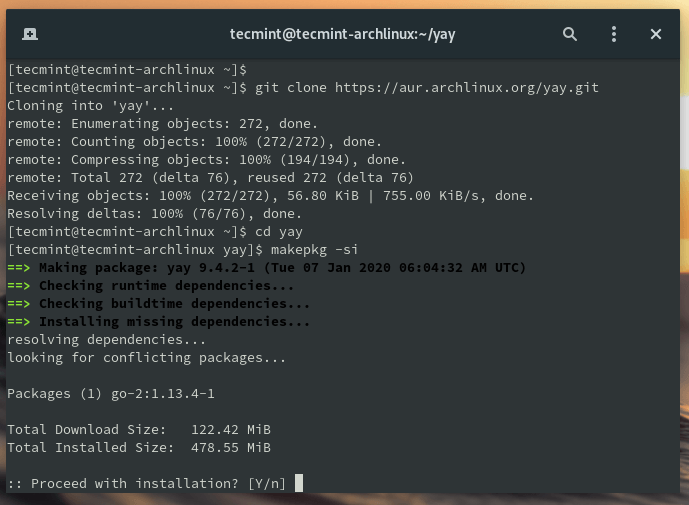
Install Yay AUR Helper in Arch Linux

Once Yay installed, you can use it to install Bandwhich as shown.

$ yay -S bandwhich
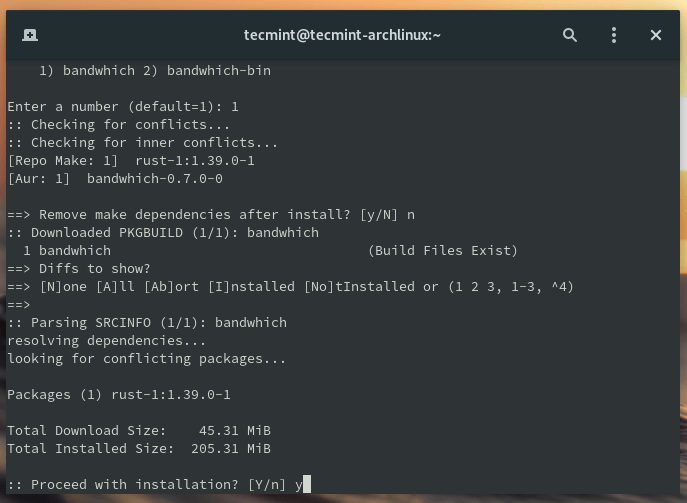
Install Bandwhich in Arch Linux

On Other Linux distributions, bandwhich can be installed using the Rust package manager called cargo. To install Cargo on Linux, you need to install Rust programming language.

$ curl --proto '=https' --tlsv1.2 -sSf https://sh.rustup.rs | sh

Once Rust installed on the system, you can simply use the cargo command to install Bandwhich in Linux systems.

$ cargo install bandwhich
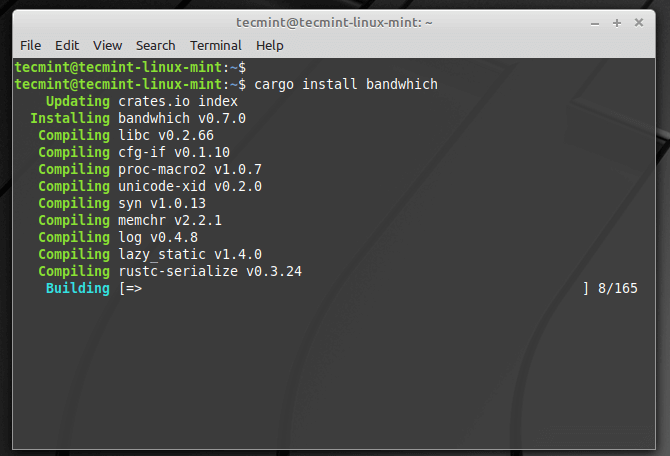
Install Bandwhich in Linux

This installs bandwhich to ~/.cargo/bin/bandwhich but you required root privileges to run it. To fix that, you need to create a symbolic link to the binary as shown.

$ sudo ln -s ~/.cargo/bin/bandwhich /usr/local/bin/

After that, you can able to run bandwhich command, instead of sudo ~/.cargo/bin/bandwhich as shown.

$ sudo bandwhich
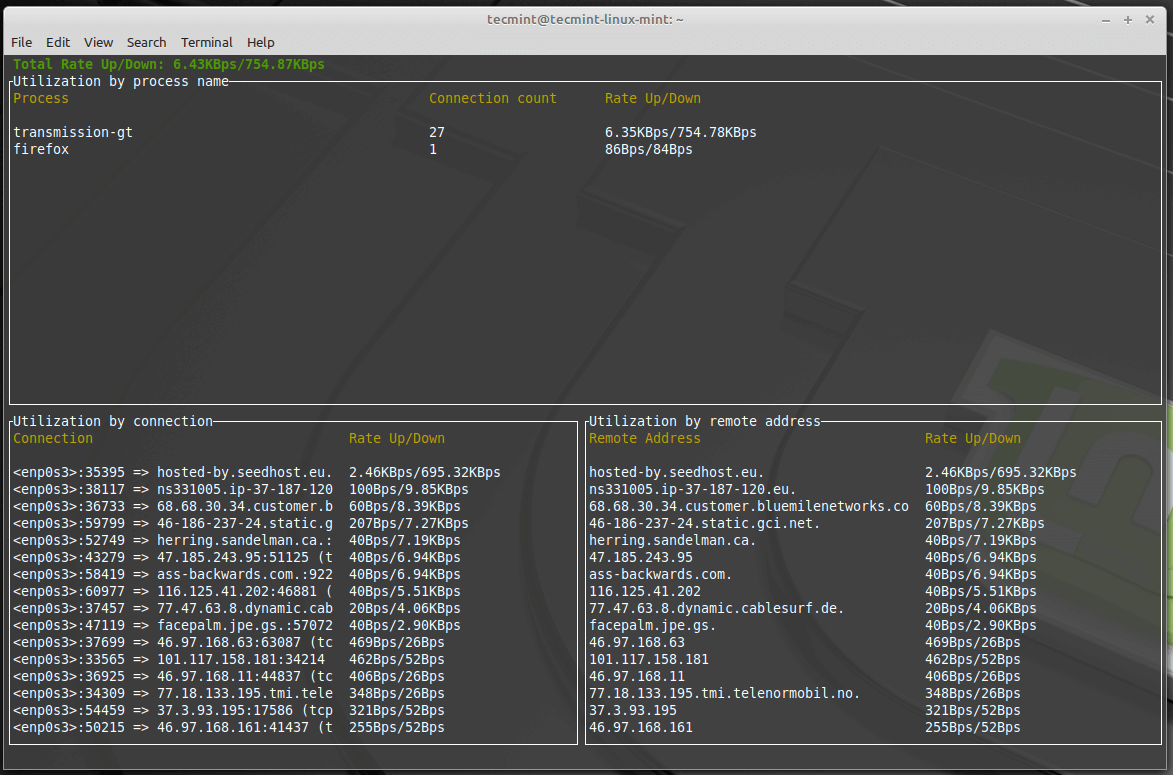
Bandwhich - Monitor Network Usage in Linux
Bandwhich – Monitor Network Usage in Linux

For more usage and options, type:

$ sudo bandwhich --help

That’s It! Bandwhich is a useful command-line utility for displaying current network usage by process, connection and remote IP/hostname in Linux.

Root Plan
Premium Linux Education for Serious Learners

Take Your Linux Skills to the Next Level

Root members get full access to every course, certification prep track, and a growing library of hands-on Linux content — with new courses added every month.

What You Get
Ad-free access to all premium articles
Access to all courses: Learn Linux, AI for Linux, Bash Scripting, Ubuntu Handbook, Golang and more.
Access to Linux certifications (RHCSA, RHCE, LFCS and LFCA)
Access new courses on release
Get access to weekly newsletter
Priority help in comments
Private Telegram community
Connect with the Linux community
Ravi Saive
I'm Ravi Saive, an award-winning entrepreneur and founder of several successful 5-figure online businesses, including TecMint.com, GeeksMint.com, UbuntuMint.com, and the premium learning hub Pro.Tecmint.com.

Each tutorial at TecMint is created by a team of experienced Linux system administrators so that it meets our high-quality standards.

Join the TecMint Weekly Newsletter (More Than 156,129 Linux Enthusiasts Have Subscribed)
Was this article helpful? Please add a comment or buy me a coffee to show your appreciation.

Got Something to Say? Join the Discussion...

Thank you for taking the time to share your thoughts with us. We appreciate your decision to leave a comment and value your contribution to the discussion. It's important to note that we moderate all comments in accordance with our comment policy to ensure a respectful and constructive conversation.

Rest assured that your email address will remain private and will not be published or shared with anyone. We prioritize the privacy and security of our users.

Root Plan Premium Linux Education for Serious Learners

Before You Go - Upgrade Your Linux Skills

Root members get everything in one place, with new courses added every month.

What You Get
Ad-free access to all premium articles
Access to all courses: Learn Linux, AI for Linux, Bash Scripting, Ubuntu Handbook, Golang and more.
Linux certifications: RHCSA, RHCE, LFCS and LFCA
Access new courses on release
Weekly newsletter, priority support & Telegram community
Join Root Today and Start Learning Linux the Right Way
Structured courses, certification prep, and a community of Linux professionals - all in one membership.
Join Root Plan →
$8/mo · or $59/yr billed annually