

It’s quite often that we keep forgetting which version of the Debian operating system we are using and this mostly happens when you log in to the Debian server after a long time or are you looking for a software that is available for a specific version of Debian only.
Or it may also happen when you are using few servers with multiple versions of the operating system and may not be necessary to remember which version of Debian is installed on which system. There may be many other reasons.
Read Also: How to Find Out What Version of Linux You Are Running
In this article, we will explain to you several ways to find out the Debian version installed on your system.
Checking Debian Version Using lsb_release Command
The lsb_release command displays certain LSB (Linux Standard Base) information about your Linux operating system and it is the preferred way to check the installed version of your Debian system.
$ lsb_release -a
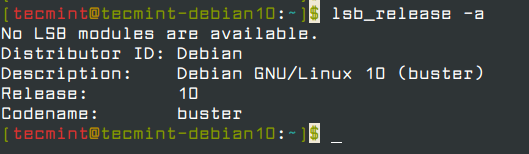
From the output above, I am using Debian GNU/Linux 10 (buster) as shown in the Description line.
That’s not the only way, there are several other ways to find out the installed Debian version as explained below.
Checking Debian Version using the /etc/issue File
The /etc/issue is a text file that holds a message or system identification information, you can use the cat command to print the contents of this file.
$ cat /etc/issue

Debian GNU/Linux 10 \n \l
The above command only shows the Debian version number, if you want to know the current Debian update point releases, use the following command, it will also work on the older version of Debian releases.
$ cat /etc/debian_version

10.1
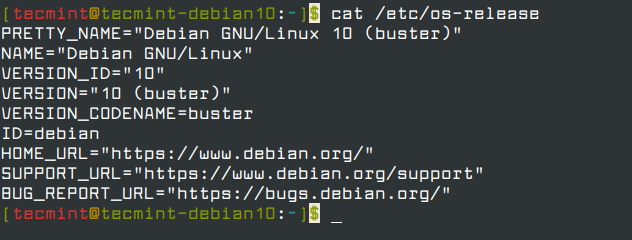
Checking Debian Version using the /etc/os-release File
The /etc/os-release is a new configuration file introduced in systemd, which contains system identification data, and only available in newer Debian distributions.
$ cat /etc/os-release
Checking Debian Version using hostnamectl Command
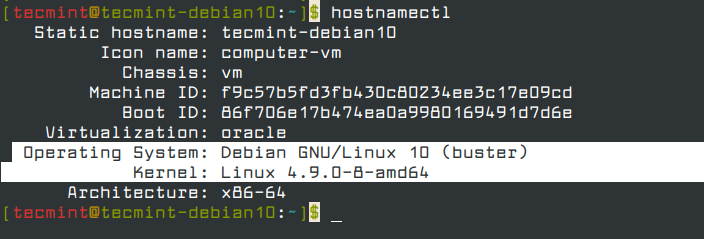
The hostnamectl command is used to set or change system hostname and related settings, but you can use this command to check the Debian version along with the kernel version.
$ hostnamectl
That’s all! In this article, we have explained several ways to check which Debian version you are running on the system. Which command did you found useful? do share with us in the comments.

Nice tutorial! Just to add that you could use “cat /etc/debian_version”
@Moltke,
Thanks for the suggestion, added the command
cat /etc/debian_versionin the article.