

Transfer.sh is a simple, easy and fast service for file sharing from the command-line. It allows you to upload up to 10GB of data and files are stored for 14 days, for free.
You can maximize amount of downloads and it also supports encryption for security. It supports the local file system (local); together with s3 (Amazon S3), and gdrive (Google Drive) cloud storage services.
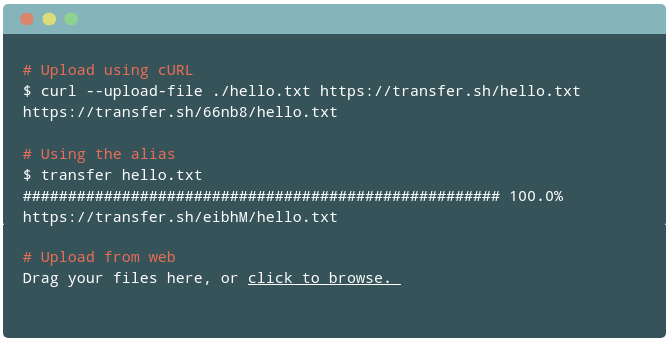
It is designed to be used with the Linux shell. In addition, you can preview your files in the browser. In this article, we will show how to use transfer.sh in Linux.
Upload a Single File
To upload a file, you can use the curl program with the --upload-file option as shown.
$ curl --upload-file ./tecmint.txt https://transfer.sh/tecmint.txt
Download a File
To download your file, a friend or colleague can run the following command.
$ curl https://transfer.sh/Vq3Kg/tecmint.txt -o tecmint.txt
Upload Multiple Files
You can upload multiple files at once, for example:
$ curl -i -F filedata=@/path/to/tecmint.txt -F filedata=@/path/to/usernames.txt https://transfer.sh/
Encrypt Files Before Transfer
To encrypt your files before the transfer, use the following command (you must have the gpg tool installed on the system). You will be prompted to enter a password to encrypt the file.
$ cat usernames.txt | gpg -ac -o- | curl -X PUT --upload-file "-" https://transfer.sh/usernames.txt
To download and decrypt the above file, use the following command:
$ curl https://transfer.sh/11Rnw5/usernames.txt | gpg -o- > ./usernames.txt
Use Wget Tool
Transfer.sh also supports the wget tool. To upload a file, run.
$ wget --method PUT –body-file=./tecmint.txt https://transfer.sh/tecmint.txt -O --nv
Create Alias Command
To use the short transfer command, add an alias to your .bashrc or .zshrc startup file.
$ vim ~/.bashrc
OR
$ vim ~/.zshrc
Then add the lines below in it (you can only choose one tool, either curl or wget).
##using curl
transfer() {
    curl --progress-bar --upload-file "$1" https://transfer.sh/$(basename $1) | tee /dev/null;
}

alias transfer=transfer
##using wget
transfer() {
    wget -t 1 -qO - --method=PUT --body-file="$1" --header="Content-Type: $(file -b --mime-type $1)" https://transfer.sh/$(basename $1);
}

alias transfer=transfer
Save the changes and close the file. Then source it to apply the changes.
$ source ~/.bashrc
OR
$ source ~/.zshrc
From now on, you upload a file using the transfer command as shown.
$ transfer users.list.gz
To setup your own sharing server instance, download the program code from the Github repository.
You can find more information and sample use cases in the project homepage: https://transfer.sh/
Transfer.sh is a simple, easy and fast service for file sharing from the command-line. Share your thoughts about it with us via the feedback form below. You can also tell us about similar services that you have come across – we’ll be grateful.

Unfortunately
transfer.shhas a 50% of downtime per day lately, I have discovered this one oshi.at it offers same command-line interface and a wide variety of file storing options.Do you know their expiration time limit on command line?
How is this better than the good old woof ?
@Sarimasu
We’ll give woof a try and compare the two before answering your question.
Thanks for sharing this with us.