
Have you upgraded your kernel and redhat-release packages and you are encountering some issues. Do you want to downgrade to a lower minor release. In this article, we will describe how to do downgrade RHEL or CentOS version to previous minor version.
Note: The following steps will only work for downgrades within the same major version (such as from RHEL/CentOS 7.6 to 7.5) but not between major versions (such as from RHEL/CentOS 7.0 to 6.9).
A minor version is a release of RHEL that does not (in most cases) add new features or content. It focuses on solving minor problems, typically bugs or security issues. Most of what makes a specific minor version is included in the kernel, so you will need to find out which kernels are supported as part of the minor version you are targeting.
For the purpose of this article, we will show how to downgrade from 7.6 to 7.5. Before we proceed, note that the kernel version for 7.5 is 3.10.0-862. Got to Red Hat Enterprise Linux Release Dates for a complete list of minor releases and associated kernel versions.
Let’s check if the required kernel packages “kernel-3.10.0-862” is installed or not, using the following yum command.
# yum list kernel-3.10.0-862*
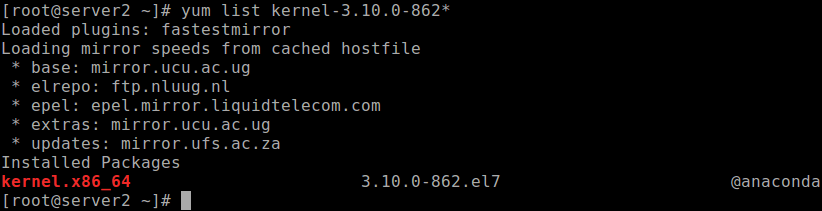
If the output of the previous command shows that the kernel package is not installed, you need to install it on the system.
# yum install kernel-3.10.0-862.el7
Once the kernel installation is compete, to apply the changes, you need to reboot the system.
Then downgrade the redhat-release package to complete the process. The command below targets the latest minor version that is lower than the current running one, such as from 7.6 to 7.5, or from 7.5 o 7.4.
# yum downgrade redhat-release
Finally, confirm the downgrade by checking the contents of /etc/redhat-release using the cat command.
# cat /etc/redhat-release

That’s all! In this article, we have explained how to downgrade RHEL or CentOS distribution to a lower minor release. If you have any queries, use the feedback form below to reach us.




Can we downgrade from centOS 7.9 to 7.6? Please help how to make it happen.
Hello, help please, can we downgrade centos 7.9 to 7.5?
Hi David, yes you have to run the above command 4 times, Also please check kernel versions are available for all.
Can we downgrade centos 7.8 to 7.7 or 7.6?
@faran
Yes, you can.
@Aaron
Thank you for your response can you share the procedure or document which we follow to downgrade centos 7.8 to 7.7
@Aaron,
Thank you, Aaron, can you share the document or detail how to downgrade?
@faran
Have you tried out the instructions in the guide?
Just to reiterate something that Red Hat has made clear in https://access.redhat.com/solutions/29617: the downgrading of the kernel is neither supported nor recommended, as it leaves the system in an undesired state.
Since Red Hat is the upstream provider, we would be wise to take their recommendation seriously. I have also come across nothing that the CentOS project provides that will facilitate this process. In light of all this, we should, unfortunately, avoid the advice that this article gives.
@Simon
Thanks for sharing this, we will check out the lin and act accordingly.
This did not work on an attempt to downgrade a centos 7.7 to 7.6. I get ‘Nothing to do”
Hi Everyone,
I have also same problem. I am using the centos-release-7-4.1708.el7.centos.x86_64. I should use this only as a project need, and mistakenly i have done
yum update. Then it updated to 7.6, now how I can downgrade to 7.4 ? i have tried above steps but it’s not working for me.can anyone help..
Usually old kernel not deleted, so you can just boot it.
Changing package with release name will not revert userspace.
This is not recomended by CentOS. You can find older packages on mirrors?
Nope