HTTP Prompt – An Interactive Command Line HTTP Client

Take Your Linux Skills to the Next Level All courses, certifications, ad-free articles & community — from $8/mo
Join Root →
Ad-free access to all premium articles
Access to all courses: Learn Linux, AI for Linux, Bash Scripting, Ubuntu Handbook, Golang and more.
Access to Linux certifications (RHCSA, RHCE, LFCS and LFCA)
Access new courses on release
Get access to weekly newsletter
Priority help in comments
Private Telegram community
Connect with the Linux community
From $8/mo · or $59/yr billed annually · Cancel anytime

HTTP Prompt (or HTTP-prompt) is an interactive command-line HTTP client built on HTTPie and prompt_toolkit, featuring autocomplete and syntax highlighting. It also supports auto cookies, OpenAPI/Swagger integration as well as Unix-like pipelines and output redirection. In addition, it comes with more than 20 themes that you can use.
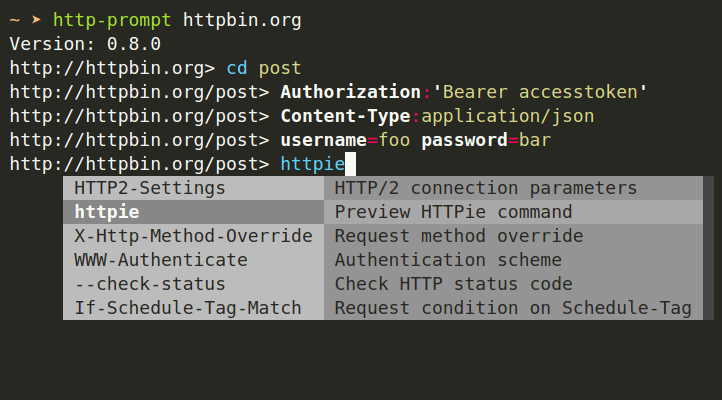
HTTP Prompt HTTP Client for Linux

In this article, we will explain how to install and briefly use HTTP-prompt in Linux.

How to Install HTTP Prompt in Linux

You can install HTTP-prompt just like a regular Python package using PIP command as shown.

$ pip install http-prompt

You will likely get some permission errors if you are trying to install HTTP-prompt on the system-wide Python. It isn’t advised, but if this is what you want to do, just use sudo command to gain root privileges as shown.

$ sudo pip install http-prompt

Alternatively, you can use the --user option to install the package into user home directory as follows:

$ pip install --user http-prompt

To upgrade HTTP Prompt, do:

$ pip install -U http-prompt

How to Use HTTP Prompt in Linux

To start a session, simply run the http-prompt command as shown.

Start with the last session or http://localhost:8000
$ http-prompt

Start with the given URL
$ http-prompt http://localhost:3000

Start with some initial options
$ http-prompt localhost:3000/api --auth user:pass username=somebody

Start HTTP Prompt
Start HTTP Prompt

After starting a session, you can type commands interactively as shown in the following screenshot.
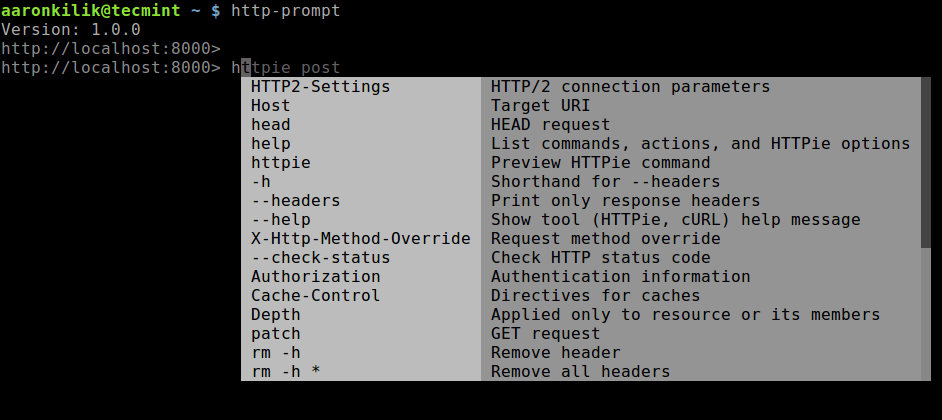
HTTP Prompt Command Usage

To preview how HTTP Prompt is going to call HTTPie, run the following command.

> httpie post
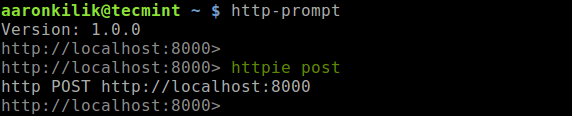
Preview How HTTPie is Called in HTTP Prompt

You can send an HTTP request, enter one of the HTTP methods as shown.

> head
> get
> post
> put
> patch
> delete
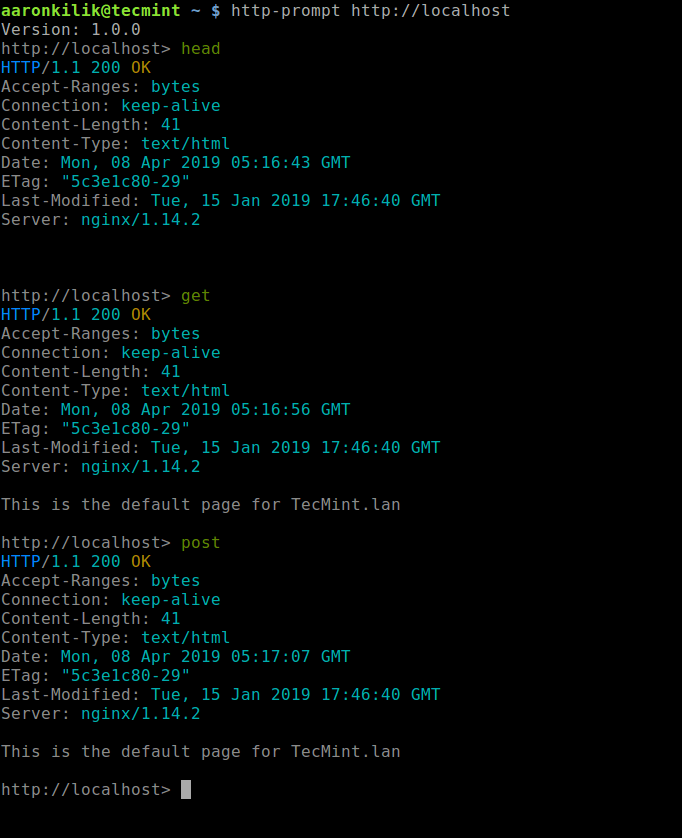
Run HTTP Methods
Run HTTP Methods

It is possible to add headers, query-string, or body parameters, use the syntax as in HTTPie. Here are some examples:

# set header
> Content-Type:application/json

# querystring parameter
> page==5

# body parameters
> username=tecmint 
> full_name='Tecmint HowTos'

# body parameters in raw JSON
> number:=45239
> is_ok:=true
> names:=["tecmint","howtos"]
> user:='{"username": "tecmint", "password": "followus"}'

# write everything in a single line
> Content-Type:application/json page==5 username=tecmint 

You can also add HTTPie options as shown.

> --form --auth user:pass
> --verify=no
OR
> --form --auth user:pass  username=tecmint  Content-Type:application/json	

To reset the session (clear all parameters and options) or exit a session, run:

> rm *		#reset session
> exit		#exit session 

For more information and usage examples, see the HTTP-prompt documentation at: http://http-prompt.com/.

That’s all! HTTP Prompt makes a perfect companion for HTTPie. We would love to hear from you. Share your thoughts or ask questions about HTTP-prompt via the feedback form below.

Root Plan
Premium Linux Education for Serious Learners

Take Your Linux Skills to the Next Level

Root members get full access to every course, certification prep track, and a growing library of hands-on Linux content — with new courses added every month.

What You Get
Ad-free access to all premium articles
Access to all courses: Learn Linux, AI for Linux, Bash Scripting, Ubuntu Handbook, Golang and more.
Access to Linux certifications (RHCSA, RHCE, LFCS and LFCA)
Access new courses on release
Get access to weekly newsletter
Priority help in comments
Private Telegram community
Connect with the Linux community
Aaron Kili
Aaron Kili is a Linux and F.O.S.S enthusiast, an upcoming Linux SysAdmin, web developer, and currently a content creator for TecMint who loves working with computers and strongly believes in sharing knowledge.

Each tutorial at TecMint is created by a team of experienced Linux system administrators so that it meets our high-quality standards.

Join the TecMint Weekly Newsletter (More Than 156,129 Linux Enthusiasts Have Subscribed)
Was this article helpful? Please add a comment or buy me a coffee to show your appreciation.

Got Something to Say? Join the Discussion...

Thank you for taking the time to share your thoughts with us. We appreciate your decision to leave a comment and value your contribution to the discussion. It's important to note that we moderate all comments in accordance with our comment policy to ensure a respectful and constructive conversation.

Rest assured that your email address will remain private and will not be published or shared with anyone. We prioritize the privacy and security of our users.

Root Plan Premium Linux Education for Serious Learners

Before You Go - Upgrade Your Linux Skills

Root members get everything in one place, with new courses added every month.

What You Get
Ad-free access to all premium articles
Access to all courses: Learn Linux, AI for Linux, Bash Scripting, Ubuntu Handbook, Golang and more.
Linux certifications: RHCSA, RHCE, LFCS and LFCA
Access new courses on release
Weekly newsletter, priority support & Telegram community
Join Root Today and Start Learning Linux the Right Way
Structured courses, certification prep, and a community of Linux professionals - all in one membership.
Join Root Plan →
$8/mo · or $59/yr billed annually