Skip to content
⏳ Offer Ends Soon: Get 17 Linux courses, 4 certification courses, 7 eBooks and all future releases for life, just $99 → [Join Now]
Tecmint: Linux Howtos, Tutorials & Guides
  • Latest Tutorials
  • Commands
    • A – Z Linux Commands
    • 100+ Linux Commands
  • Tools
  • Distros
    • Linux Distros for Beginners
    • Linux Distros for Experts
    • New Linux Distros
    • Linux Server Distros
    • Secure Linux Distros
    • CentOS Alternatives
    • RedHat Distributions
    • Debian Distributions
    • Ubuntu Distributions
    • Arch Linux Distros
    • Rolling Linux Distros
    • KDE Linux Distros
    • Linux Distros for Old PC
    • Linux Distros for Kids
    • Linux Distributions for Students
    • Linux Distros for Windows
  • Courses
    • Bash Scripting
    • Learn Linux
    • AI for Linux
    • RHCSA Certification
    • RHCE Certification
    • LFCS Certification
  • eBooks
    • RHCSA Exam
    • RHCE Exam
    • LFCS Exam
    • LFCE Exam
    • LFCA Exam
    • Ansible Exam
  • About
  • Advertise
Tecmint: Linux Howtos, Tutorials & Guides
  • Latest Tutorials
  • Commands
    • A – Z Linux Commands
    • 100+ Linux Commands
  • Tools
  • Distros
    • Linux Distros for Beginners
    • Linux Distros for Experts
    • New Linux Distros
    • Linux Server Distros
    • Secure Linux Distros
    • CentOS Alternatives
    • RedHat Distributions
    • Debian Distributions
    • Ubuntu Distributions
    • Arch Linux Distros
    • Rolling Linux Distros
    • KDE Linux Distros
    • Linux Distros for Old PC
    • Linux Distros for Kids
    • Linux Distributions for Students
    • Linux Distros for Windows
  • Courses
    • Bash Scripting
    • Learn Linux
    • AI for Linux
    • RHCSA Certification
    • RHCE Certification
    • LFCS Certification
  • eBooks
    • RHCSA Exam
    • RHCE Exam
    • LFCS Exam
    • LFCE Exam
    • LFCA Exam
    • Ansible Exam
  • About
  • Advertise

add windows to nagios

Nagios Monitor Windows Host

How to Add Windows Host to Nagios Monitoring Server

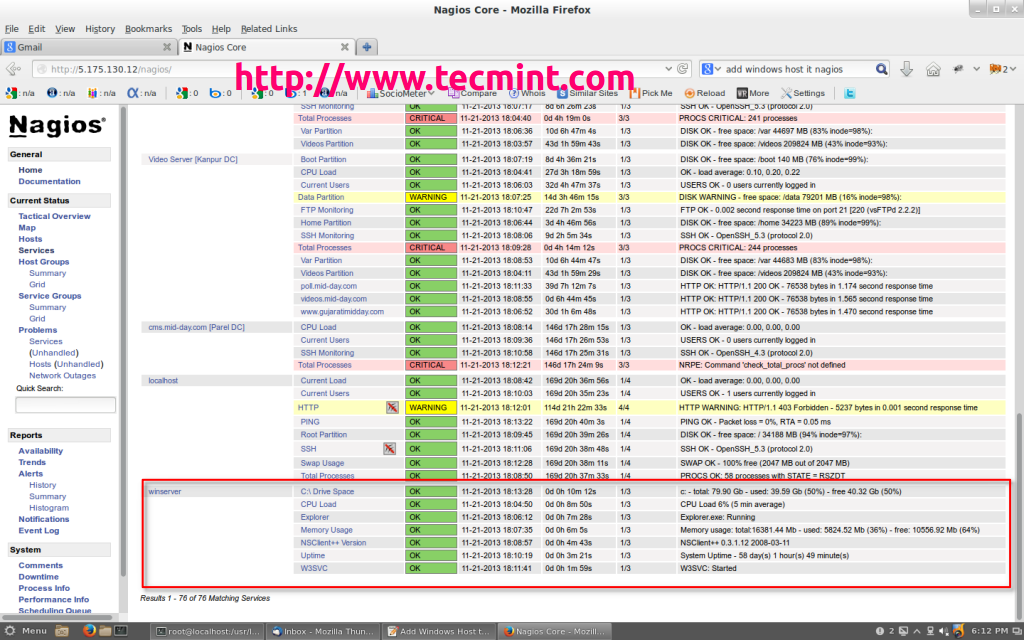
This article describes how to monitor Windows machines “private” services such as CPU load, Disk usage, Memory usage, Services, etc.

TecMint Weekly
Get the Learn Linux 7 Days Crash Course free when you join 34,000+ Linux professionals reading every Thursday.
Check your email for a magic link to get started.
Something went wrong. Please try again.
Free forever. Unsubscribe anytime.
Learn Linux Right Way
17 structured courses, ad-free articles, and the weekly newsletter in one place.
  • ✓SSH, Bash, Ubuntu, Golang, n8n, AI for Linux, Claude for Linux, RHCSA, RHCE, LFCS, LFCA and more
  • ✓Ad-free access to all premium articles
  • ✓Priority help and Telegram community
  • ✓Weekly newsletter every Thursday
Join Root for $59/yr →

Linux Server Monitoring Tools

Web VMStat: A Real Time System Statistics (Memory, CPU, Processess, etc) Monitoring Tool for Linux

How to Monitor Nginx Performance Using Netdata on CentOS 7

Sysstat – All-in-One System Performance and Usage Activity Monitoring Tool For Linux

How to Setup and Manage Log Rotation Using Logrotate in Linux

24 Best Command Line Tools to Monitor Linux Performance

nload – Monitor Linux Network Bandwidth Usage in Real Time

Learn Linux Tricks & Tips

How to Split Large ‘tar’ Archive into Multiple Files of Certain Size

4 Ways to Disable Root Account in Linux

How to Modify Linux Kernel Variables Using sysctl Command

How to Enable, Disable and Install Yum Plug-ins

8 Practical Examples of Linux “Touch” Command

13 Linux Network Configuration and Troubleshooting Commands

Best Linux Tools

Top 7 Free Odoo Apps for Linux Users in 2025

15 Best Open Source Music Making Software for Linux in 2024

5 Best Command Line HTTP Clients for Linux

Top 7 Apps to Install for Your Nextcloud Instance

11 Best IP Address Management (IPAM) Tools for Linux in 2026

13 Best Photo Editing Software for Linux in 2024

Tecmint: Linux Howtos, Tutorials & Guides © 2026. All Rights Reserved.

The material in this site cannot be republished either online or offline, without our permission.

Hosting Sponsored by : Linode Cloud Hosting