How to Use until Loop in Your Shell Scripts

Take Your Linux Skills to the Next Level All courses, certifications, ad-free articles & community — from $8/mo
Join Root →
Ad-free access to all premium articles
Access to all courses: Learn Linux, AI for Linux, Bash Scripting, Ubuntu Handbook, Golang and more.
Access to Linux certifications (RHCSA, RHCE, LFCS and LFCA)
Access new courses on release
Get access to weekly newsletter
Priority help in comments
Private Telegram community
Connect with the Linux community
From $8/mo · or $59/yr billed annually · Cancel anytime

In bash for, while, and until are three loop constructs. While each loop differs syntactically and functionally their purpose is to iterate over a block of code when a certain expression is evaluated.

Until loop is used to execute a block of code until the expression is evaluated to be false. This is exactly the opposite of a while loop. While loop runs the code block while the expression is true and until loop does the opposite.

until [ expression ]
do
	code block
	...
	...
done

Let’s break down the syntax.

  • To start the loop you should use until keyword followed by an expression within single or double braces.
  • The expression should be evaluated as false until to start running the code block.
  • The actual block of code is placed between do and done.

In this short article, you will learn how to use until loop in your shell scripts using the following examples.

Create an Infinite Loop in Scripts

You can create an infinite loop using a false statement as an expression. When you try to simulate infinite loops try to use sleep which will pass the script periodically.

count=0
until false
do
	echo "Counter = $count"
	((count++))
	sleep 2
done
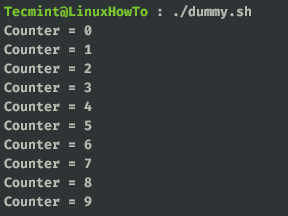
Create Infinite Loop in Linux

Create Single Line Statements

You can create single-line loop statements. Take a look at the below code. This is the same as our first infinite loop example but in a single line. Here you have to use a semicolon (;) to terminate each statement.

# until false; do echo "Counter = $count"; ((count++)); sleep 2; done

Single Line Statement

Alter Flow with break and continue Statement

You can use a break and continue statements inside while loop. The break statement will exit out of the loop and will pass the control to the next statement while the continue statement will skip the current iteration and start the next iteration in the loop.

I am using the same infinite loop example. Here when the count is equal to five continue statement will jump over to the next iteration skipping the rest of the loop body. Similarly, the loop breaks when the count is equal to or greater than 10.

count=0
until false
do
  ((count++))
  if [[ $count -eq 5 ]]
  then
    continue
  elif [[ $count -ge 10 ]]
  then
    break
  fi
  echo "Counter = $count"
done
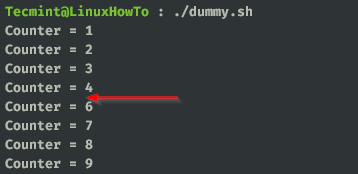
Break and Continue Statement

That’s it for this article. We will catch you with another interesting article soon ‘until‘ then keep reading and keep supporting us.


Root Plan
Premium Linux Education for Serious Learners

Take Your Linux Skills to the Next Level

Root members get full access to every course, certification prep track, and a growing library of hands-on Linux content — with new courses added every month.

What You Get
Ad-free access to all premium articles
Access to all courses: Learn Linux, AI for Linux, Bash Scripting, Ubuntu Handbook, Golang and more.
Access to Linux certifications (RHCSA, RHCE, LFCS and LFCA)
Access new courses on release
Get access to weekly newsletter
Priority help in comments
Private Telegram community
Connect with the Linux community
Karthick
A passionate software engineer who loves to explore new technologies. He is a public speaker and loves writing about technology, especially about Linux and open source.

Each tutorial at TecMint is created by a team of experienced Linux system administrators so that it meets our high-quality standards.

Join the TecMint Weekly Newsletter (More Than 156,129 Linux Enthusiasts Have Subscribed)
Was this article helpful? Please add a comment or buy me a coffee to show your appreciation.

Got Something to Say? Join the Discussion...

Thank you for taking the time to share your thoughts with us. We appreciate your decision to leave a comment and value your contribution to the discussion. It's important to note that we moderate all comments in accordance with our comment policy to ensure a respectful and constructive conversation.

Rest assured that your email address will remain private and will not be published or shared with anyone. We prioritize the privacy and security of our users.

Root Plan Premium Linux Education for Serious Learners

Before You Go - Upgrade Your Linux Skills

Root members get everything in one place, with new courses added every month.

What You Get
Ad-free access to all premium articles
Access to all courses: Learn Linux, AI for Linux, Bash Scripting, Ubuntu Handbook, Golang and more.
Linux certifications: RHCSA, RHCE, LFCS and LFCA
Access new courses on release
Weekly newsletter, priority support & Telegram community
Join Root Today and Start Learning Linux the Right Way
Structured courses, certification prep, and a community of Linux professionals - all in one membership.
Join Root Plan →
$8/mo · or $59/yr billed annually