CBM – Shows Network Bandwidth in Ubuntu

Take Your Linux Skills to the Next Level All courses, certifications, ad-free articles & community — from $8/mo
Join Root →
Ad-free access to all premium articles
Access to all courses: Learn Linux, AI for Linux, Bash Scripting, Ubuntu Handbook, Golang and more.
Access to Linux certifications (RHCSA, RHCE, LFCS and LFCA)
Access new courses on release
Get access to weekly newsletter
Priority help in comments
Private Telegram community
Connect with the Linux community
From $8/mo · or $59/yr billed annually · Cancel anytime

CBM (Color Bandwidth Meter) is a simple tool that shows the current network traffic on all connected devices in colors in Ubuntu Linux. It is used to monitor network bandwidth. It shows the network interface, bytes received, bytes transmitted and total bytes.

Read Also: iftop – A Real Time Linux Network Bandwidth Monitoring Tool

In this article, we will show you how to install and use cbm network bandwidth monitoring tool in Ubuntu and its derivative such as Linux Mint.

How to Install CBM Network Monitoring Tool in Ubuntu

This cbm network bandwidth monitoring tool is available to install from the default Ubuntu repositories using the APT package manager as shown.

$ sudo apt install cbm

Once you have installed cbm, you can start the program using the following command.

$ cbm 
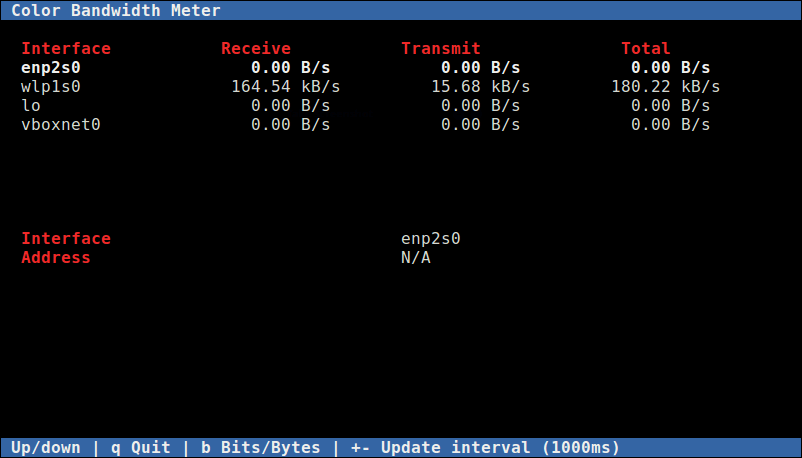
Ubuntu Network Bandwidth Monitoring

While cbm is running, you can control its behavior with the following keys:

  • Up/Down – arrows keys to select an interface to show details about.
  • b – Switch between bits per second and bytes per second.
  • + – increase the update delay by 100ms.
  • -- – decrease the update delay by 100ms.
  • q – exit from the program.

If you are having any network connection issues, check out MTR – a network diagnostic tool for Linux. It combines the functionality of commonly used traceroute and ping programs into a single diagnostics tool.

However, to monitor multiple hosts on a network, you need robust network monitoring tools such as the ones listed below:

    1. How to Install Nagios 4 in Ubuntu
    2. LibreNMS – A Fully Featured Network Monitoring Tool for Linux
    3. Monitorix – A Lightweight System and Network Monitoring Tool for Linux
    4. Install Cacti (Network Monitoring) on RHEL/CentOS 7.x/6.x/5.x and Fedora 24-12
    5. Install Munin (Network Monitoring) in RHEL, CentOS and Fedora

That’s it. In this article, we have explained how to install and use cbm network bandwidth monitoring tool in Ubuntu and its derivative such as Linux Mint. Share your thoughts about cbm via the command form below.

Root Plan
Premium Linux Education for Serious Learners

Take Your Linux Skills to the Next Level

Root members get full access to every course, certification prep track, and a growing library of hands-on Linux content — with new courses added every month.

What You Get
Ad-free access to all premium articles
Access to all courses: Learn Linux, AI for Linux, Bash Scripting, Ubuntu Handbook, Golang and more.
Access to Linux certifications (RHCSA, RHCE, LFCS and LFCA)
Access new courses on release
Get access to weekly newsletter
Priority help in comments
Private Telegram community
Connect with the Linux community
Aaron Kili
Aaron Kili is a Linux and F.O.S.S enthusiast, an upcoming Linux SysAdmin, web developer, and currently a content creator for TecMint who loves working with computers and strongly believes in sharing knowledge.

Each tutorial at TecMint is created by a team of experienced Linux system administrators so that it meets our high-quality standards.

Join the TecMint Weekly Newsletter (More Than 156,129 Linux Enthusiasts Have Subscribed)
Was this article helpful? Please add a comment or buy me a coffee to show your appreciation.

1 Comment

Leave a Reply
  1. Hi,

    I have just installed CBM as per your instructions and it seems to work ok. I was expecting it however to show a TOTAL amount acquired over time, but it does not seem to do it. As soon as a download or surfing session is complete, everything zeros again. Am I missing something or is this all it does?

    Respectfully… Mike

    Reply

Got Something to Say? Join the Discussion...

Thank you for taking the time to share your thoughts with us. We appreciate your decision to leave a comment and value your contribution to the discussion. It's important to note that we moderate all comments in accordance with our comment policy to ensure a respectful and constructive conversation.

Rest assured that your email address will remain private and will not be published or shared with anyone. We prioritize the privacy and security of our users.

Root Plan Premium Linux Education for Serious Learners

Before You Go - Upgrade Your Linux Skills

Root members get everything in one place, with new courses added every month.

What You Get
Ad-free access to all premium articles
Access to all courses: Learn Linux, AI for Linux, Bash Scripting, Ubuntu Handbook, Golang and more.
Linux certifications: RHCSA, RHCE, LFCS and LFCA
Access new courses on release
Weekly newsletter, priority support & Telegram community
Join Root Today and Start Learning Linux the Right Way
Structured courses, certification prep, and a community of Linux professionals - all in one membership.
Join Root Plan →
$8/mo · or $59/yr billed annually