

SQL Buddy is an open source web-based tool was written in PHP language that intended to manage SQLite and MySQL administration via web browsers like Firefox, Chrome, Safari, Opera and IE+ (Internet Explorer).
SQL Buddy is a simple, lightweight and super fast application that offers a well-designed interface with a comprehensive feature set for database administrators and programmers. The tool allows you to add, edit, modify and drop databases and tables, import and export databases, indexes, foreign key relationships, run SQL queries and so on.
It is a good alternative to phpMyAdmin with fast and attractive Ajax-based web interface with support for 47 different languages and themes. Compared to phpMyAdmin, SQL Buddy has almost all features set of phpMyAdmin but SQL Buddy is very lightweight in size 320kb (i.e 1.1MB) after extracting and very easy to setup no installation requires, just unzip the files under web-server root directory and log in with your database username and password.
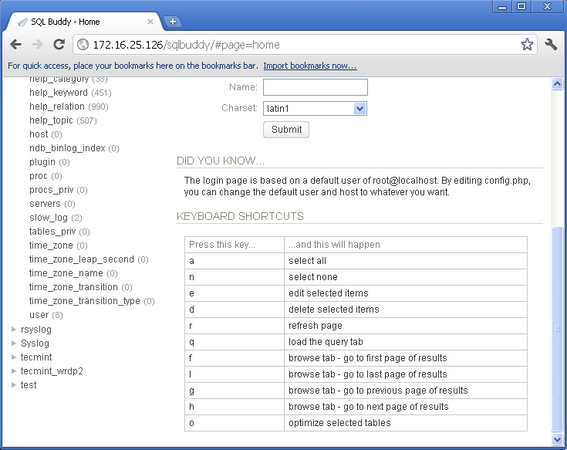
SQL Buddy also offers some useful keyboard shortcuts like create, edit, delete, refresh, select all and query, so you can manage the tool without the use of mouse. If you deal with large number of MySQL databases, then SQL Buddy is your all time choice.
Installing SQL Buddy in Linux
To use SQL Buddy, first Download SQL Buddy using wget command and unzip the files in a folder and then upload the folder to your web-server root directory via ftp. For example, (/var/www/html/sqlbuddy) in my case, but it shouldn’t matter where you place them or what you name the folder.
# wget https://github.com/calvinlough/sqlbuddy/raw/gh-pages/sqlbuddy.zip
# unzip sqlbuddy.zip
# mv sqlbuddy /var/www/html/
Next, navigate to the web browser and type the following command to launch the SQL Buddy.
http://yourserver.com/sqlbuddy
OR
http://youripaddress/sqlbuddy
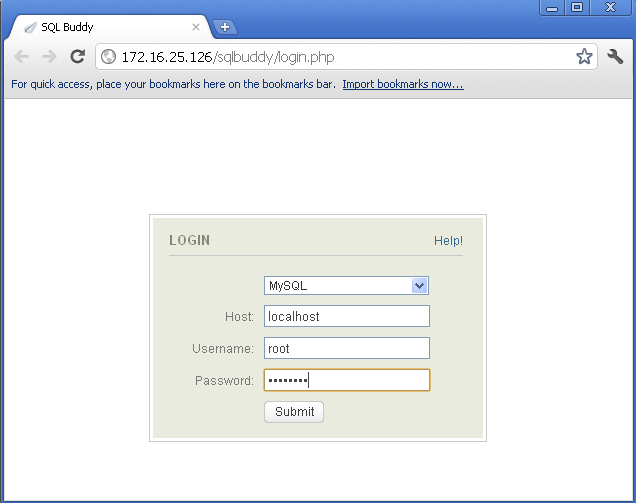
Select MySQL and enter your username and password.
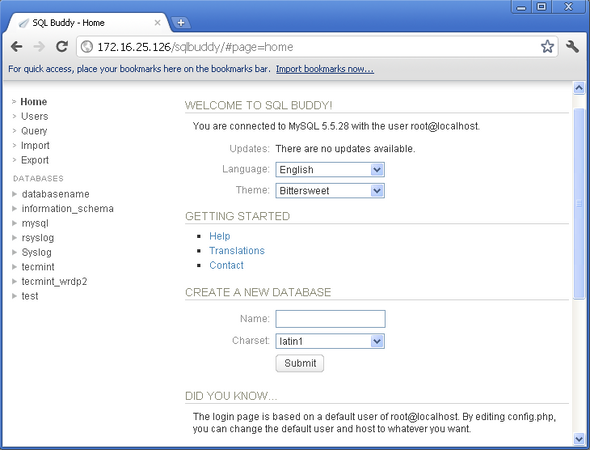
Welcome screen of SQL Buddy.
These are some useful SQL Buddy keyboard shortcuts are available.
If you want to customize your installation, then there are few useful variables in config.php that you may interested.
# vi /var/www/html/sqlbuddy/config.php
If you want to restrict SQL Buddy to specific IP address, then open the file with VI editor.
# vi /etc/httpd/conf.d/sqlbuddy.conf
Add the following lines of code to sqlbuddy.conf file. Replace your-ip-address with your server.
Alias /cacti    /var/www/html/sqlbuddy

<Directory /var/www/html/sqlbuddy>
        <IfModule mod_authz_core.c>
                # httpd 2.4
                Require all granted
        </IfModule>
        <IfModule !mod_authz_core.c>
                # httpd 2.2
                Order deny,allow
                Deny from all
                Allow from your-ip-address
        </IfModule>
</Directory>
Restart the web server.
# service httpd restart
OR
# systemctl restart apache2
If you need any help, please visit the forum available at sql-buddy topics or use our comment section for any queries.

SQL Buddy is dead since 2011.
If you want to use a lightweight tool try Adminer.
I think it’s better than phpMyAdmin.
@ClarMP,
Thanks for notifying, we’ve also covered about Adminer – A Advanced Web Based Databases Administration Tool for Linux.
Adminer (formerly phpMinAdmin) is a full-featured database management tool written in PHP. Conversely to phpMyAdmin, it consist of a single file ready to deploy to the target server. It is available for MySQL, PostgreSQL, SQLite, MS SQL, Oracle, Firebird, SimpleDB, Elasticsearch and MongoDB.
Very simple and lightweight Adminer – A Advanced Web Based Databases Administration Tool for Linux
I am startled to see you extolling the virtues of software that has had no maintenance since 2013 and must be very out of date for both PHP and MySQL support.
What is the default password for sql buddy?
I prefer SQLyog from http://www.webyog.com It is feature rich for MySQL management and very intuitive.
Take a look on free tool Valentina Studio, is the best way to transform your data into meaningful information; create, administer, query and explore Valentina DB, MySQL, Postgre and SQLite databases for free on 32/64 bit Windows, Linux and Mac OS X. http://www.valentina-db.com/en/valentina-studio-overview
phpmyadmin is not enough ? why should I use this?
If you are a beginner to MySQL administration and don’t need multiple functions phpmyadmin – http://www.phpmyadmin.net/home_page/index.php will be enough for you. I used phpmyadmin when I needed simple to import or export MySQL database to/from my sites on wordpress. But if you want to jump to a new level of MySQL management and administration, have lots of features and really comfortable and intuitive graphical user intarface, then I’ll recommend you to try Devart’s dbForge Studio for MySQL – http://www.devart.com/dbforge/mysql/studio/ . I started to use it long ago and its suits all me needs. With version 6.0 it improved the functional significantly!