TecMint.com is a community driven Linux website. Our motto is to provide an effortless howto’s to our valuable readers.

You are also welcome to join our community and can be part of our team, contributing and submitting well written article on Linux. If you have any query, please contact us by email tecmint.com [at] gmail [dot] com or use our contact form.

Install Apache, MySQL 5.5.30 & PHP 5.4.12 on RHEL/CentOS 6.4/5.9 & Fedora 18-12

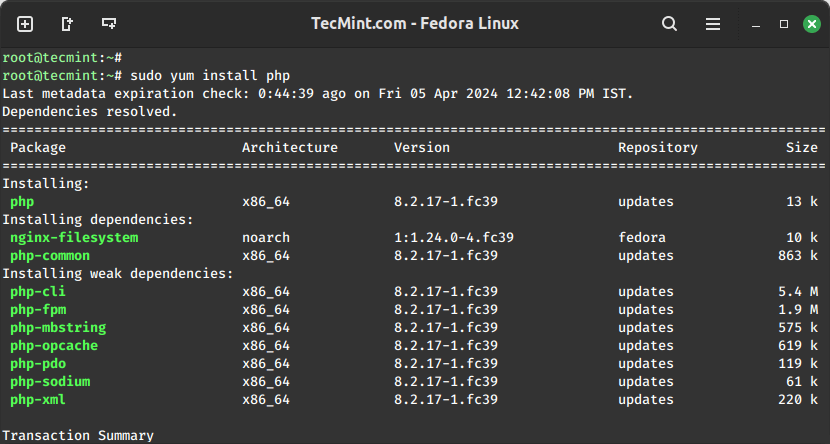
This howto guide explains you’ll how to install Apache Server with latest MySQL 5.5.30 and PHP 5.4.12 versions with php required following modules on RHEL 6.4/6.3/6.2/6.1/6.0/5.9/5.8/5.6, CentOS 6.4/6.3/6.2/6.1/6.0/5.9/5.8/5.6 and Fedora 12,13,14,15,16,17,18 systems using Remi repository via Yum tool.

Install Apache MySQL PHP

Install Apache MySQL PHP

What is Apache?

Apache is an open source freely available HTTP web server that runs on most UNIX-based operating systems as well as on Windows. Apache web server is used to serve web pages like (.htm .php .pl .cgi .js) etc. As per March 2012, Apache web server runs on almost 65.24% websites across all the domains.

What is MySQL?

MySQL is one of the world’s most popular open source relational database management system (RDBMS) that runs any server by providing multi-user access to multiple databases. MySQL runs with Apache.

What is PHP?

PHP (Hypertext Preprocessor) is an open source server-side scripting language that is best suited for web development and can be used to produce dynamic web pages for a website.

PHP Modules

We are going to install all these following PHP modules in this installation.

  1. MySQL (php-mysql) – A extension for PHP applications that use MySQL databases.
  2. PostgreSQL (php-pgsql) – A extension for PostgreSQL database for PHP.
  3. MongoDB (php-pecl-mongo) – A driver for MongoDB database.
  4. SQLite (php-sqlite) – Extension for SQLite Database Engine.
  5. Memcache (php-pecl-memcache) – Memcached caching daemon.
  6. Memcached (php-pecl-memcached) – Memcached caching daemon.
  7. GD (php-gd) – GD extension for PHP application to serve graphics.
  8. XML (php-xml) – XML Parser for PHP applications.
  9. MBString (php-mbstring) – Mbstring extension is used to handle multi-byte string in PHP applications.
  10. MCrypt (php-mcrypt) – A Mcrypt library for PHP scripts.
  11. APC (php-pecl-apc) – APC module used to optimize and cache PHP code.
  12. CLI (php-cli) – Command-line interface for PHP.
  13. PEAR (php-pear) – Application Repository framework for PHP.
  14. PDO (php-pdo) – Database access module for PHP applications.
Install Apache, MySQL 5.5.30 & PHP 5.4.12 on RHEL 6.4/6.3/6.2/6.1/6.0/5.9/5.8/5.6, CentOS 6.4/6.3/6.2/6.1/6.0/5.9/5.8/5.6 and Fedora 12,13,14,15,16,17,18

Step 1: Installing Remi Repository

## Install Remi Repository on Fedora 18, 17, 16, 15 ##
rpm -Uvh http://download1.rpmfusion.org/free/fedora/rpmfusion-free-release-stable.noarch.rpm 
rpm -Uvh http://download1.rpmfusion.org/nonfree/fedora/rpmfusion-nonfree-release-stable.noarch.rpm

## Fedora 18 ##
# rpm -Uvh http://rpms.famillecollet.com/remi-release-18.rpm

## Fedora 17 ##
# rpm -Uvh http://rpms.famillecollet.com/remi-release-17.rpm

## Fedora 16 ##
# rpm -Uvh http://rpms.famillecollet.com/remi-release-16.rpm

## Fedora 15 ##
# rpm -Uvh http://rpms.famillecollet.com/remi-release-15.rpm

## Fedora 14 ##
# rpm -Uvh http://rpms.famillecollet.com/remi-release-14.rpm

## Fedora 13 ##
# rpm -Uvh http://rpms.famillecollet.com/remi-release-13.rpm

## Fedora 12 ##
# rpm -Uvh http://rpms.famillecollet.com/remi-release-12.rpm

## Install Remi & Epel Repository on RHEL/CentOS 6.4-6.0 - 32 Bit ##
rpm -Uvh http://download.fedoraproject.org/pub/epel/6/i386/epel-release-6-8.noarch.rpm
rpm -Uvh http://rpms.famillecollet.com/enterprise/remi-release-6.rpm 

## Install Remi & Epel Repository on RHEL/CentOS 6.4-6.0 - 64 Bit ##
rpm -Uvh http://download.fedoraproject.org/pub/epel/6/x86_64/epel-release-6-8.noarch.rpm
rpm -Uvh http://rpms.famillecollet.com/enterprise/remi-release-6.rpm 

## Install Remi Repository on RHEL/CentOS 5.9-5.0 - 32 Bit ##
rpm -Uvh http://dl.fedoraproject.org/pub/epel/5/i386/epel-release-5-4.noarch.rpm
rpm -Uvh http://rpms.famillecollet.com/enterprise/remi-release-5.rpm

## Install Remi Repository on RHEL/CentOS 5.9-5.0 - 64 Bit ##
rpm -Uvh http://dl.fedoraproject.org/pub/epel/5/x86_64/epel-release-5-4.noarch.rpm
rpm -Uvh http://rpms.famillecollet.com/enterprise/remi-release-5.rpm

Step 2: Installing Apache, MySQL 5.5.30 & PHP 5.4.12

## Installing on Fedora 12, 13, 14, 15, 16, 17, 18 ##
# yum --enablerepo=remi install httpd mysql mysql-server php php-common

## Installing on RHEL/CentOS 5-6 ##
# yum --enablerepo=remi,remi-test install httpd mysql mysql-server php php-common

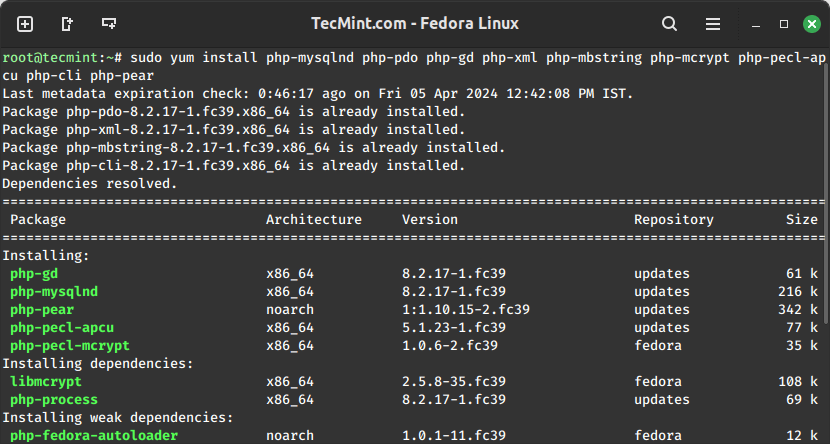
Step 3: Installing PHP 5.4.12 Modules

## Installing on Fedora 12, 13, 14, 15, 16, 17, 18 ##
# yum --enablerepo=remi install php-mysql php-pgsql php-pecl-mongo php-sqlite php-pecl-memcache php-pecl-memcached php-gd php-mbstring php-mcrypt php-xml php-pecl-apc php-cli php-pear php-pdo

## Installing on RHEL/CentOS 5-6 ##
# yum --enablerepo=remi,remi-test install php-mysql php-pgsql php-pecl-mongo php-sqlite php-pecl-memcache php-pecl-memcached php-gd php-mbstring php-mcrypt php-xml php-pecl-apc php-cli php-pear php-pdo

Step 4: Starting/Stopping Apache & MySQL 5.5.30

## Enable Apache and MySQL on Run-Levels ##
# chkconfig --levels 235 httpd on
# chkconfig --levels 235 mysqld on

## Apache Commands ## 
# /etc/init.d/httpd start
# /etc/init.d/httpd stop
# /etc/init.d/httpd status

## MySQL Commands ## 
# /etc/init.d/mysqld start
# /etc/init.d/mysqld stop
# /etc/init.d/mysqld status

Step 5: Verifying Apache, MySQL 5.5.30 & PHP 5.4.12

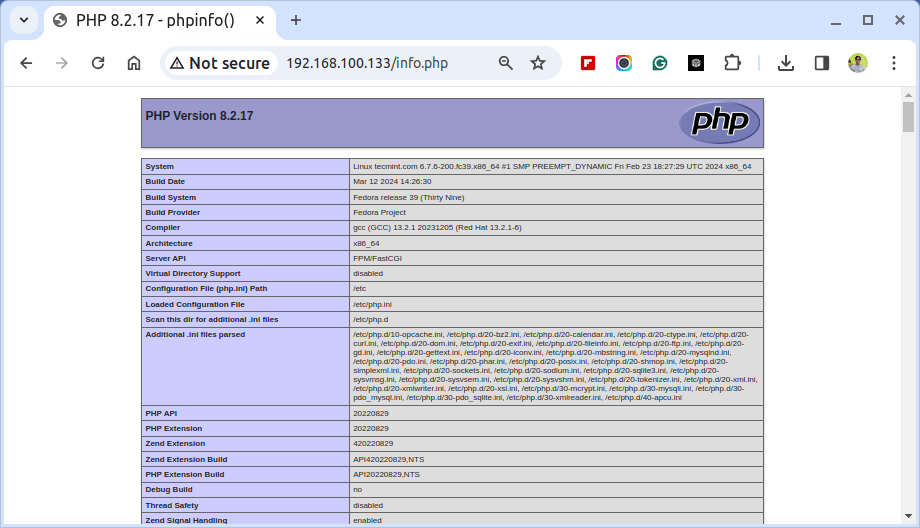
1. Create a page called phpinfo.php under your Apache root directory and add the following lines to it. For example (/var/www/html/phpinfo.php).

<?php

     phpinfo ();
?>

2. Now access the page via web browser like http://localhost/phpinfo.php. You will see below screenshot.

Install PHP 5.4.12 in Linux

PHP 5.4.11 Preview

Check MySQL Info

MySQL 5.5.30 Info

That’s it!. If you are having any trouble installing, let me know via our comment section.


68 Responses

  1. Nice post. I was watching continuously this site and I’m impressed! Extremely useful info especially the last part I care for such info much. I was looking for this specific info for a long time. Thank you and best of luck.

  2. Gary says:

    what is the root password of mysql?

    • Ravi Saive says:

      @Gary

      If it is fresh MySQL installation, then password would be blank.. or you can set password using following command.

      mysqladmin -u root password NEWPASSWORD
      

      Or to change MySQL password use.

      mysqladmin -u root -p'oldpassword' password 'newpass'
      
  3. BiBi says:

    Thanks very much

  4. Gary says:

    thanks a lot

  5. landjea says:

    Thanks very much. Easy to follow, no hassles. Upgraded my Virtualmin box this morning and no problems.

  6. landjea says:

    FYI – it isn’t mentioned because it is assumed a fresh install, but it also works with an upgrade. You just need to remember to run “mysql_upgrade” from the command line after the upgrade to fix the privileges and performance_schema.

  7. praveen says:

    /etc/init.d/mysqld start not a directory…wat to do

  8. praveen says:

    Can’t connect to local MySQL server through socket ‘/var/lib/mysql/mysql.sock’ (2)
    showing an error while connecting mysql

  9. James says:

    Thank you so much for creating this tutorial. I am having to install various content management systems on a RedHat 6 server for testing. After installing PHP, mysql and Apache before starting the install of the systems, discovered that one of them needed php mbstring enabled. I found other search results but I realized a reinstall of PHP was needed and this tutorial efficiently helped me exactly do that.

    Your site is now going to be among those I look directly for help and look at daily with my other tech resources.

    Thanks,

    James

  10. Great tip, it’s was very useful today during a CentOS 6 config :)

    Thanks.

  11. Jags says:

    indeed Impressive repository and post KB to convert fresh linux distro into productive web server in few minutes !

    It rocks flawless.

    Thanks Ravi.

  12. giet says:

    well i am using cent os 6.3 32 bit there is a problem when iam trying to install the php module
    Error: Package: mysql-server-5.1.61-4.el6.i686 (tejas-barot-wine)
    Requires: mysql = 5.1.61-4.el6
    Installed: mysql-5.5.29-1.el6.remi.i686 (@remi)
    mysql = 5.5.29-1.el6.remi
    Available: mysql-5.1.61-4.el6.i686 (tejas-barot-wine)
    mysql = 5.1.61-4.el6
    You could try using –skip-broken to work around the problem
    You could try running: rpm -Va –nofiles –nodigest
    what i wl do ?

  13. niun says:

    Very helpful!
    Thanks

  14. Mohit says:

    Hey Ravi,
    I am new to linux, Thanks for the steps i followed the steps but while checking the phpinfo i am getting php code of the file,
    Linux version – Redhat enterprise linux 5.4
    While checking with the command php -v its giving me 5.2.17 version not the installed one, do i need to uninstall previous version first?

    Please let me know if you need any other information to help me

  15. phpMyAdmin – Error
    The mysqli extension is missing. Please check your PHP configuration.

    help me please

  16. Bordin says:

    I follow the steps then.
    i can’t connect to mysql with php

  17. test says:

    short_tag php5 configuration
    Help Me.

    • Ravi Saive says:

      Set the following variable in your php.ini file, If you don’t have access to the php.ini, you can add it to .htaccess file.

      short_open_tag=On
      

      Restart your Apache server.

  18. bala says:

    how to install Apache web server in fedaro13..
    i have an tar file..

  19. you guys are life savers, good stuff. it worked on the first go

  20. Saurabh says:

    for my sql on phpinfo page, i am getting an

    Client API version 5.1.66

    • Ravi Saive says:

      First replace old php version using.

      # yum remove php php-common php-devel
      

      Then install latest version as described in the article.

  21. Rohit says:

    Hello,

    Very nice post…

  22. Really great post! Very helpful.

  23. BokaLike says:

    The easiest method to update PHP from older version 5.1.x to 5.3.x & the method is called “NASHOT’s Method”.

    ================== START ===============================
    NASHOT’s Method:

    Step 1) Go to GUI mode(X-Windows preferably Gnome desktop) & then “Add/Remove Software section(Package Manager).

    Step 2) Click on Search TAB & enter the search string as php & set the radio button to “Installed Packages” & Hit the Search Button.

    Step 3) Search result will show existing php modules with Ticked check-boxes at the beginning. It’s something like this:
    [/] php-5.1.x…..
    [/] php-common-5.1.x……
    [/] php-cli-5.1.x……
    [/] php-ldap-5.1.x……
    Etc…Etc…

    Step 4) Now Un-Tick the Check-Boxes from all resulted lines & then Click on Apply Button. This will remove existing PHP version Modules.

    Step 5) Inside the “Package Manager” click on Search Tab & enter the search string as php53 & set the radio button to “All Packages” & Hit Search Button.

    Step 6) Search shows many Result lines related to new PHP version 5.3.x with Un-Ticked Check-Box before each line.

    Step 7) Now Tick the Check-Boxes from all resulted lines & then Click on Apply Button.

    Now “Package Manager” will begins to check for Dependancy Modules for Selected PHP Modules & Downloads the new PHP 5.3.x package modules & then installs Automatically.

    Now Restart your system & check the version of the installed PHP Version by using “php -v” command & result should be PHP 5.3.x

    Please NOTE: If your installation halts at “Checking Dependancy”, then check for selection of “PHP53-odbc64-5.3.x…..”. Actually there are 2 odbc packages & each meant for 32bit & 64bit version of OS. So select only ONE odbc package which is compatible with your OS.

    =================== END ==============================

  24. kade says:

    i wont to start apache but …

    [root@hotel526 ~]# /etc/init.d/httpd start
    Starting httpd: Syntax error on line 206 of /var/www/vhosts/shikolajme.com/conf/13605257930.90124700_httpd.include:
    Wrapper /var/www/cgi-bin/cgi_wrapper/cgi_wrapper cannot be accessed: (2)No such file or directory
    [FAILED]

    • Ravi Saive says:

      I think you messed up your PHP installation with Plesk under your CentOS system. To fix such errors do this.

      # ln -s /usr/bin/sw-engine-cgi /var/www/cgi-bin/cgi_wrapper/cgi_wrapper
      

      If you don’t have wrappers installed, then install using yum command as show.

      # yum install sw-engine-cgi
      

      That’s it. let me know.

  25. Jason says:

    Thanks so much! This was incredibly helpful.

  26. bambalina says:

    first of all thanks for the tutorial.

    the linke for the libmcrypt is dead :

    Error Downloading Packages:
    libmcrypt-2.5.7-5.el5.i386: failure: libmcrypt-2.5.7-5.el5.i386.rpm from epel: [Errno 256] No more mirrors to try.

    please fix it.

    Thanks

  27. Ebin says:

    yum –enablerepo=remi,remi-test install httpd mysql mysql-server php php-common
    gives error as

    http://rpms.famillecollet.com/enterprise/5.50/remi/x86_64/repodata/repomd.xml: [Errno 14] HTTP Error 404: Not Found
    Trying other mirror.
    Error: Cannot retrieve repository metadata (repomd.xml) for repository: remi. Please verify its path and try again

  28. Worked for me. Thanks.

  29. Amanullah says:

    Error: mysql55-libs conflicts with mysql-libs-5.1.67-1.el6_3.x86_64

  30. Amanullah says:

    Error: mysql55-libs conflicts with mysql-libs-5.1.67-1.el6_3.x86_64
    Error: Package: php54w-mysql-5.4.13-1.w6.x86_64 (@webtatic)
    Requires: libmysqlclient.so.18(libmysqlclient_18)(64bit)
    Removing: mysql55-libs-5.5.29-1.w6.x86_64 (@webtatic)
    libmysqlclient.so.18(libmysqlclient_18)(64bit)
    Updated By: mysql55-libs-5.5.30-1.ius.el5.x86_64 (ius)
    Not found
    Available: mysql55-libs-5.5.28-1.w6.x86_64 (webtatic)
    libmysqlclient.so.18(libmysqlclient_18)(64bit)
    You could try using –skip-broken to work around the problem
    You could try running: rpm -Va –nofiles –nodigest

    • Ravi Saive says:

      Frist, remove the conflicting package with yum like this:

      yum remove mysql-libs
      

      And then try to install again.

      • Kotesh says:

        I want to access to of my projects simultaneously in the same machine .How can I setup virtual hosts or is their any other ways to that.

        • Ravi Saive says:

          You can create as many as virtual hosts same way as shown below. Just add the following lines to your httpd.conf file.

          NameVirtualHost *:80
          
          <VirtualHost *:80>
              ServerAdmin tecmint@tecmint.com
              DocumentRoot "/var/www/html/tecmint"
              ServerName tecmint.com
              ServerAlias http://www.tecmint.com
              ErrorLog "logs/tecmint/error_log"
              CustomLog "logs/tecmint/access_log" common
          </VirtualHost>
          
          <VirtualHost *:80>
              ServerAdmin tecmint@tecmint.com
              DocumentRoot "/var/www/html/tecmint1"
              ServerName tecmint1.com
              ServerAlias http://www.tecmint1.com
              ErrorLog "logs/tecmint1/error_log"
              CustomLog "logs/tecmint1/access_log" common
          </VirtualHost>
          
          • Kotesh says:

            I am getting [FAILED] when I restart my httpd. I want to run two projects on my local machine I dont know whether it can be done using by virtual hosts are not.

          • Ravi Saive says:

            Can you post the output of the following command.

            # httpd -t
            
      • Amanullah says:

        The requested URL /conf/myadmin was not found on this server.
        Apache Server at 82.165.24.94 Port 80

        PHP 5.4.12 (cli) (built: Feb 21 2013 20:17:01)
        Copyright (c) 1997-2013 The PHP Group
        Zend Engine v2.4.0, Copyright (c) 1998-2013 Zend Technologies

        my each step is right but not proper open my phpmyadmin..what the solution

  31. Kotesh says:

    [kotesh@machine8 Jantakhoj]$ httpd -t
    Syntax OK

  32. Ugur says:

    Php is not beeing parsed. What can i do? using Centos 6.2

    I installed virtualmin, then i followed the steps on this page.
    php-cli works fine do

    • Ugur says:

      for some reason, i find the following lines in httpd.conf
      RemoveHandler .php
      RemoveHandler .php5
      php_admin_value engine Off

      after removing, php works fine.

  33. Need help in solving “Your PHP installation appears to be missing the MySQL extension which is required by WordPress”.
    OS RedHat Linux 6 Ent. 64bit x86

  34. Prashu says:

    I want to upgrade Apache from 2.4.3 to 2.4.4 and PHP from 5.4.6 to 5.4.14 in RHEL. Can I get steps to accomplish this.

    Thanks

  35. Prashanth says:

    Thanks. My doubt is should I delete older version and install latest version or is there any update option for both apache and PHP. If so pls let me know.

    • Ravi Saive says:

      Yes! you must delete older versions before compiling new versions. Till now there are no official updates from repositories.

  36. Amanullah says:

    how to proper remove PHP 5.4.12 ….

    yum remove ?????

    • Ravi Saive says:

      Yes, use yum remove command to remove completely a package from the system.

      • Prashanth says:

        What should I do in order to install both in different locations but not in default directories like if I want to install under /apps?

        And If I want to have two different versions of apache for testing purpose before deleting older one in different directories then will there be any difference in installation procedure?

        • Ravi Saive says:

          Yes! use yum to install first version of Apache in default location and compile the second version using source.

Leave a Reply

Proudly designed by Tecmint.com.