
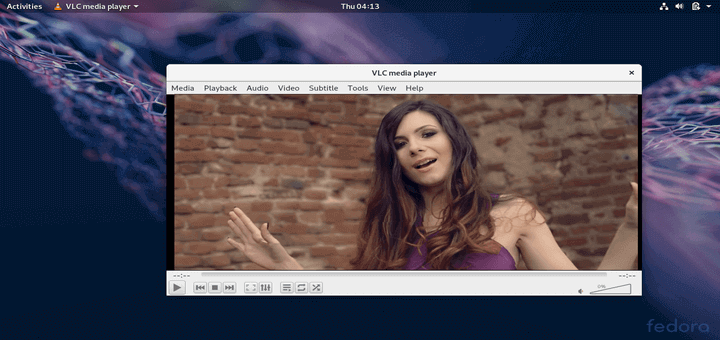
VLC (VideoLAN Client) is an open-source, free, simple, fast, and highly powerful cross-platform player and framework designed for playing a wide range of multimedia files, including CD, DVD, VCD, Audio CD, and various supported streaming media protocols
It was developed by the VideoLAN project and is available for all major operating platforms, including Windows, Linux, Solaris, OS X, Android, iOS, and other supported operating systems.
Install VLC in RHEL-based Systems
The VLC program is not included in RHEL-based operating systems such as CentOS Stream, AlmaLinux, and Rocky Linux.
To install it, we need to use third-party repositories such as RPM Fusion and EPEL. These repositories allow us to automatically install a list of updated packages using the Yum package manager tool.
Install RPM Fusion and EPEL Repositories in RHEL Systems
First, install the EPEL and RPM Fusion repositories for your RHEL-based distribution using the following commands. Please select and install them according to your Linux-supported system version.
On RHEL/CentOS/Alma and Rocky 9
# subscription-manager repos --enable=rhel-9-server-optional-rpms  [on RHEL]
# yum install https://dl.fedoraproject.org/pub/epel/epel-release-latest-9.noarch.rpm
# yum install https://download1.rpmfusion.org/free/el/rpmfusion-free-release-9.noarch.rpm
On RHEL/CentOS/Alma and Rocky 8
# subscription-manager repos --enable=rhel-8-server-optional-rpms  [on RHEL]
# yum install https://dl.fedoraproject.org/pub/epel/epel-release-latest-8.noarch.rpm
# yum install https://download1.rpmfusion.org/free/el/rpmfusion-free-release-8.noarch.rpm
On RHEL/CentOS 7
# subscription-manager repos --enable=rhel-7-server-optional-rpms  [on RHEL]
# yum install https://dl.fedoraproject.org/pub/epel/epel-release-latest-7.noarch.rpm
# yum install https://download1.rpmfusion.org/free/el/rpmfusion-free-release-7.noarch.rpm
On RHEL/CentOS 6
# subscription-manager repos --enable=rhel-6-server-optional-rpms  [on RHEL]
# yum install https://dl.fedoraproject.org/pub/epel/epel-release-latest-6.noarch.rpm
# yum install https://download1.rpmfusion.org/free/el/rpmfusion-free-release-6.noarch.rpm
Installing RPMFusion Repository on Fedora
Under Fedora distributions, the RPMFusion repository comes as pre-installed, if not you can follow the below dnf commands to install and enable it as shown.
# dnf install https://download1.rpmfusion.org/free/fedora/rpmfusion-free-release-$(rpm -E %fedora).noarch.rpm
# dnf install https://download1.rpmfusion.org/nonfree/fedora/rpmfusion-nonfree-release-$(rpm -E %fedora).noarch.rpm
Install VLC in RHEL and Fedora Systems
Once you’ve all the repositories installed on your system, do the following command to check the availability of the VLC player.
# yum info vlc
OR
# dnf info vlc
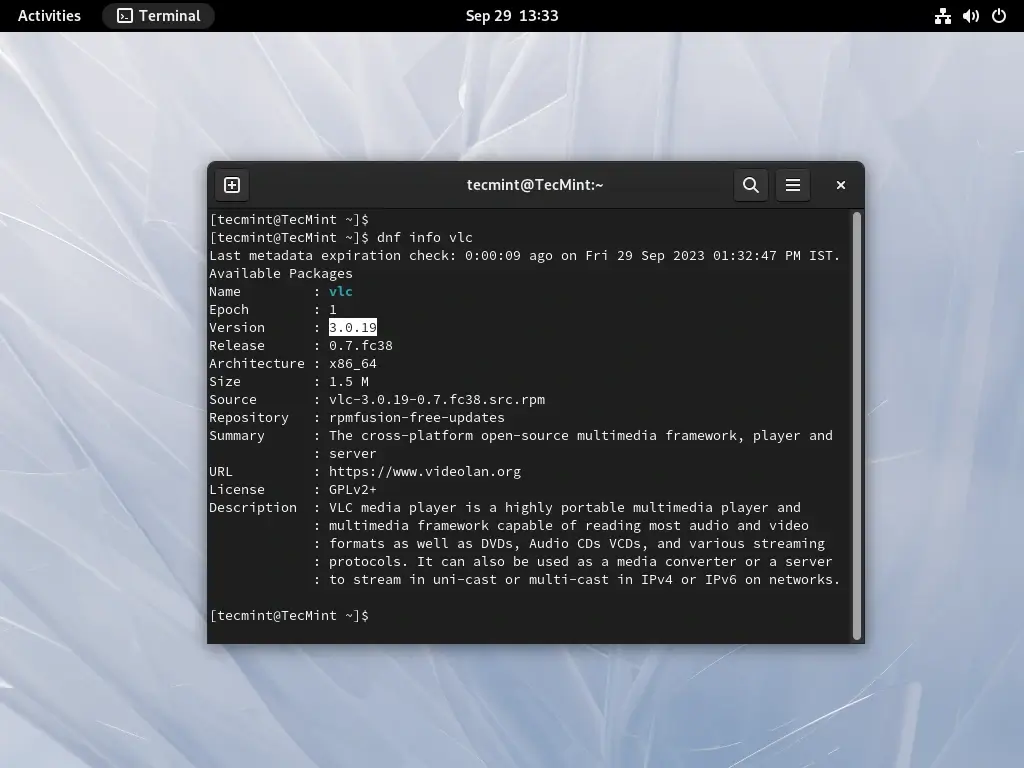
As you can see, a VLC player is available. Install it by running the following command in the terminal.
# yum install vlc
OR
# dnf install vlc
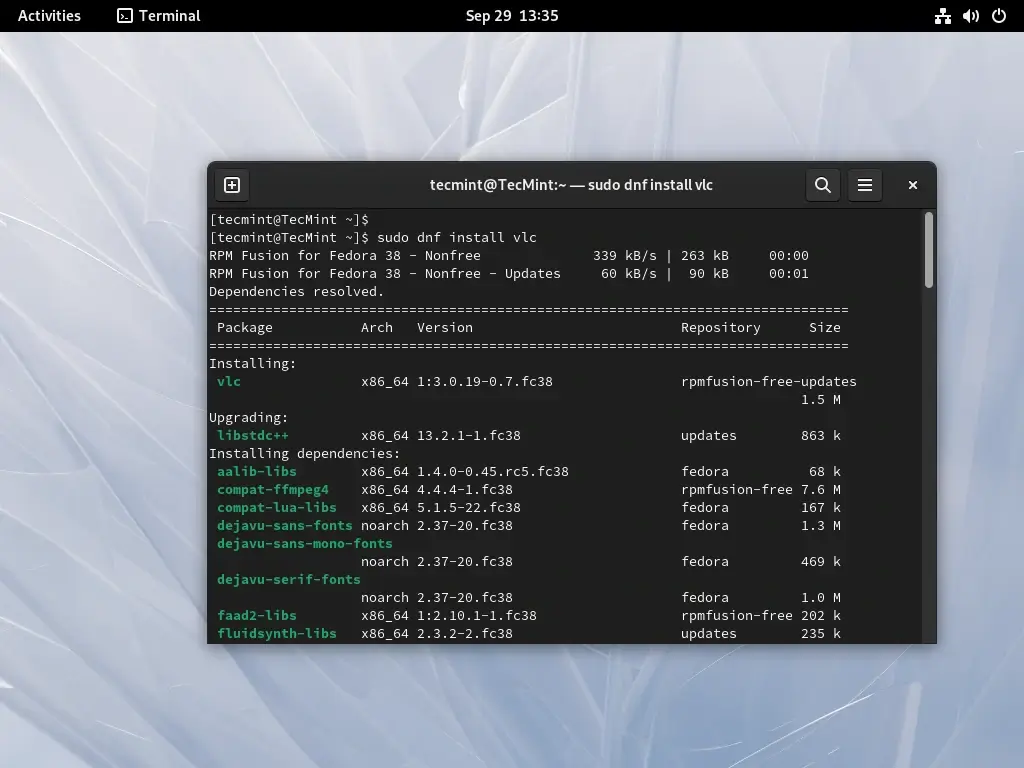
Execute the following command from the desktop terminal as a regular user to launch the VLC player. Please note that VLC is not intended to be run as a root user. If you have a specific need to run VLC as a root user, you can refer to our article that shows how to run VLC as a root in Linux.
$ vlc
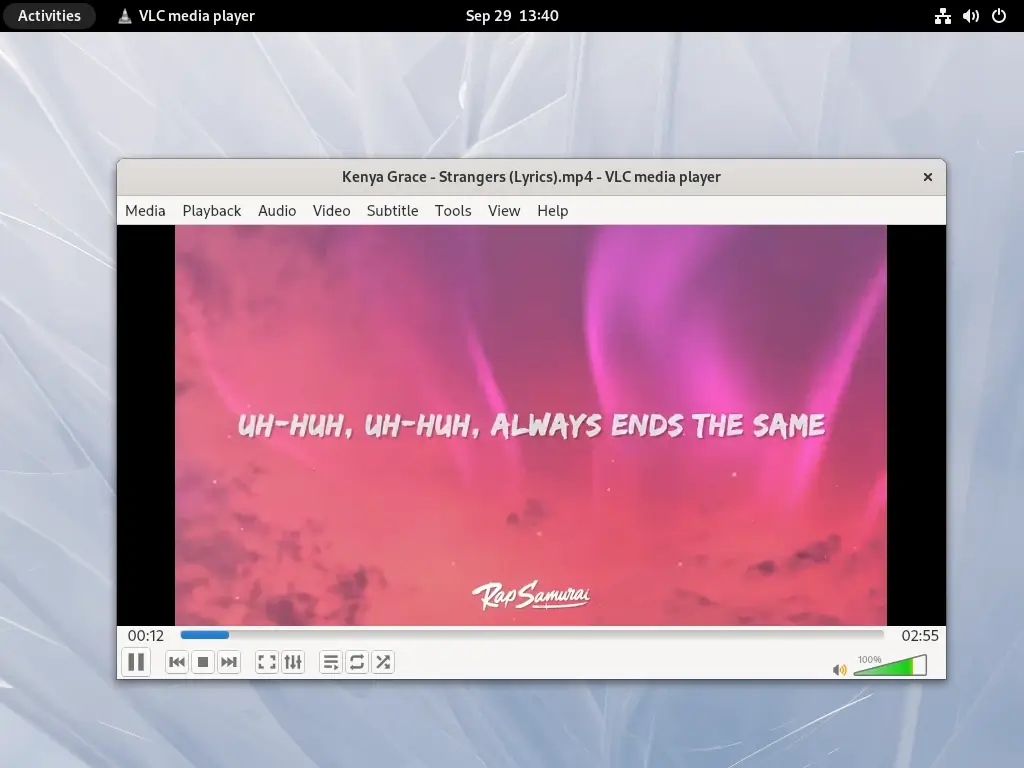
If you would like to update the VLC player to the latest stable version, use the following command.
# yum update vlc
OR
# dnf update vlc
To sum it up, VLC Media Player stands as the top choice for media playback on Linux, thanks to its outstanding format compatibility, open-source foundation, and widespread cross-platform accessibility.



Still see Dependency Resolution on RHEL 7.4, can’t get following RPMs.
For RHEL installations you must enable the RHEL optional repo.
@Eric,
Thanks for notifying me, I updated the article…
FYI, vlc-3.0.8 is now available for RHEL 8 (CentOS 8 is scheduled for next week)
You may still need to enable epel-testing or even rpmfusion-free-updates-testing, but all dependencies will be made available in regular repositories soon.
@Kwizart,
Thanks for the update, let me try installing these repositories to install VLC.
Unable to install VLC on RHEL 8
Anyone, please suggest any other installation or solution for VLC installation.?
Thanks in advance!
@Mahi,
What errors you getting during installing VLC on RHEL 8?
@Ravi Saive,
I getting below error after running ‘yum info vlc‘. I have already previous 2 commands and they both work fine but even after that yum cannot able find vlc package (RHEL 8)
[root@blackdog ~]# yum info vlc
Updating Subscription Management repositories.
RPM Fusion for EL 8 – Free – Updates 19 kB/s | 74 kB 00:03
Error: No matching Packages to list
@Mahi,
Let me try again on my RHEL 8 Box, will get back to you with solution.
@Ravi,
I got an error while checking the package information (yum info vlc) of VLC in terminal.
First 2 two commands related to downloading are working fine.
[root@blackdog ~]# yum info vlc
Updating Subscription Management repositories.
Last metadata expiration check: 0:00:33 ago on Saturday 21 September 2019 07:50:15 PM IST.
Error: No matching Packages to list
vlc is not available in rpmfusion for el8. Also no other media player for playing videos is till now not available for rhel 8 and oracle Linux 8.
Please update if you find any video player for rhel8/oracle Linux 8.
@Ashwin,
I think VLC yet not included in the EPEL and RPMFusion of RHEL 8, once it is available will update the article.
I ran through the instructions (on this page) to get vlc-3.0.7.1 installed, and they failed at the very bottom, with the following errors:
Error: Package: 1:vlc-3.0.7.1-4.el7.x86_64 (rpmfusion-free-updates)
Requires: libQt5X11Extras.so.5()(64bit)
Error: Package: 1:vlc-3.0.7.1-4.el7.x86_64 (rpmfusion-free-updates)
Requires: libQt5Svg.so.5()(64bit)
Error: Package: 1:vlc-3.0.7.1-4.el7.x86_64 (rpmfusion-free-updates)
Requires: libQt5X11Extras.so.5(Qt_5)(64bit)
Error: Package: 1:vlc-3.0.7.1-4.el7.x86_64 (rpmfusion-free-updates)
Requires: libQt5Svg.so.5(Qt_5)(64bit)
You could try using –skip-broken to work around the problem
For RHEL, you need to enable additional repositories as stated in the EPEL install wiki: https://fedoraproject.org/wiki/EPEL#How_can_I_use_these_extra_packages.3F
subscription-manager repos –enable rhel-7-server-optional-rpms –enable rhel-7-server-extras-rpms
If you do not have a valid subscription, please consider using CentOS instead.
This will allow to install the official qt5-qtx11extras package from Red Hat.
kwizart, thanks for your reply.
Does this really require a RHEL 7 Server subscription just to run a desktop application (VLC)? It seems silly to me that they did that.
But is that correct?
kwizart,
thanks for that hint. We had to enable the CentOS repository on our RHEL machine.
That worked, thanks!
Using CentOS repositories on RHEL isn’t recommended and will lead to issue at some point.
I’m not speaking for Red Hat, but you really need a subscription to access any repositories no matter what is your use-case.
If it’s a problem for you, then you should migrate to CentOS fully.
kwizart, thanks.
We run off isolated networks for security purposes, and we have used maybe 3 or 4 CentOS packages on our RHEL7 baseline, and currently RHEL is the requirement from our customer.
Thanks for the collaborative support.
Sorry. but these instructions did not work for me on my RHEL7 machine. In fact they married up perfectly to the instructions on videolan.org (the Provider’s website); and those instructions failed as well.
There were some dependencies for some libraries and symbols inside those libraries and they were nowhere to be found during my installation.
The file dependencies missing were:
So, I tried the instructions on tecadmin(dot)net and those actually DID WORK. The difference was in the repositories being used for RHEL7.
Your site suggest, just like videolan.org, to use the two Repos of:
So, tecadmin(dot)net suggest using these two Repos (notice what is the same and what is different!!):
@Warron,
Thanks for the tip, but it didn’t worked for me on my RHEL 7.6 version. I used EPEL and Nux Repos, still giving dependency errors..
Ravi, I replied to your email directly.
I just noticed that in your post you indicated the use of EPEL and NUX; like my notes indicate.
Please tell me, what was the version of BOTH of those packages after they were installed? Also, do you have localpkg_gpgcheck=0.
I believe I had to make that adjustment too in order to get the NUX package to install properly.
I will retry my steps to ensure they are repeatable today; or to validate the steps are broken as of last night.
Ravi, I reattempted the installation instructions and they did actually work for me.
Try these steps:
Go into /etc/yum.conf and set the following lines as indicated (they will exist, and just need to be altered):
1. This sets the option so that the RPMs will remain on disk).
2. This sets the option so that the nux-dextop-release-0-5.el7.nux.noarch package is installable due to the GPG Key not being on disk until after installation of this package.
3. Now install EPEL and Nux repository with the following commands.
4. Finally, install the VLC product and all of its 45 extra dependencies.
@Warron,
I tried your these settings, and try to install VLC again on my RHEL 7.6 and RHEL 8. On both machines I recevied following error..
Thanks !!!! VLC install perfect at Centos 7
RPM Fusion is in the process to update vlc in RHEL and CentOS 7 to latest vlc 3.0.x. (along ffmpeg-3.X).
Fixing waste of my time for 5 min, centos and rhel only 2.x.x supprted.
@Wood,
Why not install from source? also CentOS and RHEL only used for server purpose, not for desktop, go for Linux Mint or Ubuntu.
Because from source, yum (dnf) does not update it automatically… Linux Mint and Ubuntu are for Enthusiasts, Pros use RHEL/CentOS/etc. Install once and forget. Need to play, use a VM, docker, etc. Pros don’t have time to waste reinstalling or upgrading systems.
EOL of RHEL/CentOS/etc. > EOL hardware. Any other Linux distribution EOL Linux < EOL hardware.
give me a starting vlc player in a fedora 23 steps
Please consider moving to use RPM Fusion for RHEL, CentOS, SL and Fedora.
There is a maintained version of vlc (2.2.8 for EL and 3.0.0 for Fedora).
Also please don’t mix packages for EL and Fedora, that’s completely scary
I successfully installed VLC player on CentOS 6.9, but every mp4 and flv video I play only displays a green screen.
Check video output settings. Default is “automatic” which doesn’t seem to work.
I have error when install VLC
####
–> Processing Dependency: kernel(kill_fasync) = 0xdd9d7a7d for package: kmod-fglrx-15.12-3.el7.elrepo.x86_64
–> Processing Dependency: kernel(fasync_helper) = 0x124106ba for package: kmod-fglrx-15.12-3.el7.elrepo.x86_64
–> Processing Dependency: kernel(amd_iommu_unbind_pasid) = 0xc3022564 for package: kmod-fglrx-15.12-3.el7.elrepo.x86_64
–> Processing Dependency: kernel(amd_iommu_set_invalidate_ctx_cb) = 0x904f86f0 for package: kmod-fglrx-15.12-3.el7.elrepo.x86_64
–> Processing Dependency: kernel(amd_iommu_set_invalid_ppr_cb) = 0xe693e19b for package: kmod-fglrx-15.12-3.el7.elrepo.x86_64
–> Processing Dependency: kernel(amd_iommu_init_device) = 0xbf4e6777 for package: kmod-fglrx-15.12-3.el7.elrepo.x86_64
–> Processing Dependency: kernel(amd_iommu_free_device) = 0x90b26027 for package: kmod-fglrx-15.12-3.el7.elrepo.x86_64
–> Processing Dependency: kernel(amd_iommu_enable_device_erratum) = 0x4ea602e8 for package: kmod-fglrx-15.12-3.el7.elrepo.x86_64
–> Processing Dependency: kernel(amd_iommu_device_info) = 0x0eab57ba for package: kmod-fglrx-15.12-3.el7.elrepo.x86_64
–> Processing Dependency: kernel(amd_iommu_bind_pasid) = 0x8bd98934 for package: kmod-fglrx-15.12-3.el7.elrepo.x86_64
–> Finished Dependency Resolution
Error: Package: kmod-fglrx-15.12-3.el7.elrepo.x86_64 (elrepo)
Requires: kernel(amd_iommu_free_device) = 0x90b26027
Installed: kernel-3.10.0-514.el7.x86_64 (@anaconda)
kernel(amd_iommu_free_device) = 0xfea37b21
Installed: kernel-3.10.0-693.5.2.el7.x86_64 (@updates)
kernel(amd_iommu_free_device) = 0xfea37b21
Available: kernel-3.10.0-693.el7.x86_64 (base)
kernel(amd_iommu_free_device) = 0xfea37b21
Available: kernel-3.10.0-693.1.1.el7.x86_64 (updates)
kernel(amd_iommu_free_device) = 0xfea37b21
Available: kernel-3.10.0-693.2.1.el7.x86_64 (updates)
kernel(amd_iommu_free_device) = 0xfea37b21
Available: kernel-3.10.0-693.2.2.el7.x86_64 (updates)
kernel(amd_iommu_free_device) = 0xfea37b21
Available: kernel-debug-3.10.0-693.el7.x86_64 (base)
kernel(amd_iommu_free_device) = 0xa7d33d6a
Available: kernel-debug-3.10.0-693.1.1.el7.x86_64 (updates)
kernel(amd_iommu_free_device) = 0xa7d33d6a
Available: kernel-debug-3.10.0-693.2.1.el7.x86_64 (updates)
kernel(amd_iommu_free_device) = 0xa7d33d6a
Available: kernel-debug-3.10.0-693.2.2.el7.x86_64 (updates)
kernel(amd_iommu_free_device) = 0xa7d33d6a
Available: kernel-debug-3.10.0-693.5.2.el7.x86_64 (updates)
kernel(amd_iommu_free_device) = 0xa7d33d6a……
….
#####
CentOS Linux release 7.4.1708 (Core)
Linux mercury.centos 3.10.0-693.5.2.el7.x86_64 #1 SMP Fri Oct 20 20:32:50 UTC 2017 x86_64 x86_64 x86_64 GNU/Linux
I tried all the above and failed. Now using Video Player Chrome extension to watch mp4 on my centos 7 laptop. Works like a charm!
I followed these instructions to install VLC Player on CentOS 7.
Thank you for the article.
[root@server repo]# yum install vlc
Loaded plugins: product-id, refresh-packagekit, subscription-manager
Updating Red Hat repositories.
Error: Cannot retrieve repository metadata (repomd.xml) for repository: epel. Please verify its path and try again
@Hemanth,
You just needed to update ca-certificates package to fix this error as shown.
[root@server Desktop]# yum –disablerepo=epel -y update ca-certificates
Loaded plugins: product-id, refresh-packagekit, subscription-manager
Updating Red Hat repositories.
http://li.nux.ro/download/nux/dextop/el7/i386/repodata/repomd.xml: [Errno 14] PYCURL ERROR 22 – “The requested URL returned error: 404”
Trying other mirror.
http://mirror.li.nux.ro/li.nux.ro/nux/dextop/el7/i386/repodata/repomd.xml: [Errno 14] PYCURL ERROR 22 – “The requested URL returned error: 404”
Trying other mirror.
Error: Cannot retrieve repository metadata (repomd.xml) for repository: nux-dextop. Please verify its path and try again
when install vlc then some packages install and this are require
Error: Package: libprojectM-2.1.0-2.el7.x86_64 (epel)
Requires: libGLEW.so.1.10()(64bit)
Error: Package: 1:vlc-2.2.2-5.el7.nux.x86_64 (nux-dextop)
Requires: libfribidi.so.0()(64bit)
Error: Package: libass-0.13.4-1.el7.x86_64 (epel)
Requires: libfribidi.so.0()(64bit)
Error: Package: 1:vlc-core-2.2.2-5.el7.nux.x86_64 (nux-dextop)
Requires: libfribidi.so.0()(64bit)
Error: Package: 1:vlc-core-2.2.2-5.el7.nux.x86_64 (nux-dextop)
Requires: libminizip.so.1()(64bit)
Error: Package: 1:vlc-2.2.2-5.el7.nux.x86_64 (nux-dextop)
Requires: libminizip.so.1()(64bit)
You could try using –skip-broken to work around the problem
** Found 1 pre-existing rpmdb problem(s), ‘yum check’ output follows:
google-chrome-stable-52.0.2743.116-1.x86_64 has missing requires of libnss3.so(NSS_3.19.1)(64bit)
@Prakash,
May I know on which Linux distribution version you’re trying? If yes CentOS 6.x, you need to upgrade your system to install latest version of libraries…
I follow the steps to intall vlc in centos 7 i386 but i got error plese help me to slove the erroe
—> Package zvbi.i686 0:0.2.35-1.el6 will be installed
–> Processing Dependency: libpng12.so.0(PNG12_0) for package: zvbi-0.2.35-1.el6.i686
–> Processing Dependency: libpng12.so.0 for package: zvbi-0.2.35-1.el6.i686
–> Finished Dependency Resolution
Error: Package: libcddb-1.3.2-2.el6.i686 (epel)
Requires: libcdio.so.10
Error: Package: vlc-2.1.6-1.el6.nux.i686 (nux-dextop)
Requires: kde-filesystem
Error: Package: zvbi-0.2.35-1.el6.i686 (epel)
Requires: libpng12.so.0(PNG12_0)
Error: Package: SDL_image-1.2.12-9.el6.i686 (epel)
Requires: libpng12.so.0(PNG12_0)
Error: Package: qt-mobility-1.1.3-2.el6.i686 (epel)
Requires: qt4(x86-32) >= 4.6.2
Error: Package: qtwebkit-2.1.1-1.el6.i686 (epel)
Requires: libQtOpenGL.so.4
Error: Package: vlc-core-2.1.6-1.el6.nux.i686 (nux-dextop)
Requires: libpng12.so.0(PNG12_0)
Error: Package: schroedinger-1.0.8-4.el6.i686 (epel)
Requires: liboil-0.3.so.0
Error: Package: vlc-2.1.6-1.el6.nux.i686 (nux-dextop)
Requires: libminizip.so.1
Error: Package: vlc-core-2.1.6-1.el6.nux.i686 (nux-dextop)
Requires: libmtp.so.8
Error: Package: SDL_image-1.2.12-9.el6.i686 (epel)
Requires: libSDL-1.2.so.0
Error: Package: qt-mobility-1.1.3-2.el6.i686 (epel)
Requires: libgstphotography-0.10.so.0
Error: Package: vlc-2.1.6-1.el6.nux.i686 (nux-dextop)
Requires: libxcb-keysyms.so.1
Error: Package: qt-mobility-1.1.3-2.el6.i686 (epel)
Requires
@Rabbani,
It seems two repositories EPEL and Nux-Desktop conflicting packages, better try to disable EPEL repository and install the VLC from Nux-Desktop repository, I hope it will install without any errors..
Looks like the Centos 7 link for EPEl is broken,
Instead of
http://dl.fedoraproject.org/pub/epel/7/x86_64/e/epel-release-7-6.noarch.rpm
it should be
https://dl.fedoraproject.org/pub/epel/7/x86_64/e/epel-release-7-8.noarch.rpm
@Mike,
Thanks for updating us about new EPEL version, yes the old EPEL link is broken, I’ve updated with new working links..
hey i’m having this
[user@localhost root]$ vlc
VLC media player 2.0.8 Twoflower (revision 2.0.7-29-g12aebf9)
[0x1df1dc8] inhibit interface error: Failed to connect to the D-Bus session daemon: Did not receive a reply. Possible causes include: the remote application did not send a reply, the message bus security policy blocked the reply, the reply timeout expired, or the network connection was broken.
[0x1df1dc8] main interface error: no suitable interface module
No protocol specified
[0x1df1dc8] main interface error: no suitable interface module
[0x1d25108] main libvlc error: interface “globalhotkeys,none” initialization failed
[0x1d25108] main libvlc: Running vlc with the default interface. Use ‘cvlc’ to use vlc without interface.
No protocol specified
[0x1df1dc8] qt4 interface error: Could not connect to X server
No protocol specified
[0x1df1dc8] skins2 interface error: cannot initialize OSFactory
[0x1df1dc8] [cli] lua interface: Listening on host “*console”.
VLC media player 2.0.8 Twoflower
Command Line Interface initialized. Type `help’ for help.
Hi Ravi,
I am unable to launch vlc media player after installation. So plz help
@Ramesh,
Any error you getting while starting VLC? how you launching VLC? i mean from GUI or commandline? if via CLI do you see any error messages on the screen during starting VLC? could you share with us so that I can help you out.
what is XZ compression not available. show this problem during installation vlc media player.pls resolve my problem .
how install vlc or any media player on centos.
@Rajan,
It seems you yum is broken due to non-CentOS version of xz installed, better remove that and reinstall the CentOS-version of xz package as shown:
kindly tell me the steps to install vlc in rhel7
@Gokul,
As per your request, we’ve just updated the article for vlc installation on RHEL 7 and CentOS 7 as well as for Fedora 23-20. Just go through it and install, if any problems during installation, please ask here..
Not to be impatient, but I was wondering if my comment about vlc not being available at remi-test is true? or is it me doing something wrong?
needless to say, I tried your suggested method a while ago and it worked smoothly. It is just a recent hurdle…..thanks.
@Harry,
May i know on which distro you’re trying to setup vlc?
Sure. It is RHEL 5.8_ 64 bit. I have setup Centos repo if needed. I tried this some time ago on Centos 5.8 and got the same problem.
@Harry,
CentOS 5.8 is too old and don’t think latest version of VLC will work on such old CentOS distro…why not upgrade to CentOS 6 or 7?
Yes, it is old and annoying. but it is sometime necessary as some software suites are coded based on RHEL 5.
It seems like that Remi no longer provides VLC. I do “yum search vlc”and no results pop up.
I also checked the package list on the remi and remi-test lists, no vlc there.
Am I right?
@Harry,
Let me check and will update article accordingly…
Im getting this dependencies error :
Error: Package: ffmpeg-libs-0.10.15-1.el6.x86_64 (rpmfusion-free-updates)
Requires: libcelt0.so.1()(64bit)
Error: Package: 1:libmodplug-0.8.8.5-3.el7.x86_64 (epel)
Requires: libm.so.6(GLIBC_2.15)(64bit)
Error: Package: vlc-2.0.10-1.el6.x86_64 (rpmfusion-free-updates)
Requires: libminizip.so.1()(64bit)
Error: Package: libcddb-1.3.2-12.el7.x86_64 (epel)
Requires: libcdio.so.15()(64bit)
Error: Package: zvbi-0.2.33-15.el7.x86_64 (epel)
Requires: systemd-units
Error: Package: zvbi-0.2.33-15.el7.x86_64 (epel)
Requires: libpng15.so.15()(64bit)
Error: Package: lirc-libs-0.9.1a-4.el7.x86_64 (epel)
Requires: libsystemd-daemon.so.0()(64bit)
Error: Package: zvbi-0.2.33-15.el7.x86_64 (epel)
Requires: libpng15.so.15(PNG15_0)(64bit)
Error: Package: libcddb-1.3.2-12.el7.x86_64 (epel)
Requires: libcdio.so.15(CDIO_15)(64bit)
Error: Package: vlc-core-2.0.10-1.el6.x86_64 (rpmfusion-free-updates)
Requires: libminizip.so.1()(64bit)
Do you know how to fix this?
@Azri,
May I know on which Linux distro you’re trying?
@ravi
I’m using RHLE 6
Do you got any reply? any further progress? I am stuck here too..
How to remove dependencies while installing VLC in RHEL 6. I have received following dependencies :
SDL-1.2.14-6.el6.x86_64 from RHEL-67-x86_64
ffmpeg-libs-0.10.15-1.el6.x86_64 from rpmfusion-free-updates
kde-filesystem-4-30.1.el6.noarch from RHEL-67-x86_64
lame-libs-3.99.5-1.el6.x86_64 from rpmfusion-free-updates
libSDL_image-1.2.10-2.1.el6.x86_64 from linuxtech-release
liba52-0.7.4-10.el6.x86_64 from linuxtech-release
libass-0.10.0-3.el6.x86_64 from linuxtech-release
libcddb-1.3.2-8.el6.x86_64 from linuxtech-release
libdc1394-2.1.2-3.4.el6.x86_64 from RHEL-67-x86_64
libdca-0.0.5-6.el6.x86_64 from rpmfusion-free-updates
libdvbpsi-0.2.2-2.el6.x86_64 from linuxtech-release
libebml-1.2.1-1.el6.x86_64 from linuxtech-release
libfaad2-2.7-5.el6.x86_64 from linuxtech-release
libfribidi-0.19.2-3.el6.x86_64 from linuxtech-release
libkate-0.3.8-3.el6.x86_64 from linuxtech-release
libmad-0.15.1b-14.el6.x86_64 from rpmfusion-free-updates
libmatroska-1.2.0-1.el6.x86_64 from linuxtech-release
libmodplug-0.8.8.4-1.el6.x86_64 from linuxtech-release
libmpeg2-0.5.1-9.el6.x86_64 from rpmfusion-free-updates
libopus-1.1-1.el6.x86_64 from linuxtech-release
liborc-0.4.14-1.el6.x86_64 from linuxtech-release
librtmp-2.3-3.el6.x86_64 from linuxtech-release
libschroedinger-1.0.10-3.el6.x86_64 from linuxtech-release
libtwolame-0.3.13-3.el6.x86_64 from linuxtech-release
libupnp-1.6.15-3.el6.x86_64 from linuxtech-release
libva-1.0.16-3.el6.x86_64 from linuxtech-release
lirc-libs-0.9.0-100.el6.x86_64 from linuxtech-release
live555-0-0.37.2012.04.27.el6.x86_64 from rpmfusion-free-updates
minizip-1.2.3-29.el6.x86_64 from RHEL-67-x86_64
vlc-2.0.10-1.el6.x86_64 from rpmfusion-free-updates
vlc-core-2.0.10-1.el6.x86_64 from rpmfusion-free-updates
x264-libs-0.120-5.20120303.el6.x86_64 from rpmfusion-free-updates
xvidcore-1.3.2-3.el6.x86_64 from rpmfusion-free-updates
@Amit,
No way we can’t remove dependencies during installation, as these dependencies are part of VLC and needs to be installed on the system to function VLC properly..
Thank you. I installed according to the processes
very nice
yum remove libcaca-0.99-0
Loaded plugins: product-id, refresh-packagekit, subscription-manager
Updating Red Hat repositories.
Setting up Remove Process
No Match for argument: libcaca-0.99-0
Repository ‘saurabh’ is missing name in configuration, using id
No Packages marked for removal
[root@www yum.repos.d]# yum remove libcaca
Loaded plugins: product-id, refresh-packagekit, subscription-manager
Updating Red Hat repositories.
Setting up Remove Process
No Match for argument: libcaca
TRY AFTER libminizip.so.1 ERROR WHAT TO DO
Which version of OS you using, please tell me so that I can try out..
Another way to
Install VLC in RPM base linux distros, Open the terminal and follow few steps as root
#cd /etc/yum.repos.d/
#wget http://pkgrepo.linuxtech.net/el6/release/linuxtech.repo
#yum install vlc
NOTE: may your system will update few library files, accept all or as required, but all those are required for vlc.
Thanks man! will surely give a try to this repo..let’s see which version of VLC it has in its repo..hope may be latest version..
Thanks Ravi, for the tip about linuxtech.repo. I was able to get VLC (64-bit) installed on my RHEL company-issued computer easily. Now I can view unfriendly WMV training videos on my work computer without issues.
Thanks also to Ravi Saive. Found the above tip by searching for how to install VLC.
wow this is incredible ..worked for me .. thanks !!
Excellent tip!
It worked well on SL6.7 32-bit
i installed vlc by login through root user and i can see the icon of vlc also but when i clicked on it , it doesn’t work means nothing happen , please tell me what to do
Transaction Check Error:
file /usr/lib/libpostproc.so.52 from install of ffmpeg-libs-0.10.11-1.el6.i686 conflicts with file from package ffmpeg-libs_1.1-1.1.5-2.el6.i686
file /usr/lib/libswresample.so.0 from install of ffmpeg-libs-0.10.11-1.el6.i686 conflicts with file from package ffmpeg-libs_1.1-1.1.5-2.el6.i686
file /usr/lib/libswscale.so.2 from install of ffmpeg-libs-0.10.11-1.el6.i686 conflicts with file from package ffmpeg-libs_1.1-1.1.5-2.el6.i686
Any ideas?
OS: CentOS 6.5
You already have the latest version of ffmpeg-libs 1.1 and you are installing older version over it.
this came when trying to install vlc using command
yum install vlc
Error: Package: vlc-2.0.10-1.el6.i686 (rpmfusion-free-updates)
Requires: libQtCore.so.4
Error: Package: vlc-core-2.0.10-1.el6.i686 (rpmfusion-free-updates)
Requires: libminizip.so.1
Error: Package: vlc-core-2.0.10-1.el6.i686 (rpmfusion-free-updates)
Requires: libdvdread.so.4
Error: Package: vlc-core-2.0.10-1.el6.i686 (rpmfusion-free-updates)
Requires: libSDL-1.2.so.0
Error: Package: vlc-2.0.10-1.el6.i686 (rpmfusion-free-updates)
Requires: libXpm.so.4
Error: Package: libcaca-0.99-0.9.beta16.el6.i686 (epel)
Requires: libglut.so.3
Error: Package: ffmpeg-libs-0.10.11-1.el6.i686 (rpmfusion-free-updates)
Requires: libdc1394.so.22
Error: Package: vlc-2.0.10-1.el6.i686 (rpmfusion-free-updates)
Requires: libQtGui.so.4
Error: Package: libdvdnav-4.1.4-0.1.svn1184.el6.i686 (epel)
Requires: libdvdread.so.4
Error: Package: ffmpeg-libs-0.10.11-1.el6.i686 (rpmfusion-free-updates)
Requires: libz.so.1(ZLIB_1.2.0)
Error: Package: vlc-2.0.10-1.el6.i686 (rpmfusion-free-updates)
Requires: qt4(x86-32) >= 4.6.2
Error: Package: vlc-2.0.10-1.el6.i686 (rpmfusion-free-updates)
Requires: kde-filesystem
Error: Package: SDL_image-1.2.10-1.el6.i686 (epel)
Requires: libSDL-1.2.so.0
Error: Package: vlc-core-2.0.10-1.el6.i686 (rpmfusion-free-updates)
Requires: libz.so.1(ZLIB_1.2.0.2)
Error: Package: vlc-2.0.10-1.el6.i686 (rpmfusion-free-updates)
Requires: libminizip.so.1
Error: Package: vlc-core-2.0.10-1.el6.i686 (rpmfusion-free-updates)
Requires: libdc1394.so.22
Error: Package: ffmpeg-libs-0.10.11-1.el6.i686 (rpmfusion-free-updates)
Requires: libSDL-1.2.so.0
You could try using –skip-broken to work around the problem
You could try running: rpm -Va –nofiles –nodigest
Sorry for delay in replying, May I know on which version of Linux distribution you trying to install VLC?
In your instructions for running VLC, you note that it is not supposed to be run as root, yet your bash command is for a root shell (admitedly there are many users who skim the article text and just read the commands)
It Should read as follows
“$ vlc”
But you have
“# vlc”
The ‘#’ is reserved for root shells.
Yes, that was typo, corrected now in write-up.
Hi.. I am getting this error while installing VLC in RHEL 6.5.. Pls suggest
–> Finished Dependency Resolution
Error: Package: ffmpeg-libs_1.1-1.1.5-2.el6.x86_64 (linuxtech-release)
Requires: libcxcore.so.2.0()(64bit)
Error: Package: ffmpeg-libs_1.1-1.1.5-2.el6.x86_64 (linuxtech-release)
Requires: libSDL-1.2.so.0()(64bit)
Error: Package: vlc-2.0.7-10.el6.x86_64 (linuxtech-release)
Requires: libminizip.so.1()(64bit)
Error: Package: gstreamer-plugins-bad-0.10.19-9.el6.x86_64 (linuxtech-release)
Requires: libmusicbrainz.so.4()(64bit)
Error: Package: libdvdnav-4.2.0-3.el6.x86_64 (linuxtech-release)
Requires: libdvdread.so.4()(64bit)
Error: Package: mjpegtools-libs-2.0.0-4.el6.x86_64 (linuxtech-release)
Requires: libSDL-1.2.so.0()(64bit)
Error: Package: ffmpeg-libs_1.1-1.1.5-2.el6.x86_64 (linuxtech-release)
Requires: libdc1394.so.22()(64bit)
Error: Package: vlc-2.0.7-10.el6.x86_64 (linuxtech-release)
Requires: libdc1394.so.22()(64bit)
Error: Package: ffmpeg-libs_1.1-1.1.5-2.el6.x86_64 (linuxtech-release)
Requires: libcv.so.2.0()(64bit)
Error: Package: liblrdf-0.5.0-2.el6.x86_64 (linuxtech-release)
Requires: ladspa
Error: Package: ffmpeg-libs_0.6-0.6.6-3.el6.x86_64 (linuxtech-release)
Requires: libdc1394.so.22()(64bit)
Error: Package: gstreamer-plugins-bad-0.10.19-9.el6.x86_64 (linuxtech-release)
Requires: libdc1394.so.22()(64bit)
Error: Package: vlc-2.0.7-10.el6.x86_64 (linuxtech-release)
Requires: libdvdread.so.4()(64bit)
Error: Package: vlc-2.0.7-10.el6.x86_64 (linuxtech-release)
Requires: libSDL-1.2.so.0()(64bit)
Error: Package: libbluray-0.2.2-0.git20120222.1.el6.x86_64 (linuxtech-release)
Requires: java-1.6.0-openjdk
Error: Package: gstreamer-plugins-bad-0.10.19-9.el6.x86_64 (linuxtech-release)
Requires: libdvdread.so.4()(64bit)
Error: Package: libSDL_image-1.2.10-2.1.el6.x86_64 (linuxtech-release)
Requires: libSDL-1.2.so.0()(64bit)
You could try using –skip-broken to work around the problem
You could try running: rpm -Va –nofiles –nodigest
Worked like a charm. Thanks a lot … :)
Hello Ravi thanks for the info ! I want to download all the dependancy in my laptop , so that i can install VLC player in my desktop which has no internet connection please help me out .
Any clues on a work-around for the script below. Thank you in advance.
Bruce
[root@localhost bruce]# yum –enablerepo=remi install vlc
Loaded plugins: fastestmirror
Loading mirror speeds from cached hostfile
* base: mirror.anl.gov
* epel: mirrors.mit.edu
* extras: mirrors.einstein.yu.edu
* remi: remi.mirrors.hostinginnederland.nl
* rpmfusion-free-updates: mirror.nexcess.net
* rpmfusion-nonfree-updates: mirror.nexcess.net
* updates: mirror.steadfast.net
http://deb.torproject.org/torproject.org/rpm/centos5/repodata/repomd.xml: [Errno 14] HTTP Error 404: Not Found
Trying other mirror.
Error: Cannot retrieve repository metadata (repomd.xml) for repository: torproject. Please verify its path and try again
[root@localhost bruce]#
To fix such error go to /etc/yum.repos.d/ and delete torproject.repo file.
I visited multiple sites but the audio feature for audio songs current at this
website is in fact fabulous.
Hello, thank you, VLC on CentOS 6.4 works! I used an installer to install RPMFusion repository.
I got it here http://rpmfusion.org/Configuration
How to run Vlc Player on root user??
Not possible.
Thank you. This is legendary.
How to install vlc in an offline mode. I have fedora13 installed on a pc without internet connection and it has no medial player. When I tried to install using the rpm file it keeps saying dependencies missing (each time a diff. file). Where can I get all the dependent files along with the rpm for vlc and how to run it?
Thanks in advance
No way, you can’t install VLC offline it relay on too many dependent packages.
hi
linux serves public with free of cost
Thanks :)
Hi
i installed vlc using
yum install vlc ; Everything got installed.All steps were successful.
I even get VLC icon Applications-Sound & Video-VLC Media Player.
But when i click on it ,it does not start.HElp
Please run VLC as normal user?
Thanks a lot this did work for me on CentOS 6.3 final.
Awesome work and will be now visiting more regularly.
after doing all process this error come when i am installing vlc
Error: Package: vlc-core-2.0.6-1.el6.x86_64 (rpmfusion-free-updates)
Requires: libminizip.so.1()(64bit)
Error: Package: libcaca-0.99-0.9.beta16.el6.x86_64 (epel)
Requires: libglut.so.3()(64bit)
Error: Package: vlc-2.0.6-1.el6.x86_64 (rpmfusion-free-updates)
Requires: libminizip.so.1()(64bit)
Error: Package: vlc-core-2.0.6-1.el6.x86_64 (rpmfusion-free-updates)
Requires: libz.so.1(ZLIB_1.2.0.2)(64bit)
You could try using –skip-broken to work around the problem
You could try running: rpm -Va –nofiles –nodigest
Error: Package: libcaca-0.99-0.9.beta16.el6.i686 (epel)
Requires: libglut.so.3
Error: Package: vlc-core-2.0.6-1.el6.i686 (rpmfusion-free-updates)
Requires: libminizip.so.1
Error: Package: vlc-2.0.6-1.el6.i686 (rpmfusion-free-updates)
Requires: libminizip.so.1
Error: Package: vlc-core-2.0.6-1.el6.i686 (rpmfusion-free-updates)
Requires: libz.so.1(ZLIB_1.2.0.2)
You could try using –skip-broken to work around the problem
You could try running: rpm -Va –nofiles –nodigest
getting this error after running this command #yum –enablerepo=remi-test install vlc
Please give me the solutions…
#yum localinstall –nogpgcheck http://download1.rpmfusion.org/nonfree/el/updates/5/i386/
you have mention on website that it will work on RHEL 5,but thsi is also working with RHEL 6.
and thank you so much for your expensive help..
Error: Package: vlc-core-2.0.3-1.el6.i686 (rpmfusion-free-updates)
Requires: libzvbi.so.0
Error: Package: ffmpeg-libs-0.10.6-1.el6.i686 (rpmfusion-free-updates)
Requires: libschroedinger-1.0.so.0
Error: Package: vlc-core-2.0.3-1.el6.i686 (rpmfusion-free-updates)
Requires: libfribidi.so.0
Error: Package: vlc-core-2.0.3-1.el6.i686 (rpmfusion-free-updates)
Requires: libebml.so.3
Error: Package: vlc-core-2.0.3-1.el6.i686 (rpmfusion-free-updates)
Requires: libass.so.4
Error: Package: ffmpeg-libs-0.10.6-1.el6.i686 (rpmfusion-free-updates)
Requires: libass.so.4
Error: Package: vlc-core-2.0.3-1.el6.i686 (rpmfusion-free-updates)
Requires: libva.so.1
Error: Package: vlc-core-2.0.3-1.el6.i686 (rpmfusion-free-updates)
Requires: libdirac_decoder.so.0
Error: Package: ffmpeg-libs-0.10.6-1.el6.i686 (rpmfusion-free-updates)
Requires: libva.so.1
Error: Package: vlc-core-2.0.3-1.el6.i686 (rpmfusion-free-updates)
Requires: libSDL_image-1.2.so.0
Error: Package: vlc-core-2.0.3-1.el6.i686 (rpmfusion-free-updates)
Requires: libupnp.so.6
Error: Package: vlc-core-2.0.3-1.el6.i686 (rpmfusion-free-updates)
Requires: libcddb.so.2
Error: Package: vlc-2.0.3-1.el6.i686 (rpmfusion-free-updates)
Requires: libfribidi.so.0
Error: Package: vlc-core-2.0.3-1.el6.i686 (rpmfusion-free-updates)
Requires: libva-x11.so.1
Error: Package: vlc-core-2.0.3-1.el6.i686 (rpmfusion-free-updates)
Requires: libmodplug.so.1
Error: Package: vlc-core-2.0.3-1.el6.i686 (rpmfusion-free-updates)
Requires: libgme.so.0
Error: Package: vlc-core-2.0.3-1.el6.i686 (rpmfusion-free-updates)
Requires: libdirac_encoder.so.0
Error: Package: vlc-core-2.0.3-1.el6.i686 (rpmfusion-free-updates)
Requires: liblirc_client.so.0
Error: Package: ffmpeg-libs-0.10.6-1.el6.i686 (rpmfusion-free-updates)
Requires: libopenal.so.1
Error: Package: vlc-core-2.0.3-1.el6.i686 (rpmfusion-free-updates)
Requires: libixml.so.2
Error: Package: vlc-core-2.0.3-1.el6.i686 (rpmfusion-free-updates)
Requires: libmatroska.so.4
Error: Package: vlc-core-2.0.3-1.el6.i686 (rpmfusion-free-updates)
Requires: libthreadutil.so.6
Error: Package: vlc-2.0.3-1.el6.i686 (rpmfusion-free-updates)
Requires: libcaca.so.0
Error: Package: vlc-core-2.0.3-1.el6.i686 (rpmfusion-free-updates)
Requires: libtiger.so.5
Error: Package: vlc-core-2.0.3-1.el6.i686 (rpmfusion-free-updates)
Requires: libkate.so.1
Error: Package: ffmpeg-libs-0.10.6-1.el6.i686 (rpmfusion-free-updates)
Requires: libcelt0.so.1
Error: Package: vlc-core-2.0.3-1.el6.i686 (rpmfusion-free-updates)
Requires: libdvdnav.so.4
Error: Package: vlc-2.0.3-1.el6.i686 (rpmfusion-free-updates)
Requires: libaa.so.1
same problem here
Very helpful indeed, thank you.
hi i am using redhat 6 i am not able to install vlc anyboy help me
Hi,
Thanks for the post, I got through the install all well but when I run vlc I get audio and no video. I tried reinstalling, I also tried installing the one from the rpm forge repo instead but no luck. I am running centos 6.3. Any suggestions?
How to remove libcaca-0.99-0 ? in centos ?
Just use the command as.
this message came when i was tryin to delete it
yum remove libcaca
Loaded plugins: refresh-packagekit, rhnplugin
This system is not registered with RHN.
RHN support will be disabled.
Setting up Remove Process
No Match for argument: libcaca
Package(s) libcaca available, but not installed.
No Packages marked for removal
Error: Package: libcaca-0.99-0.9.beta16.el6.x86_64 (epel)
Requires: libglut.so.3()(64bit)
Error: Package: vlc-core-2.0.3-1.el6.x86_64 (rpmfusion-free-updates)
Requires: libminizip.so.1()(64bit)
Error: Package: vlc-2.0.3-1.el6.x86_64 (rpmfusion-free-updates)
Requires: libminizip.so.1()(64bit)
You could try using –skip-broken to work around the problem
You could try running: rpm -Va –nofiles –nodigest
@Chandan,
Remove libcaca-0.99-0 and then try the command.
Download and install
http://rpm.pbone.net/index.php3/stat/4/idpl/20346668/dir/centos_6/com/minizip-1.2.3-29.el6.x86_64.rpm.html
Go into terminal and type “yum –enablerepo=rpmforge install libupnp-1.6.6-1.el6.rf.x86_64” Once this completes, then run the “yum –enablerepo=remi-test install vlc” command and it should install. I just ran into the same issue, and that is how I was able to solve it.
Hope this helps.
Chris, thanks for the trick, hope it will help other users.
Hii Chris,
While using your way to install vlc in Fedora 14, I am getting the following errors:
Error: Package: python-mako-0.3.5-1.el5.rf.noarch (rpmforge)
Requires: python(abi) = 2.4
Installed: python-2.7-8.fc14.1.i686 (@fedora/$releasever)
python(abi) = 2.7
Available: python3-3.1.2-14.fc14.i686 (fedora)
python(abi) = 3.1
Error: Package: libssh2-1.2.9-1.el5.rf.i386 (rpmforge)
Requires: libcrypto.so.6
Error: Package: cifs-utils-4.6-2.el5.rf.i386 (rpmforge)
Requires: libtalloc.so.1
Error: Package: libssh2-1.2.9-1.el5.rf.i386 (rpmforge)
Requires: libssl.so.6
Error: Package: pkcs11-helper-1.08-1.el5.rf.i386 (rpmforge)
Requires: libcrypto.so.6
Error: Package: cifs-utils-4.6-2.el5.rf.i386 (rpmforge)
Requires: libcap.so.1
Error: Package: openvpn-2.2.2-1.el5.rf.i386 (rpmforge)
Requires: libcrypto.so.6
Error: Package: pkcs11-helper-1.08-1.el5.rf.i386 (rpmforge)
Requires: libgnutls.so.13
Error: Package: python-markupsafe-0.11-1.el5.rf.i386 (rpmforge)
Requires: python(abi) = 2.4
Installed: python-2.7-8.fc14.1.i686 (@fedora/$releasever)
python(abi) = 2.7
Available: python3-3.1.2-14.fc14.i686 (fedora)
python(abi) = 3.1
Error: Package: pkcs11-helper-1.08-1.el5.rf.i386 (rpmforge)
Requires: libgnutls.so.13(GNUTLS_1_3)
Error: Package: openvpn-2.2.2-1.el5.rf.i386 (rpmforge)
Requires: libssl.so.6
You could try using –skip-broken to work around the problem
You could try running: rpm -Va –nofiles –nodigest
Please suggest me the possible solution for this.
Thanks in anticipation
Works Fine :)
Thanks a lot, very precise and works well.
Wowww .. thx u so muchhhhhhhh !!!!!
ur post’s help me ……. Yahooo !
Hi
yum localinstall where will be installed path location???
suppose if i want to remove local install, how can i do this?
but here http://rpmfusion.org/Configuration/ different details given
Not exists the repo
————–
yum localinstall –nogpgcheck http://download1.rpmfusion.org/free/el/updates/testing/6/i386/rpmfusion-free-release-6-0.1.noarch.rpm
yum localinstall –nogpgcheck http://download1.rpmfusion.org/nonfree/el/updates/testing/6/i386/rpmfusion-nonfree-release-6-0.1.noarch.rpm
@narayana – Thanks for pointing out..the links are corrected and working now..
1. You can get actual location of install file using following command.
2. If you want to remove a package from the local install use the following option.
Hii sir,
I am installing vlc player in fedora 14. But I am getting the following error.
——————————————————————————————————-
–> Processing Dependency: system-release >= 17 for package: rpmfusion-free-release-17.0.5-1.noarch
–> Finished Dependency Resolution
Error: Package: rpmfusion-free-release-17.0.5-1.noarch (/rpmfusion-free-release-stable.noarch)
Requires: system-release >= 17
Installed: fedora-release-14-1.noarch (@fedora/$releasever)
system-release = 14-1
Available: generic-release-14-0.2.noarch (fedora)
system-release = 14-0.2
You could try using –skip-broken to work around the problem
You could try running: rpm -Va –nofiles –nodigest
—————————————————————————————————–
Please sir help me.
Thanks in anticipation.