

In this guide, we will cover how to display the total number of files in the current working directory or any other directory and its subdirectories on a Linux system.
We will use the find command which is used to search for files in a directory hierarchy together with wc command which prints newline, word, and byte counts for each file, alternatively data read from standard input.
Following are the options that we can use with find command as follows:
-type– specifies the file type to search for, in the case above, thefmeans find all regular files.-print– an action to print the absolute path of a file.-l– this option prints the total number of newlines, which is equals to the total number of absolute file paths output by find command.
The general syntax of find command.
# find . -type f -print | wc -l
$ sudo find . -type f -print | wc -l
Important: Use sudo command to read all files in the specified directory including those in the subdirectories with superuser privileges, in order to avoid “Permission denied” errors as in the screen shot below:

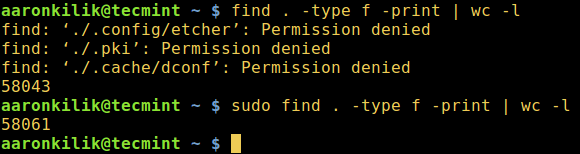
You can see that in the first command above, not all files in the current working directory are read by find command.
The following are extra examples to show total number of regular files in /var/log and /etc directories respectively:
$ sudo find /var/log/ -type f -print | wc -l
$ sudo find /etc/ -type f -print | wc -l
For more examples on Linux find command and wc command go through the following series of articles for additional usage options, tips and related commands:
- 35 Useful ‘find’ Command Examples in Linux
- How to Find Recent or Today’s Modified Files in Linux
- Find Top 10 Directoires and Files Disk Space in Linux
- 6 Useful ‘wc’ Command Examples to Count Lines, Words and Characters
That’s all! In case you know of any other method to display the total number of files in a directory and its subdirectories, do share it with us in the comments.







The correct tool to use in this case is “tree“. No pipes, no arguments required.