How to Install PHP 7 in CentOS 6

Take Your Linux Skills to the Next Level All courses, certifications, ad-free articles & community — from $8/mo
Join Root →
Ad-free access to all premium articles
Access to all courses: Learn Linux, AI for Linux, Bash Scripting, Ubuntu Handbook, Golang and more.
Access to Linux certifications (RHCSA, RHCE, LFCS and LFCA)
Access new courses on release
Get access to weekly newsletter
Priority help in comments
Private Telegram community
Connect with the Linux community
From $8/mo · or $59/yr billed annually · Cancel anytime

The CentOS 6 official software repositories has PHP 5.3 which has reached end of life and no longer actively maintained by the developers.

To keep up with the latest features and security updates, you need a newer (probably the latest) version of PHP on your CentOS 6 system.

If you’re looking to install different versions of PHP in CentOS 6, go through the following article.

  1. How to install PHP 5.4, PHP 5.5 or PHP 5.6 on CentOS 6

For the purpose of this guide, we will be operating the system as root, if that is not the case for you, make use of the sudo command to acquire root privileges.

Installing PHP 7 on CentOS 7

1. To install latest PHP 7, you need to add EPEL and Remi repository to your CentOS 6 system like so.

# yum install https://dl.fedoraproject.org/pub/epel/epel-release-latest-6.noarch.rpm
# yum install http://rpms.remirepo.net/enterprise/remi-release-6.rpm

2. Now install yum-utils, a group of useful tools that enhance yum’s default package management features.

Yum-utils can be used for manipulating package repositories and additional package management operations such as enabling or disabling packages without any manual configuration by a system administrator.

You can install it as follows:

# yum install yum-utils

3. In this step, you need to enable Remi repository using yum-config-manager utility, as the default repository for installing PHP.

# yum-config-manager --enable remi-php70   [Install PHP 7.0]

If you want to install PHP 7.1 or PHP 7.2 on CentOS 6, just enable it as shown.

# yum-config-manager --enable remi-php71   [Install PHP 7.1]
# yum-config-manager --enable remi-php72   [Install PHP 7.2]

4. Then finally install PHP 7 on CentOS 6 with all necessary PHP modules using the following command.

# yum install php php-mcrypt php-cli php-gd php-curl php-mysql php-ldap php-zip php-fileinfo 
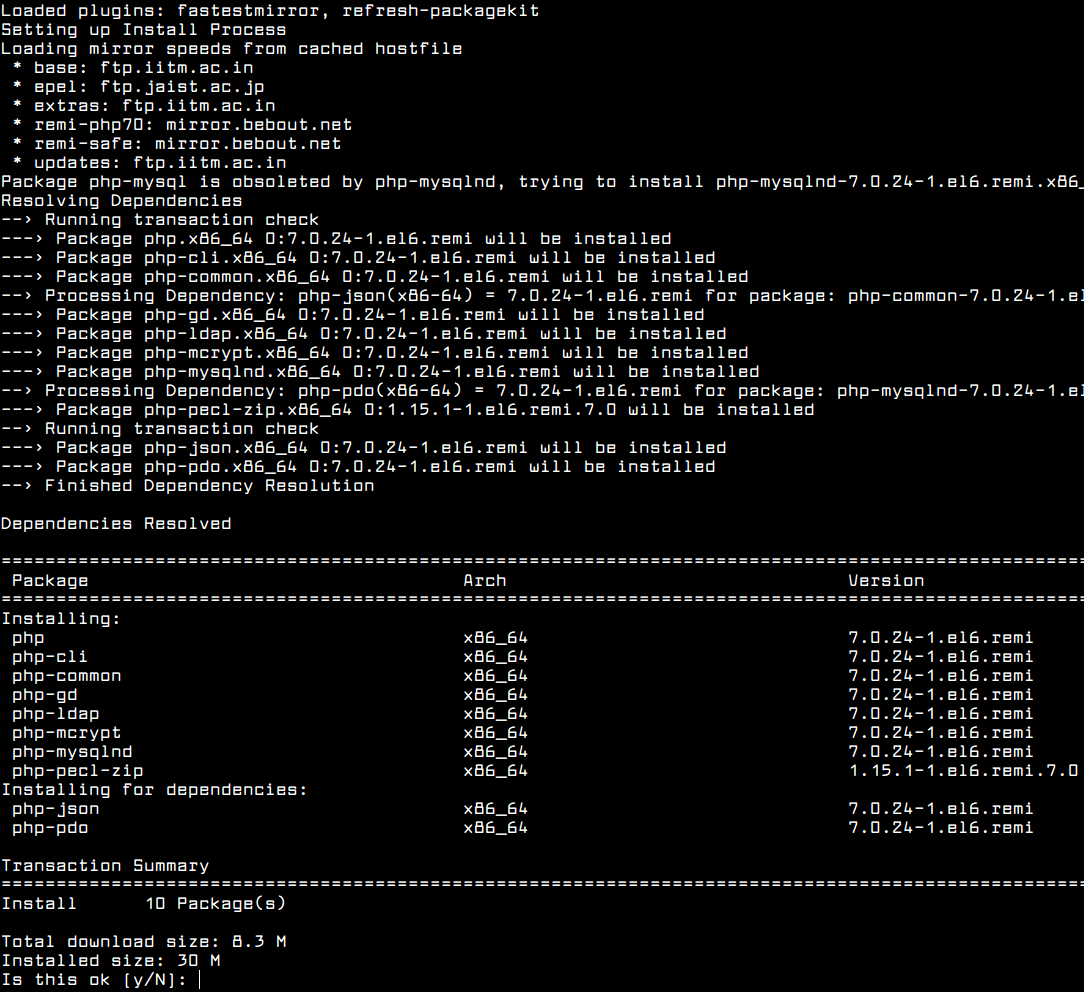
Install PHP 7 on CentOS 6

If you are curious, double check the installed version of PHP on your system as follows.

# php -V 

Check PHP Version in CentOS 6

You might also want to check out these useful PHP articles:

  1. How to Use and Execute PHP Codes in Linux Command Line
  2. How to Find MySQL, PHP and Apache Configuration Files
  3. How to Test PHP MySQL Database Connection Using Script
  4. How to Run PHP Script as Normal User with Cron

In this article, we have explained how to install PHP 7 on CentOS 6 Linux. You can send us any questions or additional thoughts via the feedback form below.

Root Plan
Premium Linux Education for Serious Learners

Take Your Linux Skills to the Next Level

Root members get full access to every course, certification prep track, and a growing library of hands-on Linux content — with new courses added every month.

What You Get
Ad-free access to all premium articles
Access to all courses: Learn Linux, AI for Linux, Bash Scripting, Ubuntu Handbook, Golang and more.
Access to Linux certifications (RHCSA, RHCE, LFCS and LFCA)
Access new courses on release
Get access to weekly newsletter
Priority help in comments
Private Telegram community
Connect with the Linux community
Aaron Kili
Aaron Kili is a Linux and F.O.S.S enthusiast, an upcoming Linux SysAdmin, web developer, and currently a content creator for TecMint who loves working with computers and strongly believes in sharing knowledge.

Each tutorial at TecMint is created by a team of experienced Linux system administrators so that it meets our high-quality standards.

Join the TecMint Weekly Newsletter (More Than 156,129 Linux Enthusiasts Have Subscribed)
Was this article helpful? Please add a comment or buy me a coffee to show your appreciation.

10 Comments

Leave a Reply
  1. Not working for me.
    [root@www ~]# yum install php php-mcrypt php-cli php-gd php-curl php-mysql php-ldap php-zip php-fileinfo

    Loaded plugins: fastestmirror, replace
    Setting up Install Process
    Loading mirror speeds from cached hostfile
     * base: centos.quelquesmots.fr
     * epel: mirror.kinamo.be
     * extras: centos.quelquesmots.fr
     * ius: mirror.slu.cz
     * remi-php72: remirepo.reloumirrors.net
     * remi-safe: remirepo.reloumirrors.net
     * updates: centos.quelquesmots.fr
    ...
    

    Any ideas ?

    Reply
    • @Cedric,

      Please remove ius third party remove before enabling EPEL and Remi repository. Having multiple repositories conflict with each other..

      Reply
  2. Thanks brother, I’ve updated my PHP, but got a problem with ionloader but i resolve it my self. can you help me with this error?

    PHP Warning: PHP Startup: Unable to load dynamic library ‘/usr/lib64/php/modules/pdo_sqlite.so’ – /usr/lib64/php/modules/pdo_sqlite.so: undefined symbol: sqlite3_column_table_name in Unknown on line 0

    Reply
  3. Hello,

    I have installed Apache 2.4 on CentOS 6.10 with PHP7. Welcome Apache page is showing Red Hat Enterprise Linux Test Page instead CentOS page.

    Is this normal?

    Reply
  4. Thanks for tutorial, but I faced problems, after:

    # yum install php php-mcrypt php-cli php-gd php-curl php-mysql php-ldap php-zip php-fileinfo 
    

    I get:

    No package php available.
    No package php-mcrypt available.
    No package php-cli available.
    No package php-gd available.
    No package php-curl available.
    No package php-mysql available.
    No package php-ldap available.
    No package php-zip available.
    No package php-fileinfo available.
    Error: Nothing to do
    

    help please! :-D

    Reply
  5. If you have some other version of PHP, like say 5.6 installed from the webtatic repo, do you have to remove it before installing the 7.x collection?

    Reply
    • @Chris

      For purposes of consistency, you need to install PHP packages from the same repository. I guess it would be right to remove an old version from a different repo, before installing 7.x from Remi repository.

      Reply

Got Something to Say? Join the Discussion...

Thank you for taking the time to share your thoughts with us. We appreciate your decision to leave a comment and value your contribution to the discussion. It's important to note that we moderate all comments in accordance with our comment policy to ensure a respectful and constructive conversation.

Rest assured that your email address will remain private and will not be published or shared with anyone. We prioritize the privacy and security of our users.

Root Plan Premium Linux Education for Serious Learners

Before You Go - Upgrade Your Linux Skills

Root members get everything in one place, with new courses added every month.

What You Get
Ad-free access to all premium articles
Access to all courses: Learn Linux, AI for Linux, Bash Scripting, Ubuntu Handbook, Golang and more.
Linux certifications: RHCSA, RHCE, LFCS and LFCA
Access new courses on release
Weekly newsletter, priority support & Telegram community
Join Root Today and Start Learning Linux the Right Way
Structured courses, certification prep, and a community of Linux professionals - all in one membership.
Join Root Plan →
$8/mo · or $59/yr billed annually