
In this post, I will be discussing the scripts from a mathematical and numerical point of view. Although I posted a more complex script (Simple Calculator) in the previous post, it was difficult for users to understand. Hence, I thought I would teach you another useful aspect of learning in smaller parts.
Before this article, three articles in the Shell Scripting Series have been published and they are:
Let’s continue the learning process with exciting new shell scripts, starting with mathematical ones.
1. Basic Addition Shell Script
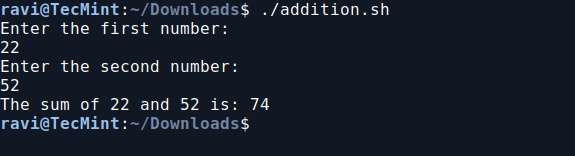
In this script ‘addition.sh‘, you will create a shell script to perform basic addition operations.
vi addition.sh
Add the following code to addition.sh file.
#!/bin/bash
# This script adds two numbers provided by the user

echo "Enter the first number: "
read a
echo "Enter the second number: "
read b

sum=$((a + b))

echo "The sum of $a and $b is: $sum"
Next, make the script executable and run it.
chmod 755 addition.sh
./addition.sh
2. Basic Subtraction Shell Script
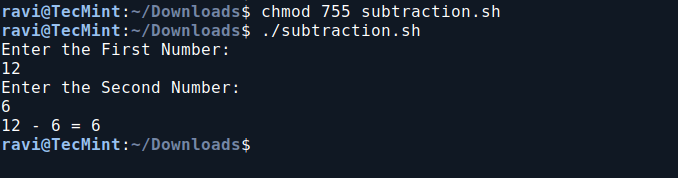
In this script ‘subtraction.sh‘, you will create a shell script to perform a basic subtraction operation.
vi subtraction.sh
Add the following code to subtraction.sh file:
#!/bin/bash
# This script subtracts two numbers provided by the user

echo "Enter the First Number: "
read a
echo "Enter the Second Number: "
read b

x=$(($a - $b))

echo "$a - $b = $x"
Next, make the script executable and run it.
chmod 755 subtraction.sh
./subtraction.sh
3. Basic Multiplication Shell Script
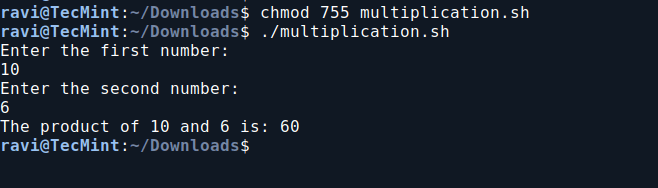
So far you would be enjoying a lot, learning scripts in such an easy way, so the next in chronological order is Multiplication.
vi multiplication.sh
Add the following code to multiplication.sh file.
#!/bin/bash
# This script multiplies two numbers provided by the user

echo "Enter the first number: "
read a
echo "Enter the second number: "
read b

product=$((a * b))

echo "The product of $a and $b is: $product"
Next, make the script executable and run it.
chmod 755 multiplication.sh
./multiplication.sh
4. Basic Division Shell Script
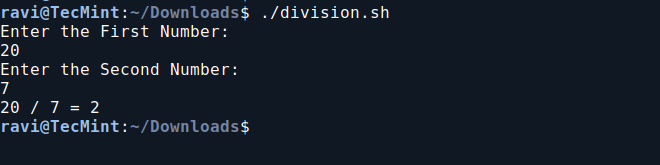
In this division script, it prompts the user to enter two numbers, then divides the first number by the second and displays the result.
vi division.sh
Add the following code to the division.sh file.
#!/bin/bash
echo "Enter the First Number: "
read a
echo "Enter the Second Number: "
read b
echo "$a / $b = $(expr $a / $b)"
Next, make the script executable and run it.
chmod 755 division.sh
./division.sh
5. Print Multiplication Table in Bash
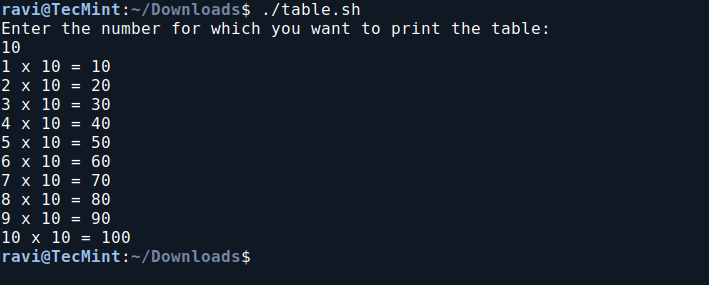
In this script, we will print the multiplication table of a user-specified number. It prompts the user to enter a number and then displays the multiplication results from 1 to 10 for that number.
vi table.sh
Add the following code to the table.sh file.
#!/bin/bash
echo "Enter the number for which you want to print the table: "
read n
i=1
while [ $i -le 10 ]
do
  table=$(expr $i \* $n)
  echo "$i x $n = $table"
  i=$(expr $i + 1)
done
Next, make the script executable and run it.
chmod 755 table.sh
./table.sh
6. Check If a Number is Even or Odd in Bash
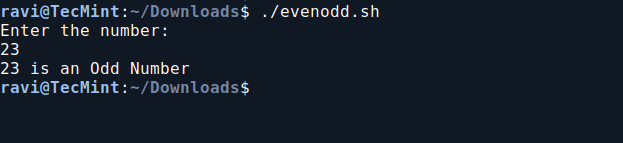
In this Bash script, we will determine whether a user-provided number is even or odd. It prompts the user to enter a number, checks its divisibility by 2 using the modulo operator, and then prints whether the number is even or odd based on the result.
vi evenodd.sh
Add the following code to evenodd.sh file.
#!/bin/bash
echo "Enter the number:"
read n
num=$(expr $n % 2)
if [ $num -eq 0 ]
then
  echo "$n is an Even Number"
else
  echo "$n is an Odd Number"
fi
Next, make the script executable and run it.
chmod 755 evenodd.sh
./evenodd.sh
7. Calculate Factorial Using Bash Script
This script calculates the factorial of a user-input number using a `while` loop, and then prints the result.
vi factorial.sh
Add the following code to the factorial.sh file.
#!/bin/bash
echo "Enter the number:"
read a
fact=1
while [ $a -gt 0 ]
do
  fact=$(expr $fact \* $a)
  a=$(expr $a - 1)
done
echo "The factorial is: $fact"
Next, make the script executable and run it.
chmod 755 factorial.sh
./factorial.sh
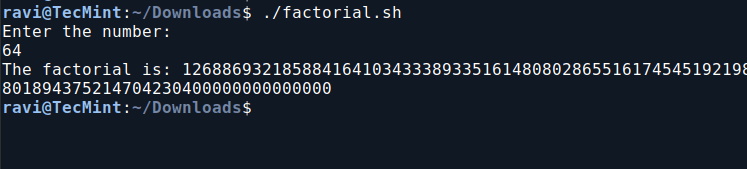
You can now relax knowing that calculating `12*11*10*9*8*7*6*5*4*3*2*1` is much simpler with the script above than doing it manually. Imagine needing to find `99!` – this script will be incredibly useful in such situations.
8. Check if a Number is an Armstrong Number in Bash
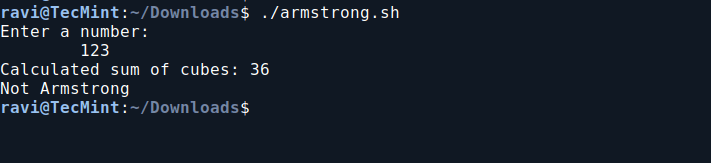
This Bash script determines whether a given three-digit number is an Armstrong number. An Armstrong number (or Narcissistic number) is a number where the sum of the cubes of its digits equals the number itself.
For example, 371 is an Armstrong number because 3×3×3+7×7×7+1×1×1 =371.
vi armstrong.sh
Add the following code to armstrong.sh file.
#!/bin/bash
echo "Enter a number:"
read n
arm=0
temp=$n
while [ $n -ne 0 ]
do
  r=$(expr $n % 10)
  arm=$(expr $arm + $r \* $r \* $r)
  n=$(expr $n / 10)
done
echo "Calculated sum of cubes: $arm"
if [ $arm -eq $temp ]
then
  echo "Armstrong"
else
  echo "Not Armstrong"
fi
Next, make the script executable and run it.
chmod 755 armstrong.sh
./armstrong.sh
9. Check if a Number is Prime in Bash
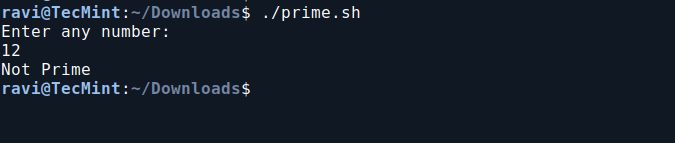
This Bash script checks if a number is prime by counting its divisors. It prints “Prime” if the number has exactly two divisors, and “Not Prime” otherwise.
vi prime.sh
Add the following code to prime.sh file.
#!/bin/bash
echo "Enter any number:"
read n

# Initialize variables
i=1
c=0

# Check for divisors
while [ $i -le $n ]
do
  if [ $(expr $n % $i) -eq 0 ]
  then
    c=$(expr $c + 1)
  fi
  i=$(expr $i + 1)
done

# Determine if the number is prime
if [ $c -eq 2 ]
then
  echo "Prime"
else
  echo "Not Prime"
fi
Next, make the script executable and run it.
chmod 755 prime.sh
./prime.sh
That’s all for now. In our next article, we will cover other mathematical programs in shell scripting. Don’t forget to share your thoughts in the comments section.




thnks