

Ranger is a simple, efficient text-based file manager with smooth integration into the Unix/Linux shell with VI key bindings. It comes with a minimalistic and nice curses interface that displays the directory hierarchy allowing you to quickly switch directories and browse the file system.
Importantly, ranger uses rifle, a file launcher that automatically determines which program to use for what file type.
Ranger Features
- Common file operations such as copy, delete, create, chmod, etc…
- UTF-8 Support.
- Multi-column display.
- VIM-like console and hotkeys.
- Preview of the selected file/directory.
- Renaming multiple files at once.
- Change the directory of your shell after exiting ranger.
- Tabs, Bookmarks, Mouse support.
- True Color Image previews using w3m web browser.
- Video thumbnails previews.
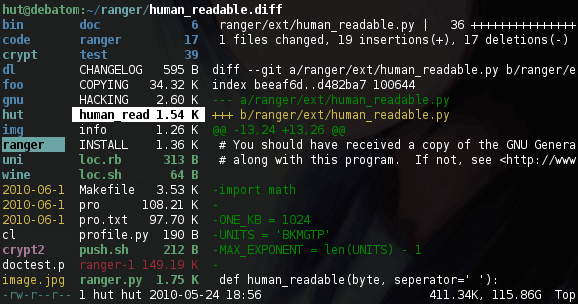
How to Install Ranger Console File Manager in Linux
Ranger is available to install from the default repositories using the package manager of your operating system as shown.
$ sudo apt install ranger		#Debian/Ubuntu
$ sudo yum install ranger		#RHEL/CentOS
$ sudo dnf install ranger		#Fedora 22+
Alternatively, you can also use PIP command to install ranger as shown.
$ sudo pip install ranger-fm
After installing ranger, you can start it from the terminal using following command.
$ ranger
After starting ranger, you can use the Arrow Keys or h j k l to navigate, Enter to open a file or q to quit.
The first column shows the parent directory, the second is the main column and the third column shows a preview of the current file/directory.
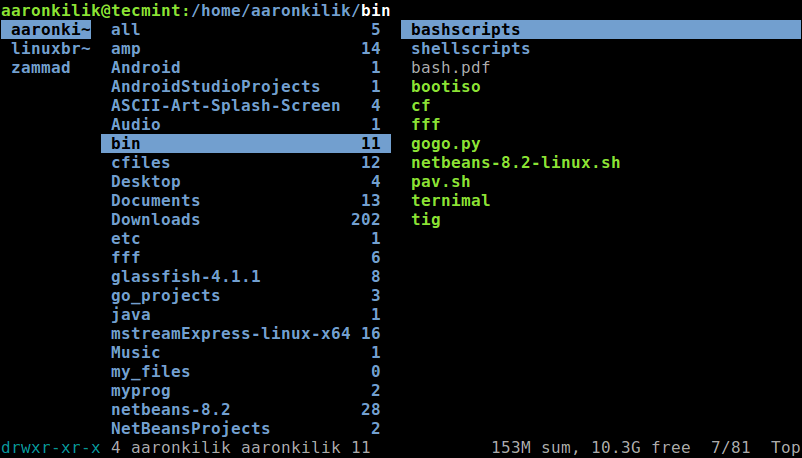
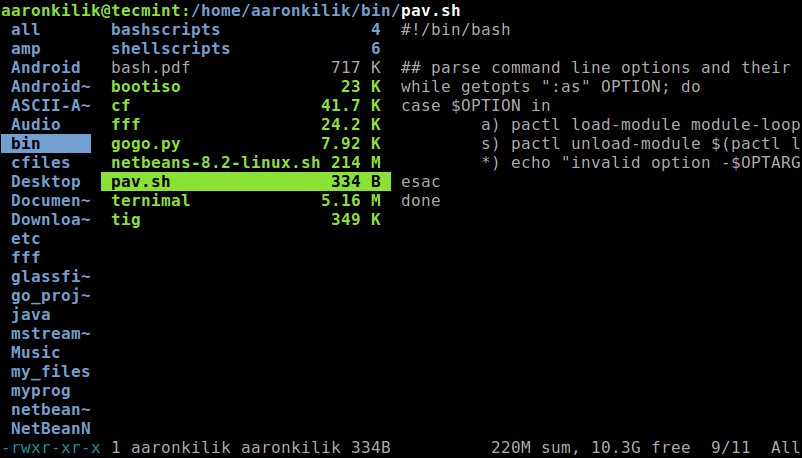
As mentioned earlier, it supports the mouse. You can therefore use your mouse to select directories or files on the console, and click Enter to open them. If you select a file, rifle will automatically try to find out which program to use for what file type. Choose the program you want from the provided list (you will do this once).
Ranger can automatically copy default user-specific configuration files, history, bookmarks and tags to ~/.config/ranger and stores system wide configuration files to /etc/ranger/config/.
For more information, consult the ranger man page.
$ man ranger
Ranger Githug repository: https://github.com/ranger/ranger.
Ranger is a small and efficient console-based file manager with VI key bindings. Try it out and share your thoughts with us via the feedback form below.

ranger-explorer is Vim plugin to use Ranger as a file explorer.
@Iberianpig
Great, thanks for sharing this.
nnn is another excellent terminal file manager: https://github.com/jarun/nnn
@Steve
We have already covered nnn file manager: https://www.fossmint.com/nnn-linux-terminal-file-browser/
I think I missed the earlier article.
I often swear at my computer – is that what the curses interface does, allows for full range of expletives?