

The Silver Searcher is a free and open source, cross platform source code searching tool similar to ack (a grep-like tool for programmers) but faster. It runs on Unix-like systems and Windows operating systems.
The major difference between the silver searcher and ack is that the former is designed for speed, and benchmark tests prove that it is indeed faster.
If you spend a lot of time reading and searching through your code, then you need this tool. It aims at being fast and ignoring files that you don’t want to be searched. In this guide, we will show how to install and use The Silver Searcher in Linux.
How to Install and Use The Silver Searcher in Linux
The silver searcher package is available on most Linux distributions, you can easily install it via your package manager as shown.
$ sudo apt install silversearcher-ag					#Debian/Ubuntu
$ sudo yum install epel-release the_silver_searcher		        #RHEL/CentOS
$ sudo dnf install silversearcher-ag					#Fedora 22+
$ sudo zypper install the_silver_searcher				#openSUSE
$ sudo pacman -S the_silver_searcher           				#Arch
After installing it, you can run the ag command line tool with the following syntax.
$ ag file-type options PATTERN /path/to/file
To see a list of all supported file types, use the following command.
$ ag --list-file-types
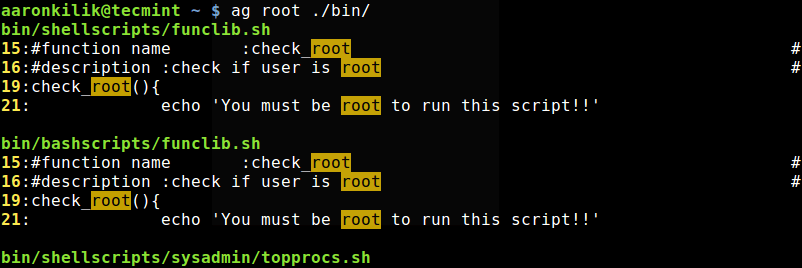
This example shows how to recursively search for all scripts that contain the word “root” under the directory ~/bin/.
$ ag root ./bin/
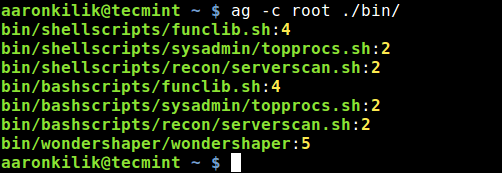
To print the filenames matching PATTERN and the number of matches in each file, other than the number of matching lines, use the -c switch as shown.
$ ag -c root ./bin/
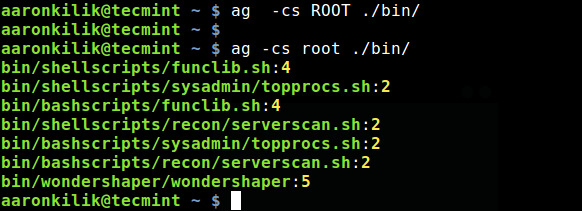
To match case-sensitively, add the -s flag as shown.
$ ag -cs ROOT ./bin/
$ ag -cs root ./bin/
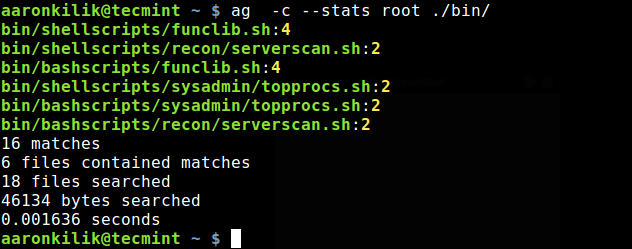
To print statistics of of a search operation such as files scanned, time taken, etc., use the the --stats option.
$ ag -c root --stats ./bin/
The -w flag tells ag to only match whole words similar to grep command.
$ ag -w root ./bin/
You can show column numbers in results using the --column option.
$ ag --column root ./bin/
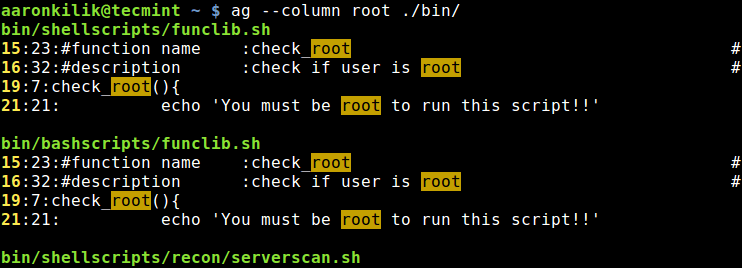
You can also use ag to search through purely text files, using the -t switch and the -a switch is used to search all types of files. In addition, the -u switch enables searching though all files, including hidden files.
$ ag -t root /etc/
OR
$ ag -a root /etc/
OR
$ ag -u root /etc/
Ag also supports searching through the contents of compressed files, using the -z flag.
$ ag -z root wondershaper.gz
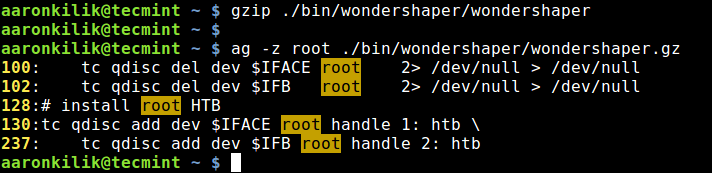
You can also enable following of symbolic links (symlinks in short) with the -f flag.
$ ag -tf root /etc/
By default, ag searches 25 directories deep, you can set the depth of the search using the --depth switch, for example.
$ ag --depth 40 -tf root /etc/
For more information, see the silver searcher’s man page for a complete list of usage options.
$ man ag
To find out, how the silver searcher works, see its Github repository: https://github.com/ggreer/the_silver_searcher.
That’s it! The Silver Searcher is a fast, useful tool for searching through files that make sense to search. It is intended for programmers for quickly searching though large source-code base. You can give it a try and share your thoughts, with us via the comment form below.
