

The very much anticipated release of Ubuntu’s latest cool project is finally upon us and the dev team made sure not to disappoint. Codenamed Eoan Ermine, Ubuntu 19.10 is the next big step that will usher us to version 20.04 LTS by allowing us to enjoy a variety of options with official support for the next 9 months.
Unlike the previous release with a fancier name of Greek origin, ἠώς which translates to a property of “dawn”, Groovy Gorilla is pretty much as it is “Groovy” is typically used to describe anything fashionable and exciting. Definitely a hint at how this release should be. Also, after Ubuntu 7.10 ‘Gutsy Gibbon‘, this is the second distro named after an ape.
If you’re not running Groovy Gorilla and the fancy name has won you over yet, wait till you see the new features that it’s shipping with as this upgrade comes with a lot of improvements targeted at improving the overall user experience.
New Features in Ubuntu “Groovy Gorilla” 20.10
Let’s quickly take a look at Ubuntu Linux 20.10 features.
- Ubiquity, Ubuntu’s installer, comes with an integrated Active Directory (AD) which enterprise users can take advantage of if they possess the necessary skills. Also, devices that are sold running Ubuntu will now enjoy support for OEM kernels.
- GNOME 3.38 is the latest version of the most popular open-source desktop environment and it ships with a ton of improvements across the program. You can finally rearrange the icons in your Applications grid using drag and drop and since folders can show a maximum of 9 icons at once, they are automatically paginated.
- As a Groovy Gorilla user, you can now enjoy wallpapers that are a lot sharper – no more blurry background issues. This corresponds nicely with the fingerprint login whose improvement is thankfully being backported to Ubuntu 20.04 LTS.
- Calendar events are now displayed underneath the calendar widget in the message tray for convenience. This UI update is accompanied by a new System Menu ‘Restart’ option for easily toggling your laptop’s hotspot to connect with a QR code. Also, you can choose to display the battery percentage in the Top Bar directly from the Power settings menu.
- Still, on the UI, the new Scale-aware sizing of the application grid makes it easier for you to maximize screen space and enjoy higher resolutions, especially on super hi-res screens without leaving out users contained by their small screens e.g. on tablets.
- As is expected, Ubuntu 20.10 ‘Groovy Gorilla’ ships with the latest versions of its default apps and that is not excluding LibreOffice 7.0.2, which uses a brand new icon theme, Mozilla Firefox, and Thunderbird 73, which features PGP encryption support and a built-in calendar.
- That’s not all. You can now enjoy high precision touchpad scrolling in the default Xorg session after enabling it via Firefox > Preferences > Use Smooth Scrolling.
- Last but certainly not least, Ubuntu 20.10 ‘Groovy Gorilla’ is the first Ubuntu version to include desktop support for both the 4GB and 8GB models of the Raspberry Pi. Groovy indeed! All these improvements add to the experience that features such as Night light, ZFS file support, proprietary NVIDIA graphics drivers, and Quicker Boot-Time contributed to in the previous versions.
What about 32-bit Architecture?
Ubuntu’s plan was to not support 32-bit architectures in the 19.04 release but they changed their mind after Valve expressed their disapproval and went to the extent of stating that Steam will no longer support Ubuntu.
While they made a version of the 19.10 for 32-bit systems with just the minimum amount of library files necessary for users to upgrade their 32-bit OS from within their OS or install it using a minimalCD or network installer, there isn’t any 32-bit version for 20.10 and there probably wouldn’t.
How to Update from Ubuntu 20.04 to 20.10
To update from Ubuntu 20.04 to Ubuntu 20.10, first, you need to backup all your important data and then run the following apt commands to update software packages on the system.
$ sudo apt update
$ sudo apt upgrade
Once the upgrade process completes, install the update-manager-core package.
$ sudo apt install update-manager-core
Open /etc/update-manager/release-upgrades file and make sure to set Prompt line to Prompt=normal.
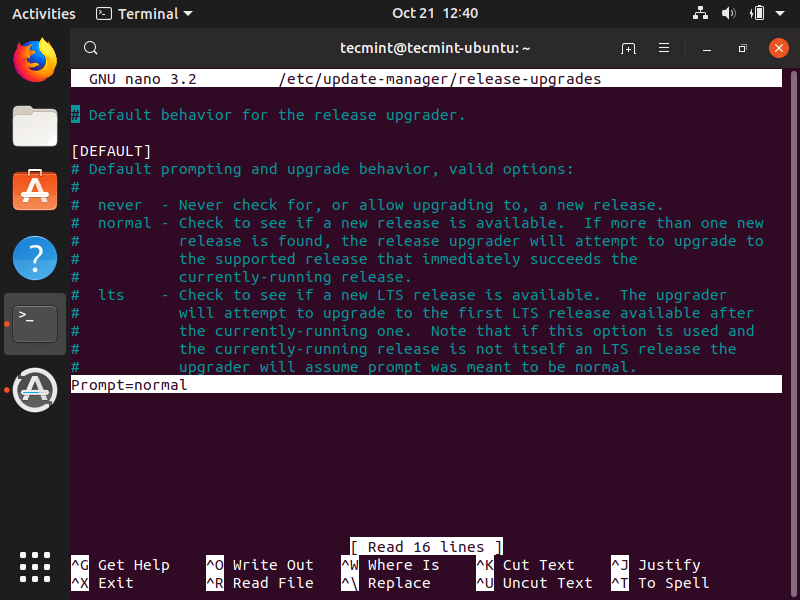
Now run the following upgrade tool to start the upgrade and follow the on-screen instructions.
$ sudo do-release-upgrade -d
Once the Ubuntu upgrade process completes, you can reboot the system and verify the Ubuntu version as shown.
$ lsb_release -a
$ cat /etc/os-release
Download Ubuntu 20.10 DVD/ISO images
Are you ready to grab Ubuntu “20.10” ISO? Hit this button to download the file directly.
- Download Ubuntu 20.10 Desktop ISO Image
- Download Ubuntu 20.10 Server ISO Image
- Download Ubuntu 20.10 Desktop ISO Torrent
- Download Ubuntu 20.10 Server ISO Torrent
Are you happy about this latest release? Did you install 20.04 LTS and will you be upgrading to this short term support version irrespective of what version you’re currently running? Share your thoughts with us in the comments section below.
