
PostgreSQL is the world’s most advanced enterprise-class open source database management system that is developed by the PostgreSQL Global Development Group. It is a powerful and highly-extensible object-relational SQL (Structured Query Language) database system popular for its reliability, feature robustness, and high performance. It is known to be highly scalable both in the amount of data it can store and manage and in the number of concurrent users it can accommodate.
PostgreSQL is available and distributed under the PostgreSQL License, a liberal open source license. This implies that you can download the software, use, modify, and distribute it free of charge for any purpose. It is also cross-platform, it runs on Linux, Windows, and macOS, and many other operating systems.
Download PostgreSQL
It uses and extends the SQL language with so many powerful and modern features. Although it is SQL compliant where many of the features required by the SQL standard are supported (the latest version of PostgreSQL is 12 at the time of writing confirms to at least 160 of the 179 mandatory features for SQL), there are some slight variations in syntax or function.
How Does PostgreSQL Work?
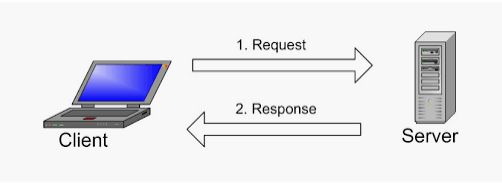
PostgreSQL uses a client-server model where the client and the server can reside on different hosts in a networked environment. The server program manages the database files, accepts connections to the database from client applications. It can handle multiple concurrent connections from clients by “forking” a new process for each connection. It executes database requests from clients and sends the results back to the clients. Remote clients can connect over the network or internet to the server.
Valid client programs include text-oriented tools that ship with PostgreSQL, a graphical tool, or applications developed using other programming languages.
Key Features of PostgreSQL
PostgreSQL supports several data types including primitives (such as string, integer, numeric, and boolean), structured (such as date/time, array, range, and UUID), document (JSON, JSONB, XML, Key-Value (Hstore)), geometry(point, line, circle, and polygon), and customizations (composite and custom types). It supports data integrity using features such as UNIQUE, NOT NULL, primary and foreign keys, exclusion constraints, explicit and advisory locks.
- It is built for concurrency and performance using many features that include indexing and advanced indexing, transactions and nested transactions, multi-version concurrency control (MVCC), parallelization of reading queries, and building B-tree indexes, table partitioning, Just-In-Time (JIT) compilation of expressions, and more.
- To ensure reliability, data redundancy, high availability, and disaster recovery, PostgreSQL offers features such as write-ahead logging (WAL), master-slave replication, active standbys, and point-in-time-recovery (PITR), and much more. These all allow for multi-node database cluster deployment which can store and manage large volumes(terabytes) of data, and specialized systems that manage petabytes.
- Importantly, PostgreSQL is also very extensible in so many ways. To extend it, you can use stored functions and procedures, procedural languages including PL/PGSQL, Perl, Python, SQL/JSON path expressions, foreign data wrappers, and more. You can also extend its core functionality using many extensions developed by the community.
- Security is also at the heart of Postgres. To protect your databases, it offers various forms of authentication(including GSSAPI, SSPI, LDAP, SCRAM-SHA-256, Certificate, etc.), a robust access control system, column, and row-level security, as well as multi-factor authentication with certificates and an additional method. However, good database server security should always start at the network and server layer.
PostgreSQL Clients and Tools
PostgreSQL provides and supports many client applications for database administration such as the psql interactive command-line utility and pgadmin, a PHP-based web interface for database administration (which is the most favored way).
To use PostgreSQL databases to store data for your applications, you can connect your applications using any of the supported libraries or drivers, available for most popular programming languages. libpq is a popular C application programmer’s interface to PostgreSQL, it is the underlying engine for several other PostgreSQL application interfaces.
Who is Using PostgreSQL?
PostgreSQL is being used at RedHat, Debian, Apple, Sun Microsystem, Cisco, and many other companies and organizations.
Check out these related guides in setting up your application with the PostgreSQL database on Linux.



So postgresql is used by sun Microsystems, a dead company ?