
In our previous articles, we’ve covered MySQL interview questions for beginners and intermediate users, and the response has been overwhelming. Today, we’re taking a different approach – focusing specifically on MySQL Database Interview Questions tailored for Linux users.
Now, some of you might be wondering why we’re separating Linux users from the rest. Well, the reason is simple. In most production environments, MySQL runs on Linux servers, and interviewers expect you to know more than just SQL queries.
They want to see if you understand how MySQL interacts with the Linux operating system, how to troubleshoot performance issues at the OS level, and how to manage databases through the command line.
We received several emails from our readers asking for questions that combine both MySQL and Linux knowledge. One reader specifically mentioned, “Your questions are good, but they don’t cover the system administration side of MySQL which is crucial for DBA roles.” Fair point. That’s exactly what we’re addressing today.
These questions are designed for those of you who are preparing for Database Administrator positions, DevOps roles, or Backend Developer interviews where Linux proficiency is expected.
Whether you’re a fresher trying to land your first job or an experienced professional looking to switch companies, these questions will help you prepare better.
1. How do you install MySQL on a Linux system, and what’s the difference between installing via package manager and source compilation?
This is often the first question interviewers ask to gauge your practical experience. When you install MySQL using a package manager like apt (Ubuntu/Debian) or yum (CentOS/RHEL), you get pre-compiled binaries that are easy to install and update.
sudo apt-get install mysql-server  # For Ubuntu/Debian
sudo yum install mysql-server      # For CentOS/RHEL
Source compilation, on the other hand, gives you more control over features and optimization but requires more time and expertise. You download the source code, configure it with specific options, compile it, and then install it.
Most production environments prefer package managers for ease of maintenance, but knowing source compilation shows you understand MySQL at a deeper level.
2. Where are MySQL configuration files located in Linux, and which file takes precedence?
This is a tricky one because the location varies depending on your Linux distribution, generally, MySQL reads configuration from multiple locations in this order:
/etc/my.cnf
/etc/mysql/my.cnf
~/.my.cnf (user-specific configuration)
The later files can override settings from earlier ones. In Ubuntu, you’ll often find the main configuration at /etc/mysql/mysql.conf.d/mysqld.cnf. Knowing this helps you troubleshoot configuration issues quickly, especially when settings don’t seem to apply even after you’ve edited a config file.
3. How do you check if MySQL service is running on Linux?
There are multiple ways to verify this, and interviewers want to see if you know more than one method:
sudo systemctl status mysql       # For systemd-based systems
sudo service mysql status         # Traditional method
ps aux | grep mysqld              # Check running processes
netstat -tlnp | grep 3306         # Check if MySQL port is listening
Each command gives you different information. The ps command shows you the actual MySQL process, while netstat confirms the port is open and listening for connections.
4. What’s the difference between stopping MySQL with systemctl and killing the mysqld process?
Now, this question separates those who’ve actually managed production databases from those who’ve only worked in development. Using systemctl stop mysql or service mysql stop sends a graceful shutdown signal to MySQL, allowing it to close all connections properly, flush data to disk, and shut down cleanly.
Killing the process with kill -9 is like pulling the power plug – it’s an immediate termination that can corrupt your database files, especially if transactions were in progress. However, kill -15 (SIGTERM) is acceptable as it allows MySQL to shut down gracefully, similar to the service command.
5. How do you find MySQL error logs in Linux?
Error logs are your best friend when troubleshooting and the default location is typically /var/log/mysql/error.log, but you can verify this by checking your MySQL configuration or running this query inside MySQL:
SHOW VARIABLES LIKE 'log_error';
From the Linux side, you can tail the log file to see real-time errors:
sudo tail -f /var/log/mysql/error.log
Some of our readers mentioned that in their interviews, they were asked to diagnose a MySQL issue using only the error log. So knowing how to read and interpret these logs is crucial.
6. How do you check MySQL disk usage on Linux?
You need to know where MySQL stores its data (usually /var/lib/mysql/) and how to check disk usage:
sudo du -sh /var/lib/mysql/              # Total MySQL data size
sudo du -sh /var/lib/mysql/*             # Size per database
df -h                                    # Overall disk usage
Inside MySQL, you can also query the information schema:
SELECT table_schema AS "Database",
       ROUND(SUM(data_length + index_length) / 1024 / 1024, 2) AS "Size (MB)"
FROM information_schema.tables
GROUP BY table_schema;
7. What’s the significance of the MySQL socket file, and where is it located?
The socket file (usually /var/run/mysqld/mysqld.sock or /tmp/mysql.sock) is used for local connections between the MySQL client and server on the same machine, which is faster than TCP/IP connections because it doesn’t involve network overhead.
If this file is missing or has the wrong permissions, you’ll get the infamous “Can’t connect to local MySQL server through socket” error. We’ve seen many developers struggle with this after system reboots or permission changes.
8. How do you backup a MySQL database from the Linux command line?
The most common method is using mysqldump command:
mysqldump -u username -p database_name > backup.sql
For all databases:
mysqldump -u username -p --all-databases > all_databases.sql
But experienced DBAs also know about physical backups using tools like Percona XtraBackup, which allows hot backups without locking tables. Some interviewers dive deeper and ask about automated backup scripts using cron jobs, which brings us to the next question.
9. How would you schedule automatic MySQL backups using cron?
You’d create a backup script and schedule it with cron:
crontab -e
Then add a line like:
0 2 * * * /usr/bin/mysqldump -u root -pYourPassword --all-databases > /backup/mysql_$(date +\%Y\%m\%d).sql
This runs a backup every day at 2 AM. However, a good answer also mentions that storing passwords in cron jobs is a security risk, and you should use the ~/.my.cnf file with proper permissions instead.
10. How do you monitor MySQL performance on Linux?
Interviewers love this question because it tests multiple skills. At the OS level, you can use:
top                    # Check CPU and memory usage
iostat                 # Check disk I/O
vmstat                 # Check system performance
For MySQL-specific monitoring:
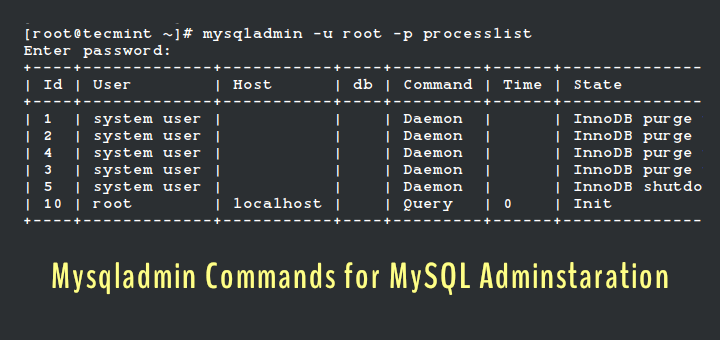
SHOW PROCESSLIST;                    # See running queries
SHOW STATUS;                         # Server status variables
SHOW ENGINE INNODB STATUS;           # InnoDB specific stats
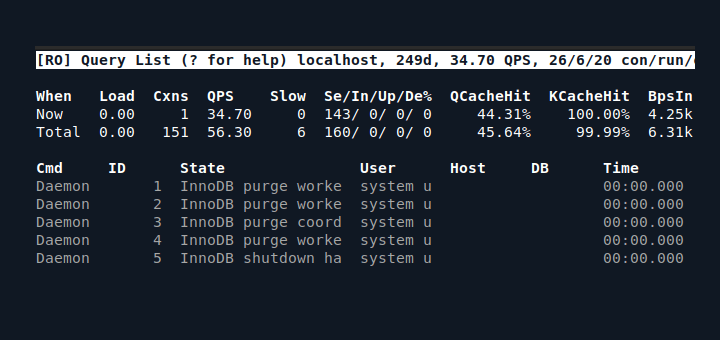
Tools like mytop, innotop, or pt-query-digest from Percona Toolkit are also worth mentioning.
We’ve noticed that many candidates know the SQL commands but struggle with the Linux-side monitoring tools. Both are equally important in production environments.


This is one of the best books in coding, by Matthew Urban: Top 30 JAVA Interview Coding Tasks (
https://www.net-boss.org/shop/top-30-java-interview-coding-tasks-by-matthew-urban) and Top 30 SQL Interview Coding Tasks (https://www.net-boss.org/shop/top-30-sql-interview-coding-tasks-by-matthew-urban).Easy read, great tips, well explained.
My advice is also recommending Matthew Urban’s book “Top 30 JAVA Interview Coding Tasks” (
https://www.net-boss.org/shop/top-30-java-interview-coding-tasks-by-matthew-urban) and “Top 30 SQL Interview Coding Tasks” (https://www.net-boss.org/shop/top-30-sql-interview-coding-tasks-by-matthew-urban). Enjoy!The most common SQL coding interview questions are listed in Matthew Urban’s book ” TOP 30 SQL Interview Coding Tasks”. Less than 100 pages include deeply-explained, most commonly used data manipulation queries, relationships modeling, aggregation, sorting, table joins, index and other top topics to discuss during the job interview. Very well written book.
Provide real time interview questions
It’s great, Thanks I find it useful, I want more in order to be Razor sharp in Mysql
Please mention the answers with the questions of the post
So that fresher like me could understand
OK… a few extra questions to ask/include on MySQL interview: (especially notable for DBA/admin)
(1) Show the total amount of storage being used by each database under MySQL… organized by owner.
(2) List the indexes for all tables in database “Sales”… and show me any tables which do not have indexes.
(3) If MySQL database service is Not running, where do you look for problems/errors to correct.
(4) If MySQL is not running, how do you find disk storage used by MySQL …storage FREE/avail for MySQL?
(5) List all active connections to running MySQL DB… and what can you know about activity…
(6) Discuss steps to move/copy a MySQL database from ServerA to ServerB ?
(7) Comment on setup of ServerJ and ServerK for load balancing & fail-over operation, so BOTH stay updated?
(8) Describe steps to backup or restore data/tables/index for database “blue” with other databases still running?
Nice tutorials .. Waiting for next.
Every MySql interview will have certain set of tough interview questions related to select and other queries. Also they will concentrate on few important topics.
very helpful !
:) @ achha insaan
very nice and easy question answers.. thank you
Welcome
Sir,
Please write more about sql and if I can get more information about ERD model and indexes in sql then I will very pleased to you. Other hand if you post any other helpful matter I am very thankful to you. Can we use data structure in sql
Sure @ Sanjay
thanks, need interview question on mysql for experience.
Dear balu,
Tecmint-team will be coming up with your suggestions, soon!
Thanks for the helpful review, it’s a great brush-up and overview.
I just want to clarify regarding number five, it says Unique Key does allows one NULL value.
But actually MySQL allows multiple Null values for a Unique Key, and MySQL creates nullable columns by default, so if you don’t specify ‘not null’ then the column will allow multiple null values.
Welcome @ Malka.
UNIQUE column can have ONLY ONE NULL “, But, NULL and ” (Empty string) are NOT SAME .
Hope this helps you.
Good and quick explanation helpful for brushing up things
Thanks for Your valuable feedback @ Mayank.
Easy to catch up information. waiting for next update
Dear abdullah,
Find our interview series articles here:
https://www.tecmint.com/category/interview-questions/
thank you this was helpful!
Dear swag,
welcome. Keep connected.
Thanks sir
very helpful question and answer
Dear Mukesh,
Pleased to know, it helped you.
thanks sir
these are very technical question kindly more explain question
data mining and date warehouse with an example . so it will be best
Dear adbul,
keep connected, we are coming up with Interview articles very often.
these are very technical questions . thank you
Welcome @ andrew
Good one Bro waiting for next post
Dear champ007,
we have been contineously writing Interview articles.
here is the Link to all those article: https://www.tecmint.com/category/interview-questions/
Keep connected for future articles.