

This tutorial is intended to explain the necessary steps for solving the “ERROR 2003 (HY000): Can’t connect to MySQL server on ‘127.0.0.1’ (111)” which might occur when you try to access the MySQL database server.
Before moving any further, if you are a Linux user who is new to MySQL/MariaDB, then you may consider learning MySQL / MariaDB for Beginners – Part 1 and 20 MySQL (Mysqladmin) Commands for Database Administration in Linux as well.
On the other hand, if you are already a intermediate/experienced MySQL user, you can master these 15 Useful MySQL/MariaDB Performance Tuning and Optimization Tips.
Note: For this tutorial, it is assumed that you have already installed mysql database server.
Coming back to the point of focus, what are some of the possible causes of this error?
- Network failure especially if mysql database server is running on remote host.
- No mysql server is running on the mentioned host.
- Firewall blocking TCP-IP connection or other related reasons.
Below are the essential steps to deal with it.
1. If database server is on a remote machine, then try to test the client-server connectivity using ping command, for instance:
$ ping server_ip_address
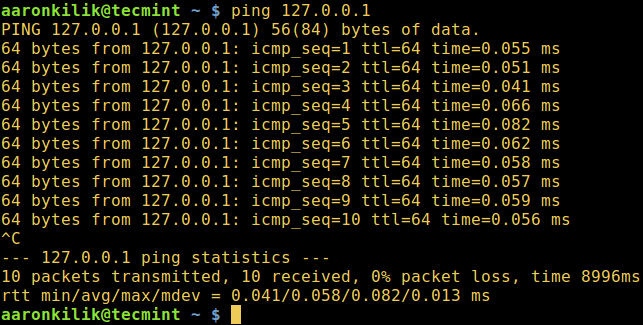
Once there is connectivity, use the ps command below which shows information about a selection of the active processes, together with a pipe and grep command, to check that the mysql daemon is running on your system.
$ ps -Af | grep mysqld
where the option:
-A– activates selection of all processes-f– enables full format listing

If there is no output from the previous command, start the mysql service as follows:
$ sudo systemctl start mysql.service
$ sudo systemctl start mariadb.service
OR
# sudo /etc/init.d/mysqld start
After starting mysql service, try to access the database server:
$ mysql -u username -p -h host_address
2. If you still get the same error, then determine the port (default is 3306) on which the mysql daemon is listening by running the netstat command.
$ netstat -lnp | grep mysql
where the options:
-l– displays listening ports-n– enables display of numerical addresses-p– shows PID and name of the program owning the socket

Therefore use the -P option to specify the port you see from the output above while accessing the database server:
$ mysql -u username -p -h host_address -P port
3. If all the above commands run successfully, but you still see the error, open the mysql config file.
$ vi /etc/mysql/my.cnf
OR
$ vi /etc/mysql/mysql.conf.d/mysqld.cnf
Look for the line below and comment it out using the # character:
bind-address = 127.0.0.1
Save the file and exit, afterwards restart the mysql service like so:
$ sudo systemctl start mysql.service
$ sudo systemctl start mariadb.service
OR
# sudo /etc/init.d/mysqld start
However, if you have firewallD or Iptables running try to review firewall services and open the mysql port, assuming it is firewall blocking TCP-IP connections to your mysql server.
That’s all! Do you know other methods or have suggestions for solving the MySQL connection error above? Let us know by dropping a comment via the feedback form below.

Hi Aaron,
Can you please contact me? I have a few questions about connecting the client to the DB_VM Instance.
Please, it’s very important for me. I have to solve this problem.
Thank you in advance.
Thank you. This information was extremely useful. The problem in my case was the bind-address (which seems like a new default).
PHP Warning: mysqli_connect(): (HY000/2003): Can’t connect to MySQL server on ‘127.0.0.1’ (111)
How to setup this error, while using GoDaddy shared hosting
@Ravi
You need to contact the GoDaddy web/system admins. Normally, there are some access restrictions in shared hosting environments to backend configurations.
Thank you.
My problem was the “bind-address” inside “/etc/mysql/mysql.conf.d/mysqld.cnf”
(Ubuntu)
I had firewall issues but resolved.
Thank you.
My problem was bind-address.
I am trying to connect to my master server database, but getting the below error.
but I can able to access my master database with same credentials from the same server, When am trying from slave server getting that error.
Please do help on this.
Regards,
Harikrishna Guggilla
+917347060544
@ Harikrishna
Have you enabled remote root access on the master server. This could be the issue; try to run the mysql_secure_installation script and allow remote root access.
First of all, check your slave machine status: it is pinging or not?
Then check your configuration file /etc/mysql/my.cnf or /etc/mysql/mysqld.conf/mysqld.cnf check your bind address.
If the problem was not solved give grant privileges to the slave user from the master machine.
that’s it.
Excellent page!! You solved my problem!
@Dhwani
Many thanks for the useful feedback. Don’t forget to share it.
you solved a great problem of mine
Thanks buddy…!
@ganesh
Welcome, thanks for the feedback.