

In one of our earlier article, we have explained about 9 best file comparison and difference (Diff) tools for Linux systems. We listed a mixture of command-line and GUI tools for comparing and finding differences between files, each with certain remarkable features. Another useful diff utility for Linux is called sdiff.
Read Also: How to Find Difference Between Two Directories Using Diff and Meld Tools
sdiff is a simple command line utility for showing the differences between two files and merge interactively. It is easy to use and comes with straightforward usage options as explained below.
The syntax for using sdiff is as follows.
$ sdiff option... file1 file2
Show Difference Between Two Files in Linux
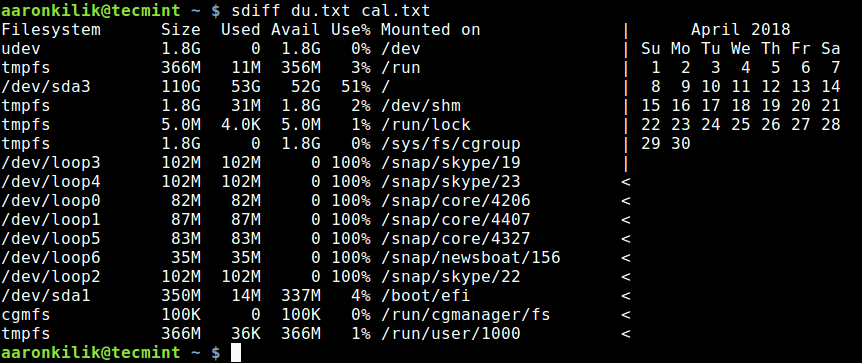
1. The easiest way to run sdiff is to provide the two filenames you are trying to compare. It will show the merged difference side-by-side as shown in the following screenshot.
$ cal >cal.txt
$ df -h >du.txt
$ sdiff du.txt cal.txt
Treat all Files as Text Files
2. To treat all files as text and compare them line-by-line, whether they are text files or not, use the -a flag.
$ sdiff -a du.txt cal.txt

Filesystem      Size  Used Avail Use% Mounted on	      |	     April 2018
udev            3.9G     0  3.9G   0% /dev		      |	Su Mo Tu We Th Fr Sa
tmpfs           788M  9.7M  779M   2% /run		      |	 1  2  3  4  5  6  7
/dev/sda10      324G  265G   43G  87% /			      |	 8  9 10 11 12 13 14
tmpfs           3.9G  274M  3.6G   7% /dev/shm		      |	15 16 17 18 19 20 21
tmpfs           5.0M  4.0K  5.0M   1% /run/lock		      |	22 23 24 25 26 27 28
tmpfs           3.9G     0  3.9G   0% /sys/fs/cgroup	      |	29 30
/dev/loop2       82M   82M     0 100% /snap/core/4206	      |
/dev/loop4      181M  181M     0 100% /snap/vlc/190	      <
/dev/loop1       87M   87M     0 100% /snap/core/4407	      <
/dev/loop0      189M  189M     0 100% /snap/vlc/158	      <
/dev/loop3       83M   83M     0 100% /snap/core/4327	      <
cgmfs           100K     0  100K   0% /run/cgmanager/fs	      <
tmpfs           788M   40K  788M   1% /run/user/1000	      <
Ignore Tabs and White Space
3. If you have files with too much whitespace, you can tell sdiff to ignore all white space while comparing using the -W switch.
$ sdiff -W du.txt cal.txt
4. You can also tell sdiff to ignore any white space at line end using the -z option.
$ sdiff -z du.txt cal.txt
5. In addition, you can instruct sdiff to ignore changes due to tab expansion with the -E flag.
$ sdiff -E du.txt cal.txt
Ignore Case While Comparing Difference
6. To ignore case (where sdiff treats upper- and lower-case as the same), use the -i option as shown.
$ sdiff -i du.txt cal.txt
Ignore Blank Lines While Comparing Difference
7. The -B option helps to ignore blank line in files.
$ sdiff -B du.txt cal.txt
Define Number of Columns to Output
8. sdiff allows you to set the number of columns to be printed (default is 130), by using the -w switch as follows.
$ sdiff -w 150 du.txt cal.txt
Expand Tabs to Spaces
9. To expand tabs to spaces in output, use the -t option.
$ sdiff -t du.txt cal.txt
Run sdiff Interactively
10. The -o flag enables it to run more interactively and send output to a file. In this command, the output will be sent to the sdiff.txt file, press Enter after seeing the % sign, to get the interactive menu.
$ sdiff du.txt cal.txt -o sdiff.txt

Filesystem      Size  Used Avail Use% Mounted on	      |	     April 2018
udev            3.9G     0  3.9G   0% /dev		      |	Su Mo Tu We Th Fr Sa
tmpfs           788M  9.7M  779M   2% /run		      |	 1  2  3  4  5  6  7
/dev/sda10      324G  265G   43G  87% /			      |	 8  9 10 11 12 13 14
tmpfs           3.9G  274M  3.6G   7% /dev/shm		      |	15 16 17 18 19 20 21
tmpfs           5.0M  4.0K  5.0M   1% /run/lock		      |	22 23 24 25 26 27 28
tmpfs           3.9G     0  3.9G   0% /sys/fs/cgroup	      |	29 30
/dev/loop2       82M   82M     0 100% /snap/core/4206	      |
/dev/loop4      181M  181M     0 100% /snap/vlc/190	      <
/dev/loop1       87M   87M     0 100% /snap/core/4407	      <
/dev/loop0      189M  189M     0 100% /snap/vlc/158	      <
/dev/loop3       83M   83M     0 100% /snap/core/4327	      <
cgmfs           100K     0  100K   0% /run/cgmanager/fs	      <
tmpfs           788M   40K  788M   1% /run/user/1000	      <
%
ed:	Edit then use both versions, each decorated with a header.
eb:	Edit then use both versions.
el or e1:	Edit then use the left version.
er or e2:	Edit then use the right version.
e:	Discard both versions then edit a new one.
l or 1:	Use the left version.
r or 2:	Use the right version.
s:	Silently include common lines.
v:	Verbosely include common lines.
q:	Quit.
%
Note that you need to have some of the editors such as ed installed on your system before using them, in this scenario.
Invoke Another Program To Compare Files
11. The --diff-program switch allows you to call another command-line tool, other than sdiff itself to compare files, for instance, you can call the diff program as shown.
$ sdiff --diff-program=diff du.txt cal.txt
For more information, consult the sdiff man page.
$ man sdiff
In this article, we looked at sdiff command-line tool examples for beginners. If you have any questions, use the comment form below to reach us.

The
-zoption isn’t valid.@David
Thanks for the info, we will cross check this.
Thanks for this. Wasn’t aware of sdiff, this and wdiff are useful for a project I’m working on comparing the accuracy of Youtube autogenerated captions to an 3rd parties automated captions…
@John
You are most welcome. Many thanks for sharing your experience from a practical perspective.