
Malware, or malicious software, is the designation given to any program that aims at disrupting the normal operation of a computing system. Although the most well-known forms of malware are viruses, spyware, and adware, the harm that they intend to cause may range from stealing private information to deleting personal data, and everything in between, while another classic use of malware is to control the system in order to use it to launch botnets in a (D)DoS attack.
In other words, you can’t afford to think, “I don’t need to secure my system(s) against malware since I’m not storing any sensitive or important data”, because those are not the only targets of malware.
For that reason, in this article, we will explain how to install and configure Linux Malware Detect (aka MalDet or LMD for short) along with ClamAV (Antivirus Engine) in RHEL 8/7/6 (where x is the version number), CentOS 8/7/6 and Fedora 30-32 (same instructions also works on Ubuntu and Debian systems).
A malware scanner released under the GPL v2 license, specially designed for hosting environments. However, you will quickly realize that you will benefit from MalDet no matter what kind of environment you’re working on.
Installing LMD on RHEL/CentOS and Fedora
LMD is not available from online repositories but is distributed as a tarball from the project’s web site. The tarball containing the source code of the latest version is always available at the following link, where it can be downloaded with wget command:
# wget http://www.rfxn.com/downloads/maldetect-current.tar.gz
Then we need to unpack the tarball and enter the directory where its contents were extracted. Since the current version is 1.6.4, the directory is maldetect-1.6.4. There we will find the installation script, install.sh.
# tar -xvf maldetect-current.tar.gz
# ls -l | grep maldetect
# cd maldetect-1.6.4/
# ls
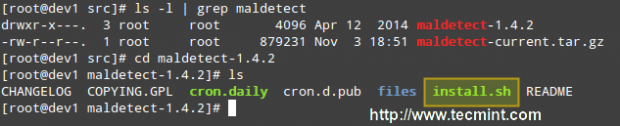
If we inspect the installation script, which is only 75 lines long (including comments), we will see that it not only installs the tool but also performs a pre-check to see if the default installation directory (/usr/local/maldetect) exists. If not, the script creates the installation directory before proceeding.
Finally, after the installation is completed, a daily execution via cron is scheduled by placing the cron.daily script (refer to the image above) in /etc/cron.daily. This helper script will, among other things, clear old temporary data, check for new LMD releases, and scan the default Apache and web control panels (i.e., CPanel, DirectAdmin, to name a few) default data directories.
That being said, run the installation script as usual:
# ./install.sh
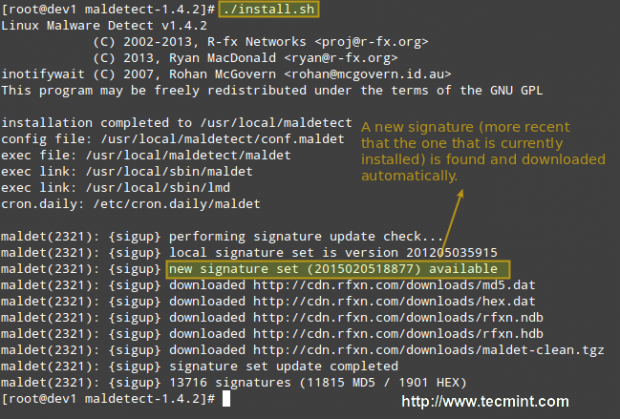
Configuring Linux Malware Detect
The configuration of LMD is handled through /usr/local/maldetect/conf.maldet and all options are well commented to make configuration a rather easy task. In case you get stuck, you can also refer to /maldetect-1.6.4/README for further instructions.
In the configuration file you will find the following sections, enclosed inside square brackets:
- EMAIL ALERTS
- QUARANTINE OPTIONS
- SCAN OPTIONS
- STATISTICAL ANALYSIS
- MONITORING OPTIONS
Each of these sections contains several variables that indicate how LMD will behave and what features are available.
- Set email_alert=1 if you want to receive email notifications of malware inspection results. For the sake of brevity, we will only relay mail to local system users, but you can explore other options such as sending mail alerts to the outside as well.
- Set email_subj=”Your subject here” and email_addr=username@localhost if you have previously set email_alert=1.
- With quar_hits, the default quarantine action for malware hits (0 = alert only, 1 = move to quarantine & alert) you will tell LMD what to do when malware is detected.
- quar_clean will let you decide whether you want to clean string-based malware injections. Keep in mind that a string signature is, by definition, “a contiguous byte sequence that potentially can match many variants of a malware family”.
- quar_susp, the default suspend action for users with hits, will allow you to disable an account whose owned files have been identified as hits.
- clamav_scan=1 will tell LMD to attempt to detect the presence of ClamAV binary and use as default scanner engine. This yields an up to four times faster scan performance and superior hex analysis. This option only uses ClamAV as the scanner engine, and LMD signatures are still the basis for detecting threats.
Summing up, the lines with these variables should look as follows in /usr/local/maldetect/conf.maldet:
email_alert=1
email_addr=gacanepa@localhost
email_subj="Malware alerts for $HOSTNAME - $(date +%Y-%m-%d)"
quar_hits=1
quar_clean=1
quar_susp=1
clam_av=1
Installing ClamAV on RHEL/CentOS and Fedora
To install ClamAV in order to take advantage of the clamav_scan setting, follow these steps:
Enable EPEL repository.
# yum install epel-release
Then do:
# yum update && yum install clamd
# apt update && apt-get install clamav clamav-daemon  [Ubuntu/Debian]
Note: That these are only the basic instructions to install ClamAV in order to integrate it with LMD. We will not go into detail as far as ClamAV settings are concerned since as we said earlier, LMD signatures are still the basis for detecting and cleaning threats.
Testing Linux Malware Detect
Now it’s time to test our recent LMD / ClamAV installation. Instead of using real malware, we will use the EICAR test files, which are available for download from the EICAR web site.
# cd /var/www/html
# wget http://www.eicar.org/download/eicar.com
# wget http://www.eicar.org/download/eicar.com.txt
# wget http://www.eicar.org/download/eicar_com.zip
# wget http://www.eicar.org/download/eicarcom2.zip
At this point, you can either wait for the next cron job to run or execute maldet manually yourself. We’ll go with the second option:
# maldet --scan-all /var/www/
LMD also accepts wildcards, so if you want to scan only a certain type of file, (i.e. zip files, for example), you can do so:
# maldet --scan-all /var/www/*.zip
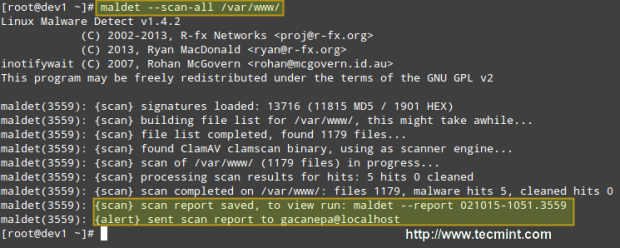
When the scanning is complete, you can either check the email that was sent by LMD or view the report with:
# maldet --report 021015-1051.3559
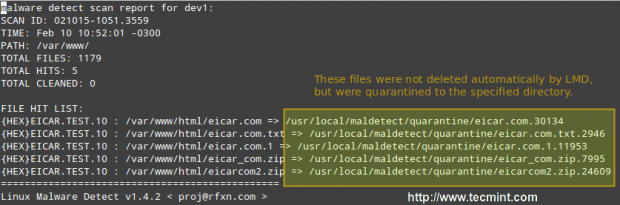
Where 021015-1051.3559 is the SCANID (the SCANID will be slightly different in your case).
Important: Please note that LMD found 5 hits since the eicar.com file was downloaded twice (thus resulting in eicar.com and eicar.com.1).
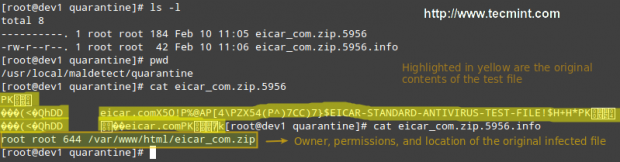
If you check the quarantine folder (I just left one of the files and deleted the rest), we will see the following:
# ls -l
You can then remove all quarantined files with:
# rm -rf /usr/local/maldetect/quarantine/*
In case that,
# maldet --clean SCANID
Doesn’t get the job done for some reason. You may refer to the following screencast for a step-by-step explanation of the above process:
Final Considerations
Since maldet needs to be integrated with cron, you need to set the following variables in root’s crontab (type crontab -e as root and hit the Enter key) in case that you notice that LMD is not running correctly on a daily basis:
PATH=/sbin:/bin:/usr/sbin:/usr/bin
MAILTO=root
HOME=/
SHELL=/bin/bash
This will help provide the necessary debugging information.
Conclusion
In this article, we have discussed how to install and configure Linux Malware Detect, along with ClamAV, a powerful ally. With the help of these 2 tools, detecting malware should be a rather easy task.
However, do yourself a favor and become familiar with the README file as explained earlier, and you’ll be able to rest assured that your system is being well accounted for and well managed.
Do not hesitate to leave your comments or questions, if any, using the form below.






I had to symlink egrep and fgrep on Ubuntu 20.04 LTS to their location in
/usr/bin/fgrep|egrepfor LMD.Hi.
Just to reiterate some Admin question: this article was written back in 2015, so is this solution (aka LMD) still valid or outdated?
Thank YOU.
@Gio,
Yes LMD (Linux Malware Detect) package is still available to install on Linux. I have updated the article with the latest version and instructions…
Thank you for this article.
Since the last update of this article is on Feb 2015, I wonder if this is still an updated and applicable solutions or there are more recent methods to obtain security?
Thanks
@Armin,
Yes, still the given instructions are valid for installation..
HI.
Admin question was not about the instruction but about whether LDM is still a valid solution or is outdated given that this article was written in 2015.
I am also curious of the same especially after visiting the website I could not find any reference to version number or last-update date.
Thank YOU.
Hello!! no matter what i try, i alway get this “Failed to enable unit: No such file or directory” message, which didn’t seem like a big thing, but then when i try to run maldet i get the error “bash: maldet: Comando não encontrado…” which is in Portuguese (i’m Brazilian), but it means “Command not Found“.
Any ideas how to solve this ? (clamav is installed)
[root@localhost maldetect-1.6.2]# ./install.sh
Failed to enable unit: No such file or directory
Linux Malware Detect v1.6
(C) 2002-2017, R-fx Networks
(C) 2017, Ryan MacDonald
This program may be freely redistributed under the terms of the GNU GPL
installation completed to /usr/local/maldetect
config file: /usr/local/maldetect/conf.maldet
exec file: /usr/local/maldetect/maldet
exec link: /usr/local/sbin/maldet
exec link: /usr/local/sbin/lmd
cron.daily: /etc/cron.daily/maldet
imported config options from /usr/local/maldetect.last/conf.maldet
maldet(30589): {sigup} performing signature update check…
maldet(30589): {sigup} local signature set is version 2017070716978
maldet(30589): {sigup} new signature set (201708255569) available
maldet(30589): {sigup} downloading https://cdn.rfxn.com/downloads/maldet-sigpack.tgz
maldet(30589): {sigup} downloading https://cdn.rfxn.com/downloads/maldet-cleanv2.tgz
maldet(30589): {sigup} verified md5sum of maldet-sigpack.tgz
maldet(30589): {sigup} unpacked and installed maldet-sigpack.tgz
maldet(30589): {sigup} verified md5sum of maldet-clean.tgz
maldet(30589): {sigup} unpacked and installed maldet-clean.tgz
maldet(30589): {sigup} signature set update completed
maldet(30589): {sigup} 15218 signatures (12485 MD5 | 1954 HEX | 779 YARA | 0 USER)
[root@localhost maldetect-1.6.2]# maldet
bash: maldet: Comando não encontrado…
[root@localhost maldetect-1.6.2]#
I think the “ed” package wasn’t installed by default and I thought that this must be a bug or an error. Try to install ‘ed’ package as shown.
For Debian based distro’s:
For Red Hat based distro’s:
So you install a package outside of the repo without any integrity checking, for malware detection ?
Hello,
I installed the Linux Malware Detect but was surprised to detect a virus scan and see viruses in the newly installed items.
So I removed LMD again.
When I scan eicar test files using clamscan command it finds viruses but when I use lmd –scan-all it doesn’t find anything!! I tried clamav_scan=0 and 1 in conf.maldet.
Same here, no malware is found with maldet
@Armin and @Brenenro, make the following change – this worked for me because the files were root owned and were being skipped. ( https://forum.vestacp.com/viewtopic.php?t=17511 )
I’m a bit of a novice here, but I wanted more protection for my server and was glad to find this article. I attempted to load Maldet and ClamAV on my Centos 5 server. When I run it, I’m getting errors and I get the following.
I’m eager for help. Thanks.
# maldet -a /home/brotherhood2/
, please try again later.f} could not download
Linux Malware Detect v1.5
(C) 2002-2016, R-fx Networks
(C) 2016, Ryan MacDonald
This program may be freely redistributed under the terms of the GNU GPL v2
maldet(19972): {scan} signatures loaded: 10906 (8988 MD5 / 1918 HEX / 0 USER)
maldet(19972): {scan} building file list for /home/brotherhood2/, this might take awhile…
: integer expression expecteds/functions: line 871: [: 0
maldet(19972): {scan} setting nice scheduler priorities for all operations: cpun , ionice 6
maldet(19972): {scan} scan returned zero results, please provide a new path.
Why are you using CentOS 5 in 2016? Even though it will receive updates until March 2017, I don’t see any reasons why a new user would want to use it today – more than 9 years after its release! Go get yourself a CentOS 7 VM or VPS and use it instead. This article was written for that version.
Is LMD intended to scan for threats to the Linux OS of the server, or does it scan for hacks such as those common with WordPress and Joomla, or does it look for all of those? Also, is the LMD signature database still being updated or is it frozen in the past? Good article, thanks.
Thanks a lot, Very good writer
Nice Post. Can I scan the systems in my network by sending them a script (through mail) which should scan thier systems and send an email alert to me when they execute the script. Because we have 200+ linux systems. As a time constraint I cant install AV in all the systems. Is there any possibility with this AV or any other Antivirus
Pretty useless when it comes to sending alerts. I have researched this thoroughly and mail binary is active in my Centos System, all conf.maldet switches are set for sending email, yet nothing ever comes through.
I can manually send a report with maldet -e SCANID “[email protected]” but don’t expect any continuity of care with getting notified. Also, multiple messages to the domain owner of rfxn.com go unanswered and the emails listed in the conf.maldet file are non-deliverable. Look for another service if you need critical alerts.
Have you found a solution to this I just switched to a faster dedicated server and looking to install it again. But I too suffered the no email alerts. I checked the author’s website and there has not been any activity or new updates posts anything written since 2014.
So for now I have just clamAV. What replacement AV and MW scanner do you suggest with email Alert working of course :>
thanks
Nice, Thanks you for post full perfect
I think the wget URl is wrong
I just tried it again and still works.
I am getting no such folder found while installing, can you please help me
@Rajendra,
Please let us know exactly in which step you are experiencing this issue. Provide as much detail about your setup as possible to help us come up with the right answer for you.
Thank you for the great info Gabriel. I go it installed but when I try to run it says
bash: maldet: command not found
@Fabui,
As @abhi suggested below, try adding /usr/local/sbin to your PATH and let us know how it goes.
Might help a few people. PATH environment variable, then you can use the short form of the name.
export PATH=$PATH:/usr/local/sbin
@abhi,
Thank you for your comment!
i installed this on arch linux with no issues i had previously installed clam av before i installed the malware. Seems to be working fine.
See the installation steps
[root@kr maldetect-1.5]# ./install.sh
cat: /proc/1/comm: No such file or directory
./install.sh: line 85: test: =: unary operator expected
Linux Malware Detect v1.5
(C) 2002-2015, R-fx Networks
(C) 2015, Ryan MacDonald
This program may be freely redistributed under the terms of the GNU GPL
installation completed to /usr/local/maldetect
config file: /usr/local/maldetect/conf.maldet
exec file: /usr/local/maldetect/maldet
exec link: /usr/local/sbin/maldet
exec link: /usr/local/sbin/lmd
cron.daily: /etc/cron.daily/maldet
maldet(26907): {sigup} performing signature update check…
maldet(26907): {sigup} local signature set is version 201509272848
maldet(26907): {sigup} latest signature set already installed
Error found in line 2 and 3, on checking script I understood that, the else condition is executed of if statement.(line 85)//I guess installation completes successfully.
The issues is that when I scan a directory, its finding some files only.
[root@kr public_html]# ls | wc -l
174
[root@keralamirror public_html]# pwd
/var/www/html/kr/public_html
[root@keralamirror public_html]# maldet –scan-all /var/www/html/kr/public_html
Linux Malware Detect v1.5
(C) 2002-2015, R-fx Networks
(C) 2015, Ryan MacDonald
This program may be freely redistributed under the terms of the GNU GPL v2
maldet(28662): {scan} signatures loaded: 10822 (8908 MD5 / 1914 HEX / 0 USER)
maldet(28662): {scan} building file list for /var/www/html/kr/public_html, this might take awhile…
maldet(28662): {scan} setting nice scheduler priorities for all operations: cpunice 19 , ionice 6
maldet(28662): {scan} scan returned zero results, please provide a new path.
What happend here ?
Next Scanning / directory? do you agree that / partition having only 480 files? have a look below
[root@kr public_html]# maldet –scan-all /
Linux Malware Detect v1.5
(C) 2002-2015, R-fx Networks
(C) 2015, Ryan MacDonald
This program may be freely redistributed under the terms of the GNU GPL v2
maldet(28802): {scan} signatures loaded: 10822 (8908 MD5 / 1914 HEX / 0 USER)
maldet(28802): {scan} building file list for /, this might take awhile…
maldet(28802): {scan} setting nice scheduler priorities for all operations: cpunice 19 , ionice 6
maldet(28802): {scan} file list completed in 3s, found 480 files…
maldet(28802): {scan} found clamav binary at /usr/bin/clamscan, using clamav scanner engine…
maldet(28802): {scan} scan of / (480 files) in progress…
maldet(28802): {scan} scan completed on /: files 480, malware hits 0, cleaned hits 0, time 4s
maldet(28802): {scan} scan report saved, to view run: maldet –report 150928-1415.28802
OS: Centos 5.4, maldet 1.5
I entered this command: nano /etc/yum.repos.d/dag.repo
and then I entered below lines in it and saved the file, Did I do it right?
the clamav is installed now? don’t I need any more steps like what mentioned here: ismailyenigul.wordpress.com/2015/01/05/install-clamav-on-centos-7/
___________________
[dag]
name=Dag RPM Repository for Red Hat Enterprise Linux
baseurl=http://apt.sw.be/redhat/el$releasever/en/$basearch/dag/
gpgcheck=1
gpgkey=http://dag.wieers.com/packages/RPM-GPG-KEY.dag.txt
enabled=1
Nice article, LMD is a great tool together with clamd.
BTW, $(date +%Y-%m-%d) can be shortened to $(date +%F).
@Tomas,
You’re right – I am used to the larger format as it is easy to remember but the +%F switch may as well become my favorite from now on!
Hola Gabriel, en algunas webs de wordpress, el maldet me mueve algunos archivos .min.css y .min.js a la carpeta quarantine. ¿Cómo podría evitar que el maldet revisara ciertas carpetas?
Ese problema me acarrea que mis clientes accedan al Panel de Administración de su web en wordpress sin los estilos CSS característicos.
Gracias!
English Version
————–
Hi Gabriel , in some wordpress sites , the maldet moves me some .min.css .min.js files and the quarantine folder. How could prevent maldet revise certain folders ?
That problem brings me to my clients access to Administration Panel your website in wordpress without the characteristic CSS styles .
Thank You!
@José,
Fijate en la sección 8 [ IGNORE OPTIONS ] en el archivo de ayuda (https://www.rfxn.com/appdocs/README.maldetect). Hope it helps!
Hi, Thanks for this helpful tutorial. I note that you only install clamd (not clamav) — is this because only clamd is needed to interface with maldet? Or, is clamav installed as a dependency when installing clamd?
Thanks again.
@Gavin,
Your assumption is correct. Clamav is installed as a dependency when installing clamd.
Seriously, you’re asking people to install this kind of software, not from a known secure repository, but from a website with private registration?!?
BAD IDEA. VERY VERY BAD IDEA. Even if legit, it’s like you’re missing the forest for the trees– you’re asking people to violate a very basic security protocol.
@Kenneth,
Thank you for your comment, but I will have to disagree with you. First off, as you can see in this article, you can download the tarball without registration. Second, many trusted programs which are now included in official repositories started off this way. Third, if you find something in the source code or the installation script that can be considered to violate a basic security protocol, please copy and paste and another comment and we will review it carefully. Last, but not least, if you check the developers’ web site at http://www.rfxn.com, you will realize that there are many companies who are providing funds for this project – which IMHO would not happen if LMD was “a bad idea”.
Excellent article. Extremely helpful. Thank you…
@nima,
That’s great to hear! Thank you for taking the time to comment.
also experienced it , but after the reading of this tutorial , I managed to fix it thank you very much . :D
@hp,
What was the issue you ran into? I am glad to hear that you were able to solve it. But if you can take a minute or two to tell us a little bit more about your experience, we would appreciate it.
Thanks for the tutorial very useful do you have any extra information how to install Linux Malware Detect (Maldet) on plesk??? Thanks.
@Cecilia,
I am not familiar with Plesk so I can’t comment much. But I don’t think you could integrate LMD seamlessly with Plesk, which is proprietary software. I would advise you to take a look at this article: https://www.tecmint.com/web-control-panels-to-manage-linux-servers/ which although it lists cPanel and Plesk at the top, it also includes several open source solutions. I would pick one or two and go from there. Hope it helps.
Hi noob here what command would i type in terminal linux mint 17 for configuring clamav malware detect? thanks
after installing maldet I see lots of directory maldet.bk* files inside /usr/local. is it safe to delete those files. How to configure maldet so that it will self delete those directories.
@prakash,
During the installation and setup of maldet I did not run into this issue. My advice to you would be to check what kind of file those bk*’s are (you can check with ‘file filename’, where filename is the name of each of those files). If it’s ASCII text, I would take a look at their contents before considering deleting them.
I don’t know if you can configure maldet to remove those files on a periodic basis – you can use a shell script run via cron for that, though.
Actually this is not an installation issue. This happen after some months or so.
After scanning the directories , I am unable to get the mail for reports.
This is what it is showing .Can you kindly see what’s going wrong ?postfix is enabled on this server
maldet –scan-all /home/
Linux Malware Detect v1.4.2
(C) 2002-2013, R-fx Networks
(C) 2013, Ryan MacDonald
inotifywait (C) 2007, Rohan McGovern
This program may be freely redistributed under the terms of the GNU GPL v2
maldet(6877): {scan} signatures loaded: 10725 (8821 MD5 / 1904 HEX)
maldet(6877): {scan} building file list for /home/, this might take awhile…
maldet(6877): {scan} file list completed, found 37 files…
maldet(6877): {scan} found ClamAV clamscan binary, using as scanner engine…
maldet(6877): {scan} scan of /home/ (37 files) in progress…
maldet(6877): {scan} scan completed on /home/: files 37, malware hits 0, cleaned hits 0
maldet(6877): {scan} scan report saved, to view run: maldet –report 022515-1110.6877
For people using CentOS 6.6, I recommend you to use the following command when installing:
# sh ./install.sh
instead of just
# ./install.sh
It might not work as expected if you don’t, and it will print the same output given on this post!
great help.
on clean command maldet -n report id.
I am getting this error
maldet(32328): file path error on /usr/local/maldetect/quarantine/.apache.4016
/usr/local/maldetect/quarantine/.apache.1894, aborting.
can’t track down any doc on this kind of error. .apache.4016 is not in the quarantine directory. Not sure how maldet thought it was there
Thanks
The priority that monitoring process will run as
# [ -19 = high prio , 19 = low prio, default = 10 ]
what happen if i change the default into 3 or lower than 10?
I just wanna make the scan more quicker then he does right now because i was scanning home director with million files it take 9 hour to scan just 83 thousand files
Hope to help
Also you can clean infected files with this command
# maldet -q ISCANID
Also you can get all scan reports with this command
# maldet –report list
hope it helps you
To scan one user your should run this command maldet -a /home/username of the cpanel/public_html/
Hello,
1.I have got 4 infected files how do i clean it using commands?
2.when i type my email in configuration file how do i save the changes?
Hope to help
Use the following command to quarantine the infected files.
i got this is the ifected files removed or not i have run this command maldet –clean SCANID
Linux Malware Detect v1.4.2
(C) 2002-2013, R-fx Networks
(C) 2013, Ryan MacDonald
inotifywait (C) 2007, Rohan McGovern
This program may be freely redistributed under the terms of the GNU GPL v2
Like your tutorial so much. I follow your step and it’s done very well. LMD scans our system right now. Thanks a alot
Hi,
How i can scan one account in my server using LMD, if i found malicious files how i remove them?
Hope to help
Thanks
We’ve already shown you how to scan the directories and partitions for malicious files, please follow instructions carefully.
FILE HIT LIST:
{MD5}gzbase64.inject.unclassed.533 : /downloads/maldetect-1.4.2/files/clean/gzbase64.inject.unclassed => /usr/local/maldetect/quarantine/gzbase64.inject.unclassed.22501
you have an infected file in maldetect-current.tar.gz
Just installed today and i think its cleaned own files by mistake, what should it do to revert? Also how to make it ignore its own folder?
——————–
Jun 10 14:25:53 s1 maldet(2758): {md5hash} malware hit {MD5}gzbase64.inject.unclassed.533 on /home/temp/maldetect-1.4.2/fi les/clean/gzbase64.inject.unclassed
Jun 10 14:25:53 s1 maldet(2758): {quar} malware quarantined from ‘/home/temp/maldetect-1.4.2/files/clean/gzbase64.inject.u nclassed’ to ‘/usr/local/maldetect/quarantine/gzbase64.inject.unclassed.654’
Jun 10 14:25:53 s1 maldet(2758): {clean} restoring /usr/local/maldetect/quarantine/gzbase64.inject.unclassed.654 for clean ing attempt
Jun 10 14:25:53 s1 maldet(2758): {restore} quarantined file /usr/local/maldetect/quarantine/gzbase64.inject.unclassed.654 restored to /home/temp/maldetect-1.4.2/files/clean/gzbase64.inject.unclassed
Jun 10 14:25:53 s1 maldet(2758): {clean} trying to clean /home/temp/maldetect-1.4.2/files/clean/gzbase64.inject.unclassed with gzbase64.inject.unclassed rule
Jun 10 14:25:53 s1 maldet(2758): {clean} rescanning /home/temp/maldetect-1.4.2/files/clean/gzbase64.inject.unclassed for m alware hits
Jun 10 14:25:53 s1 maldet(2758): {clean} clean successful on /home/temp/maldetect-1.4.2/files/clean/gzbase64.inject.unclas sed
—–
Hi Ravi,
Thanks for this usefull article.
Is there a way I can speed things up? it takes more than 24 hours to scan the /home folder.
Or can I adjust the cron-job, to do a weekly scan, instead of a daily scan?
Thanks in advance!
Hi,
love the tutorial.
i installed it like mentioned, but during install and after install ( executing )
i get
“could not find required binary wget, aborting.”
here and on several sites there is mentioned that i have to install wget…
but i used wget to download the lmd !!
but i tried and got this
“Package wget-1.11.4-3.el5_8.2.x86_64 already installed and latest version”
but i still get the error “could not find required binary wget, aborting.”
so there must be a bug in the install / lmd soft.
Found the solution.
LMD depends on several binairies that has to be installed before it can run.
LMD checks if they are present on the server through the command “which”, that is not installed standard on linux…
So it can not find the binairies needed ( wget and others )
The solution sits in installing which through yum, and reinstall LMD.
LMD runs fine after that and gives no errors.
What troubles me is that a non standard tool is used and on every page where you look for a solution, it says install wget.
Even on the LMD site there is no install direction our solutions in how to solve a problem if it occurs.
sendmal is installed:
stat /usr/sbin/sendmail
File: `/usr/sbin/sendmail’
Size: 11719 Blocks: 24 IO Block: 4096 regular file
Device: 901h/2305d Inode: 35654693 Links: 1
Access: (2755/-rwxr-sr-x) Uid: ( 0/ root) Gid: ( 500/mailtrap)
Access: 2014-01-29 23:30:30.806225618 +0100
Modify: 2013-11-08 21:09:13.000000000 +0100
Change: 2014-01-20 23:03:53.664924604 +0100
root@usloft3180 [/home/stickgza]#
Is it working now? Having the same issue, I am able to send reports manually by email but nothing is sent if I set email_alert=1…
I have used to eliminate some malware, but I don’t seem to get any emails despite that I have entered my email address in conf.maldet and set email_alert to 1.
maybe the problem is here in /etc/crontab:
PATH=/sbin:/bin:/usr/sbin:/usr/bin
MAILTO=root
HOME=/
SHELL=/bin/bash
Do you have installed SMTP service like sendmail or postfix for sending mails?
Probably not, It is a new Cpanel Server on which I haven’t installed sendmail or postfix. Which one do you recommend?
I suggest you to go with postfix.
hi ,
I have Ubuntu server 12.04 i have installed maldet and start scan for /var folder but after some it will get struck no shell access nothing happening to server so need to hard-boot server is there any solution ?
as my server sending mails through PHP scripts and not able to detect it properly
Instead of running scan on whole /var directory, run on selected folders under /var partition and then keep a watch on scan and see where exactly it stuck. So, this will help you to identify the problem.
Fresh install. No email sent to me as well when it said there are 2 malwares detected.
How does this script send mail?
Set your email address in configuration file /usr/local/maldetect/conf.maldet
Scan is executed daily using cronjob script file added during Installation (/etc/cron.daily/maldet)
Hi, I have installed LMD but not getting scan report to my email even when trying to get it manually.
I am also getting this error : /usr/local/sbin/maldet: line 461: mail: command not found
====== Details as below ===
root@hostname [~]# maldet –report 083013-0051.34330 [email protected]
Linux Malware Detect v1.4.2
(C) 2002-2013, R-fx Networks
(C) 2013, Ryan MacDonald
inotifywait (C) 2007, Rohan McGovern
This program may be freely redistributed under the terms of the GNU GPL v2
/usr/local/sbin/maldet: line 461: mail: command not found
maldet(34541): {report} report ID 083013-0051.34330 sent to [email protected]
Let me check, why such command not found error you getting, will update you soon.
yum install mailx
Are there daily/weekly updates? If so what is the command to update LMD?
Simply run the maldet command to get updates.
Hi
I am install LMD but when I am scan getting error line 907: -s: command not found .. and I am not getting report in email… can you help me
With Regards
ravi, added LMD yesterday, great tool… my web directories are in another place, so default scan is scanning an empty directory.
by changing the config file value for inotify_webdir=”/directory/directory/etc.. should change the next daily scan to the new directory, correct?
Hello Ravi,
I followed the instruction to download and install LMD. When I issue the tar command: tar xfz maldetect-current.tar.gz, I get this response:
gzip: stdin: not in gzip format
tar: Child returned status 1
tar: Error is not recoverable: exiting now.
I cannot proceed any further from this point on. What seems to be the problem?
Thanks,
Okei
Hello Ravi,
I successfully installed LMD, after deleting initial download and correcting the download path which I had typed wrong. I am new to Linux. I checked the cron file for maldet with the intention of adding more locations for scanning but I could not understand how to add additional paths. Could you give me a example?
Thanks,
Okei
That’s good to hear you finally, installed LMD on the system. To add a different locations for scanning. Do this way.
Where “add-path-here” is the actual location of your folder or drive.
Hi Ravi ,
Please let me know how can I configure it to get mails if I have clean report or hit=0 ,
through command line
Add your email address in maldet configuration file to receive scan reports or alerts.
Hi!, Im trying to install but Im getting the Bad Interpreter error. I have assigned 755 permission to instal.sh but am still getting the error. I checked /etc/fstab file but im not sure what exactly you mean by “set EXEC to specific device”. Can you please help me out here?
Do you have needed shell installed? Because each shell script has its own default interpreter. Run the following command to verify that you have /bin/sh installed on your system. If not, install it.
Dear Ravi,
I installed LMD in my dedicated server and it detected 21 malware which i removed them. However one of my websites does not load the front end ..only the administrator loads.
What should i do?
might be front end index file gets affected and its removed by LMD. Please upload backup of index file if you have.
Hi i run LMD in my server and found 21 malware. When i quarintined them one of my websites do not load http://www.profilmedia.gr , but i can login to administrator.
What should i do?
Hi Ravi,
First, thank you for the usefull information, and second, how can I recursively scan a user home directory? I would like a user home that have 38,000 files and directories and when I try to run the maldet only show me 15348.
Thanks a lot
H Ravie,
How do i scan file types using maldet, for example i want to scan all *.php, *.html files in server what is the command ??
Yes, you can scan php or html files using the command as.
Hi techmint,
Could you update for a newbie how to to uninstall maldet. Some php shells are able to be hidden with malde. :(
Simply find the location of maldet installation and remove that directory. thats it.
Hi Ravi,
Thank you for your article. i have questions: Do you recommend to scan an other repertory than HOME ? and what about maldet updates. the author is saying “Updates to the release version of LMD are not automatically installed but can
be installed using the –update-ver option.” How often are you updating Maldet ?
thx
You can scan any drive or directory, just mention the path..I never yet try the command that you advising me to update. I do try it and let you know..
Hi Ravi,
I would like to know whether this software will support my Redhat Enterprise 64 bit OS release 6.3 (santiago) or not? I installed Apache on this server and is on DMZ zone. iptables are enabled on it. but SeLiux is disabled? Please help me with an answer?
thanks,
Usha.
Hi Usha,
Yes it will work on your RHEL 6.3. Go ahead and install it. If you’ve face any problem do let me know..
Thanks you. Great tool!!
When I try to run .install.sh I get the following response on my Centos server:
-bash: ./install.sh: /bin/bash: bad interpreter: Permission denied
Set execute permission to install.sh file and run again. If you still getting error then you need to check your /etc/fstab file and set ‘exec’ flag to specific device.
It shows still error.. Same problem…
What error, can you post here. so we could trace it..
Hello Friend
My name is Franca Hari, I wish to start a bond of friendship with you as i read your profile, please accept my friend request,I assure you that I will keep you happy all days.
thank you and have a nice day.
I will be grateful if you can respond to my mail for more information about me.
i will explain my self more better as soon as i read from you.
([email protected] )
thanks,
Your Franca Hari
@Franca,
Please use our contact page to get in touch with us for any Linux relates queries, we love to help you out…
I have recently run a scan and got the following results
the infected file: May 15 2010 /usr/local/maldetect/clean/gzbase64.inject.unclassed
is the only file foud yet this is in this softwares directory; why is this?
SCAN ID: 022013-1905.7282
TIME: Feb 20 19:59:07 +0000
PATH: /
TOTAL FILES: 37613
TOTAL HITS: 1
TOTAL CLEANED: 0
NOTE: quarantine is disabled! set quar_hits=1 in conf.maldet or to quarantine results run: maldet -q 022013-1905.7282
FILE HIT LIST:
{MD5}gzbase64.inject.unclassed.599 : /installations/maldetect-1.4.1/files/clean/gzbase64.inject.unclassed
Yes! this is the only file infected, you can delete those files and rescan again.
Hi Ravi – thanks for a very well-written article – short and informative. Look forward to reading more of the same on this site!
Hi,
i had installed LMD as you mentioned above. i can’t able to execute the step 4.
Getting the following output. Please assist
eg :
[root@ip-182-50-142-53 maldetect-1.4.1]# maldet –scan-all /home
bash: maldet: command not found
@Mathan,
On Which version Of OS you have installed it, Can you post the output of the command “sh install.sh”.
@Ravi
Linux ip———————-.net 2.6.18-028stab101.1 #1 SMP Sun Jun 24 19:50:48 MSD 2012 i686 i686 i386 GNU/Linux
@Mathan: On AWS Centos move (or copy) all files from /usr/local/sbin/ to /usr/sbin/
Hi and great read! I installed it right away because my system was acting strangely. While I was online it seemed my HD was cycling like mad! I ran “top” in Konsole to see what was going on, but it all seemed normal, except for systemd which was running tons of stuff, which I thought was probably norm, but not sure, so I did a search for “malware proggy” for Linux (I use Fedora) and found this great post.
I do have a question. I tried everything exactly as you wrote, but I got this back when I tried the step 2 after the scan (the clean/quarrantine part):
maldet(21913): {clean} invalid SCANID, aborting.
Now, I had no viruses detected, but now I am wondering; now that I have this installed, does it just “run daily” on it’s own? Does it turn on when I boot up or what? I did see that script you mentioned right where you said it was, and I looked at it, but it being a rather involved bit of script I didn’t touch it! :)
Email me for any info you can provide and thanks again. I am off to read the other posts that popped up in the ‘You Might Also Like’ window! my email is coded below:
c|-|in/-\ “D0t” /\/\ike “/-\t” h0t/\/\ai|_ “D0t” c0/\/\”
@ China Mike – If you have used my script with cron enabled, as i mentioned above, The cron will run the script every day and send the scan report to your mail. It’s really good idea to have script in place for scanning system for malware detection.
Hi Ravi
I have a dedicated server which is infected with eval64 string I need some pro help to use LMD in my server.Please pm me if you have some pro service for server security.
regards
@rft – Yes, We have pro service where we clean up all malware codes from the server. Please contact us for more details.