

If you install Debian 9 system using a netinstall CD image, your system probably will not have all the necessary repositories (from which you can install common packages), included in the apt sources list file. This can result into error like “E: unable to locate package package-name”.
In this article, I will explain how to fix the “E: unable to locate package package-name” error in Debian 9 distribution.
Useful Articles to read:
- 25 Useful Basic Commands of APT-GET and APT-CACHE for Package Management
- 15 Examples of How to Use New Advanced Package Tool (APT) in Ubuntu/Debian
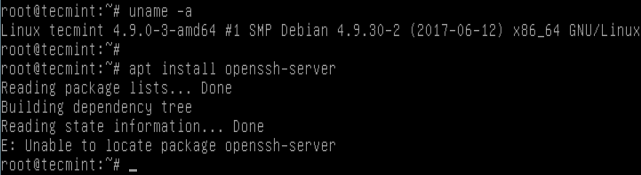
I encountered this error while trying to install openssh-server package on Debian 9 server as shown in the screen shot below.
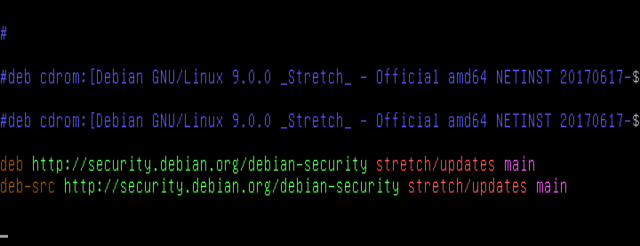
When you look into the /etc/apt/sources.list file, the default repositories included are shown in the screen shot below.
To fix this error, you need to add the necessary Debian software repositories in your /etc/apt/sources.list file:
deb  http://deb.debian.org/debian  stretch main
deb-src  http://deb.debian.org/debian  stretch main
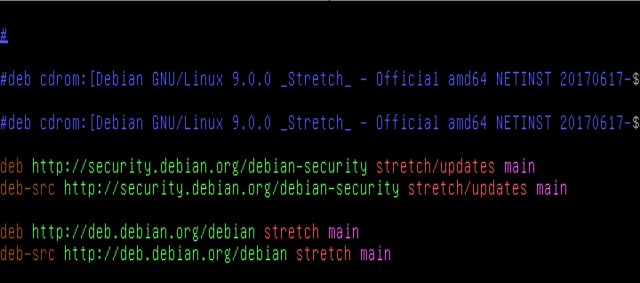
Save and close the file. Then update the system packages list using the command below.
# apt update
Now try to install the package which showed an error (for example the openssh-server).
# apt install openssh-server
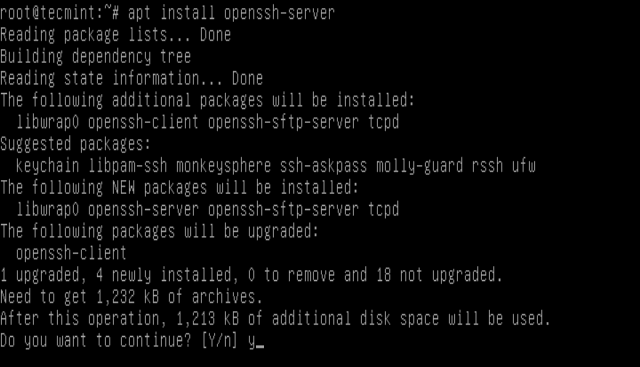
Note: If you also want the contrib and non-free components, then add contrib non-free after main like this to /etc/apt/sources.list:
deb  http://deb.debian.org/debian stretch main contrib non-free
deb-src  http://deb.debian.org/debian stretch main contrib non-free
You can find more information about /etc/apt/sources.list file from: https://wiki.debian.org/SourcesList
Finally, also read our recent articles concerning installation of useful packages Debian 9:
- How to Install Webmin Control Panel in Debian 9
- How to Install LEMP (Linux, Nginx, MariaDB, PHP-FPM) on Debian 9 Stretch
- Install LAMP (Linux, Apache, MariaDB or MySQL and PHP) Stack on Debian 9
- How to Install MariaDB 10 on Debian and Ubuntu
Thats all! If you have any queries, use the feedback form below to reach us. And remember to stick with Tecmint.com for everything Linux.

Thank you, this helped me install the packages on Debian 10 running on windows 10!
Thanks
You Solved my problem
Thanks to this articles you save me a lots.
Hi, I face the same thing while trying to install tomcat7. I followed your steps and try to change sources.list to it is read only. Can you suggest something that could help?
@ss
To change sources.list file, you need to use the sudo command: