
Recently I was working on a shell script and I saw a significant difference in how bash special variable $ and BASHPID behaves. Every process running in Linux will be assigned with a process ID and that is how the operating system handles the process.
Similarly, your bash terminal session will also be assigned with a process ID. There is a special variable called "$" and "$BASHPID" which stores the process ID of the current shell.
Go ahead and run the below command to see what is the process ID of your current shell. Both "$" and "$BASHPID" is going to return the same value.
$ echo $$               # Printing special variable $
$ echo $BASHPID         # Printing the varibale $BASHPID

In bash when we call any external program from the shell, it will create a child process/subshell and the program will be submitted in the child process only. See below example where I put a simple process monitor command in a script called “sample.sh” to demonstrate how the parent shell creates a subshell to run the program.
#!/usr/bin/env bash

ps -ef --forest | grep -i bash
Now on running this script we can get the process ID of bash. From the below image, you can understand when I called the script bash creates a child process and run the script.
$ ./sample.sh

Now let’s use both "$" and "$BASHPID" inside the script and see what it returns.
#!/usr/bin/env bash
echo "============================"
ps -ef --forest | grep -i bash
echo "============================"
echo "PID USING $ FOR SCRIPT $0 ==> $$"
echo "PID USING BASHPID FOR SCRIPT $0 ==> $BASHPID"
echo
Now run the script again.
$ ./sample.sh
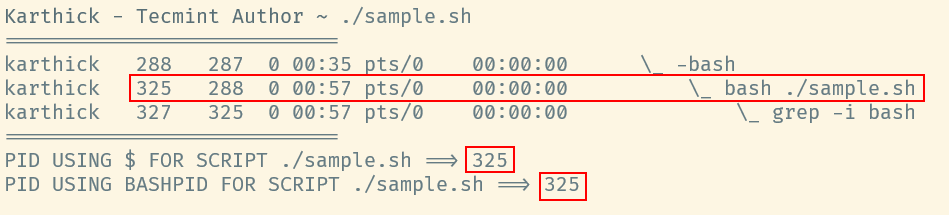
All right, it returns the same process ID. Here comes the actual difference. Let’s create another child process inside the script by running a command inside parentheses().
# STORING THE PID INTO A VARIABLE…

VAR_HASH=$(echo $$)
VAR_BASHPID=$(echo $BASHPID)

echo "VALUE OF VAR_HASH ==> $VAR_HASH"
echo "VALUE OF VAR_BASHPID ==> $VAR_BASHPID"
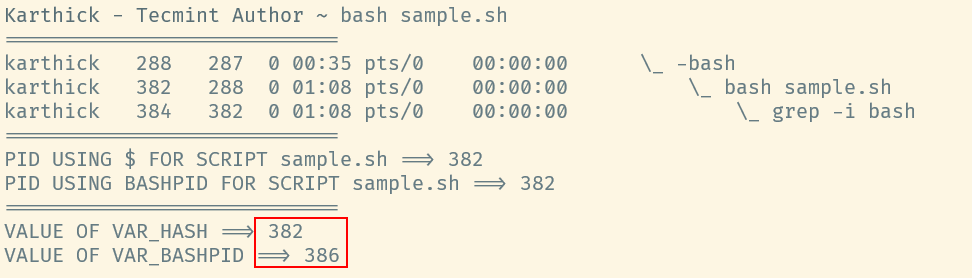
In bash, Parentheses will invoke a child process and run whatever comes inside the parentheses. In that case, both $ and $BASHPID should store a new child process ID. But from the above image, you can see there is a difference where $ stores 382 which is the parent ID (Process ID of the script sample.sh), and $BASHPID stores the created child process ID created by parentheses.
Now let’s try to understand this behavior. We will see what the man page says.
$ man bash


When you use $, even in a subshell, it stores the process ID of the parent process it got created from. But BASHPID will store the current process ID, i.e when called inside parentheses it will store the child process ID.
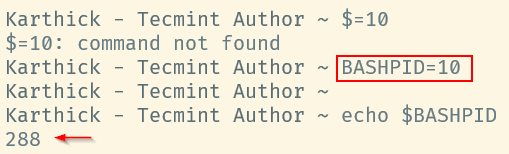
We cannot assign or modify the variable $, but BASHPID can be reassigned but it has no effect.
$ $=10
$ BASHPID=10
$ echo $BASHPID
It is possible to unset BASHPID. When you unset it loses its special state and also you can start using this as a normal variable.
$ unset BASHPID
$ echo $BASHPID
$ BASHPID="Tecmint"
$ echo $BASHPID
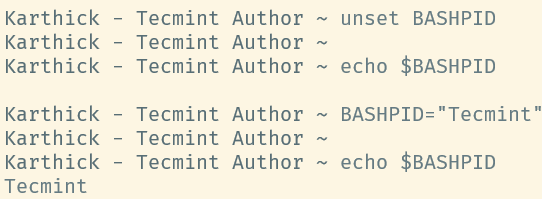
Even if you try to assign the process ID of the shell it will be treated as a user-defined variable since it already lost its special state.
$ BASHPID=$(echo $$)
$ echo $$;echo $BASHPID
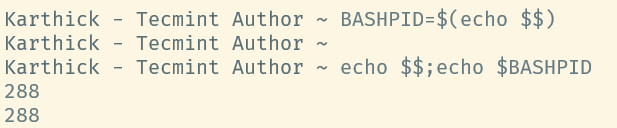
In this case, you have to use a new terminal session for BASHPID to get its special state.
That’s it for this article. We have seen the difference between $ and BASHPID and how they behave in this article. Go through this article and share your valuable feedback with us.




Nice demonstration.
Good to have this article in one paragraph, if possible.
Thanks
@SB
Thanks for the feedback.
Hi,
Thank you so much for the great topic
@jalal
Glad you liked it. Thanks for the continuous feedback you provide across all our articles :)