

There are several ways of NGINX web server security hardening one of which is access control based on IP address. This guide explains how to secure web applications by controlling access based on a client’s IP address in NGINX.
This guide assumes that you have an NGINX web server installed and running, otherwise check out these guides:
- How to Install Nginx Web Server on Ubuntu
- How to Install Nginx on CentOS
- How to Install Nginx on Debian
- How to Install Nginx on RHEL
Control Access Based on Client IP Address in NGINX
The ngx_http_access_module module in NGINX enables limiting access to certain client IP addresses. You can activate it with the allow and deny directives.
The allow directive as the name implies allows access for a specific IP address, network, Unix socket, or all (keyword for the previous entities), and the deny directive denies access for a specific IP address, network, Unix socket, or all.
Both directives are valid in the HTTP, server, location as well as limit_except context. Here is an example of using the allow and deny directives within a location context to restrict access to an API service:
upstream app_api {
	keepalive 100;
	server 10.1.1.50:5000;
	server 10.1.1.71:5001;
}
server {
    listen 80;
    server_name _;
    access_log /var/log/nginx/app_api_access.log main;
    error_log /var/log/nginx/app_api_error.log debug;
    root /usr/share/nginx/html/;
    location / {
        try_files $uri /api;
    }
    location /api {
	proxy_read_timeout 3600;
    	proxy_connect_timeout 3600s;
	keepalive_timeout 15;
	send_timeout 300;
            proxy_set_header X-Forwarded-For $proxy_add_x_forwarded_for;
            proxy_set_header X-Forwarded-Proto $scheme;
            proxy_set_header Host $http_host;
            proxy_redirect off;

	proxy_http_version 1.1;
 	proxy_set_header Connection "";
            proxy_pass http://app_api$request_uri;

	#list of allowed IPs to access API
	allow 10.10.10.20;
	allow 10.10.40.29;
	allow 192.168.2.23;
	allow 192.168.10.0/24;
   	deny  all;
    }
}
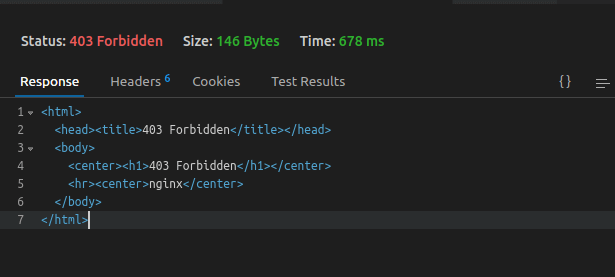
In the above example, any request to access any of the proxied API endpoints is allowed only for the 10.10.10.20, 10.10.40.29, 192.168.2.23 IP addresses, and any of the ones in the 192.168.10.0/24 network. Requests from any other IP address or network or UNIX-domain socket will be denied.
NGINX will respond with a 403 forbidden error to the client as shown.
When you check the /var/log/nginx/app_api_error.log error log, you will find entries like the ones shown in the following screenshot:
# cat /var/log/nginx/app_api_error.log debug

For more NGINX web server security hardening tips, check out: The Ultimate Guide to Secure and Harden Nginx Web Server.

Very informative.
Well, I would like to know about Nginx Reverse Proxy in Docker.
I am trying to configure it, but my Proxy server is not coming Up when I run:
docker-compose ps.Also:
curl -ipv4Connection port refuse